AI & Automation
Field Ascend is AI field service software that does real work — generating quotes, building dashboards, analyzing purchase orders, and writing reports from plain-English questions. Not chatbot gimmicks, but automation that saves hours every week.
AI Dashboard Builder
Build custom dashboards in minutes using plain English. Ask for "overdue invoices this month" or "technician utilization by week" and watch the dashboard create itself. 50+ tile types, real-time data, drag-and-drop layout.
- Natural language dashboard creation
- Role-based views for managers, dispatchers, owners
- Real-time metrics with color-coded alerts
AI Estimating
Draft professional estimates in seconds. Upload a customer request, or create an estimate from a completed work order, PM defect, or structured task list. Perfect for HVAC, electrical, plumbing, and specialty trades.
- Uses relevant job and pricing context
- Upload emails or documents for estimate drafts
- Fully editable results with AI speed
AI Certificate Builder
Generate compliance certificates with AI assistance. Equipment inspection certificates, electrical test reports, and custom compliance documents pre-filled from equipment data and inspection history.
AI Report Builder
Ask questions in plain English and get formatted PDF or Excel reports. "Show me all incomplete jobs for ABC Company" generates a professional report instantly. No report builder training needed.
AI Purchase Order Analysis
Upload purchase orders from customers and AI extracts line items, matches them to your quotes, and creates jobs automatically. Batch upload multiple POs at once. Eliminates manual data entry.
Auto-Scheduling
AI-powered job assignment based on technician skills, location, availability, and job priority. Suggests the best technician for each job. You confirm with one click.
AI Connector for Claude
Connect Field Ascend to Claude and ask plain-English questions about jobs, customers, equipment, PM contracts, certificates, and service history. Read-only tools and OAuth security keep the connection controlled.
Magic Importer
Upload a spreadsheet and let AI help identify whether it contains customers, sites, contacts, equipment, jobs, inventory, or tools. Validation happens before import so migration work stays controlled.
AI PM Builder
Use AI assistance to turn equipment types, service routines, and inspection scopes into structured preventive maintenance checksheets that technicians can complete in the mobile app.
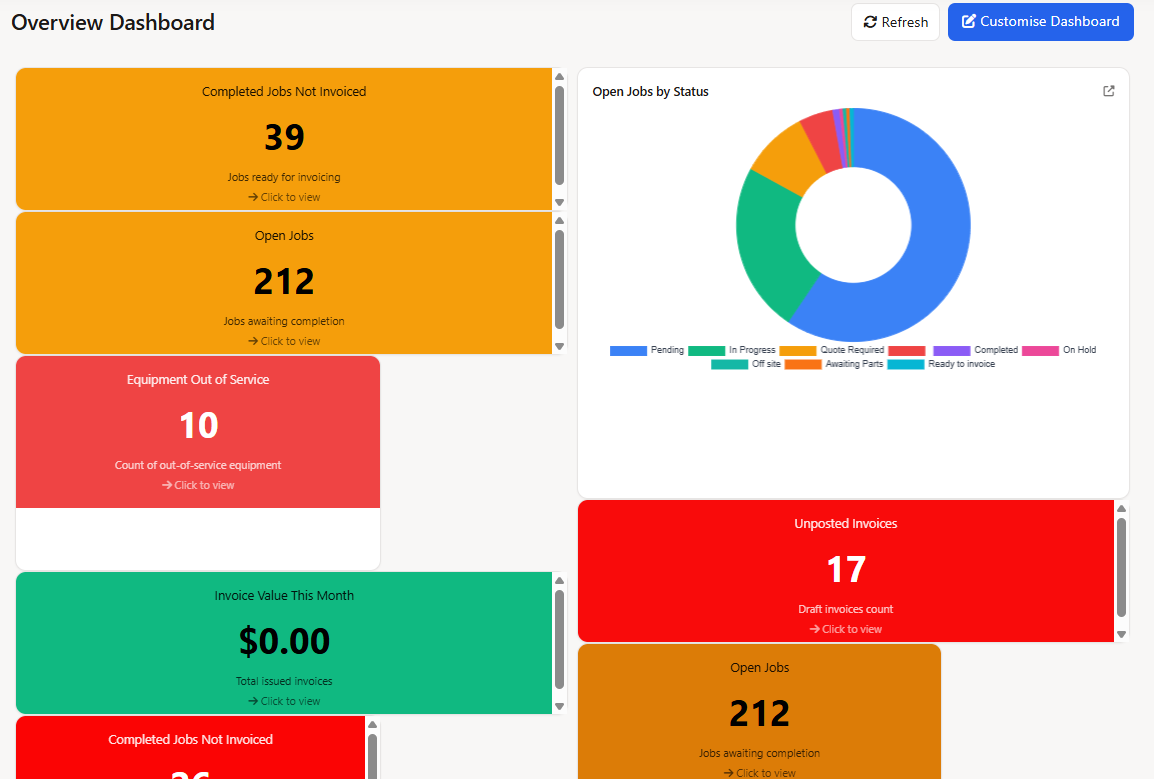
AI Dashboard Builder — create custom dashboards from plain-English questions
Scheduling & Dispatch
Field service scheduling software that gives dispatchers a visual command center. Drag-and-drop planner boards, map-based job allocation, geofenced technician territories, and smart matching rules that suggest the right person for every job.
Visual Planner Board
Drag-and-drop field service scheduling software with day, week, and month views. See technician availability, job durations, and travel gaps at a glance. Resize jobs for duration changes, spot conflicts instantly.
- Day, week, and month calendar views
- Drag jobs between technicians
- Unscheduled jobs queue with quick assign
Map-Based Job Allocation
See all jobs on a map and allocate intelligently. Use the lasso tool to select multiple jobs at once and assign to a technician in bulk. Filter by ZIP code, status, or customer.
- Lasso selection for bulk assignment
- Route visualization between jobs
- Filter by area, status, or job type
GPS Technician Tracking
See exactly where your technicians are on an interactive map. View status indicators (traveling, on-site, available), speed, and heading. Know who's closest to an emergency callout.
Technician Territory Geofencing
Create technician territories using polygon drawing, radius zones (10-100+ miles), or travel time isochrones. Auto-assign jobs by location, alert dispatchers when assigning outside territories, or enforce strict boundaries.
Smart Planner Matching
Visual skill badges show technician qualifications at a glance. Territory indicators highlight when technicians are in or out of zone. Configurable rules for skills, territory, availability, and distance priority.
Route Optimization
Optimize daily routes to minimize drive time and maximize billable hours. See suggested route order, estimated travel times, and total mileage before the day starts.
Rota & Shift Planning
Plan availability, shifts, working patterns, and coverage alongside the scheduler. Dispatchers can avoid assigning work into time off, absences, or unavailable periods.
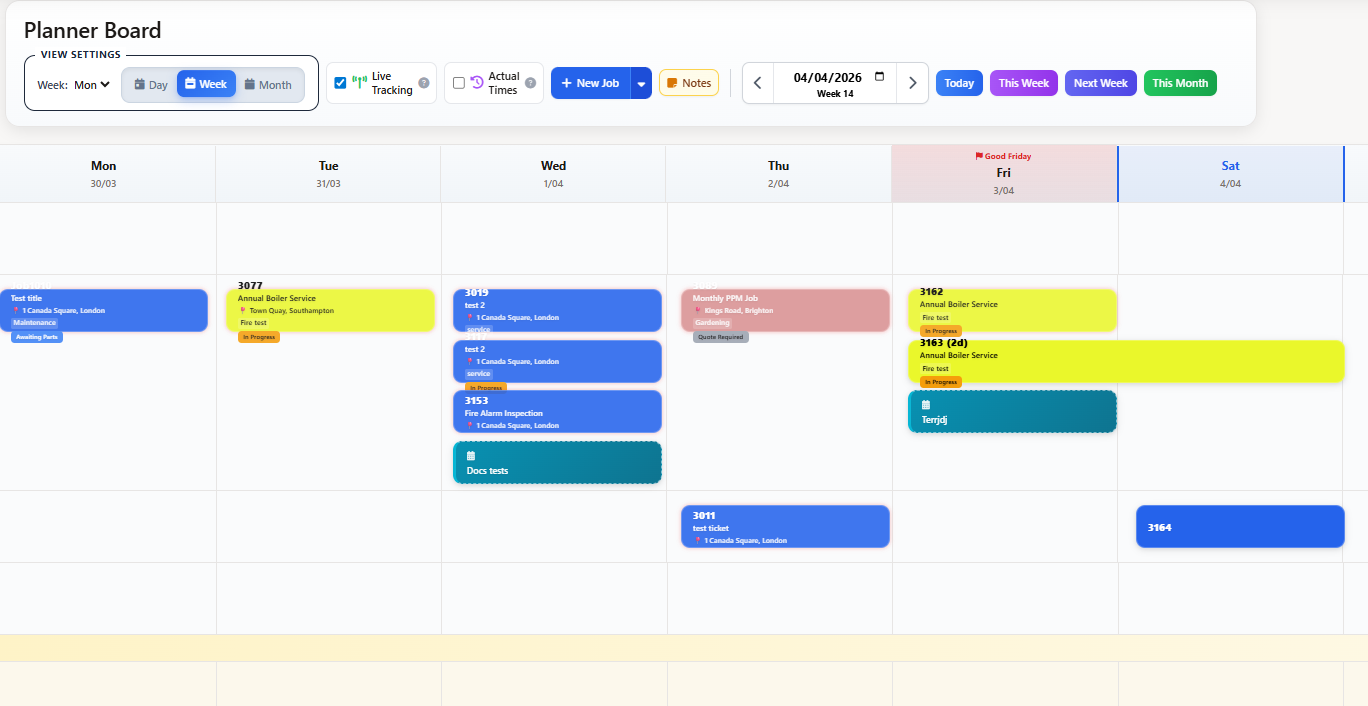
Visual Planner Board — drag-and-drop scheduling with day, week, and month views
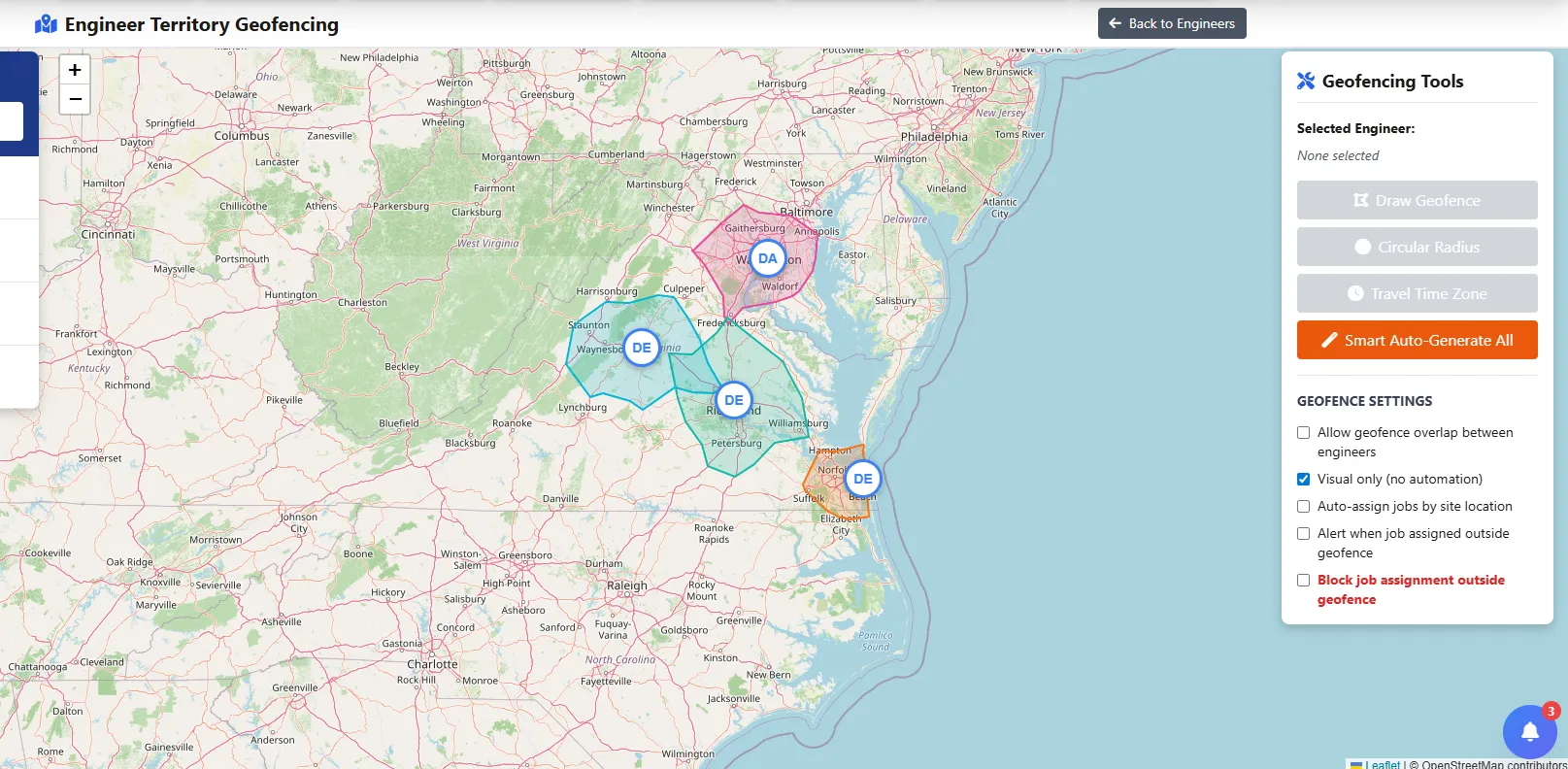
Technician Territory Geofencing — polygon, radius, and travel-time zones
Work Orders & Jobs
Job management software and work order management software that track every job from creation to completion. Table view, Kanban board, or planner — pick the view that fits how your team works, and never lose visibility into what's open, what's blocked, and what needs attention.
Work Order Management
Create, assign, track, and complete work orders with real-time updates. Full lifecycle management with custom statuses, categories, and priorities. Table view, list view, or Kanban board.
- Custom status workflows per job type
- Bulk actions for efficiency
- Full job history and audit trail
Kanban Board View
Visualize work orders in a Kanban board with drag-and-drop between status columns. See all jobs by stage, spot bottlenecks, and move work forward without opening individual records.
Job Task Management
Break work orders into tickable tasks with their own scope, completion notes, and audit trail. Quote tasks carry through automatically, technicians tap to complete on mobile with quick phrases, invoice mirrors the same task structure end to end.
- Quote → work order task carry-through
- Tap-to-complete with quick phrase chips
- Force-completion + reopen audit trail
Job Templates & Presets
Create jobs in one click with reusable templates. Pre-fill titles, categories, notes, materials, technicians, and compliance checks. Build once, use everywhere across your team.
Job Documents & Photos
Attach documents, photos, and files to any job. Before and after photos, signed documents, technical manuals, customer communications. Batch download for customer handover.
Digital Signatures
Capture customer and technician signatures on any device. Signatures stored securely and appear on job completion PDFs. Configurable signature requirements per job type.
Lifecycle Flowchart
Visual flowchart showing how quotes, jobs, invoices, and purchase orders connect. Click any node to navigate instantly. Full audit trail for compliance and customer queries.
Action Lists & Forced Completion
Create required job action lists and completion gates. Force photos, work done notes, equipment selection, PM checks, compliance forms, refrigerant logs, signatures, or custom tasks before closure.
Quote Kanban & Workflow Statuses
Manage quote pipelines visually with configurable statuses, color-coded workflow columns, and follow-up views. Keep draft, sent, accepted, declined, and review estimates moving.
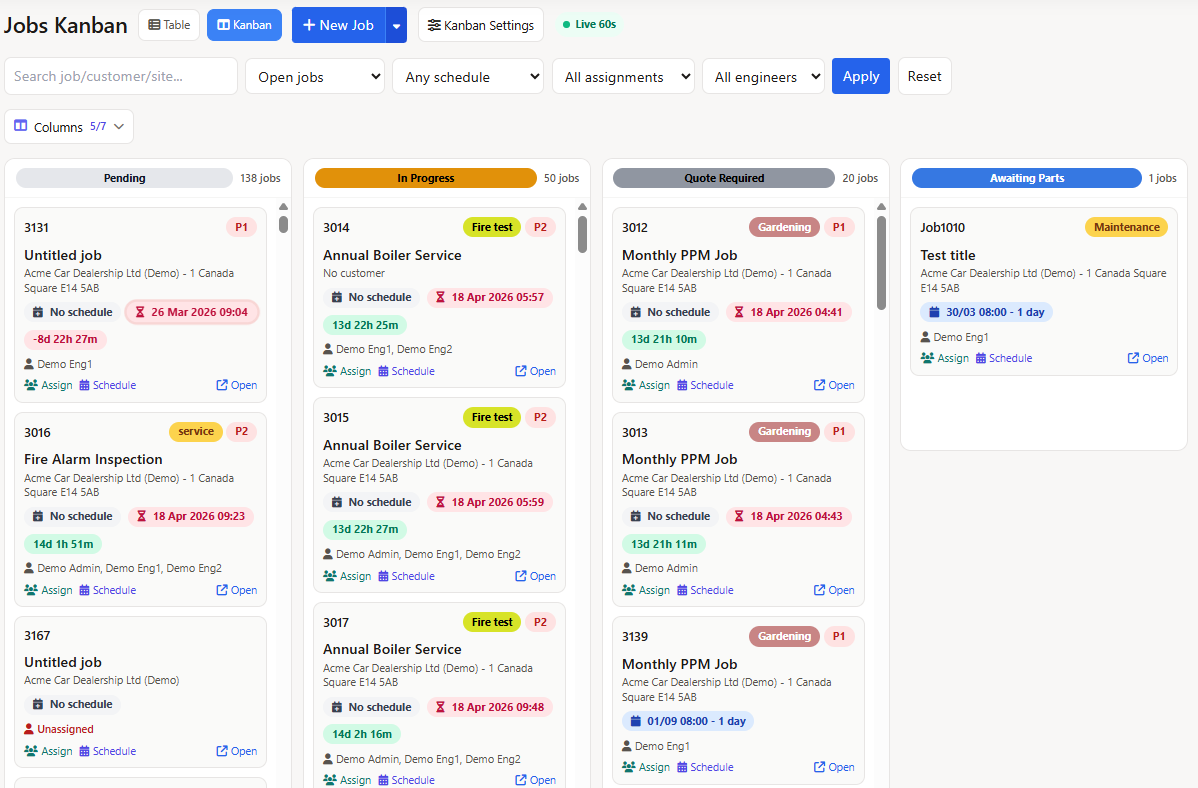
Kanban Board — drag work orders between status columns
Customer Management
A built-in CRM purpose-built for service businesses. Customer profiles, multi-contact management, communication logs, a self-service portal, and a ticketing system that captures requests from phone, email, or web and converts them into jobs.
Customer Database & CRM
Complete customer profiles with contact details, billing information, service history, and communication logs. Search, filter, and segment your customer base. Link customers to sites, equipment, and contracts.
Contact Management
Multiple contacts per customer with roles, phone numbers, and email addresses. Set primary contacts for invoicing, site contacts for access, and technical contacts for equipment questions.
Customer Portal
Give customers 24/7 access to their service history. View jobs, approve quotes, download invoices, submit support requests. Branded with your logo. Reduces phone calls and improves customer satisfaction.
Customer Ticketing System
Capture inbound requests from phone, email, website, or portal. Custom ticket statuses, priorities, and categories. One-click conversion from ticket to job or quote with full data carry-across.
Communication History
Full log of every email, quote, invoice, and job sent to each customer. See what was communicated and when. Email open tracking available for quotes and invoices.
Customer Estate Map
Map all customer sites and see equipment condition by location. Status-segmented markers help account managers and customers understand risk across large estates or multi-site contracts.
Customer Reports
Publish selected saved reports to the customer portal so clients can run service, equipment, invoice, or compliance reports and export CSV or Excel without emailing the office.
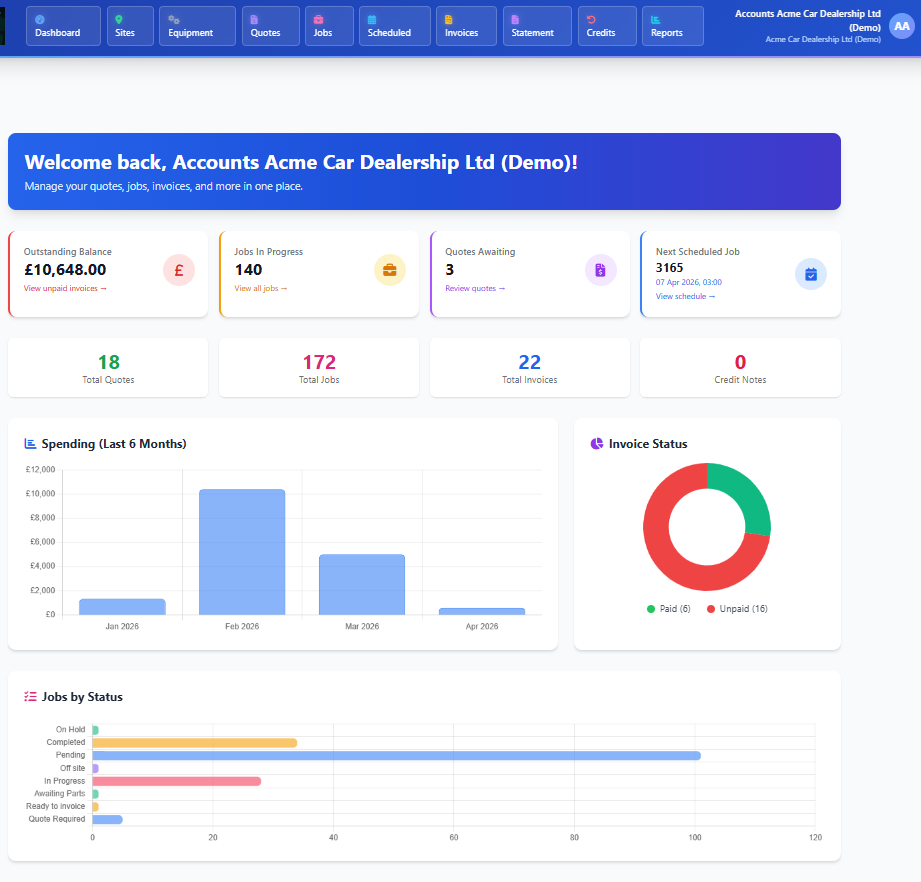
Customer Portal — self-service access to jobs, quotes, invoices, and service history
Sites & Equipment
Equipment tracking and multi-site management for commercial service operations. Maintain a complete asset registry with service history, log defects with photos, and organize large sites into zones so technicians know exactly where to go.
Multi-Site Management
Manage customers with multiple locations. Each site has its own address, contacts, equipment, access instructions, and service history. Perfect for facility management and commercial service contracts.
Site Areas & Zones
Organize large sites into areas, floors, or zones. Assign equipment to specific areas. Technicians know exactly where to go on arrival. Building management made simple.
Equipment Registry
Complete asset tracking with serial numbers, makes, models, installation dates, warranty status, and custom fields. Full service history per asset. Know exactly what equipment you're maintaining.
PM Defect Tracking & Remediation
Log deficiencies on PM inspections with custom severity tiers, bulk-quote remedial works from the work order page, and auto-resolve defects when the linked task completes. Full audit trail from inspection to resolution.
QR Code Lookup
Assign QR codes to equipment and scan from the mobile app. Instant access to equipment details, service history, and open jobs. Perfect for technicians in the field.
Floorplans & Control Room Views
Upload site floorplans, pin equipment to exact positions, and view asset condition visually. Technicians and customers can understand where equipment lives across large facilities.
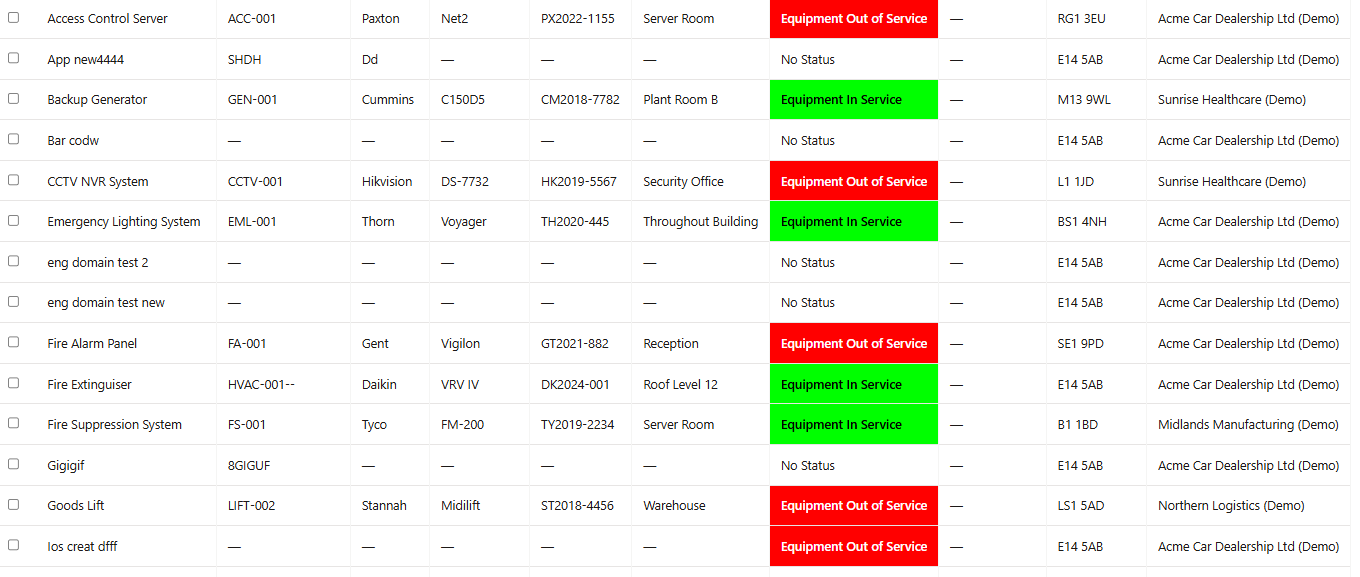
Equipment Registry — full asset tracking with service history and custom fields
Quoting & Estimates
Quoting and estimating tools that shorten the gap between customer request and signed proposal. Build quotes with labor and material breakdowns, send branded PDFs, and let customers accept directly from the email — no login required.
Structured Quote Builder
Build itemized quotes with sections and tasks instead of a flat line list. Group tasks by section or equipment, per-task labor calculator with rate bands, materials picker from your stock catalog. Customer PDF mirrors the structure end to end.
- Sections + tasks with per-section subtotals
- Per-task labor calculator with rate bands
- Materials picker from stock catalog
Quote Builder
Build quotes with labor breakdown, materials costing, and miscellaneous items. Apply markups, discounts, and taxes. Preview exactly what the customer will see before sending.
AI-Powered Estimating
Draft estimates in seconds using AI. Upload customer requests, emails, or specifications, or use work order and PM defect context. Per-task and bulk AI assist on the structured builder. Edit and send in minutes instead of hours.
Online Quote Acceptance
Customers accept, decline, or provide feedback directly from the email. No portal login required. One click to accept, instant notification to your team, automatic job creation option.
Quote Analytics
Track quote performance with acceptance rates, average response times, and win/loss analysis. See which quote types perform best and optimize your pricing strategy.
Quote Templates
Design professional quote PDFs with your branding. Drag-and-drop template builder with merge tags for dynamic content. Multiple templates for different service types.
Preventive Maintenance
Preventive maintenance scheduling that automates recurring service visits. Create PM contracts, auto-generate jobs when visits are due, run equipment-specific checksheets from the mobile app, and batch-invoice completed maintenance work — all from one system. Explore the full preventive maintenance software workflow or see how Field Ascend works as CMMS software.
Preventive Maintenance Software
Run recurring service visits, asset-linked schedules, mobile checksheets, customer-ready reports, and invoice handoff from one contractor-focused PM workflow.
- Recurring schedules and work orders
- Mobile maintenance checksheets
- Completed visits ready for billing
PM Schedule Management
Create recurring maintenance schedules with custom frequencies (weekly, monthly, quarterly, annual). Auto-generate jobs when visits are due. Link schedules to equipment for complete tracking.
- Flexible scheduling frequencies
- Auto-job creation when due
- Equipment-specific schedules
PM Contracts
Track service contracts with contract values, billing cycles, and renewal dates. Link multiple schedules to a single contract. Invoice contract visits automatically or in batches.
Maintenance Checksheets
Custom inspection checklists per equipment type. Technicians complete checksheets in the mobile app with pass/fail items, readings, and photos. Auto-generate defects from failed items.
PM Invoice Queue
View all completed PM visits ready for invoicing in one queue. Select multiple jobs, batch generate invoices, and send to customers or sync to accounting in one click.
Schedule Health Dashboard
At-a-glance view of PM compliance. See overdue visits, upcoming schedules, and completion rates. Catch missed maintenance before it becomes a customer complaint.
Tool Tracking & Calibration
Track your contractor-owned tools and test instruments — serial numbers, calibration due dates, OSHA-ready inspection records, and custody chain across warehouse, truck, and technician. Dispatch blocks non-compliant tools automatically.
- Calibration & inspection management
- Tool custody chain & audit trail
- Dispatch blocks overdue tools
Log Cards
Create configurable site or equipment log cards for readings, checks, and recurring inspection records. Technicians complete entries in the job workflow and the office keeps an audit-ready history.
Certificates & Compliance
Compliance tools built for regulated trades. Generate inspection certificates, enforce mandatory checklists before job closure, track EPA 608 refrigerant data for HVAC, and maintain a full audit trail that's ready when inspectors ask.
Certificate Builder
Generate equipment inspection certificates, electrical test reports, and custom compliance documents. AI pre-fills based on equipment data. Export as branded PDFs ready for customer delivery.
EPA 608 Refrigerant Tracking
For HVAC contractors: Per-equipment refrigerant logging, automatic CO2e calculations, running charge tracking, and leak check scheduling. Force rules ensure technicians log refrigerant data before completing jobs.
- Per-equipment refrigerant logs
- Automatic calculations and thresholds
- Leak check scheduling
Compliance Checklists
Mandatory checklists that technicians must complete before closing jobs. Configurable per job type. Enforce safety checks, customer sign-offs, and regulatory requirements.
RAMS / Safety Documentation
Risk Assessment and Method Statement management. Assign RAMS to jobs or sites. Technicians acknowledge safety documents in the mobile app before starting work, with digital signatures for compliance evidence.
Electrical Safety Testing
Track electrical inspections, appliance testing, and safety compliance. Custom test forms, automatic certificate generation, and full audit history per asset.
Vault — Document Management
A secure, shared document library for your whole team. Store O&M manuals, certificates, SDS, install guides, and company policies in one place — with folder-level access control and instant access on the technician mobile app.
- Company-wide file storage
- Folder permissions by team
- View & download in the field
Invoicing & Finance
Invoicing that flows directly from completed work orders. Generate invoices with pre-populated labor, materials, and expenses — then send, track payments, and sync to your accounting system without re-keying data.
Invoice Generation
Create invoices directly from completed jobs with labor, materials, and expenses pre-populated. Customizable invoice templates, automatic tax calculations, and payment terms.
Email Invoices
Send professional invoice PDFs directly to customers. Track email opens and link clicks. Automated payment reminders for overdue invoices.
Payment Tracking
Track invoice status from sent to paid. Record partial payments, payment dates, and payment methods. See aging reports and chase overdue invoices.
Credit Notes
Generate credit notes linked to original invoices. Full audit trail for refunds and adjustments. Sync credit notes to your accounting system automatically.
Customer Statements
Generate customer statements showing all invoices, payments, and outstanding balances. Email statements directly to customers for payment collection.
Expense Tracking
Track business expenses, link them to jobs, and upload receipt photos. Convert paid purchase orders to expenses with one click. Real-time cashflow dashboard shows money in vs money out.
Recurring Invoices
Automate repeat billing for service contracts, retainers, and recurring charges. Generate invoices on schedule and keep recurring revenue connected to customers and accounting workflows.
Credit Limits & Auto-Hold
Set company defaults or customer-specific credit limits. Field Ascend can automatically place customers on hold when outstanding balances exceed their limit, reducing risky new work.
Mobile App for Technicians
A field service management app that works in basements, tunnels, and rural dead zones. Everything your technicians need — job details, planner visibility, maps, quotes, messaging, signatures, photos, timesheets, and materials — in one app that works with or without cell signal.
Native Mobile App
iOS and Android app designed for field technicians. Access job details, update work done, collect signatures, take photos, and log time. Everything your team needs in their pocket.
- iOS and Android native apps
- Fast, responsive interface
- Works on phones and tablets
True Offline Capability
Works in basements, tunnels, and dead zones. Job details, photos, signatures, and timesheets are stored locally and sync automatically when connection returns. No data loss, no waiting.
Complete Job Details
Every job detail at your technician's fingertips. Work done notes, materials used, labor times, equipment serviced, customer contacts, and site information. Update in real-time or offline.
Smart Job Dashboard
Start the day with the right jobs front and center. Technicians see open work, key priorities, quick filters, and personal tiles in one home view. The app keeps next actions obvious without digging through multiple screens.
Planner & Calendar View
Give technicians a clear view of planned work by date. See assigned jobs, upcoming visits, and schedule changes in calendar-style views so the day is easier to organize in the field.
Map-Enabled Field Work
Use in-app maps for location-aware working, job context, and route awareness. Technicians can see where work is, understand travel context, and move between jobs with better visibility during the day.
Photo Capture
Take before and after photos, document defects, and capture equipment details. Photos attach to jobs automatically and sync to the office. Visual proof of work completed.
GPS Job Validation
Verify technician location when clocking job times. GPS coordinates validate that time entries match actual job sites. Optional setting for businesses that need location verification.
Push Notifications
Real-time alerts for new job assignments, schedule changes, and urgent callouts. Return journey reminders ensure technicians log travel time. Configurable per-user preferences.
In-App Messaging
Communicate without leaving the platform. Technicians can stay aligned with office teams and keep job conversations connected to the wider workflow instead of relying on separate messaging tools.
Mobile Quote Access
Give technicians visibility of quote-related workflows on mobile. Review quote context in the field, keep work aligned to what was priced, and reduce back-and-forth when customers ask what has been proposed.
In-App Timesheets
Time visibility stays inside the same app your technicians already use. Review captured travel and on-site time, keep daily records accurate, and avoid switching to separate tools just to manage timesheets.
Lone Worker Safety
Protect technicians working alone with built-in check-ins, panic alerts, and escalation workflows. Live safety dashboard shows worker status. Configurable check-in intervals and emergency contacts.
Realtime Timing Mode
Technicians can start travel, arrive on site, travel home, and end the day from the app. Timing records sync back for pricing, timesheets, GPS audit, and job history.
Truck Stock Picking
Technicians can add materials from assigned truck or warehouse stock, linking parts to jobs and equipment while keeping inventory usage visible to the office.
Voice Dictation & Quick Phrases
Capture work completed notes faster with voice dictation and reusable quick phrases. Standardize technician notes without making mobile data entry painful on site.
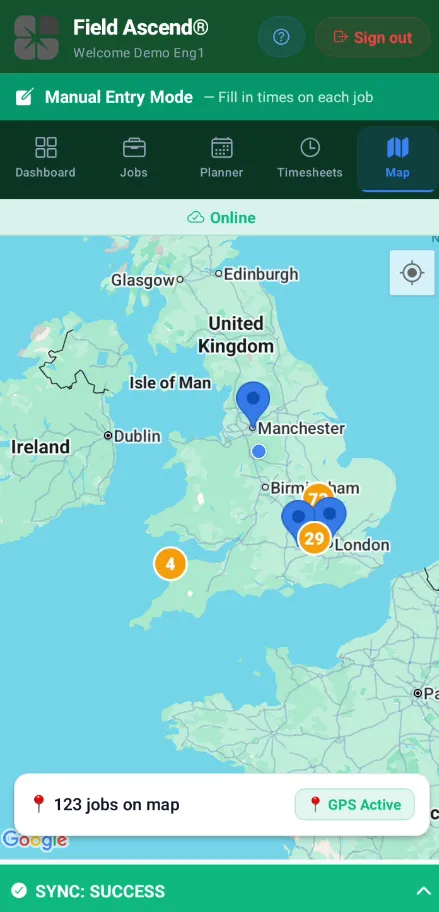
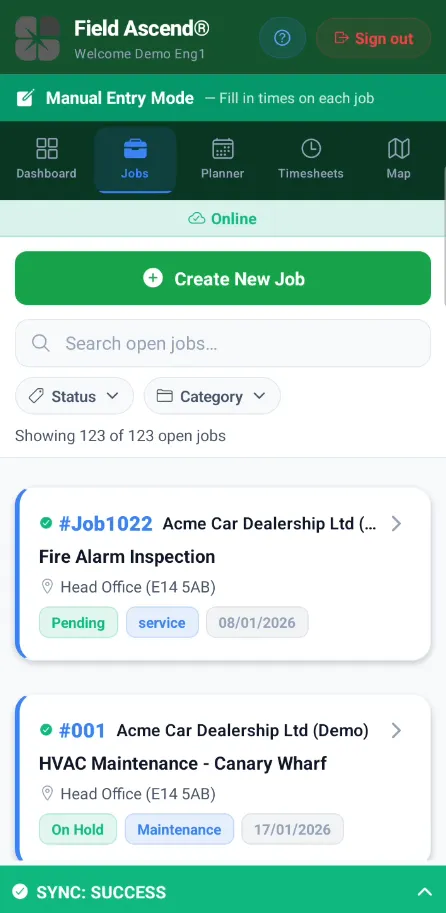
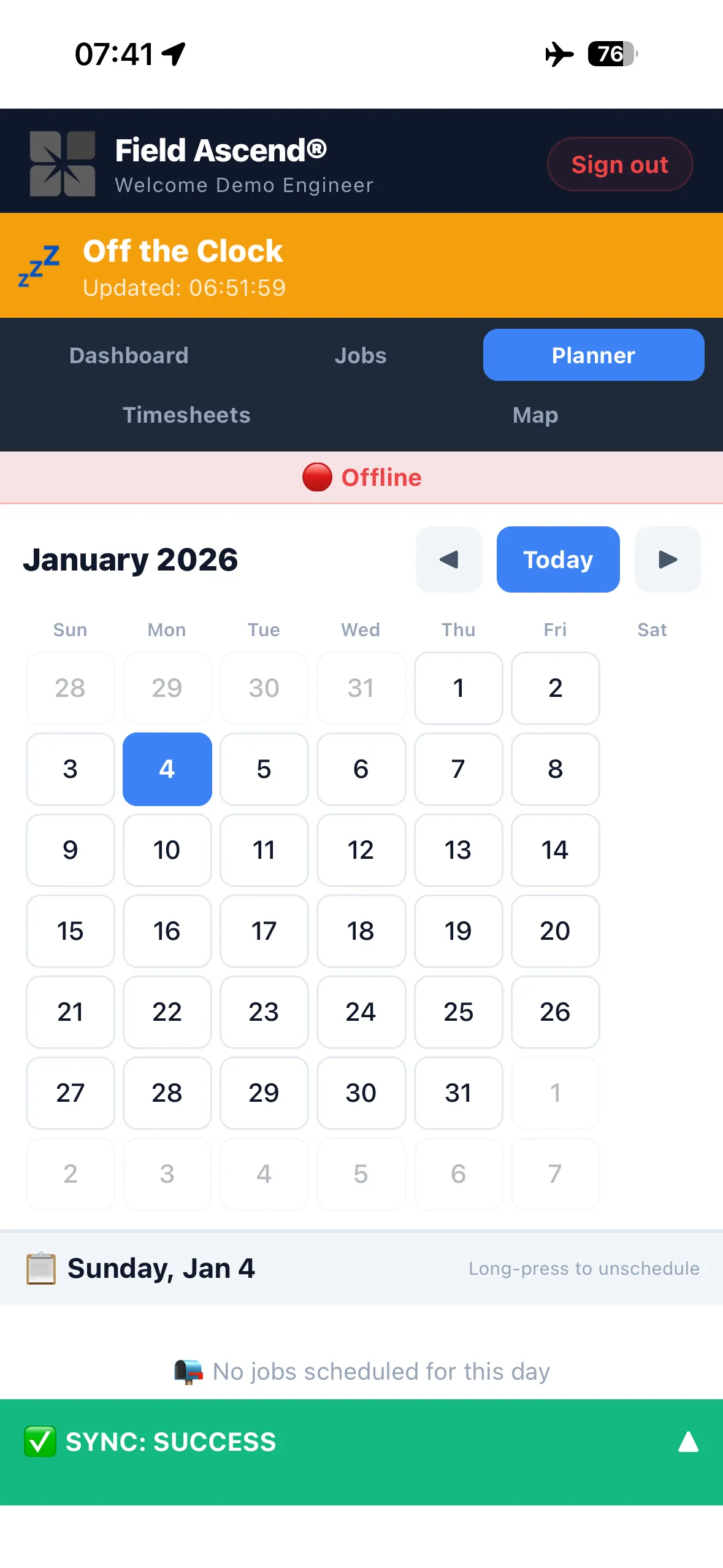
Left to right: GPS map view, job detail, and offline sync — all from the native mobile app
Technician Management
Technician profiles, certification tracking, Gantt-style timesheets, and GPS audit — in one place. Know who's qualified for what, verify time entries against actual locations, and export approved hours straight to payroll.
Technician Profiles
Complete profiles with contact details, skills, certifications, and employment information. Track hire dates, hourly rates, and assigned vehicles. Everything in one place.
Training & Certifications
Track technician certifications, qualifications, evidence, required credentials and renewal work. Compliance matrix views show valid, expiring, expired, missing and optional credentials.
Timesheet Tracking
Visual Gantt chart timesheets showing travel, onsite, and return segments. See the full day at a glance. Technicians log time from the mobile app, managers review and approve.
GPS Timesheet Audit
Validate timesheets against actual GPS locations. Flag discrepancies for review. Provides audit evidence and eliminates timesheet disputes. Optional setting for trust-but-verify management.
Payroll Export
Export approved timesheets in formats compatible with major payroll providers. Automatic overtime calculation based on your rules. Time-off pay and absence deductions included.
Technician Web Portal
Give technicians browser access as well as the mobile app. They can view assigned jobs, planner, maps, documents, quotes, tools, timesheets, memos, messages, and HR information where enabled.
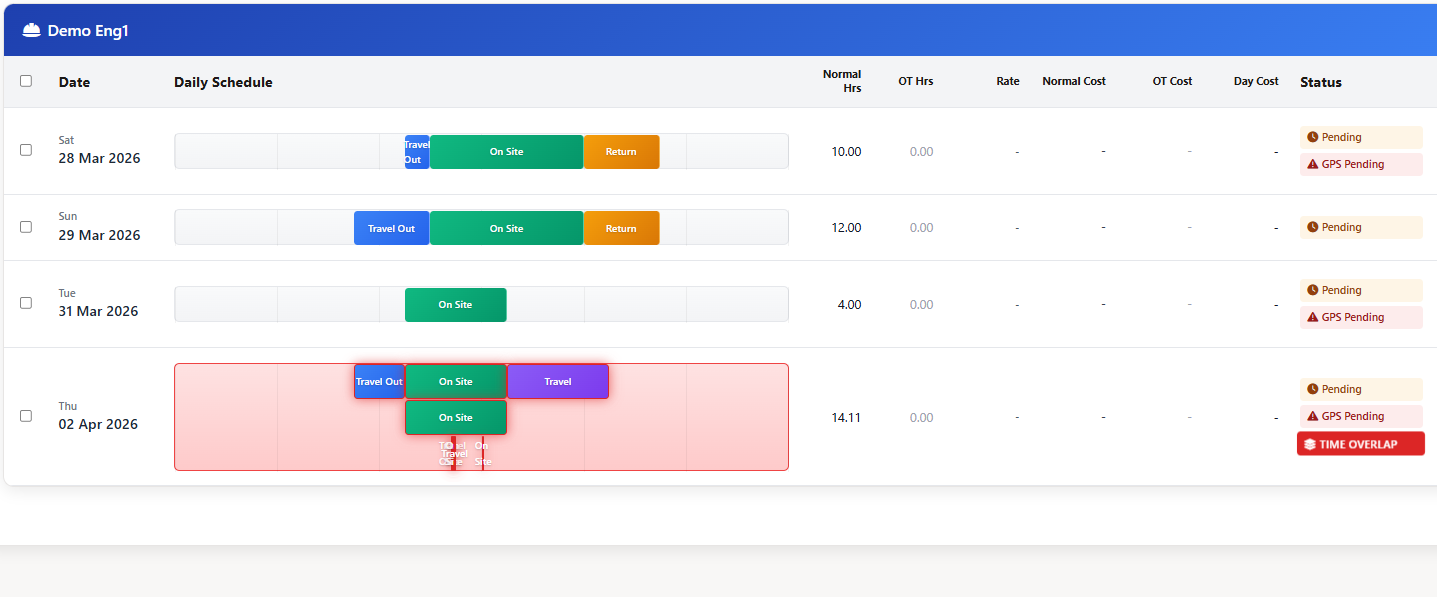
Timesheet Tracking — Gantt chart with travel, onsite, and return segments plus GPS audit
HR & Workforce
Workforce management built into your field service platform. Staff profiles, 80+ granular permissions, org charts, time-off requests, training records and development plans — so you run people operations from the same system you run jobs.
Staff Profiles
Employee profiles with personal information, emergency contacts, employment history, and HR documents. Upload contracts, agreements, and certifications. Complete personnel records.
Granular Permissions
80+ permission settings to control exactly what each user can see and do. Create roles for dispatchers, managers, technicians, and administrators. Master user bypass for owners.
Organization Chart
Visual org chart showing company hierarchy. Define reporting lines, team structures, and approval chains. Interactive chart for growing businesses managing multiple teams.
Time-Off Management
Self-service vacation and time-off requests. Employees submit requests via app or web, managers approve with one click. Automatic calendar blocking prevents scheduling conflicts.
Training Records & Development Plans
Manage training completions, certification evidence, renewal reminders, evidence review and technician development targets in the same workforce system.
Staff Portal
Give office staff, helpers, and non-technician workers a focused portal for time off, timesheets, documents, memos, messages, assigned vehicles, and read-only planner visibility where permissions allow.
Compliance Matrix
See which technicians hold required certifications, what is expiring, what is missing, and where the business has compliance gaps. Export matrix views for audits and renewals.
HR Cases & Performance Reviews
Manage HR cases, staff records, development plans, and performance review workflows inside the same system used for field operations and training evidence.
Fleet & Vehicles
Fleet management tools for service contractors. Vehicle registry, customizable daily inspection checklists completed in-app with photo evidence, service reminders, and state inspection tracking.
Vehicle Registry
Track all company vehicles with registration details, mileage, insurance, and maintenance history. Assign vehicles to technicians. Know exactly what's on the road.
Digital Vehicle Inspections
Customizable daily inspection checklists for lights, tires, fluids, and safety equipment. Technicians complete checks in-app with photo evidence before starting their day. Automatic alerts for failed items.
Maintenance Tracking
Track service intervals, oil changes, tire rotations, and repairs. Set maintenance reminders based on date or mileage. Full service history per vehicle.
Inspection & Service Alerts
Automatic reminders for state inspections, insurance renewals, and scheduled maintenance. Never miss a compliance deadline or let a vehicle fall out of service.
Inventory Management
Inventory Management
Field service inventory management software for parts, warehouses, trucks, work orders, counts, transfers, receiving, and low-inventory alerts. Scan items onto jobs, receive deliveries, transfer stock between locations, run inventory counts, and see complete movement history.
Purchase Orders
Purchase order software for supplier buying, work order links, inventory receiving, documents and committed cost visibility. Keep procurement connected to job costing.
AI Supplier Invoice Inbox
Upload supplier invoice PDFs, extract invoice details with AI, match them to purchase orders or create work-order-linked expenses after review.
Accounting Integrations
Connect field service jobs, work orders, invoices, customers, tax codes and accounting handoff workflows with finance tools where configured. Reduce double entry between your field operations and your accounting system.
QuickBooks Integration
Connect field service jobs, work orders, quotes and invoices with your accounting workflow and reduce duplicate admin.
- Field-to-finance workflows for U.S. contractors
- Invoice, customer, item and tax mapping where configured
- Confirm QuickBooks availability during setup
Xero Integration
Two-way sync with Xero. Push invoices and customers, pull payments and account codes. Automatic reconciliation keeps both systems in sync.
Sage Integration
Connect with Sage Business Cloud Accounting and Sage Intacct. Push invoices and sync payments. Works with Sage accounting products.
Zoho Books Integration
Two-way sync with Zoho Books. Push invoices, customers, and expenses. Pull payments automatically. Perfect for businesses using the Zoho ecosystem.
Reports & Dashboards
Operational visibility without spreadsheet gymnastics. Customizable reports, AI-generated reports from plain-English questions, live dashboards with 50+ tile types, and financial analytics — so you spot problems before they become expensive.
Custom Reports
Build reports on jobs, invoices, technicians, customers, and equipment. Filter by date range, status, customer, and more. Export to PDF or Excel.
AI Report Builder
Ask questions in plain English and get formatted reports. "Show me revenue by customer this quarter" generates a professional report instantly. No report training needed.
Real-Time Dashboards
Live dashboards with 50+ tile types. Job counts, revenue tracking, technician utilization, invoice aging, and more. Drag-and-drop layout with role-based views.
Financial Analytics
Monthly cashflow dashboard showing money in vs money out. Revenue trends, expense tracking, and profitability analysis. 12-month rolling view of your financial health.
Scheduled Reports
Create saved reports and send regular exports to the right people. Customer-visible reports can also be published through the portal for account reviews and service transparency.
Documents & Communication
Store documents, send emails, and generate branded PDFs — all from inside the platform. Quote PDFs, job sheets, invoices, and statements use drag-and-drop template builders with merge tags, so they look professional without design work.
Document Library
Cloud storage for manuals, certificates, policies, photos, and compliance documents. Assign documents to technicians for acknowledgment. Everything organized and accessible from anywhere.
Email System
Send quotes, invoices, job confirmations, and statements directly from the platform. Email templates with merge tags for personalization. Email open and click tracking.
Microsoft 365 Email Integration
Connect Microsoft 365 for authenticated outbound email workflows. Quotes, invoices, statements, and job messages can be sent through your configured provider with tenant-specific templates.
PDF Templates
Design professional PDFs for jobs, quotes, invoices, statements, and purchase orders. Drag-and-drop template builder with merge tags. Multiple templates per document type.
Staff Memos
Broadcast announcements to your team. Create memos that require acknowledgment. Track who has read important communications. Perfect for policy updates and safety alerts.
Subcontractors & Projects
Tools for businesses that outsource work or manage multi-phase projects. Issue work orders to subcontractors through a secure portal, track acceptance and completion, and group related jobs into projects for larger scopes of work.
Subcontractor Portal
Connect with subcontractor companies securely. Send work orders from jobs, track real-time status from acceptance through completion. Both parties maintain operational independence.
Work Order Issuance
Create work orders from jobs and send to subcontractors. Include equipment details, scope of work, and pricing. Track acceptance and completion status.
Project Grouping
Group related jobs into projects for larger work scopes. Track project progress, costs, and timelines. Perfect for construction, renovation, and multi-phase work.
Platform & Security
Two-factor authentication, 80+ granular permissions, bulk CSV import, and recycle bins that protect against accidental deletions. Your data stays safe, your team gets appropriate access, and migrating from another system takes minutes.
Two-Factor Authentication
Secure your account with two-factor authentication. Authenticator app support for admin, technician, and customer logins. Optional enforcement per user type.
User Permissions
80+ granular permission settings control exactly what each user can see and do. Create custom roles or assign permissions individually. Master bypass for owners.
Bulk CSV Import
Mass import customers, sites, equipment, and jobs from CSV files. Template downloads ensure correct formatting. Validation checks catch errors before import. Migrate from spreadsheets in minutes.
Recycle Bins
Deleted records go to recycle bins for 90 days. One-click restore with full audit trail. Protects against accidental deletions. Available for jobs, quotes, invoices, customers, and more.
Industry Solutions
The same field service management platform adapts to 30+ trades. Custom statuses, job types, compliance checklists, and PDF templates mean your HVAC operation looks different from an electrical contractor's setup — but both run on the same system.
Explore industry-specific pages to see how Field Ascend handles the workflows, terminology, and compliance requirements for your trade.