Last updated: May 4, 2026
What is preventive maintenance defect tracking? Preventive maintenance defect tracking captures every deficiency a technician finds during a PM inspection — equipment that needs repair, parts that need replacement, follow-up work outside the planned visit — and carries it through to remediation. Without dedicated defect tracking, this work falls through the cracks between visits.
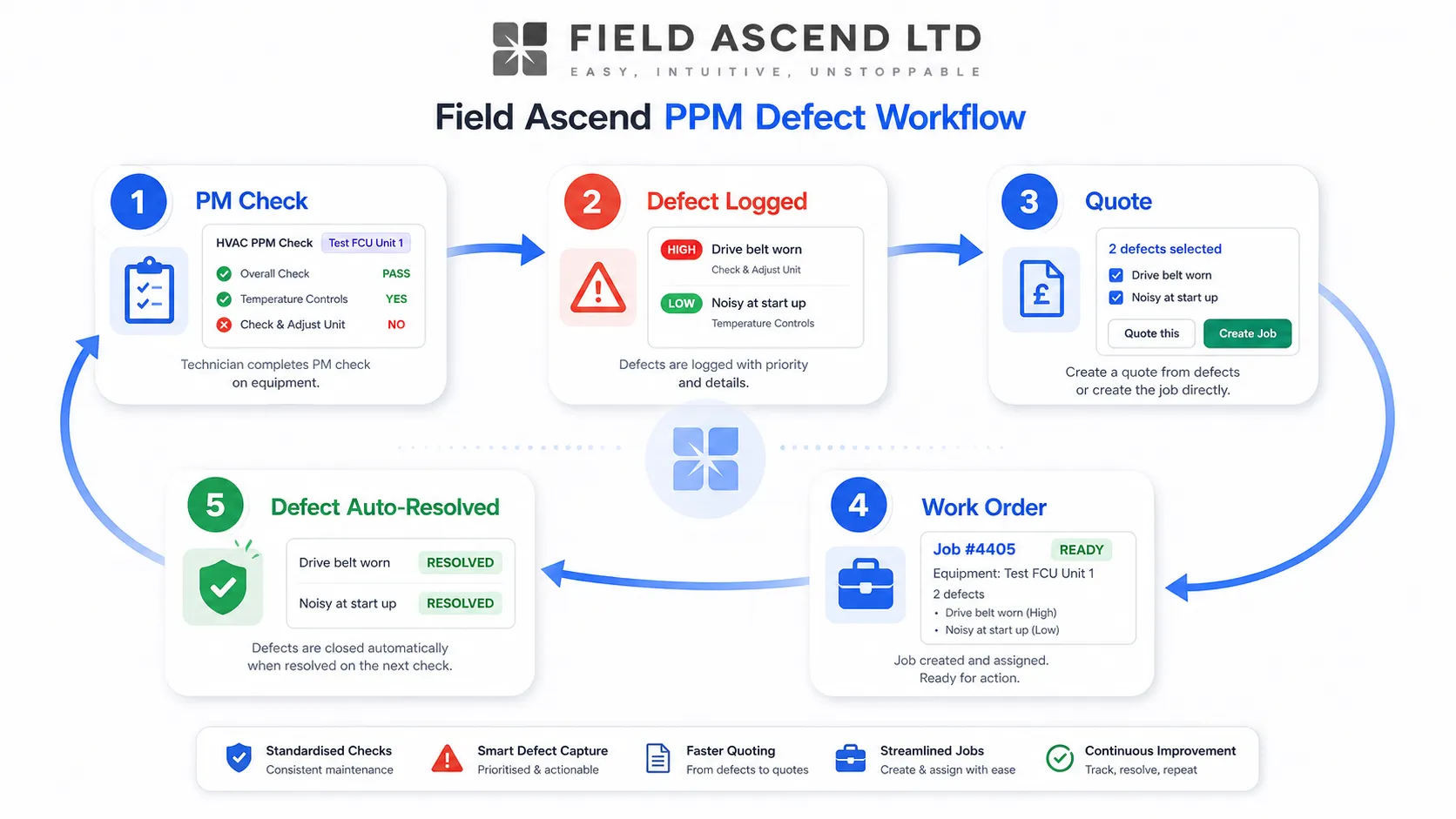
Field Ascend tracks the full defect lifecycle: technician logs the deficiency on the PM check, severity is set against tenant-customizable tiers, the office bulk-quotes the defects from the work order page, and the defect auto-resolves when the linked task is completed. Every step is audited.
Pair this page with preventive maintenance software, the structured quote builder, and job task management to see the full PM-to-remediation workflow. It is especially relevant for maintenance-heavy trades such as elevator service contractors and roofing teams using condition survey software for roofing to capture and remediate roof defects.
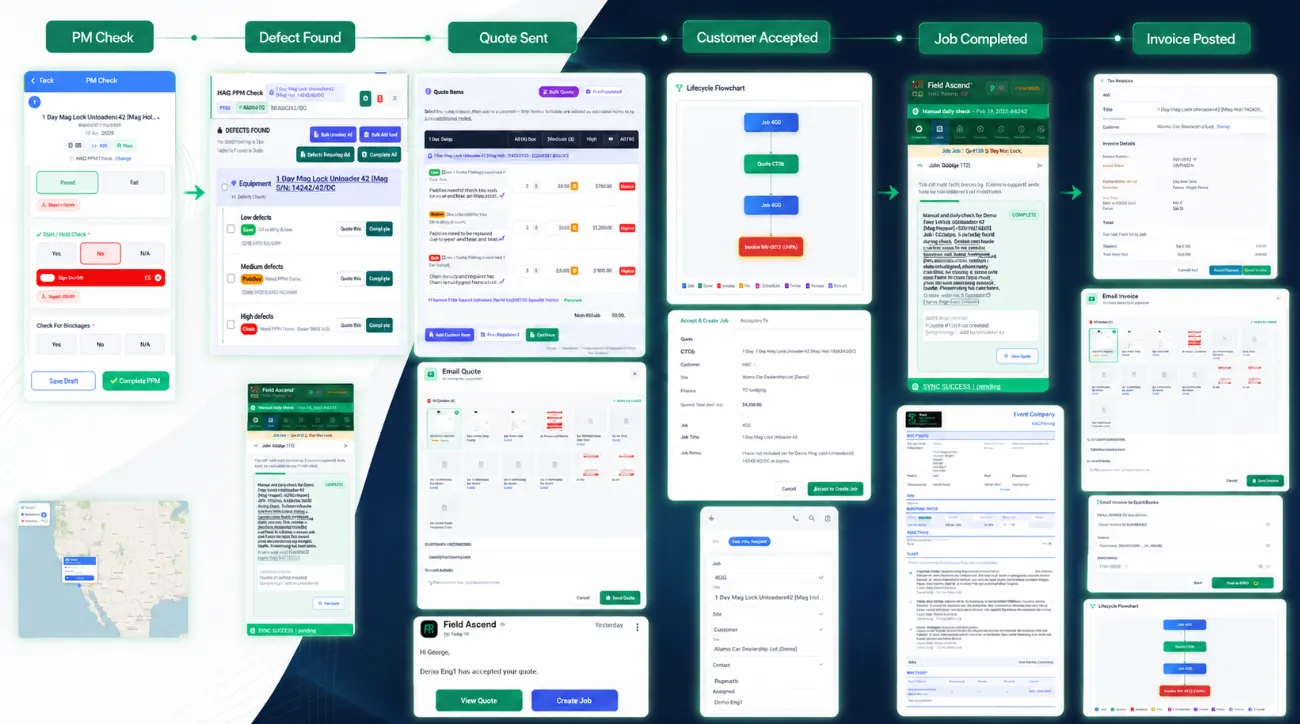
Track the full PM defect lifecycle from failed check to quote, completed work and invoice.
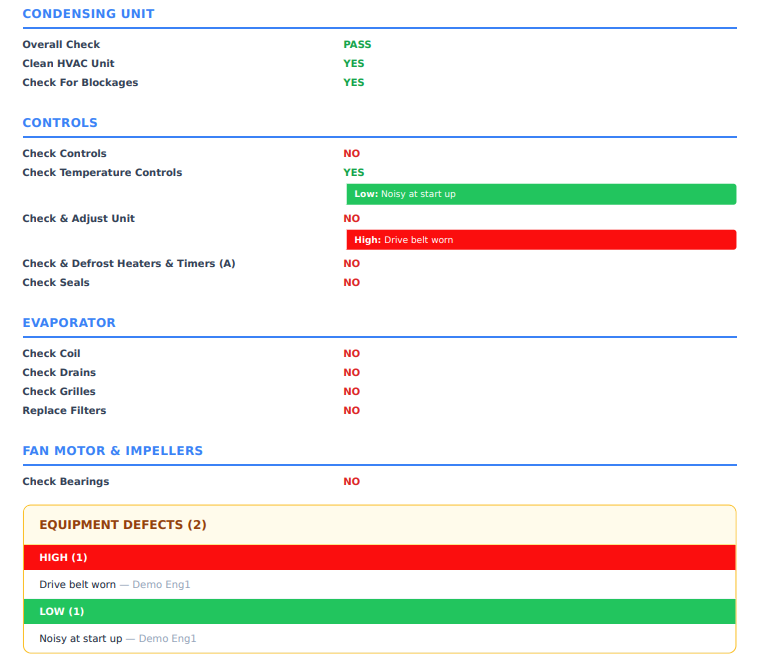
See how one defect found during preventive maintenance flows through the whole Field Ascend workflow: quote creation, quote PDF email, customer acceptance, automatic work order creation, technician completion on the app, job sheet email, invoice creation, and QuickBooks sync.
Every remedial quote starts with a defect raised during a preventive maintenance visit. This walkthrough shows how technicians log defects mid-inspection, tag severity, attach photos, carry issues forward from previous visits, and sync to the office instantly.
Most preventive maintenance platforms stop at the inspection. The technician runs the checklist, marks pass/fail, the visit closes — and any deficiency they noticed sits in a free-text notes field that the office may or may not action before the next visit. That works for an internal facilities team where the same crew is back next month. It does not work for a service contractor running PM contracts across many customer sites, where the office has to convert deficiencies into quoted remedial work and then deliver it on a separate visit.
A proper preventive maintenance defect tracking system treats each deficiency as a first-class object — with severity, equipment context, audit trail, and a clear lifecycle from logged through quoted through resolved.
| Workflow stage | PM software without defect tracking | Field Ascend defect tracking |
|---|---|---|
| Technician finds a deficiency | Writes it in a free-text notes field | Logs it as a defect with severity, photos, equipment link |
| Office reviews the visit | Has to read every visit notes field manually | Sees a defects panel on the work order with all open deficiencies |
| Office decides to quote remedial works | Re-types every deficiency into a quote | Multi-selects defects and clicks "Quote selected" |
| Remedial work gets done | Office manually marks the deficiency as fixed | Defect auto-resolves when the linked task completes |
| Customer or auditor asks for history | Reconstructs from notes and emails | Pulls the defect events timeline — full audit trail in one place |
The structural difference is that defects exist as their own data model — not as side effects of a checklist answer. That is what makes deferred maintenance, recurring deficiencies, and lifecycle traceability actually work.
Each tenant defines severity names (e.g. Low, Medium, High, Critical) and colors. The same colors flow through the work order, the picker, the quote PDF, and customer reports.
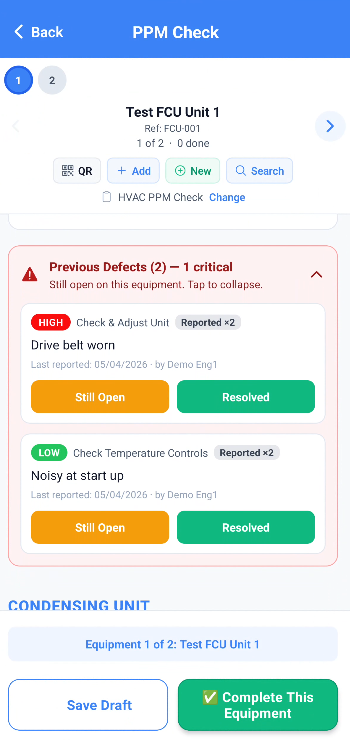
When the next PM check runs on the same equipment, open defects from the previous visit surface for the technician to confirm, accept, or dismiss — preventing duplicate logging.
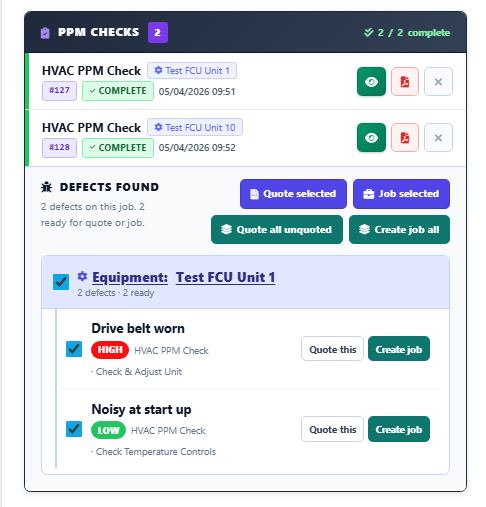
Multi-select defects on the work order page, click "Quote selected" — the system creates a structured quote with one task per defect, pre-populated with severity and equipment context.
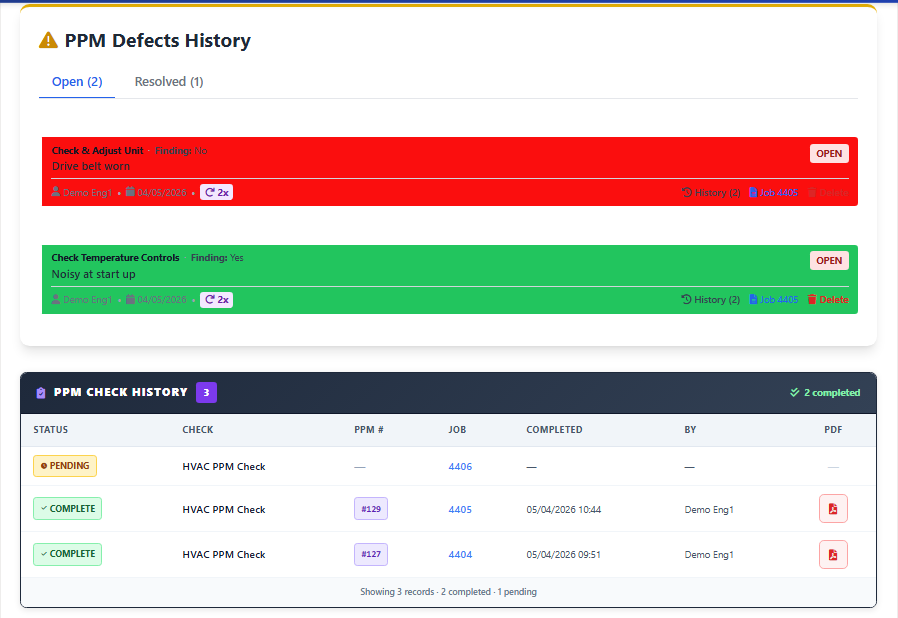
When the work order task linked to a defect is marked complete, the defect auto-resolves with the closing work order ID, the technician name, and a timestamped audit event.
This is what separates a deficiency log from a remediation lifecycle. Pair with the structured quote builder for the bulk-quote path and job task management for the resolution side.
Severity language varies by industry. Commercial HVAC contractors often use Critical / Major / Minor / Observation. Property maintenance firms might use Red / Amber / Green. Compliance contractors might use a 1-5 scale. Field Ascend doesn't force a vocabulary — tenants define their own tiers, names, and colors, and the same colors flow through every screen and PDF where severity appears.
For contractors handling multi-customer compliance work, the same severity framework keeps reporting consistent across every site, every PM visit, and every customer.
The technician finds the deficiency on site, while the equipment is in front of them. That is the right moment to capture it — not back at the truck or later in an email. The Field Ascend mobile app puts a "Log defect" option on every PM check question, so the technician can capture the deficiency without leaving the inspection flow.
This matters especially in plant rooms, basements, rooftops, and other low-signal areas where field service teams routinely lose connection. The defect is captured locally and synced when the device reconnects — see the mobile app for the offline architecture.
Once a PM visit returns with a list of defects, the office's job is to convert them into quoted remedial work as quickly as possible. The work order page shows every defect logged on the visit, grouped by equipment, with severity color-coded and a multi-select checkbox per row. Three buttons drive the conversion:
Each defect becomes a structured estimate task with its own labor and materials lines. Already-quoted defects show an "Already quoted in Q-2031" badge so they can't be quoted twice. Pair with AI estimating to draft customer-friendly task wording and suggest labor and materials in bulk.
The most fragile part of any defect-tracking workflow is closing the loop — making sure the deficiency is marked resolved when the remedial work actually gets done. Manual resolution depends on someone remembering to update the defect after the work order completes. That memory routinely fails. Field Ascend closes the loop automatically.
The defect timeline becomes a clean lifecycle record: created on PM-1234 → quoted in Q-2031 → resolved on Job W-4567 by John Smith on 2026-04-15. That's the kind of trail customers and auditors actually trust.
Defect tracking sits at the center of a five-step lifecycle that connects preventive maintenance to remediation work. PM check generates a defect; office reviews and quotes; customer accepts; technician completes the remedial task; defect auto-resolves with full audit trail. None of those steps require manual hand-off, and none rely on someone remembering to close the loop.
This is the workflow contractors typically build out of three or four disconnected tools — PM software, a quoting system, a work order tracker, and a spreadsheet of "open issues". Field Ascend collapses it into one operating system where the data flows are automatic and the audit trail is built-in.
For HVAC, plumbing, electrical, and refrigeration contractors running compliance-heavy PM contracts, this lifecycle is also where the commercial value lives — every resolved defect is a billable remediation visit, and every audit-trail event is a defensible record of work done.
This page is for U.S. service contractors running preventive maintenance contracts where deficiencies routinely turn into quoted follow-up work.
If you also need the wider PM scheduling layer, see preventive maintenance software.
It captures the deficiencies a technician finds during a PM inspection — equipment that needs repair, parts that need replacement, follow-up work outside the planned visit — and tracks them through to remediation. Without dedicated tracking, this work falls through the cracks between visits.
On the technician's mobile app, each PM check question has a "Log defect" option. The technician picks severity, writes a description, attaches photos. The defect saves against the equipment item, separate from the inspection answer, so the PM check can still complete cleanly.
Yes. Tenants define their own tier names and colors. The same colors flow through the work order page, the defect picker, the quote PDF, and the customer-facing reports — severity is consistent everywhere.
The work order page shows every defect logged on the visit. Multi-select the ones you want to quote, click Quote selected — Field Ascend creates a structured quote with one task per defect, pre-populated with severity and equipment context. AI quote generation can then draft the customer-facing wording and propose labor and materials.
When the work order task linked to the defect is marked complete (admin web, technician web, or mobile app), Field Ascend auto-resolves the defect — sets status to resolved, stamps the closing work order, technician, date, and writes an event row to the audit log. No manual cleanup needed.
Every defect carries a timeline of events — created, re-reported, severity changed, accepted, dismissed, resolved — with the actor (technician or admin), timestamp, and notes. Available on the defect detail panel, the equipment record, and via API.
Yes. If a defect from a previous visit is still open, the next PM check on the same equipment surfaces it — the technician can confirm it is still present (re-reports it), accept it, or dismiss it. This stops the same deficiency being re-logged on every visit.
Field Ascend publishes U.S. pricing at $13 per user per month with all features included, no per-tech pricing, and a 30-day free trial. See pricing for the live plan.
Stop letting deferred maintenance fall through the cracks between visits. Log defects on the inspection, bulk-quote remedial work, and auto-resolve when the work is done — with a full audit trail at every step.
Start your free 30-day trial