Field Ascend gives your field technicians a native iOS and Android app that handles work orders, preventive maintenance, equipment tracking, photos, signatures, and time logging — even in basements, mechanical rooms, and rural areas with zero cell signal.
The app connects directly to the Field Ascend platform, so dispatchers see updates as they happen and technicians always have the latest job information.

Native apps for iPhone and Android. Offline-first architecture included.
Most field service apps treat offline mode as an afterthought — a loading spinner that waits for signal, or a "try again later" message. That breaks down the first time your HVAC tech walks into a basement mechanical room in a downtown Chicago high-rise, or your elevator technician steps into a shaft, or your service crew drives into rural Montana.
Field Ascend was built offline-first from the ground up. All job-critical data lives on the device before anything touches the server. Technicians can complete full work orders, capture photos, collect signatures, update equipment status, and log every minute of labor — all without cell signal. When connectivity returns, queued changes sync automatically. Nothing gets lost. The office sees updates without anyone making a phone call.
This matters for underground parking garages in Manhattan, hospital sub-basements in Texas, construction sites in Appalachian backcountry, and anywhere else signal drops to zero. If your technicians work in places like these, offline-first is not optional.
Complete the entire job workflow — notes, materials, status updates, equipment checks — without any internet connection. Data syncs when signal returns.
Take before and after photos, document defects, capture equipment labels. Photos store locally and upload automatically later.
Collect customer signatures on the device. The signature attaches to the job record and syncs with everything else when connectivity resumes.
Travel, onsite, and return times all log accurately on the device. No connection needed. Timesheets stay precise even in dead zones.
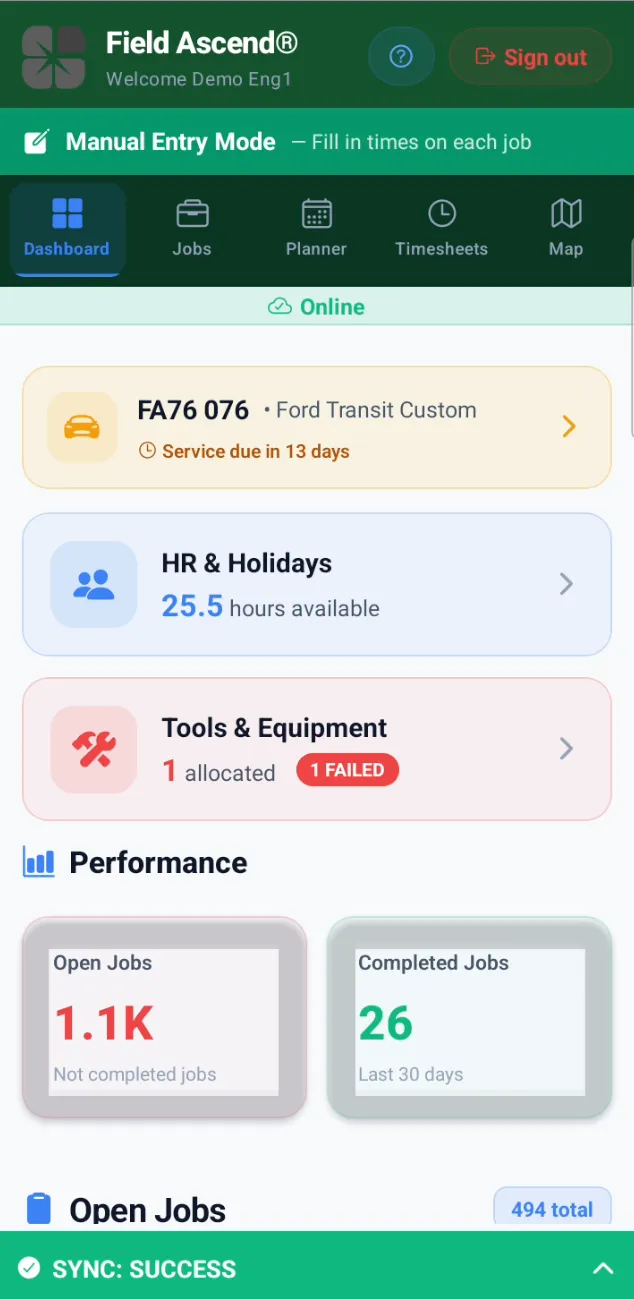
The dashboard gives technicians everything they need for the day in one place. No digging through menus. No switching between apps.
Shows the assigned vehicle (plate number, make, model), days until next service, and a link to vehicle inspection details. Technicians know their truck status at a glance.
Displays available vacation hours (e.g., "25.5 hours available"). Technicians can check their balance without calling the office.
Shows allocated tools and flags any that have FAILED a recent check. Technicians know immediately if something needs attention before leaving the yard.
Open Jobs count, Completed Jobs (last 30 days), and Not Completed total. Simple metrics that keep technicians aware of their workload.
Scrollable list of assigned work orders with total count. Tap any job to see full details, customer info, equipment, and site history.
Persistent indicator at the bottom showing "SYNC: SUCCESS" when all queued changes have uploaded. Technicians know their data made it to the office.
The mobile app handles the full technician workflow — from morning sign-in through job completion and sign-off. Here is what technicians can do on the device.
Move through the entire job: travel, arrive, work in progress, complete. Add notes, materials, miscellaneous items. Every update ties back to the work order record in the office system.
Run PM checks against the correct equipment. Pass/fail items, readings, photos. Failed items can auto-generate defect records. Connects to the CMMS side of the platform.
Scan a QR code to pull up the right asset instantly. See equipment details, service history, and open jobs against that piece of equipment — no searching through lists.
Require Job Safety Analysis (JSA) acknowledgment before technicians can start work. Configurable per job type. Digital signature confirms the technician reviewed safety documents.
Optional GPS arrival detection and location stamps on job events. Businesses configure how strict to be. Some use it for audit. Some turn it off. The app respects your settings.
Daily pre-trip inspections with customizable check items. Technicians complete the checklist in-app with photo evidence. Failed items alert the office before the truck leaves.
Review previous jobs at the same site — earlier notes, photos, materials, equipment status. Technicians arrive better informed. Less repeat diagnostic work.
Built-in check-ins, panic alerts, and escalation workflows for technicians working alone. Configurable intervals. The office sees worker status in real time.
Here is how a typical workday flows when your team uses Field Ascend.
The technician opens the app and sees today's assigned jobs. If the business requires it, they complete a vehicle inspection checklist before leaving — checking lights, tires, fluids, and safety equipment with photo evidence.
The technician taps "Start Travel" and the app begins logging drive time. GPS can optionally track the route. When they arrive, tapping "Arrive" automatically ends travel time and starts onsite time.
On site, the technician reviews job details, acknowledges any JSA documents, selects equipment, runs PM checksheets if needed, logs work done, adds materials, and captures photos. All of this works whether they have signal or not.
The customer signs on the device screen. The technician updates equipment status, adds any follow-up notes, and marks the job complete. The office sees the closed job — with full documentation — as soon as the data syncs.
The technician either starts travel to the next job (where the cycle repeats) or heads home. At the end of the day, timesheets are complete. The dispatcher can run invoicing. No phone calls. No missing data.
The mobile app fits any trade where technicians need reliable job data, equipment context, and documentation in the field.
See the full platform at Features or explore all industries we serve.
Many field service platforms started as web applications and later added a "mobile app" that is really just a web portal wrapped in an app shell. These wrapper apps need constant internet connectivity. Open a job with no signal and you get a blank screen. Try to save a photo in an elevator shaft and it fails silently. Technicians learn fast that they cannot trust these tools, and they revert to paper, text messages, and scribbled notes.
Field Ascend is different. The mobile app is a native application built specifically for field work. It stores all job data locally on the device before syncing to the server. That means technicians can complete full work orders, capture photos, collect signatures, and log time — even when they have zero cell coverage. When signal returns, everything syncs automatically. No data loss. No re-entry. No chasing.
The interface is purpose-built for technicians, not adapted from an office screen. Jobs, equipment, PM checks, notes, photos, signatures, and timesheets all live in one fast, focused app. That makes adoption natural instead of a fight.
A field service mobile app is software that runs on iOS or Android and gives technicians access to work orders, customer info, equipment details, and job documentation in the field. Field Ascend's app connects directly to the office platform, so updates sync automatically.
Yes. Field Ascend is built offline-first. All job data stores locally before touching the server. Technicians can complete full work orders, capture photos, collect signatures, and log time with no signal. Data syncs when connectivity returns.
Yes. Field Ascend offers native apps for both iOS and Android. Both versions have the same features and offline capabilities, and both sync to the same office platform.
Yes. When dispatchers assign jobs, technicians see them immediately. When technicians complete work, the office sees updates in real time. This two-way sync eliminates phone calls and manual data entry.
No. GPS tracking is configurable. Businesses can enable arrival detection, location stamps, and audit tracking — or turn these off entirely. The app respects your settings.
Technicians view PM schedules, scan equipment QR codes, and complete checksheets in the app. Pass/fail items, readings, and photos attach to the asset. Failed items can auto-generate defects.
Yes, where enabled. Technicians can review earlier work orders, notes, photos, and materials from previous visits. This context helps them arrive better prepared.
Yes. The mobile app is one part of Field Ascend's full field service management platform, which includes scheduling, dispatch, quoting, invoicing, and reporting.
Start a free trial or book a demo to see how Field Ascend handles work orders, PM, equipment tracking, and offline sync on iOS and Android.