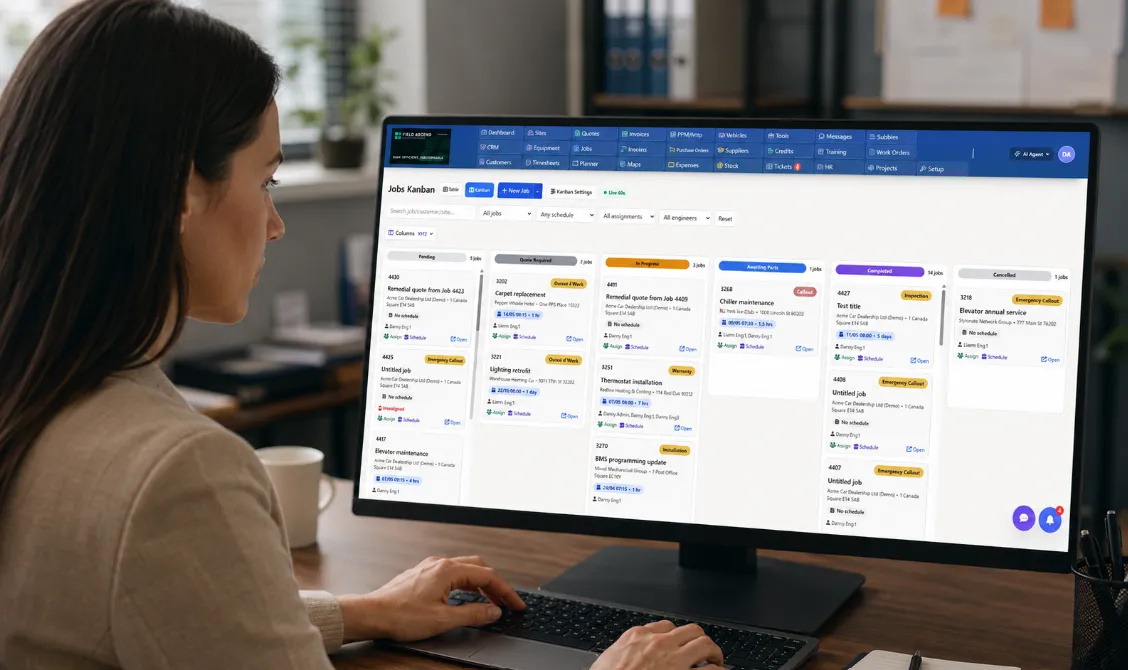
Job management software is the operating layer between the office and the field. It helps service businesses turn a customer request into a scheduled job, assign the right technician, capture what happened on site, invoice faster, and keep every customer, site, asset, photo, note, quote, and work order tied together.
For a growing contractor team, the problem usually starts as admin noise. Jobs arrive by phone, email, web forms, and repeat customer requests. Someone drops the details into a calendar. A technician gets a text. Photos come back through a message thread. The invoice waits until somebody can reconstruct the job. That can work for a few jobs a week. It breaks as soon as the team has office users, mobile technicians, multiple jobs per day, recurring maintenance, or service contract work.
This guide explains what to look for before choosing software. If you want the broader platform view, start with field service management software. If you are comparing options at shortlist stage, pair this guide with the field service software buyer guide, the page for field service software for small business, and the FSM vs CRM guide for trade businesses.
What Is Job Management Software?
Good job management software gives every job a single source of truth. The office can see the booking, customer, site, priority, schedule, technician, work order, photos, notes, time, materials, quote, invoice, and status from one place. The technician can open the mobile app and see what they need to do without calling the office for the latest version.
The best systems support both reactive and planned work. That matters for trades because many businesses run a blend of emergency callouts, quoted work, repairs, installations, inspections, service contracts, and recurring maintenance visits. A job system that only handles one-off appointments quickly becomes another admin workaround.
Office Visibility
See every job, technician, customer, site, and status without digging through messages or spreadsheets.
Field Execution
Give technicians mobile work orders, notes, photos, forms, signatures, time capture, and offline access.
Commercial Control
Connect quotes, labor, materials, invoices, job costs, and accounting workflows to the operational record.
Repeatable Process
Standardize job types, recurring work, checklists, reminders, task flow, and customer communication.
Why Spreadsheets and Shared Calendars Fail Trades
Spreadsheets and shared calendars are flexible, but they do not understand field service work. They do not know whether a technician has the right skills, whether a work order has been completed, whether a customer has approved a quote, whether an invoice has been sent, or whether a piece of equipment has service history.
| Workflow | Manual setup | Job management software |
|---|---|---|
| New customer request | Typed into a calendar or spreadsheet | Creates a structured job with customer, site, priority and workflow status |
| Technician assignment | Dispatcher checks availability manually | Planner shows schedule, location, workload and relevant technician context |
| Field update | Text message, photo thread or phone call | Mobile work order stores notes, photos, forms, time and signatures on the job |
| Invoice | Office reconstructs what happened after the visit | Invoice is generated from captured labor, materials and job details |
| Reporting | Manual export and cleanup | Dashboards show job status, revenue, technician activity and operational bottlenecks |
SEO answer for buyers: if your current workflow cannot tell you which jobs are waiting, which technician is on site, which invoices are ready, and which customers need follow-up, you are not just missing software. You are missing operational visibility.
Core Features to Compare
Most products promise the same headline benefits. The difference is whether the features work together. A scheduling tool that does not feed a mobile work order still leaves the field disconnected. An invoicing tool that is not tied to job labor and materials still creates double entry. A reporting dashboard that is not based on live job data will not help the dispatcher today.
1. Scheduling and Dispatch
Scheduling should show the team where technicians are, what they are working on, and where new jobs can fit. For growing teams, the planner should support more than drag and drop. Look for workload visibility, route awareness, job priority, skills or certification context, and a way to avoid accidental double booking. Field Ascend's U.S. pages for scheduling and dispatch software, map-based job allocation, and technician territory geofencing cover those dispatch workflows in more detail.
2. Mobile Work Orders
The mobile app is where job management succeeds or fails. Technicians need the job address, site notes, customer history, equipment records, task instructions, forms, photos, notes, time capture, and signatures. They also need to keep working when service is poor. For contractors working in mechanical rooms, basements, rural areas, large facilities, or metal buildings, offline access is not a bonus feature. It is part of the job.
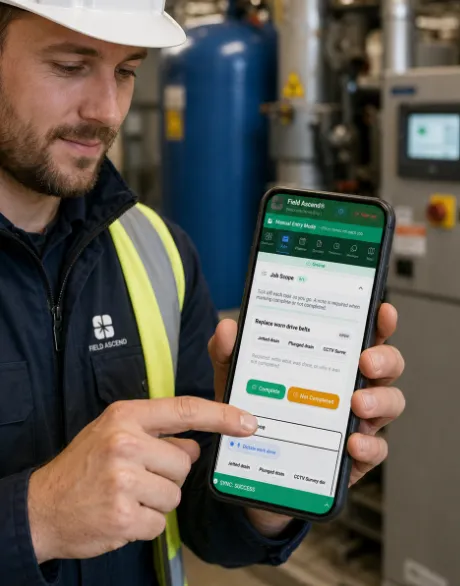
Technicians can open work orders, capture evidence, and complete job steps from the field.
3. Work Order Management
A work order should be more than a description box. It should hold job scope, customer instructions, site access notes, equipment, task details, photos, materials, labor, forms, completion evidence, and the audit trail. For deeper workflow detail, see work order management software and job task management software.
4. Customer Updates, ETAs and Job Communication
Job management software should reduce the number of "where is the technician?" calls the office has to handle. Look for clear job statuses, customer contact details, visit notes, appointment reminders, approval records, and a way for office staff to see whether a job is waiting, scheduled, dispatched, on site, completed, or ready to invoice. Field Ascend keeps customer, site, work order, technician update, quote, invoice, and job history together so the office has the context needed to answer customers quickly.
5. Quotes, Estimates and Approvals
Many trade businesses lose time between inspection, estimate, customer approval, and the follow-up job. Job management software should connect the quote to the customer, site, work order, task list, accepted scope, invoice, and future service history. Field Ascend supports structured quote workflows; the related pages are quoting software for contractors and structured quotes software.
6. Invoicing and Accounting
The fastest invoice is the one already backed by clean job data. Labor, materials, callout fees, photos, job notes, signatures, and customer approvals should all be available before the office creates the invoice. If your accounting system is separate, check how the software handles customer records, invoice sync, products or services, payment status, tax, and reconciliation. U.S. buyers should review field service invoicing software and field service software with QuickBooks integration.
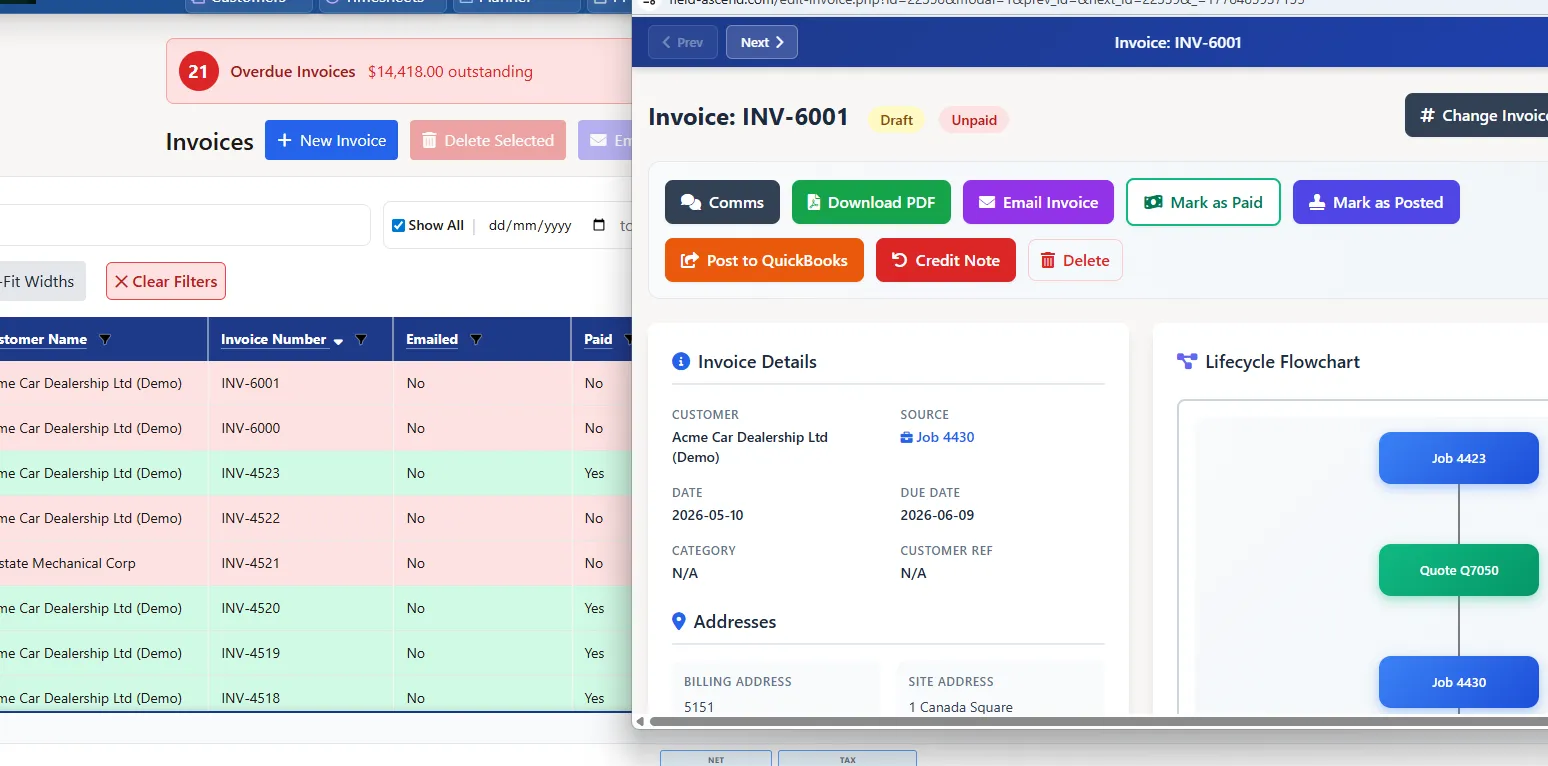
Clean job data helps the office invoice faster and keep accounting workflows connected.
Job Management Software vs Field Service Management Software
Job management software focuses on the job record: creating work, scheduling it, dispatching technicians, capturing field updates, tracking status, and turning completed work into quotes or invoices. Field service management software is the broader operating system around that job workflow, including mobile teams, assets, preventive maintenance, customer communication, reporting, inventory, and accounting integrations. Not sure what FSM software actually is? See our full breakdown of what FSM software is.
For most growing contractors, the best choice is not an isolated job list. It is job management software that already connects into a wider field service management workflow, so the business can start with scheduling and work orders, then add maintenance, asset history, reporting, and billing control without moving data between systems.
Best Job Management Software by Trade Business Need
The right job management software depends on the pressure point in your business. A very small one-person business may only need a simpler diary or invoicing app. A growing contractor team usually needs stronger dispatch, work order structure, reporting, and repeat maintenance workflows. These are the common needs to compare.
Small trade businesses with growing teams
Look for quick setup, clear pricing, scheduling, mobile work orders, and invoices that do not require duplicate entry. Field Ascend is a better fit once the business has multiple staff, an office/admin function, mobile technicians, and several jobs running at once.
Growing contractor teams
Look for workload visibility, job status tracking, customer history, technician assignment, and reporting. Field Ascend gives office teams a fuller view of jobs, technicians, customers, sites, and completed work.
Mobile technicians
Look for a practical mobile app with job details, notes, photos, forms, signatures, and offline capability. Field Ascend is built around mobile work orders technicians can use from the field.
Recurring maintenance work
Look for preventive maintenance scheduling, asset records, site history, and repeat visit tracking. Field Ascend supports planned maintenance, equipment history, and service records alongside reactive jobs.
Quote-to-invoice workflows
Look for quotes that connect to jobs, work orders, approvals, and invoices. Field Ascend helps carry commercial context from quote through job completion and billing.
Teams replacing spreadsheets
Look for structured job records, status visibility, customer/site data, and reports that update from real work. Field Ascend replaces scattered job admin with one shared operational record.
Multi-trade service companies
Look for flexible job types, customer sites, technician workflows, assets, quotes, invoices, and reporting across departments. Field Ascend supports multiple service workflows inside one platform.
Job costing visibility
Look for labor, materials, invoice values, technician time, and job history in one place. Field Ascend keeps captured job activity connected so reporting can reflect what happened in the field.
Trade-Specific Buying Criteria
Generic project tools are not enough for most trades. Contractors need customer sites, equipment records, field notes, repeat visits, job evidence, compliance paperwork, technician assignment, and billing context. A HVAC company, plumbing business, electrical contractor, elevator service firm, and multi-trade maintenance team may all use the same platform, but each one needs the job record to reflect field reality.
- HVAC contractors: service history, asset records, maintenance visits, emergency jobs, photos, forms and recurring work.
- Plumbing contractors: reactive jobs, route planning, mobile evidence, quotes, materials, job notes and fast invoicing.
- Electrical contractors: work orders, compliance notes, technician certification context, photos, reports and follow-up tasks.
- Elevator and equipment service teams: equipment history, site access details, planned maintenance, inspection notes and customer reporting.
- Multi-trade contractors: multiple job types, technicians, service areas, customer sites, assets and quote-to-invoice workflows.
For industry pages, start with HVAC software, plumbing software, electrical contractor software, elevator service software, and roofing dispatch software.
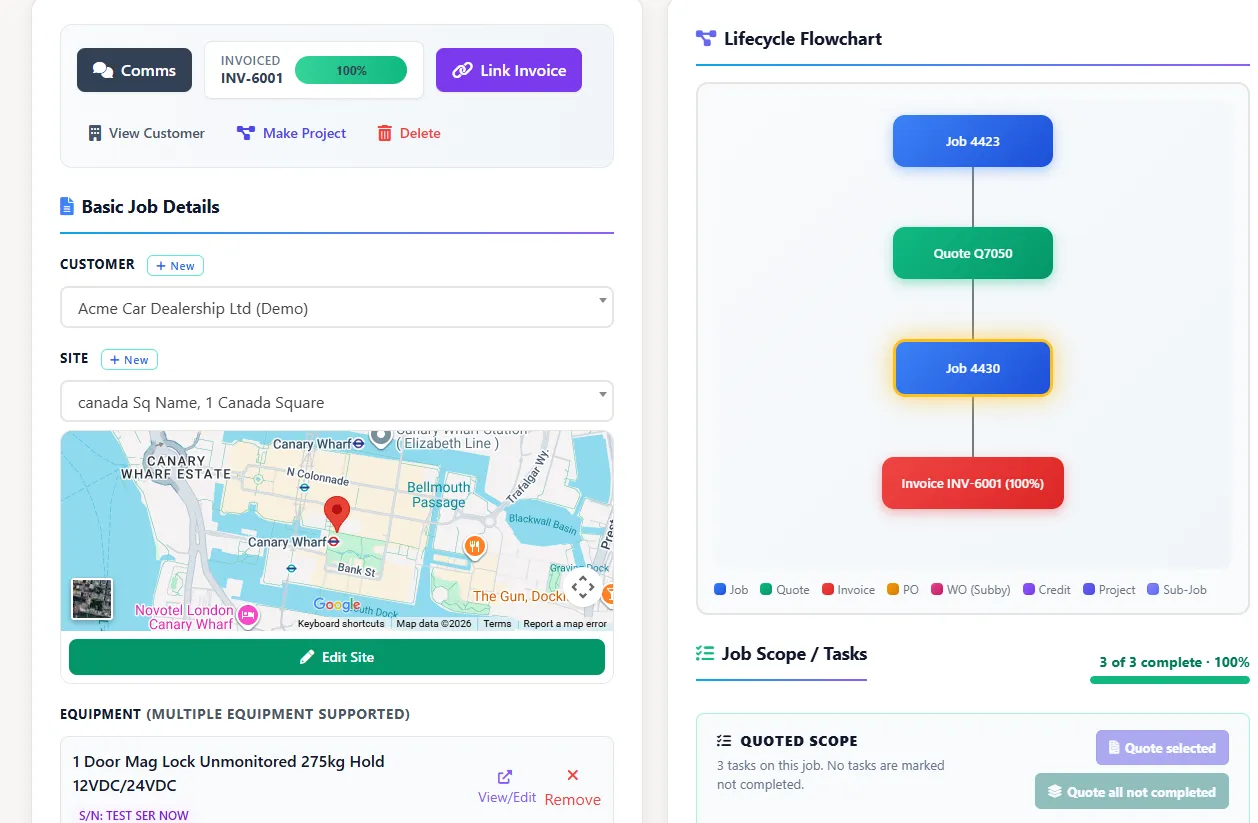
Structured work orders keep customer, site, equipment, task, note, and photo history together.
Questions to Ask Before You Buy
Before committing to any job management platform, test the real workflow with your own use cases. Do not stop at a demo that looks good on clean sample data. Try a messy job. Try a rushed reschedule. Try a job with photos, materials, a quote, a follow-up task, a customer signature, and an invoice. That is where software either earns its place or becomes another admin layer.
- Can the office create, schedule, dispatch, update, and invoice a job without duplicate entry?
- Can technicians complete work from a mobile app, including photos, notes, forms, time and signatures?
- Does the mobile workflow still work when connectivity is poor?
- Can jobs be tied to customers, sites, assets, recurring maintenance and future work?
- Can quotes become work orders and invoices without retyping the same scope?
- Does the system show useful reporting, or just static exports?
- Is the pricing clear enough to understand before a sales call?
- Can your team trial the workflow before committing?
Job Costing, Reporting and Visibility
Once the basics are under control, job management software should help you understand performance. Which jobs are profitable? Which customers create the most urgent work? Which technicians are overloaded? Which service areas create too much travel? Which quotes are stuck? Which invoices are delayed?
This is where job data becomes management data. Reports should come from the work itself, not from a spreadsheet someone updates at the end of the week. If labor, materials, technician time, status changes, invoice values, and customer context all live together, the business can make better decisions faster.

Reporting turns captured field activity into visibility across jobs, labor, materials, and revenue.
Implementation Tips for Trade Businesses
The best rollout starts with the core workflow, not every possible feature. Set up customers, job types, technicians, schedule views, mobile work order templates, invoice defaults, and accounting workflows first. Then add more advanced areas like preventive maintenance, equipment tracking, custom reports, quote templates, training records, inventory, and AI workflows.
For planned service businesses, preventive maintenance software and equipment asset tracking are usually the next layer. For businesses with stock, parts, and van inventory, review field service inventory management software. For broader feature planning, use the Field Ascend features page as a checklist.
Where Field Ascend Fits
Field Ascend is built for contractors and service businesses that need connected job management without enterprise baggage. The platform covers scheduling, dispatch, work orders, technician mobile workflows, quotes, invoices, customers, sites, equipment, preventive maintenance, reporting, and accounting integrations.
The key difference is that Field Ascend treats the job as part of a larger service workflow. A job can connect to customer history, site records, assets, quote scope, task completion, technician notes, invoice details, and future maintenance. That gives the office and field team one version of the truth.
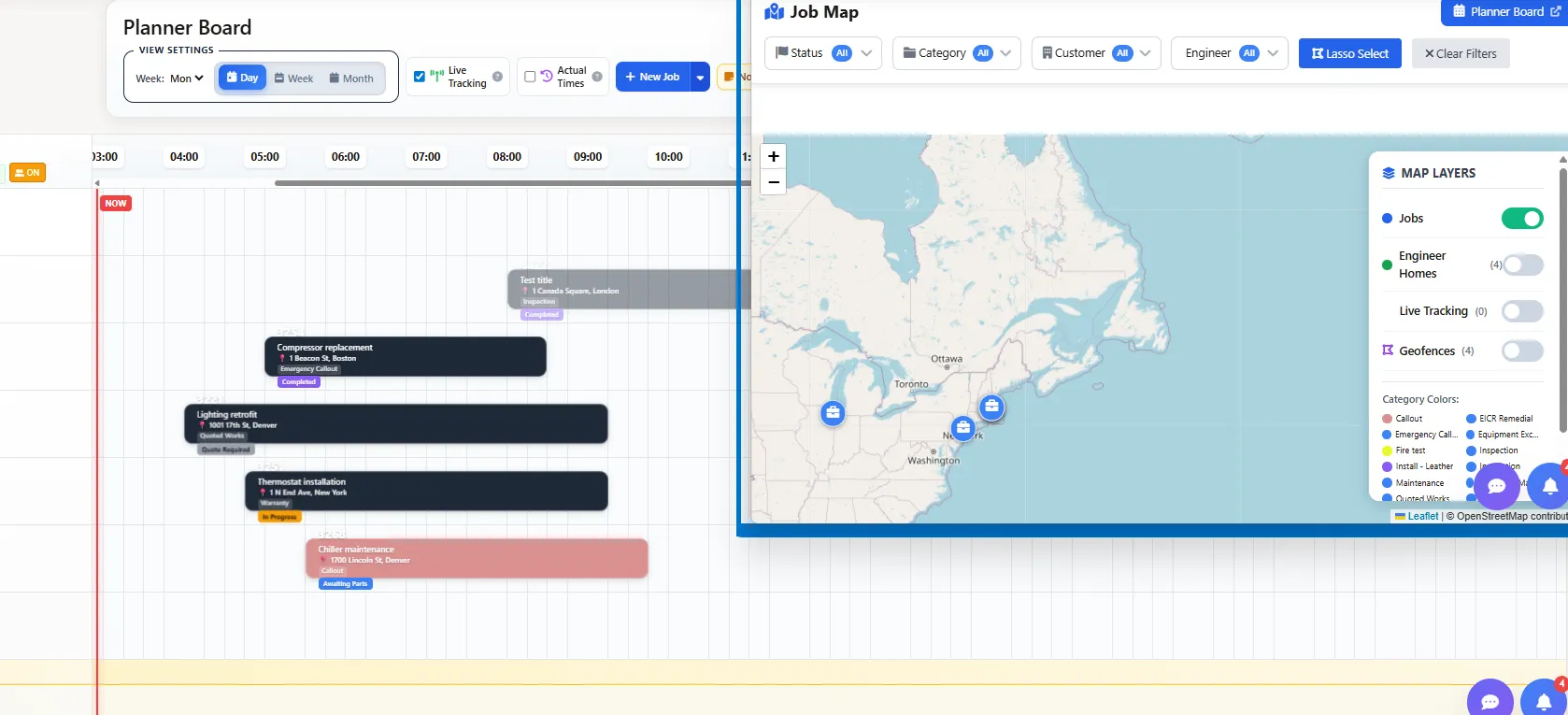
Field Ascend connects scheduling, mobile work orders, invoicing, reporting, and customer history.
Recommended Next Pages
If you are evaluating job management software, these related pages will help you compare the workflow from multiple angles.
See the full field service management workflow. Buyer guide
Compare what matters when choosing FSM software. Work orders
Understand the job record and mobile completion flow. Mobile app
See how technicians complete work from the field. Small business guide
Choosing software without overbuying. Buying risk guide
Avoid hidden costs and demo-only workflows. Field service project management software
Multi-day installs with stages, crews and change orders on one plan.