Field service inventory management software

Know what inventory you have, where it is, and what changed.

Track truck stock, work order materials, transfers, receiving, and low-inventory email alerts in one field service system. Office teams run warehouse counts on the web. Technicians can count their own truck from the app when you switch that on.

Built for field service teams Mobile technician picking Truck count from the app From $13/user/month
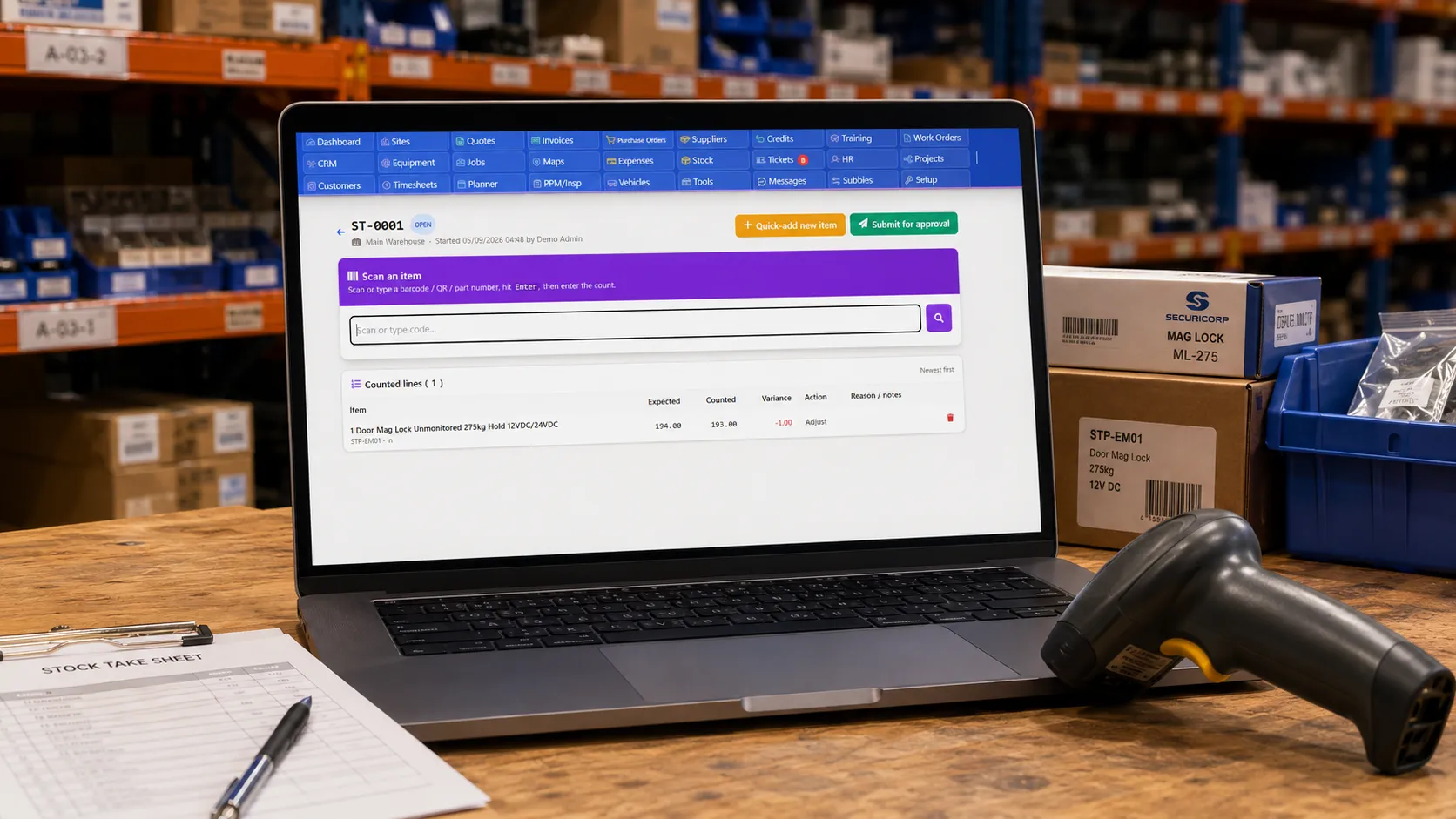
Field service inventory count screen showing counted quantities and inventory variance checks

Quick answer

Field service inventory management software helps contractors track parts, materials, warehouses, truck stock, transfers, counts, job usage and low-inventory email alerts in one system. Field Ascend shows each technician their assigned truck, lets them pick parts onto work orders, and (where enabled) count that truck from the phone. Office teams still run warehouse counts on the web. Live inventory does not change until a count is approved.

Inventory control built into your field service workflow

General inventory tools stop at the warehouse. Field Ascend connects inventory to work orders, mobile technicians, customer sites, and billing so the office can see what was used and where stock is now.

Parts inventory catalog

Manage parts, materials, SKUs, descriptions, suppliers, costs, sell prices, QR codes, barcodes, documents, and preferred accessories from one inventory catalog.

Warehouse and truck stock

Track inventory by location, including warehouses, storage areas, and technician trucks. A technician with an assigned truck sees that location on the app, with low and out badges.

Work order inventory picking

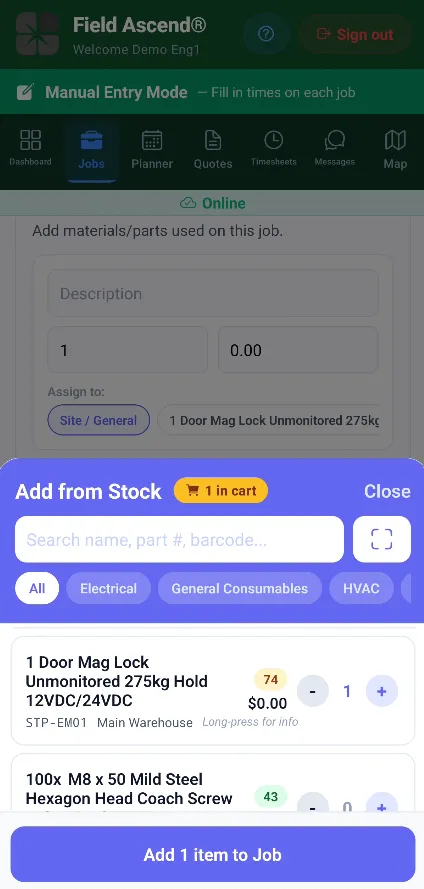
Technicians can scan or select materials from the mobile field service app, attach them to work orders, and keep the office updated on what was actually used.

Full movement history

Every receiving, transfer, adjustment, pick, return, and write-off creates an audit trail so managers can trace inventory movement without digging through spreadsheets.

Connect inventory directly to work orders

Parts do not live in isolation. They get used by technicians, at customer sites, on service jobs. Field Ascend ties inventory usage to the work order so job costing and material history stay connected.

  • Pick parts onto jobs from the office, the technician web portal, or the technician app.
  • Return unused items back into inventory when the job changes.
  • Prompt for serial numbers when a part creates an installed equipment record.
  • Use accessory prompts for common parts that are normally fitted together.

For teams comparing inventory features inside broader field service management software, this is the difference: stock usage is part of the job lifecycle, not a disconnected spreadsheet.

Technician picking inventory onto a field service work order from a mobile app
Inventory count screen for counting parts in a warehouse or truck location

Run inventory counts without rebuilding your stock list

Inventory drifts. Items get moved, broken, picked, returned, or counted wrong. Office and warehouse teams still run a web count for a warehouse, truck, or storage location. Technicians can count their own assigned truck from the app, when you switch that on in Stock Settings and give them permission.

  • Start a web count for a warehouse, truck, or storage location. Only one count can be open per location.
  • Technicians tap Stock Take on their truck inventory screen, then count by tap, scan, or search. They cannot count the warehouse from the phone.
  • Scan or paste item codes, enter the counted quantity, and record a reason when the count differs.
  • Review variances before approving. Technician counts always wait for the office. Live inventory does not change on submit.
  • Untouched rows stay as they were. Parts picked to jobs while the count was open are not undone.
  • Optional blind count hides the system quantity on the phone so the technician has to count rather than confirm.
  • Scan and search need a connection. If signal drops mid-count, unsaved counts stay on the phone until it returns.
Move inventory between warehouses, trucks, and job locations

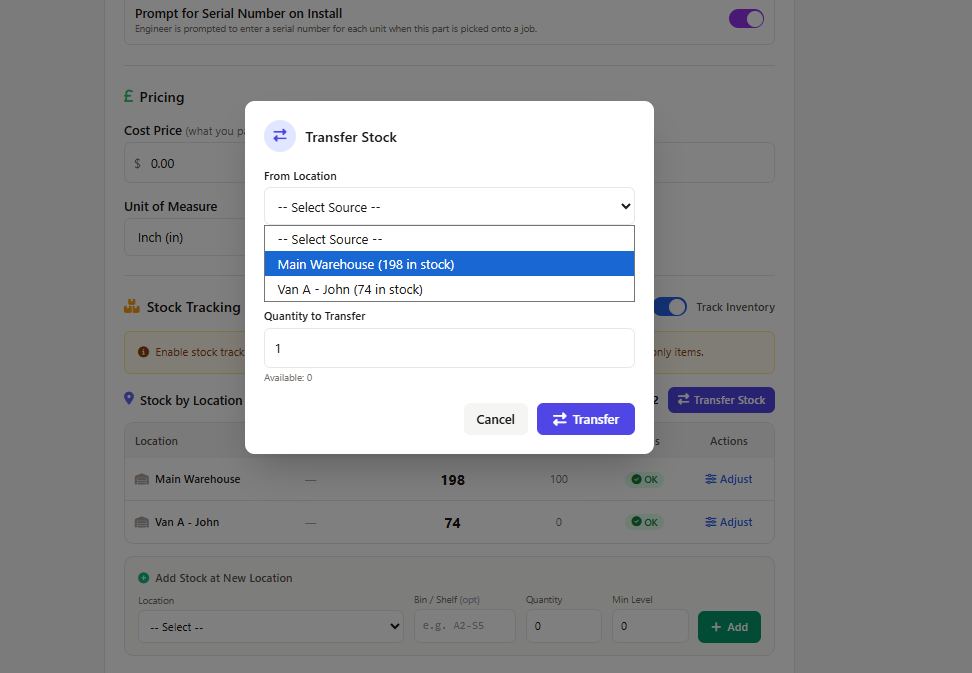
When parts move from a warehouse to a truck, the system needs to know. Field Ascend records inventory transfers with a matching in-and-out movement so both locations stay accurate.

  • Transfer parts from warehouse to truck, truck to warehouse, or between storage locations.
  • Record who moved the stock and when.
  • Keep transfer movements grouped together for reporting.
  • Use location-aware stock levels when technicians pick materials.
Truck inventory transfer workflow for moving parts between field service locations
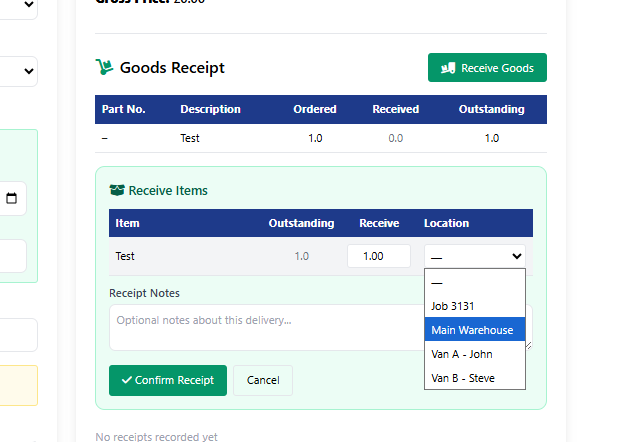
Purchase order receiving screen booking delivered parts into inventory

Receive deliveries straight into inventory

Book parts into inventory when deliveries arrive. Use purchase order receiving when the delivery relates to an order, or ad-hoc receiving when parts arrive outside the normal purchase order flow.

  • Receive against purchase orders and update received quantities.
  • Receive ad-hoc deliveries from suppliers.
  • Record unit cost changes when items are booked in.
  • Write inventory movement history automatically as stock increases.

Once inventory is available, the same parts can be picked onto work orders, used in quotes, or connected to field service invoicing workflows.

Inventory visibility for service contractors

Give dispatch, warehouse, technicians, and finance a shared view of parts activity without asking everyone to update a separate spreadsheet.

Low-inventory email alerts

Set minimum inventory levels and receive email alerts when key parts drop below threshold, so your team can reorder before jobs are delayed.

Usage and value reports

See which parts are moving, which are sitting idle, and where inventory value is tied up across your field service operation.

Accounting context

Keep inventory usage close to jobs, purchase orders, supplier invoices, expenses and integrations like QuickBooks so operations and finance do not drift apart.

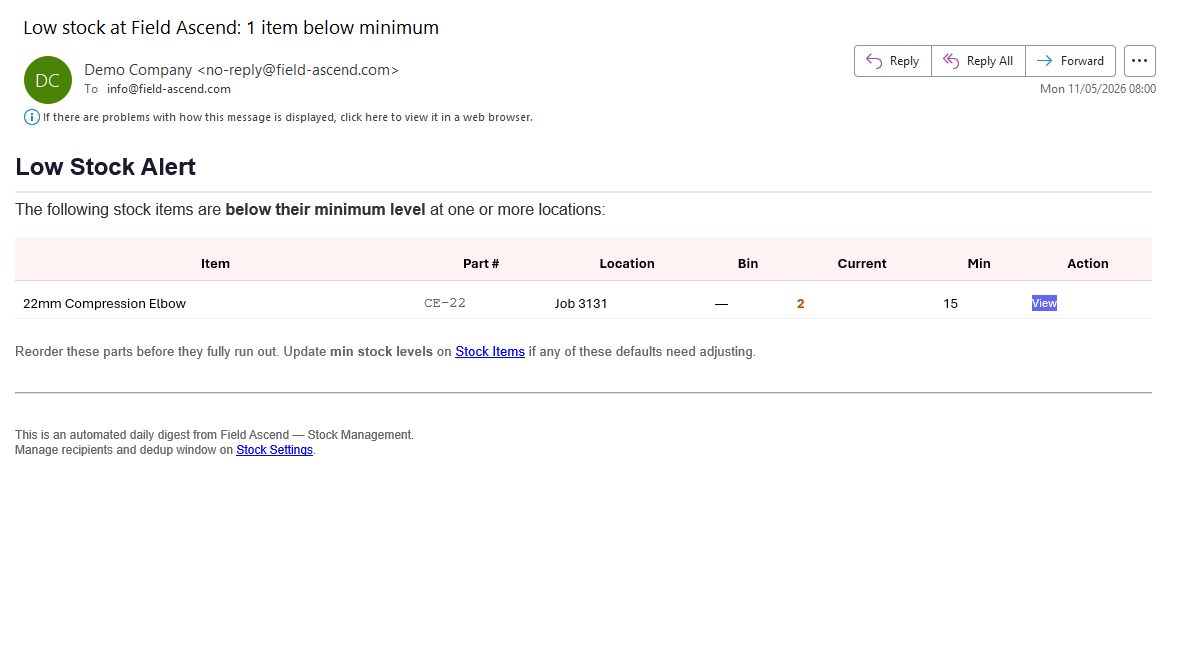
Low-inventory email alert showing parts below minimum level in Field Ascend

Low-inventory email alerts before parts run out

Minimum stock levels only help if someone sees the warning in time. Field Ascend can send a low-inventory email digest when items fall below their minimum level at warehouses, trucks or job locations.

  • Highlight items below their configured minimum inventory level.
  • Show the part, location, current quantity and minimum level in the email.
  • Link back to inventory items and stock settings for quick follow-up.
  • Help purchasing and operations teams reorder before technician visits are delayed.

Field service inventory management FAQs

Short answers for contractors comparing inventory features inside a field service platform.

How does truck stock management work in field service?

Truck stock management tracks which parts are held on each technician vehicle, what has been transferred from a warehouse, and what has been used or returned on jobs. Field Ascend keeps truck stock connected to inventory movements and work order materials.

Can inventory be linked to work orders and invoices?

Yes. Field Ascend lets teams pick parts onto work orders, record materials used by technicians, and keep that job material history available for invoicing and reporting.

Can Field Ascend track parts by warehouse, truck and technician?

Yes. Field Ascend can track inventory by location, including warehouses, storage areas and technician trucks, so the office can see where parts are held before they are used on a job.

Does Field Ascend send low-inventory email alerts?

Yes. Field Ascend can send low-inventory email alerts when parts fall below their minimum stock level at one or more locations, helping teams reorder before work orders are delayed.

Can technicians count their truck from the app?

Yes, when the office has switched on truck counts and given that technician permission. They can only count their assigned truck. The count does not change live inventory until the office approves it. Untouched rows are left as they are, so later picks are not undone.

Does a submitted inventory count change stock right away?

No. Entering a count saves the sheet, but live inventory updates only after an approver applies the count. Technician counts always wait for the office, even when office counts can apply on submit.

Ready to see your parts, trucks, and work orders in one place?

Try Field Ascend free for 30 days and see how inventory management works alongside scheduling, work orders, technician updates, and invoicing.

Start your 30-day free trial