QuickBooks-connected field service workflows

Field Service Software with QuickBooks Integration

If your team already uses QuickBooks, your field service software should reduce double entry - not force you to replace your accounting system.

Field Ascend helps U.S. contractors manage scheduling, dispatch, mobile work orders, quotes, invoices and reporting in one field service management platform, with accounting-connected workflows designed to support the move from completed field work to finance review.
Field service software QuickBooks integration dashboard showing jobs, work orders, invoices and accounting workflow status

Quick answer: Field service software with QuickBooks integration helps contractors connect field operations with accounting, so completed jobs, work orders, quotes and invoices can move through the business with less duplicate admin.
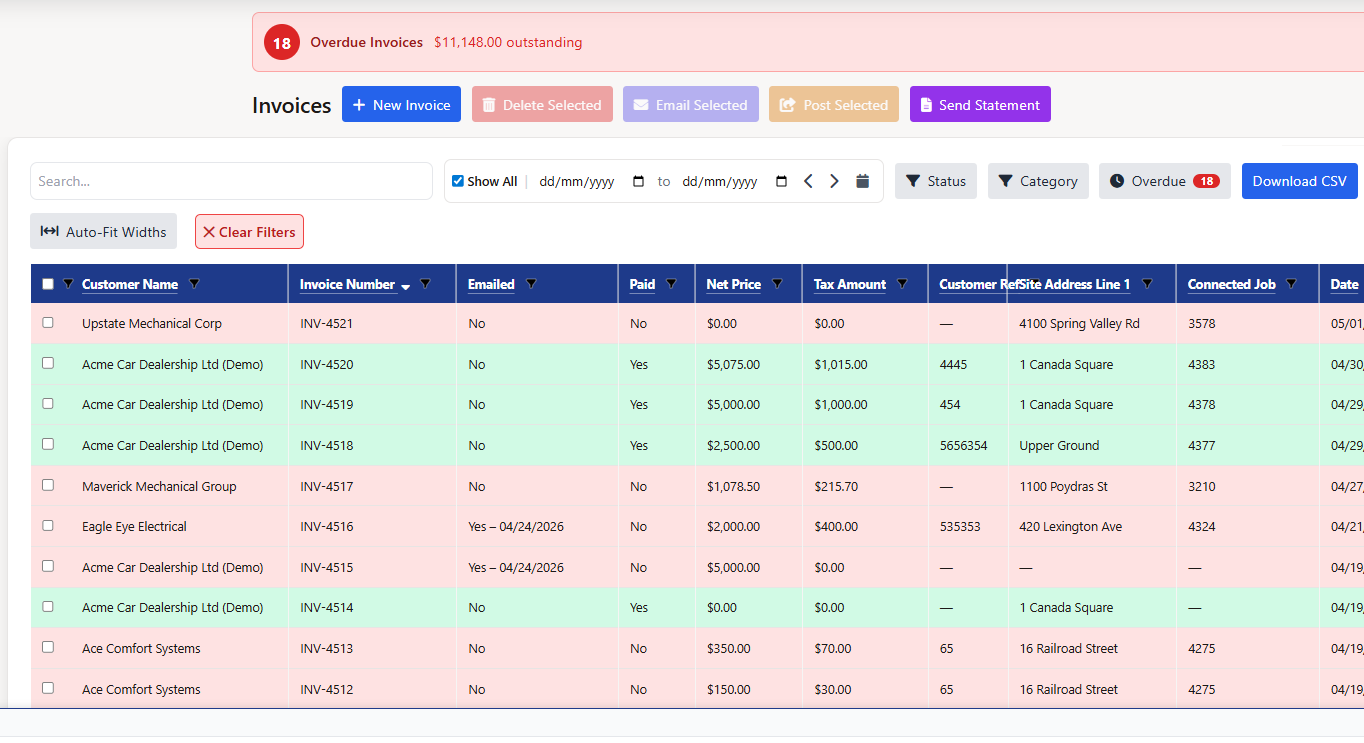
Jobscapture the work
Invoicesprepare billing
Accountingstays the ledger

Definition: Field Ascend is field service management software for contractors. QuickBooks is accounting software used by many contractors. The value of a QuickBooks integration for field service software is reducing duplicate entry between field operations and finance while keeping each system focused on the job it does best.

Why Connect Field Service Software with QuickBooks?

Contractors often lose time after the job is complete: the technician has finished the work, but the office still needs to rebuild the billing record for accounting.

Reduce duplicate entry

Use the customer, job, work order and invoice detail already captured in Field Ascend instead of typing the same information into another system.

Speed up invoicing

Completed field work can move into invoice preparation faster, with the office reviewing details before accounting handoff.

Improve billing accuracy

Job notes, materials, labor, signatures and customer references stay closer to the invoice workflow, reducing missed charges and rework.

Support better job costing

When time, materials and invoice data stay connected to the job, teams get clearer visibility from job completion to payment.

Keep cleaner records

Customer, service location and invoice details are easier to review when the field record and finance workflow are aligned.

Reduce office admin

Dispatchers, office staff and finance teams spend less time chasing handwritten notes, spreadsheets and disconnected invoice drafts.

The Field-to-Finance Workflow

The best QuickBooks integration for field service software starts before the invoice. It begins with clean operational data captured during the job.

1

New job

Office creates the job with customer and service location context.

2

Scheduled

The work is placed on the planner with the right technician.

3

Dispatched

The technician receives the work order in the mobile app.

4

Completed

Notes, photos, signatures, time and materials are captured.

5

Reviewed

The office checks the job record before billing.

6

Invoice prepared

The invoice is built from the approved job data.

7

Accounting updated

QuickBooks or the accounting workflow is updated where configured.

Field to finance workflow for field service software with QuickBooks integration from scheduled job to invoice review and accounting handoff
A field-to-finance workflow helps contractors move from completed work orders to reviewed invoices and accounting handoff with less duplicate admin.

What Should a QuickBooks Integration Support?

Use this checklist when comparing field service management software QuickBooks integration options. Status labels below are intentionally careful and should be confirmed during setup for your version and configuration.

Data or workflow Why it matters Field Ascend status
Customers Reduces duplicate customer entry and helps invoices reach the right account record. Supported
Service locations Keeps site address context close to the work order and invoice. Confirm during setup
Jobs / work orders Connects the operational job record to the billing workflow. Configurable
Quotes / estimates Helps approved quoted work move toward invoice preparation. Confirm during setup
Invoices Reduces re-keying once the office has reviewed the billing record. Supported
Products and services Controls how invoice lines map to accounting items or accounts. Configurable
Materials Captures parts and materials from the job so they are not missed in billing. Supported
Labor/time Helps turn technician time into reviewed invoice detail. Supported
Payments Helps finance and operations understand invoice status after posting. Confirm during setup
Tax information Tax behavior needs careful mapping because setup can vary by company and location. Configurable
Job costing data Useful for understanding margin by job, customer or service category. Confirm during setup
QuickBooks invoice mapping for field service software showing customer, service location, labor, materials, tax and accounting item fields
Use controlled invoice, customer, labor, materials, item and tax mapping so field service billing data can be reviewed before accounting handoff.

QuickBooks Online vs QuickBooks Desktop

Confirm your QuickBooks version

Before choosing any FSM system, confirm whether your business uses QuickBooks Online or QuickBooks Desktop. Integration options, sync behavior and setup steps can differ depending on the version and configuration.

Ask about configuration

Integration options may depend on your QuickBooks version and configuration. Ask which records can move, whether review is required, how errors are handled and who owns setup.

Useful external reference: Visit the official QuickBooks website if you need to confirm which QuickBooks product your business is using.
QuickBooks official logo Official QuickBooks website Confirm your QuickBooks product, account setup and version before choosing a field service software integration.

Watch: how to connect QuickBooks Online to Field Ascend

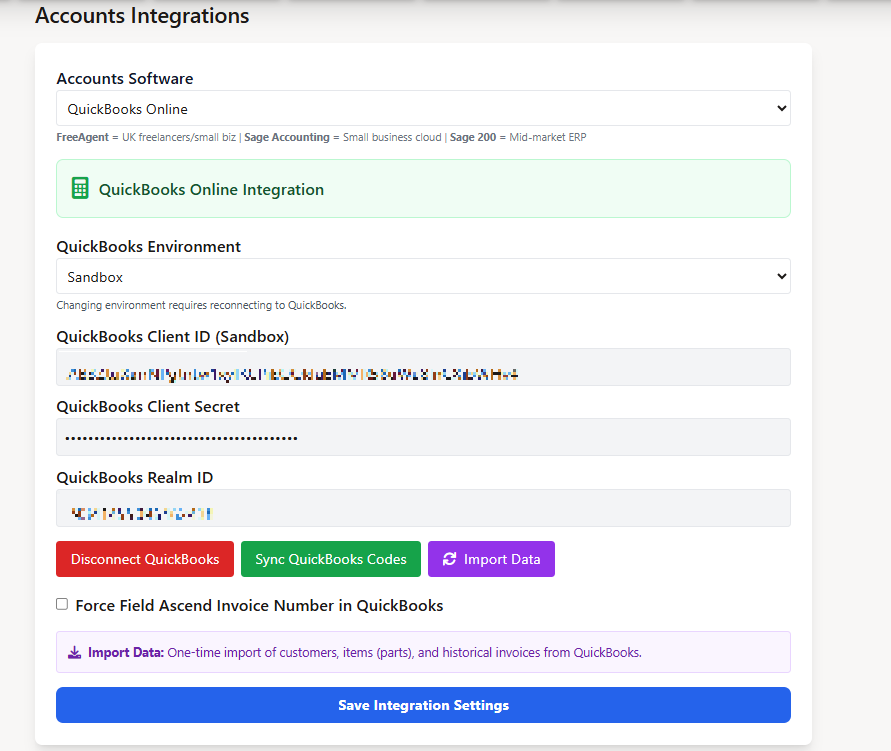
This walkthrough shows the setup flow from the dashboard through Accounts Settings, Manage Integration, QuickBooks sign-in, connection approval, code sync and importing customers, items and selected historical invoices.

How Field Ascend Supports the Field Workflow Before Accounting

Accounting integration works best when the field record is complete. Field Ascend helps contractors capture the work clearly before finance review.

Scheduling and dispatch

Plan work, assign technicians and keep the office aware of job progress.

Mobile technician app

Give technicians access to job details, notes, photos, forms and signatures in the field.

Work orders

Create and complete structured work orders with customer, site and job history attached.

Quotes and estimates

Prepare quoted work and move approved work into the job and billing process.

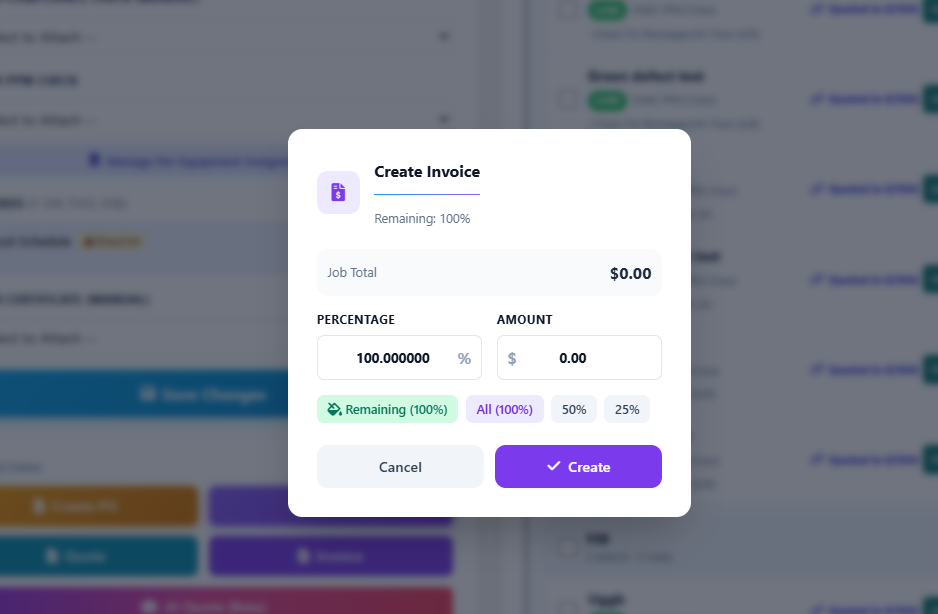
Invoicing workflow

Review completed work, materials, labor and charges before the accounting handoff.

Asset history

Track equipment, service history, defects and maintenance context by customer site.

Preventive maintenance

Manage recurring service work and planned maintenance without rebuilding schedules manually.

Reporting

Give managers visibility into jobs, invoices, customers, technicians and operational performance.

Who This Page Is For

This page is for U.S. contractors that already use QuickBooks and want field service software compatible with QuickBooks-connected accounting workflows.

HVAC contractors

Manage service calls, maintenance, equipment history and invoice review.

Plumbing companies

Run field jobs, urgent callouts, recurring work and materials-heavy billing.

Electrical contractors

Connect site work, inspections, quotes and customer billing evidence.

Home service companies

Move from scheduling and field completion to cleaner finance workflows.

Facilities maintenance teams

Track multi-site jobs, asset service history and invoice preparation.

Commercial service contractors

Coordinate office, field and finance teams around one job record.

Elevator maintenance teams

Manage recurring visits, service evidence, assets and billing handoff.

Teams leaving spreadsheets

Replace manual invoice entry and disconnected job records with a controlled workflow.

Questions to Ask Before Choosing FSM Software with QuickBooks Integration

Integration fit

  • Does it support QuickBooks Online, QuickBooks Desktop, or both?
  • Is the sync one-way or two-way?
  • What records sync?
  • Are invoices created automatically or reviewed first?
  • What happens if records do not match?

Finance setup

  • How are taxes handled?
  • How are products and services mapped?
  • Can payments sync?
  • Can job costing or labor sync?
  • How much setup is required?

Field Ascend for Contractors Using QuickBooks

Field Ascend is built for contractors that want their office team, field technicians and finance workflow working from clearer job information. It helps teams manage scheduling, dispatch, work orders, mobile job completion, quotes, invoices and reporting from one field service platform, with accounting-connected workflows designed to reduce manual admin.

Related Field Ascend Pages

Explore the connected field service workflows that sit around invoicing, work orders, scheduling and finance.

FAQs About Field Service Software QuickBooks Integration

What is field service software with QuickBooks integration?

Field service software with QuickBooks integration helps contractors connect field operations with accounting. The goal is to reduce duplicate admin between jobs, work orders, quotes, invoices and the finance workflow.

Does Field Ascend integrate with QuickBooks?

Field Ascend supports field-to-finance workflows for jobs, work orders, quotes and invoicing. QuickBooks integration availability should be confirmed during setup so your team understands what can sync and how it will be configured.

Does field service software work with QuickBooks Online?

Many field service systems offer QuickBooks Online integration options, but exact support depends on the vendor and configuration. Field Ascend has QuickBooks Online connection and accounting workflow support where configured; confirm availability during setup.

Does field service software work with QuickBooks Desktop?

QuickBooks Desktop integration options can differ from QuickBooks Online. Before choosing any FSM system, confirm whether Desktop is supported, what connector is used, and what records can move between systems.

What data should sync between field service software and QuickBooks?

Buyers often review customers, service locations, invoices, products and services, materials, labor or time, tax information, payments and job costing data. Each workflow should be confirmed because not every system supports every record type.

Can completed work orders become QuickBooks invoices?

In a good field-to-finance workflow, completed work orders feed invoice preparation so the office can review the billing record before accounting handoff. In Field Ascend, invoice posting to QuickBooks Online is available where the integration is configured.

Why use FSM software instead of only QuickBooks?

QuickBooks is accounting software. Field service management software manages the operational work before accounting: scheduling, dispatch, work orders, mobile technicians, photos, notes, signatures, quotes, invoices and reporting.

Is QuickBooks integration useful for small contractors?

Yes. Small contractors often feel duplicate admin first because the same person may dispatch jobs, answer customers and prepare invoices. A controlled QuickBooks workflow can reduce re-keying and speed up billing.

What should I check before choosing FSM software with QuickBooks integration?

Confirm QuickBooks Online or Desktop support, one-way or two-way behavior, which records sync, whether invoices are reviewed first, tax handling, product and service mapping, payment handling, job costing, error handling and setup effort.

Connect Field Operations with Your Accounting Workflow

Field Ascend helps contractors manage scheduling, dispatch, mobile work orders, quotes, invoices and reporting from one connected field service platform.