Automated Sales Tax for Field Service Businesses
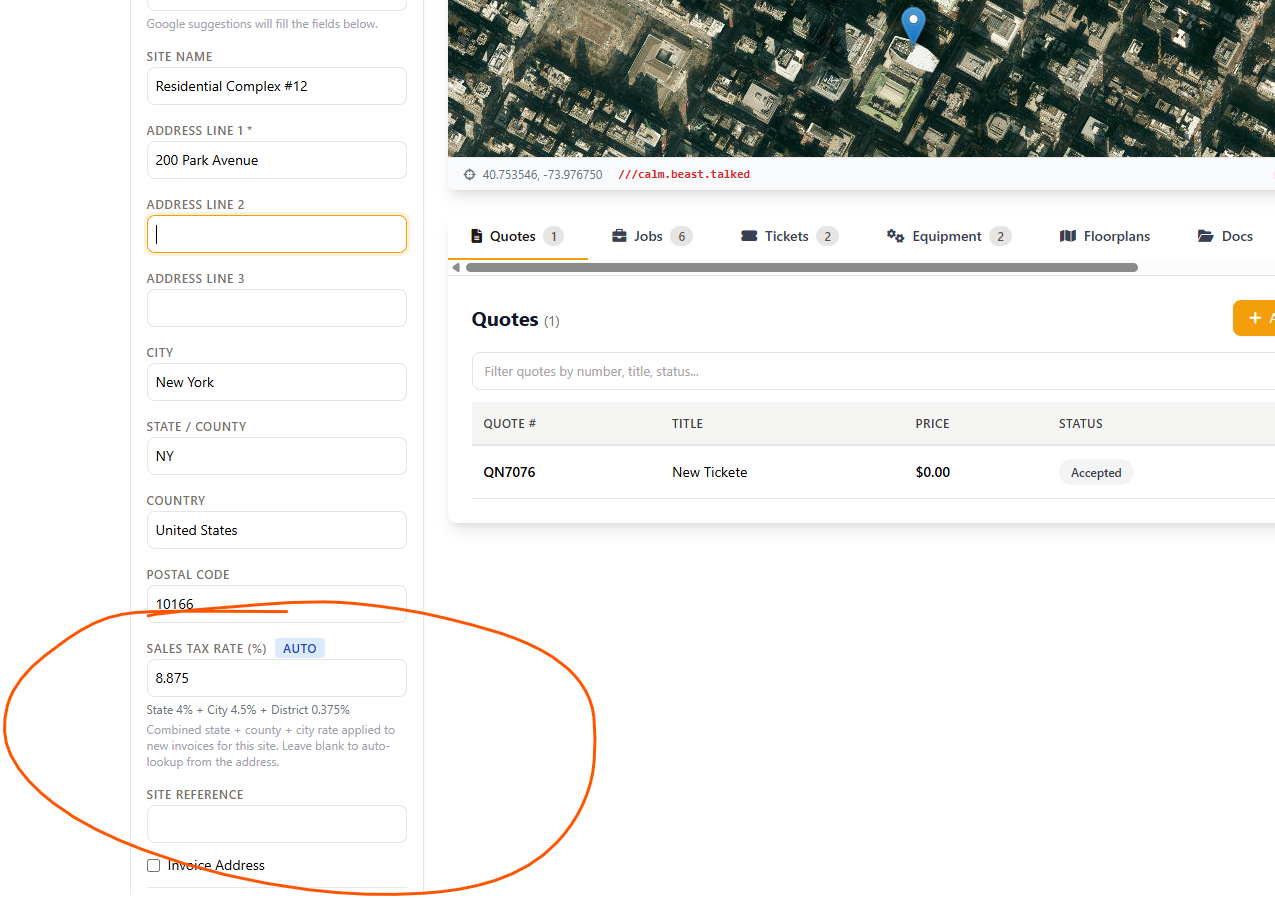
The right local rate follows the job site. Field Ascend is field service sales tax software built into the same field service management software that runs your work orders - each site carries its own combined state, county, city and district rate, looked up automatically from the address.
Invoices lock the rate in at creation, taxable and non-taxable lines are controlled per line, and a jurisdiction-grouped report gets you ready for filing.
Included with Field Ascend. It calculates, records and reports - filing and remittance stay with you or your accountant.
What is field service sales tax software?
Field service sales tax software calculates sales tax from the job site's location instead of one flat company rate. That matters because most states layer county, city and special-district taxes on top of the state rate - so two jobs in the same metro can owe different combined rates. Field Ascend stores the combined rate on each site, stamps it onto every new invoice, applies tax only to lines you mark taxable, and groups collected tax by jurisdiction for filing prep.
The Right Rate, Every Service Address
Set it up once. From then on, the rate is decided by where the work happens - entered manually or looked up automatically when the site is saved.
Rate lives on the job site
Every site carries its own combined local rate - state, county, city and district - so jobs and invoices for that address start with the right number.
Automatic address lookup
When a site is saved or geocoded, the combined rate and jurisdiction breakdown are looked up from the address automatically. Type a rate instead any time - manual entries are never overwritten.
Invoices lock the rate in
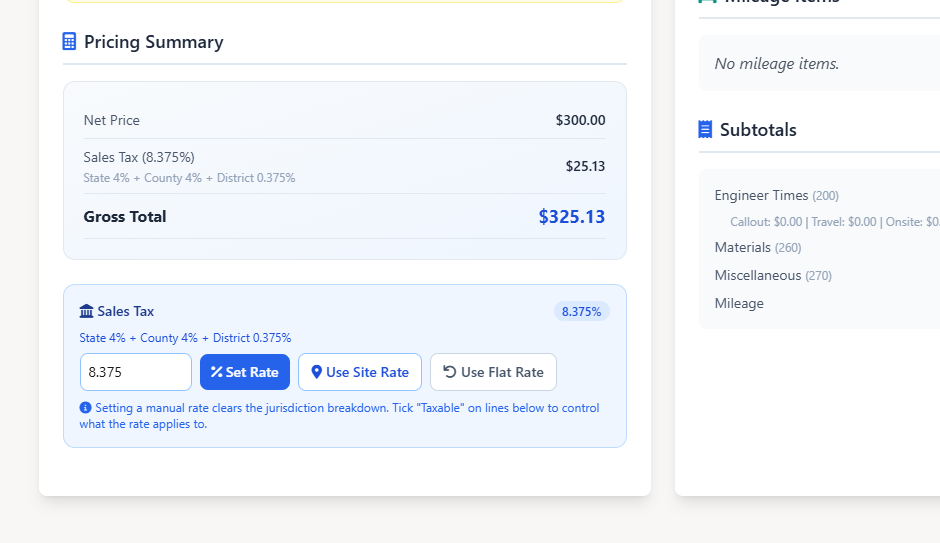
New invoices store the site's rate at creation. Rate changes later never rewrite historical invoices - your records stay exactly as charged.
Per-line taxability
A Taxable checkbox on every labor, materials and misc line, with account-wide defaults - because many states tax parts but not separately-stated labor.
Override when you need to
On any draft invoice: set a custom rate, re-pull the site rate, or fall back to your flat account rate. After issue, the stored figures stay fixed.
Jurisdiction reporting
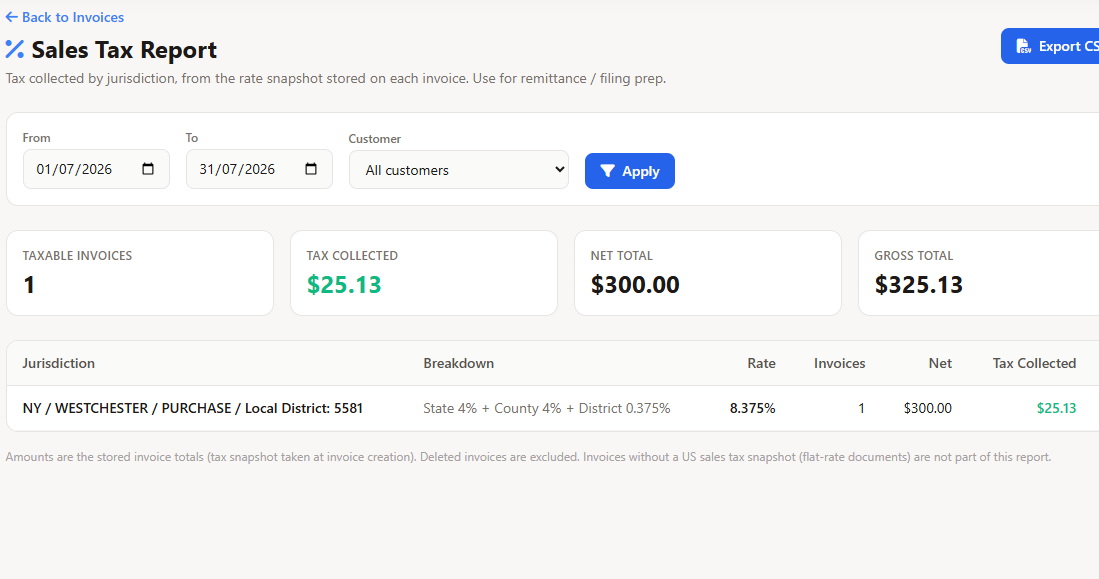
Tax collected grouped by state, county, city and district, with date and customer filters, invoice drill-down and CSV export for filing prep.
See the setup walkthrough
Watch how to turn on US sales tax in Accounts Settings, save a job site so the local rate is picked up automatically, then follow that rate through jobs, quotes and invoices in Field Ascend field service software.
Also in our training videos library.
Sales tax by service address - the way inspectors expect it
Flat-rate tax works in a handful of single-rate states. Everywhere else, the combined rate depends on the county, city and special districts around the job site. Field Ascend answers the screening question US buyers actually ask: "is tax automatically available when I enter an address?" Yes.
- Combined rate per site: state + county + city + district
- Automatic address-based rate lookup on site save and geocode
- Jurisdiction breakdown stored with the rate, not just a number
- Manual entry always available and clearly flagged as manual
- Clearing a manual rate re-triggers the automatic lookup
A sales tax report for field service filing prep
At filing time you need tax collected per jurisdiction, not a pile of invoices. The Sales Tax Report groups everything from your invoice records - by state, county, city and district - for whatever period you pick.
- Date-range and customer filters, defaulting to the current month
- Summary tiles: taxable invoices, tax collected, net and gross totals
- Jurisdiction rows you can expand to see the invoices behind each total
- Manual-rate invoices reported in their own clearly-labeled bucket
- CSV export with one row per invoice for your accountant or filing tool
QuickBooks-ready invoices, line by line
Taxability decisions shouldn't die at export. When invoices post to QuickBooks Online, each line carries its taxable or non-taxable status - so the labor line you marked non-taxable stays non-taxable in your books.
- Taxable and non-taxable lines post with correct taxable status
- Works with the existing QuickBooks integration - one-click posting, no re-keying
- Labor, materials and misc lines all respected individually
- Part of the wider accounting integrations family
Honest estimates up front, authoritative tax on the invoice
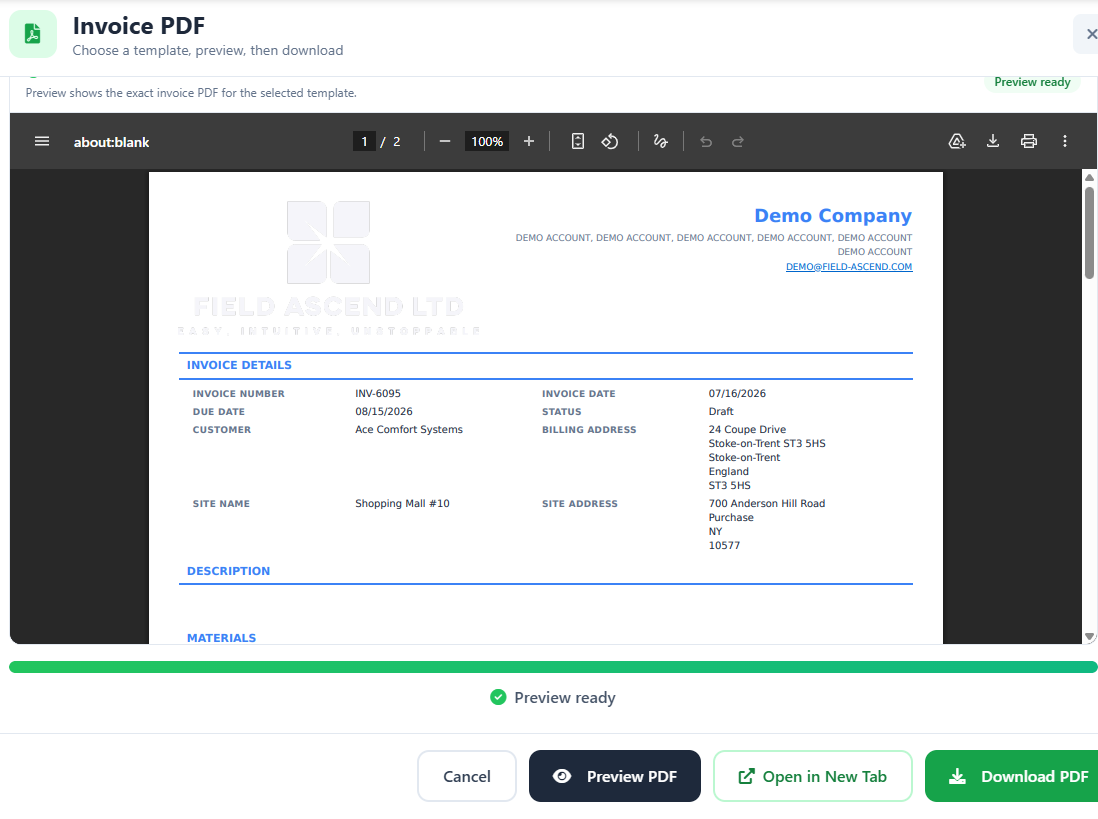
Quotes and jobs display the site's rate as an estimate, so customers see realistic totals before work starts. The invoice is the authoritative tax document - it stores the rate at creation and taxes only the lines marked taxable. Estimates stay transparent; filed numbers stay accurate.
- Quotes and jobs show the site rate - no surprise totals at billing
- The invoice stores the rate and per-line taxable flags for audit
- Issued invoices keep their figures permanently
- Built into the full field service invoicing workflow - templates, delivery and payment tracking included
From Service Address to Filing-Ready Numbers
One flow that keeps the office, the field and the accountant working from the same figures.
What It Does - and What Stays With Your Accountant
Straight answers beat compliance theater. Here is exactly where Field Ascend's job ends and your filing process begins.
Scope, honestly stated
Field Ascend calculates the right local rate per job site, records it permanently on each invoice with per-line taxability, and reports collected tax by jurisdiction with CSV export. That is the operational layer most field service businesses are missing.
- It does not determine nexus - where you're required to collect is a decision for you and your advisor.
- It does not manage exemption certificates or file tax returns - remittance is done by you or your accountant, using the report and CSV.
- It does not guarantee compliance - it gives you accurate, address-based numbers and a clean audit trail to file from.
Frequently Asked Questions
Direct answers for U.S. service businesses comparing automated sales tax for field service.
What is field service sales tax software?
Software that calculates sales tax from the job site's location instead of one flat rate. Field Ascend stores a combined state + county + city + district rate on each site, stamps it onto new invoices with per-line taxable control, and reports collected tax by jurisdiction.
How does the automatic rate lookup work?
When a job site is saved or geocoded, the combined local rate and its jurisdiction breakdown are looked up from the address automatically and stored on the site. You can always type a rate manually - manual rates are flagged and never overwritten.
Do old invoices change when rates change?
No. Each invoice stores the rate at the moment it's created. Later rate changes - by the jurisdiction or on the site record - never rewrite historical invoices.
Can I tax parts but not labor?
Yes. Set account-wide defaults for whether labor and materials are taxable, then override per line with the Taxable checkbox on any invoice. Many states tax parts but not separately-stated labor - this is built for exactly that.
Does Field Ascend file my sales tax returns?
No. It calculates, records and reports - filing and remittance are done by you or your accountant using the jurisdiction report and CSV export. It doesn't determine nexus, manage exemption certificates or guarantee compliance.
Does it work with QuickBooks?
Yes. Invoices post to QuickBooks Online with each line carrying the correct taxable or non-taxable status, through the existing QuickBooks integration.
Why is the quote tax an estimate?
Quotes and jobs display the site rate so customers see realistic totals up front. The invoice is the authoritative document - it stores the rate and applies tax only to taxable lines, which is what your filings are built from.
Can I override the rate on one invoice?
Yes. On a draft invoice you can set a custom rate, re-pull the linked site's rate, or fall back to your flat account rate. Once issued, the stored figures stay fixed for audit.
Related U.S. Field Service Features
Let the Rate Follow the Job Site
Stop maintaining tax spreadsheets by city. Save the address, get the combined local rate, invoice with per-line taxability, and export filing-ready numbers by jurisdiction.
Start your 30-day free trial