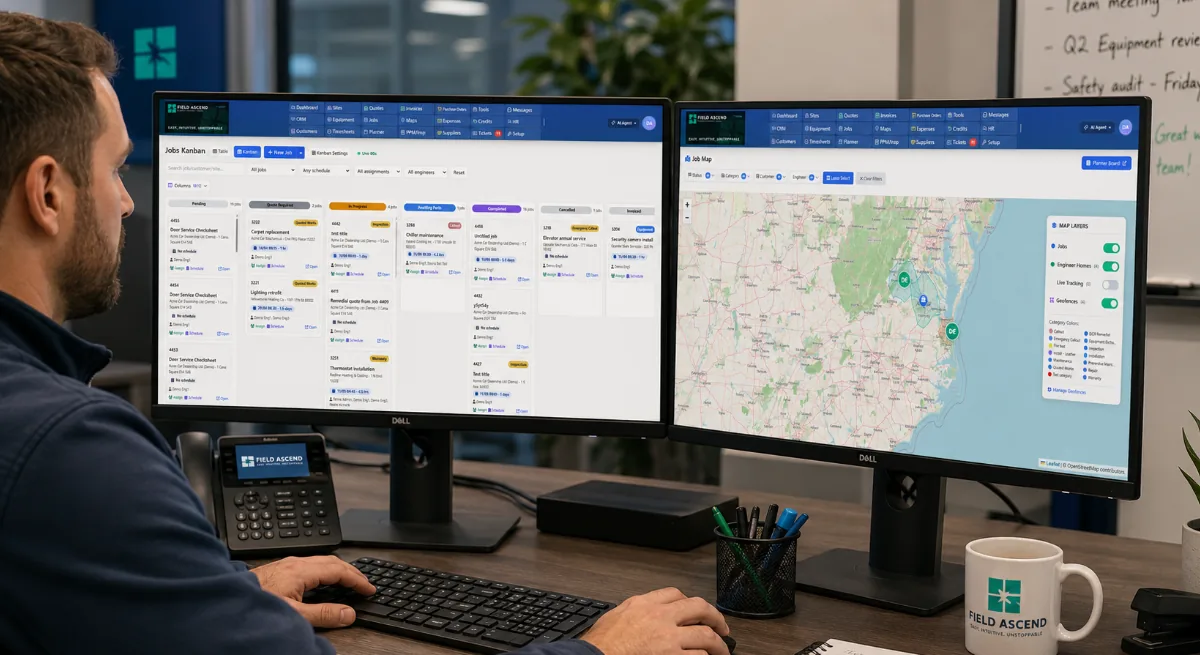
FSM software is the platform service businesses use to run work away from the office - scheduling, dispatch, work orders, mobile technician updates, preventive maintenance, estimates, invoices and reporting in one connected system.
This guide covers how the technology works, who uses it, how it compares with other business systems, and how Field Ascend fits for U.S. contractors that want practical field service software without unnecessary enterprise complexity.
Built for scheduling, dispatch, work orders, mobile technicians, preventive maintenance, invoicing and reporting.
FSM software is the operating system for a field service business. Short for field service management software, it connects the office, dispatchers, technicians, customers, jobs, sites, equipment, work orders and invoices so work can move from request to completion without relying on scattered spreadsheets, texts, paper forms or disconnected apps.
At its best, the platform gives every team the same live version of the job: what was requested, who is assigned, where the technician is, what happened on site, what evidence was collected, what needs quoting, and what is ready to invoice. When you are ready to compare platforms, see Field Ascend field service management software for U.S. contractors. If you are comparing customer relationship tools with field operations software, see the FSM vs CRM guide for trade businesses.
The exact feature list varies by platform, but modern field service management systems usually cover these operational workflows.
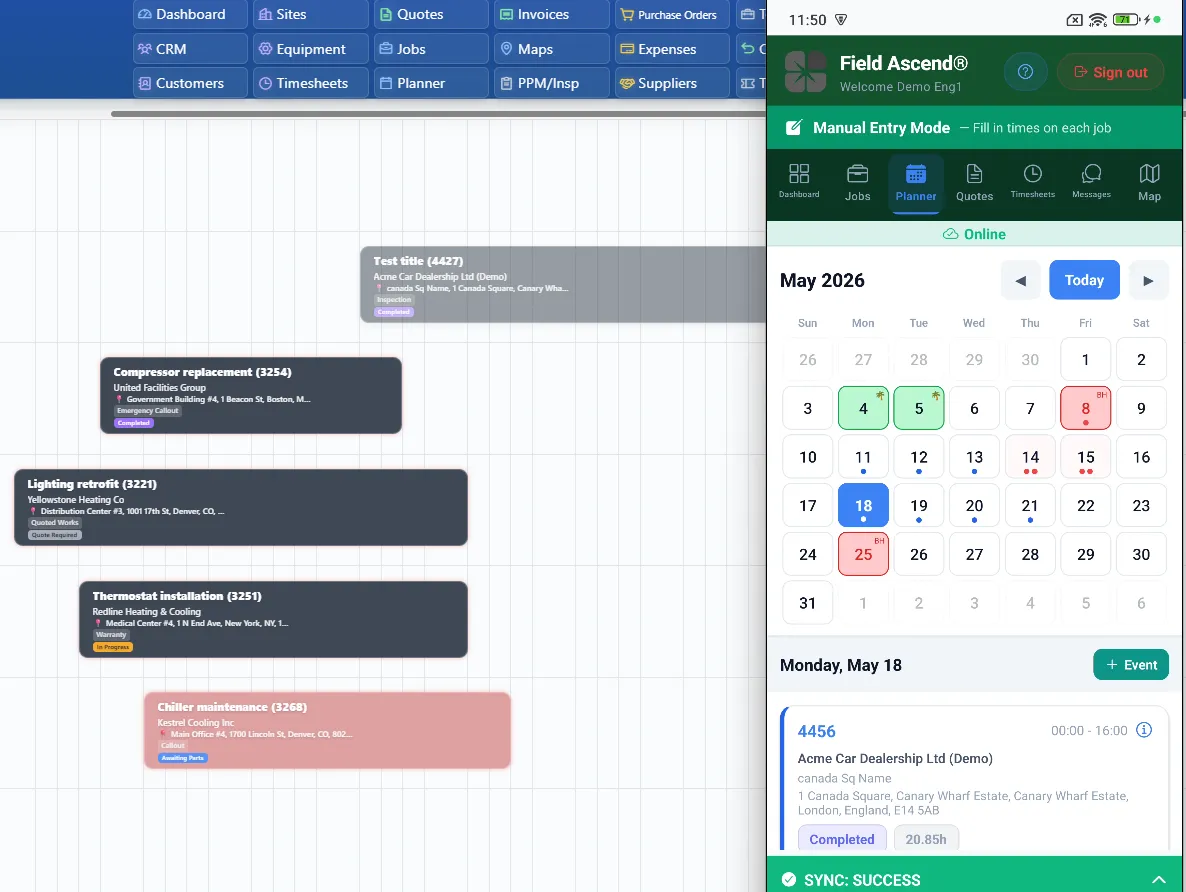
Dispatchers can see upcoming jobs, technician availability, job priorities, customer locations and open work. A visual schedule replaces whiteboards, shared calendars and back-and-forth calls.
Jobs can be assigned by availability, location, skills, workload or urgency. The goal is simple: send the right person to the right place with the right information.
The work order holds customer details, site notes, job description, photos, forms, materials, time logs, signatures and completion details in one place.
Technicians can view job details, add notes, upload photos, complete checklists, log time and update job status from a phone or tablet.
Preventive maintenance software helps contractors schedule planned work, track asset history and avoid missed service visits.
When job evidence, materials and labor are already captured, estimates and invoices can be produced faster with less manual rekeying.
These systems are built for companies that send people to customer sites. They become especially useful once the office needs more control than a calendar, spreadsheet or basic job app can provide.
Teams that handle reactive service, installations, follow-ups, quotes, invoices and scheduled maintenance need work to move cleanly between office and field.
Service businesses managing equipment across customer sites need asset history, recurring maintenance, field evidence and clear reporting.
Once a company has multiple technicians, dispatchers or office roles, informal systems usually start to break. A connected platform gives the team a shared operating workflow.
FSM software, work order management software, CMMS and ERP all overlap in places. The difference is where each system puts its operational center of gravity.
| System | Main focus | Best fit |
|---|---|---|
| FSM software | Scheduling, dispatch, mobile technicians, work orders, customers, sites, assets, quotes, invoices and reporting in one connected workflow. | Service contractors that send technicians to customer locations and need office and field on the same system. |
| Work order management software | Creating, assigning, tracking and closing individual work orders. | Teams focused on job control. Usually a subset of what a complete field service platform covers. |
| CMMS software | Asset history, maintenance tasks, preventive maintenance schedules and equipment records. | Maintenance-heavy or in-house teams where equipment uptime and service history are central. |
| ERP software | Company-wide finance, inventory, purchasing, HR and broad operational processes. | Larger businesses with significant back-office requirements and implementation resources. |
Most small and mid-sized contractors do not need a heavy enterprise system to manage field work. They need practical field service software that connects the office and field without making daily work harder.
These three terms get used interchangeably, but they describe different things. Knowing the difference helps when comparing options.
An FSM platform covers the whole service workflow - scheduling, dispatch, work orders, customers, sites, assets, preventive maintenance, estimates, invoicing and reporting - in one system with one shared job record. Field Ascend is field service management software built as an FSM platform.
An FSM tool solves one slice of the workflow, such as a standalone scheduling calendar, a form builder or a basic work order tracker. Tools are quick to adopt but leave gaps that get filled with spreadsheets and rekeying.
An FSM app is the mobile front end technicians use in the field - job details, status updates, photos, forms and signatures on a phone or tablet. A good mobile field service app is one part of a platform, not a replacement for it.
The practical takeaway: a contractor shopping for "FSM software" usually needs a platform - a connected system where the mobile app and every tool share the same live job record - rather than a collection of disconnected single-purpose tools.
A good FSM platform should cover the full service workflow, not just one part of it.
Live planner views, job assignment, technician availability and urgent-work visibility.
Job details, status updates, notes, photos, forms, signatures and offline support where possible.
One job record from request through completion, with history and evidence attached.
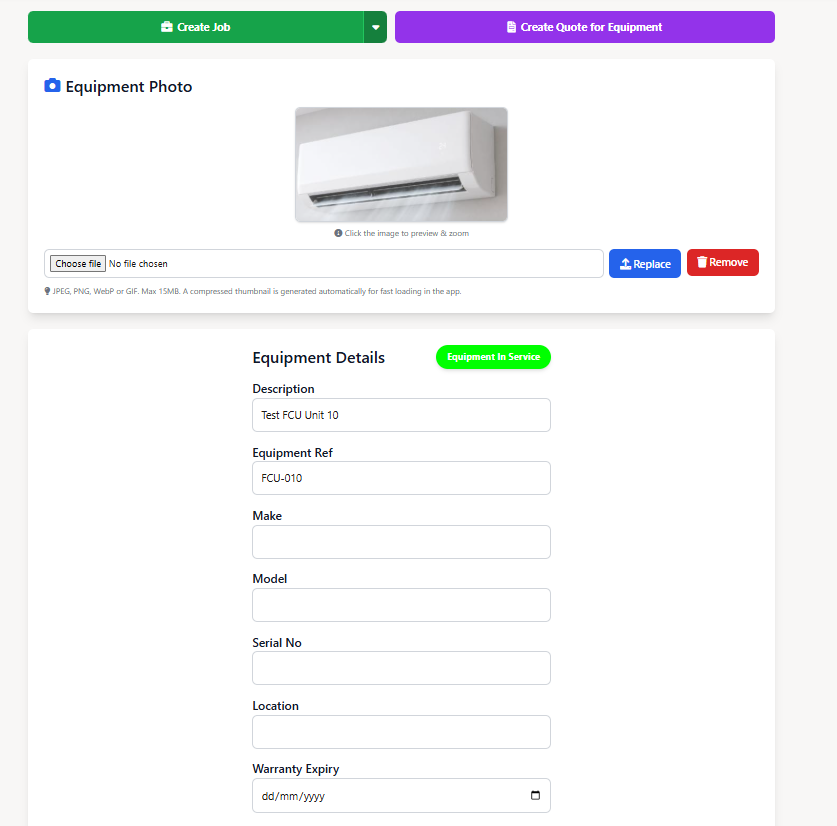
Customer contacts, site notes, access instructions, service history and equipment links.
Service history, recurring maintenance schedules and job records linked to equipment.
Recurring visits, planned work, maintenance records and visibility before visits are missed.
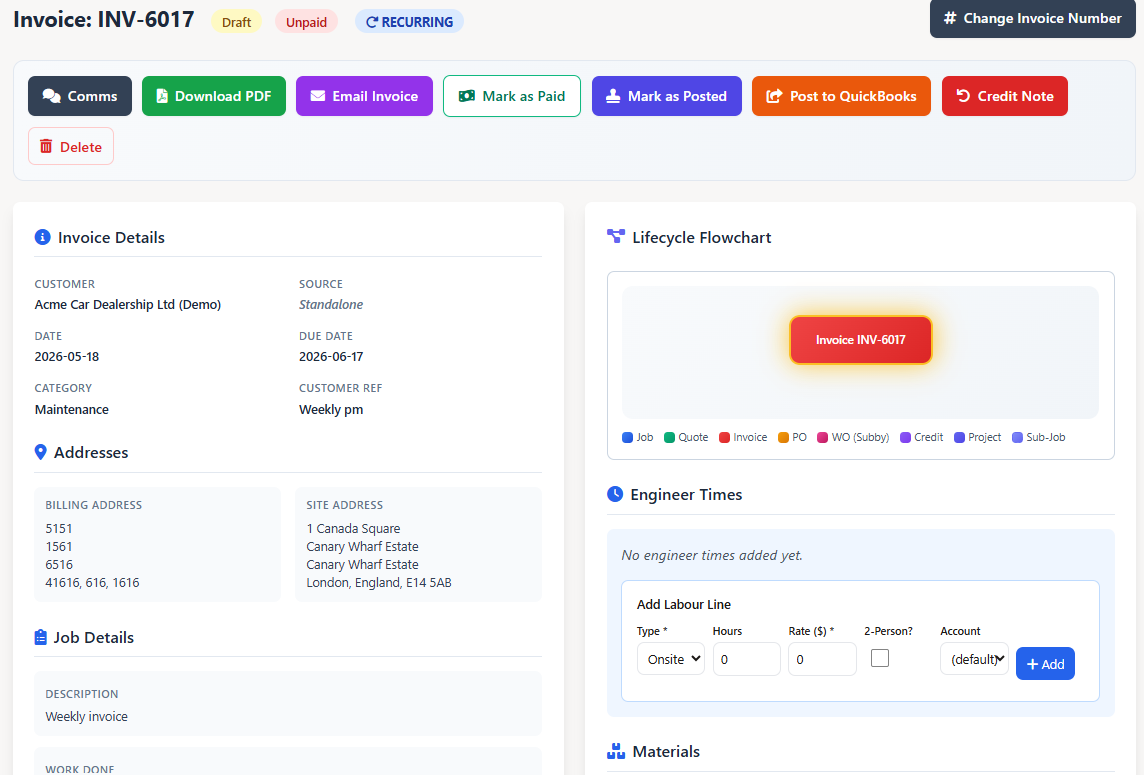
Quoting, approvals, invoices and job-to-billing handoff without repeated data entry.
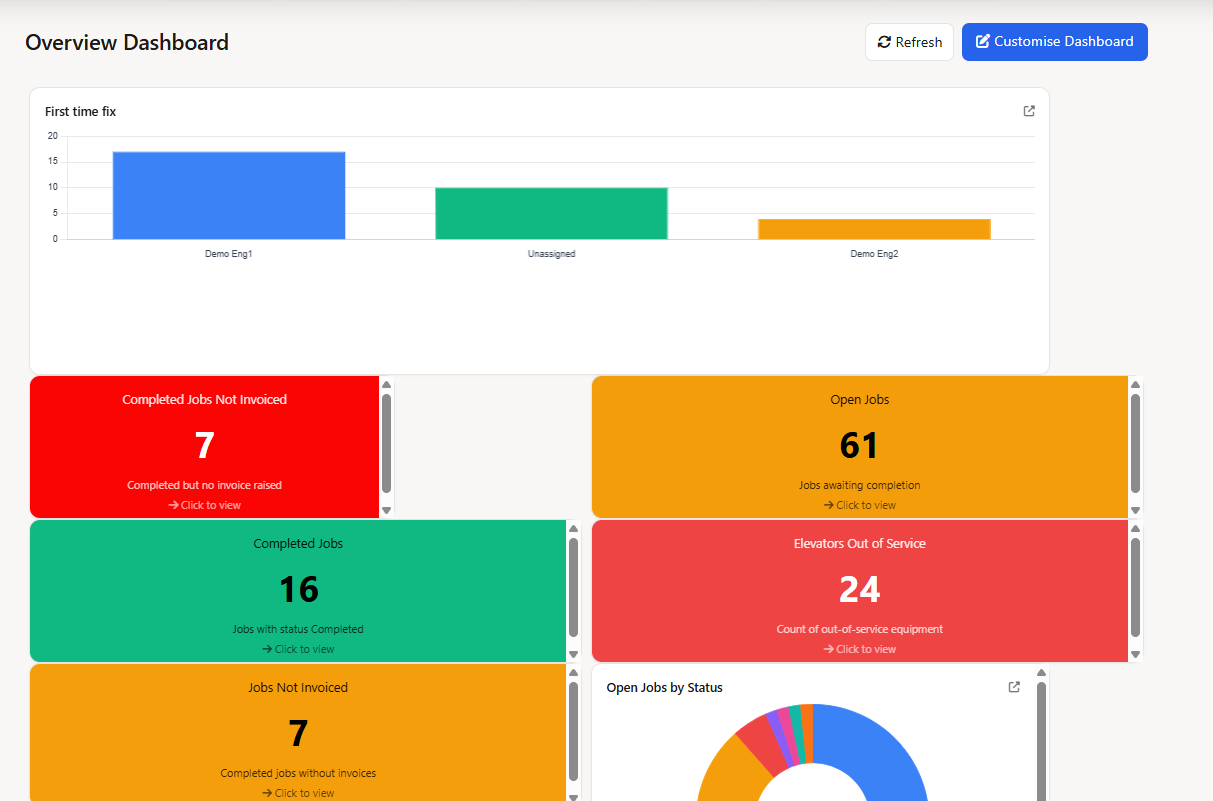
Operational visibility across open jobs, completed work, overdue work, technician activity and billing readiness.
A typical job in field service management software flows through eight clear stages, with the office and the technician sharing the same live record at every step.
A request comes in by phone, email, web form, customer portal or recurring contract.
A new job is logged with customer, site, asset, priority, required skills and any context the technician needs.
A dispatcher assigns the right technician from a live planner, matched on availability, skills and location.
The technician sees the work order on the mobile app, updates status, logs time and records what was done.
Job evidence - photos, forms, notes and a customer signature - is captured on site without paperwork.
Recommended remedial work becomes an estimate without rekeying job details, ready for customer approval.
Completed work flows into invoicing with labor, materials and accounting handoff such as QuickBooks.
Dashboards refresh so the office can see what is open, completed, overdue, unbilled or due for follow-up.
From customer request to invoice and reporting, every step shares the same job record. That connected record is what separates a complete field service platform from a calendar, spreadsheet or stack of disconnected apps.
Field Ascend is field service management software for U.S. contractors that connects scheduling, dispatch, mobile work orders, preventive maintenance, asset tracking, estimates, invoices and reporting in one platform.
It is built for growing service teams that want operational control without buying a heavy system they struggle to roll out. Office teams get visibility, technicians get a practical mobile workflow, and owners get a clearer picture of what is scheduled, completed, overdue and ready to bill.
The clearest signal is not team size alone. It is operational drag: lost job context, repeated data entry, missed follow-ups, slow invoicing and too many manual handoffs.
If dispatch depends on a spreadsheet, shared calendar or whiteboard, changes can easily be missed. A live planning view gives the office one reliable schedule.
If field staff need to call for job details, history or customer notes, the system is not giving them enough context at the point of work.
If completed jobs sit unbilled because paperwork is missing, a connected system can capture evidence and hand it to the billing workflow faster.
Recurring service needs reliable schedules, asset history and visibility. Calendar reminders are rarely enough once the customer base grows.
When job details are scattered across emails, texts and notebooks, the office cannot answer simple questions quickly.
Owners need to know what is open, overdue, completed, profitable and ready to bill. The platform should turn daily work into usable operational data.
FSM software (field service management software) is a platform service businesses use to run work carried out at customer sites, covering scheduling, dispatch, work orders, mobile technician updates, preventive maintenance, estimates, invoicing and reporting. It connects the office and field around one shared live job record so work moves from request to completion and billing without spreadsheets, texts or paper forms.
FSM software means field service management software. It helps service businesses manage work performed away from the office, including scheduling, dispatching, work orders, mobile technician updates, preventive maintenance, estimates, invoices and reporting.
The main purpose is to connect office and field work so jobs can move from request to schedule, dispatch, completion, billing and reporting without scattered manual processes.
Field service software is a broad term covering any software used by field teams, including basic scheduling or work order tools. FSM software is a more complete category that connects scheduling, dispatch, mobile work orders, customers, assets, preventive maintenance, invoicing and reporting in one platform.
An FSM platform is a complete connected system covering scheduling, dispatch, work orders, customers, assets, preventive maintenance, invoicing and reporting. An FSM tool is a single-purpose utility that handles one slice of that workflow. An FSM app is the mobile front end technicians use in the field - one part of a platform, not a replacement for it.
No. Work order management software focuses on creating, assigning and closing individual work orders. FSM software is broader - it connects work orders with scheduling, dispatch, mobile technicians, customer history, assets, preventive maintenance, invoicing and reporting.
CMMS (computerized maintenance management system) is built around assets, equipment uptime and maintenance tasks, usually for an in-house facilities or maintenance team. FSM software is built around customer-facing field service: scheduling technicians, dispatching jobs, capturing mobile work orders, quoting follow-up work and invoicing customers. Many contractors use FSM software with built-in preventive maintenance rather than a standalone CMMS.
Small contractors usually move to FSM software when spreadsheets, calendars, paper job sheets or text messages start dropping information. Common signals include schedule changes that get missed, technicians calling the office for job details, invoices lagging behind completed work, preventive maintenance slipping and reporting that takes hours to pull together.
No. Small and mid-sized contractors often benefit the most because they need better operational control but do not have time for complex enterprise rollouts. Modern FSM software is designed to be quick to set up and easy for technicians to use on a phone or tablet.
FSM software is used by HVAC, plumbing, electrical, elevator, facilities maintenance, property maintenance, fire protection, landscaping, cleaning and many other service businesses that send technicians to customer sites.
Basic scheduling software mainly manages appointments and calendars. FSM software also handles work orders, mobile updates, customers, sites, assets, preventive maintenance, estimates, invoices and reporting in one connected workflow.
Yes. Field Ascend publishes U.S. pricing from $13 per user per month, with a 30-day free trial.
Try Field Ascend free for 30 days and see how scheduling, dispatch, mobile work orders, preventive maintenance, invoicing and reporting work together for a U.S. service business.