Fire protection software for U.S. contractors inspecting fire alarms, extinguishers, sprinklers and emergency lighting. Keep inspection schedules, asset records and technician checklists in one field service platform, instead of a truck folder and a spreadsheet nobody trusts on a Friday.
Dispatch emergency work orders, log deficiencies on the device, raise a corrective quote, then invoice from the same job. Field Ascend is field service scheduling software with preventive maintenance and an offline mobile app. It is not a standalone fire logbook and it is not a NICET portal.
From $13/user/month. All core features included for U.S. service teams.
Fire protection software is field service software for contractors who inspect and maintain life safety systems. It holds recurring fire alarm inspections, extinguisher routes, emergency lighting tests and sprinkler visits against the right site, floor and asset, then gives technicians a mobile checklist when they arrive.
Most fire protection firms do not struggle with knowing the work. They struggle with keeping it visible. A shopping center might have four fire alarm panels, two hundred extinguishers, emergency lighting on every floor and a sprinkler valve set in a locked stairwell. The contract says monthly, quarterly and annual visits. The client wants last month's evidence by Friday. If that sits in a truck notebook and a shared spreadsheet, overdue work is already happening before anyone notices.
Life safety work is calendar-heavy. A missed monthly extinguisher visit or an overdue emergency lighting test is not just an office gap. It is a contract risk and, on a serious site, a conversation you do not want with the facilities manager or the AHJ. Dispatchers need overdue lists, technician skill matching and a clean trail of photos, signatures and deficiencies. Preventive maintenance and equipment asset tracking sit underneath that, so each panel and each extinguisher keeps its own history instead of a generic "fire PM" job note.
Field Ascend is built for that mix of planned visits and reactive callouts. Technicians use the mobile app in mechanical rooms with poor signal. Failed devices can move into a contractor quote without retyping the site notes. It stores inspection records. It is not a NICET certificate portal and it does not auto-file reports to an authority having jurisdiction. Your accredited technician still completes the certificate in the usual way.
If you already run electrical, HVAC or facilities work on the same sites, the same platform covers that too. Fire protection is one contract type inside a field service system, not a separate logbook that never talks to scheduling or invoices.

Recurring fire alarm, extinguisher, emergency lighting and sprinkler visits on one inspection calendar.
A typical U.S. fire contract is not one job. It is a pile of overlapping visits on the same sites. An assisted living group might want monthly extinguisher checks, quarterly fire alarm inspections against NFPA 72, monthly emergency lighting function tests, an annual duration test that has to happen after hours, and a sprinkler valve inspection that needs a key from facilities. One missed round on one building is enough for the property manager to start asking whether anyone is actually looking after the systems.
The asset list is rarely clean when you take the work on. The last contractor left a spreadsheet of 400 extinguishers. Half the references do not match the labels on the wall. Two panels were added during a remodel and never made it onto the PM. Field Ascend is useful here because each panel, detector, pull station, extinguisher and luminaire can sit as its own asset against the site, with its own frequency, last visit and next due date. You do not have to pretend the client's list was perfect on day one. You load what you have, then technicians correct it as they walk the building.
Scheduling is the other half. Fire alarm technicians are not interchangeable with extinguisher route staff. Sprinkler pump tests need someone who knows the kit. Night duration tests need people who will actually show up at 10pm. Scheduling and dispatch software lets the office book the right person, keep planned inspections away from a day's worth of trouble calls, and still see overdue work when a round slips. That is the difference between a contract you can defend and a diary full of "we'll catch it next month".
Clients also want evidence. Not a certificate generated by software that is not accredited to issue one. They want last month's visit dates, who attended, photos of failed devices and a list of open deficiencies. When that lives on the job and the asset, the office can answer a Friday request without calling three technicians. When it lives in notebooks, you already lost that conversation.
The technician arrives, opens the job, and should already know the site rules: where the panel is, who holds the keys, whether a permit is needed before isolating, and what failed last time. Attach access notes to the job so that is not a phone call from the parking lot.
Mechanical rooms, stairwells and basement panels are where generic apps fall over. There is often no signal. The mobile app has to keep working while the technician walks the building: pass/fail items, comments, photos of a smashed pull station, a signature from the duty manager. Sync happens later, when they are back in the truck. If the app needs a live connection to save the sheet, that visit will get written on paper and typed up on Monday, which is how deficiencies disappear.
Emergency lighting duration tests and some fire alarm work happen after hours. Those visits are often lone working. Pair the job with lone worker safety so the office still has a check-in, not just a completed form. Night work does not get a lower standard of evidence just because nobody from the client is standing next to the technician.
When something fails, it should stay on that asset. A leaking extinguisher, a detector in trouble, a luminaire that did not last the duration test. The technician logs it with a photo. That is the start of the corrective work, not a sticky note that never becomes a quote. Field Ascend does not complete the NICET certificate for you. It holds the inspection record so your accredited technician has the visit trail when they fill the certificate in the usual way.
Office staff should not be rebuilding the week from text-message photos. Completed visits show on the job. Overdue PM stays on the board until it is booked. A fire alarm trouble that came in at 4pm can be dispatched without knocking the next day's extinguisher route off the planner, as long as you can see who is already committed.
Deficiencies should become money, or a clear "not proceeding", not a pile of unread emails. From the failed device on the job, raise a contractor quote, send it, then convert approval into a booked follow-up. The site notes, photos and asset stay attached. Nobody retypes "Level 3, east stair, pull station PS-14" because that is how you quote the wrong device.
When the visit is done, invoicing should not be a second system. Completed inspections and approved corrective work can go to invoice from the same record, including a QuickBooks push if that is how you run accounts. The client's question is usually simple: show me the last twelve months of visits on this site. If the calendar, the assets and the invoices all point at the same jobs, you can answer it. If they do not, you will spend the afternoon in Excel.
Mixed trades feel this most. The same shopping center might have fire, electrical, HVAC and a generator contract. Running life safety in a separate logbook means the dispatcher never sees the whole week. Field Ascend is the field operation for all of it. Fire protection is one contract type, with checklists and frequencies that match that work, sitting next to the rest of the maintenance you already sell.
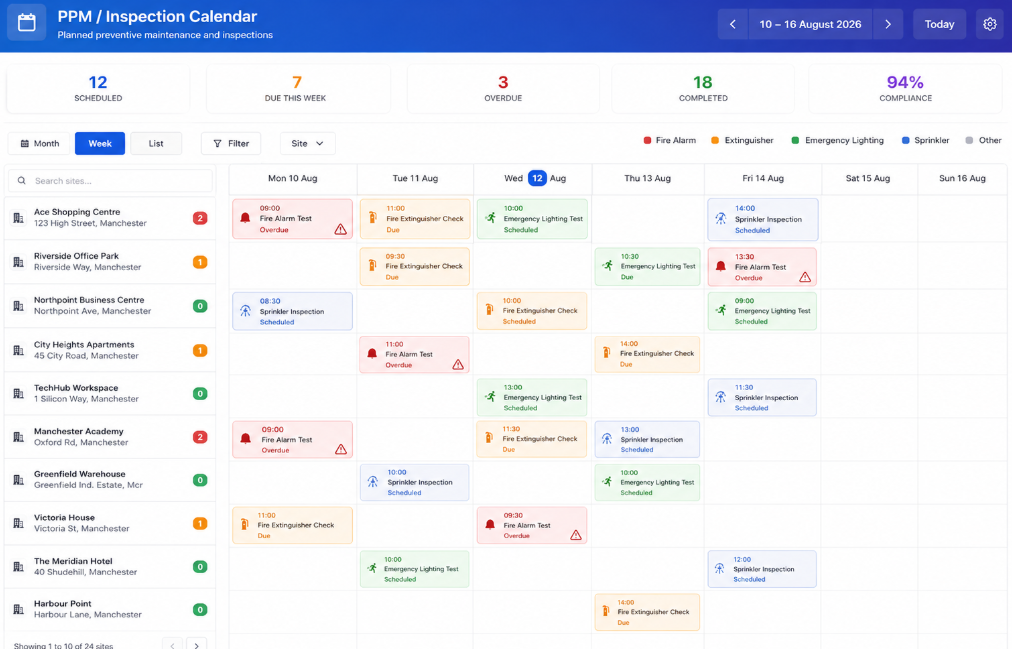
NFPA-driven routes only work if the calendar, the asset and the technician checklist stay connected. A shopping center can have extinguisher rounds on a different cycle to the fire alarm, and a night duration test that only happens once a year.
Create recurring schedules for fire alarm inspections, extinguisher service, sprinkler tests and emergency lighting checks. Overdue fire alarm work stays on the board until it is booked, instead of vanishing into next month's pile.
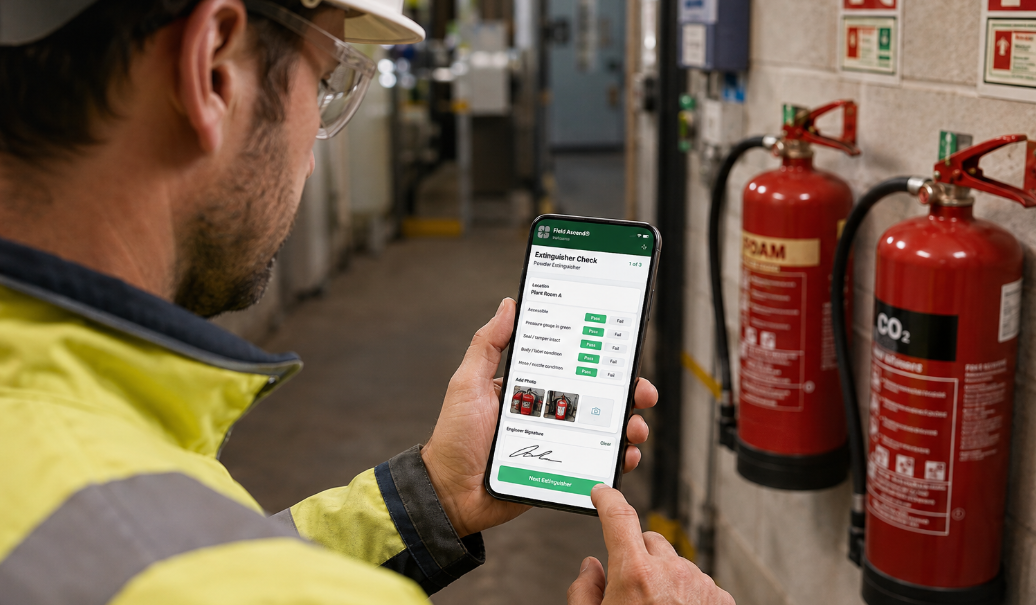
Technicians capture pass/fail items, photos, notes and customer signatures from the mobile app while they walk the building. That is how you stop a route of 200 extinguishers being ticked off a paper list that never matched the labels.
Inspection findings need to stay on the device record, then become a quote when the customer approves repair. Nobody should retype "Level 3, east stair, pull station PS-14" into a blank document.
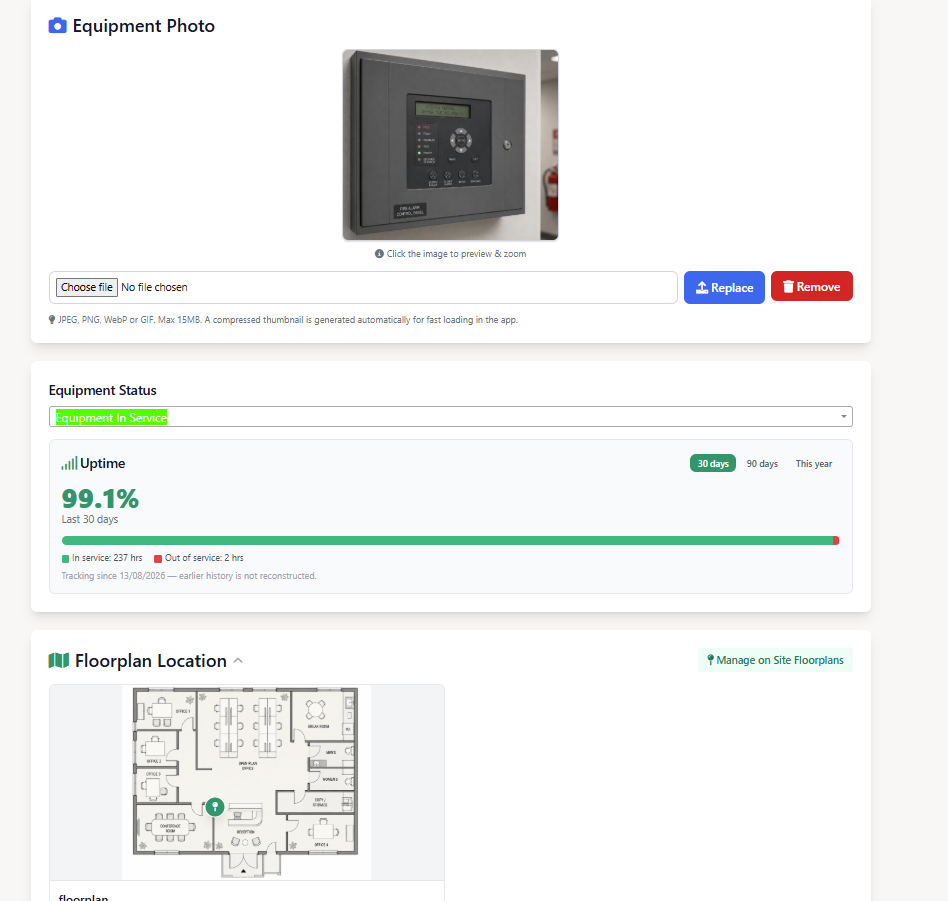
Track fire alarm panels, detectors, extinguishers, sprinkler valves and emergency luminaires by site, floor and zone. When a detector in the east stair fails, it stays on that device with the photo and the date. The next technician does not have to ask the office which panel it was.
Turn a failed device into a quote, then convert approval into a scheduled work order. The site notes, photos and asset stay attached so the office prices the device that actually failed.

A fire alarm panel record with last inspection, next due date, deficiencies and photos.
When a fire alarm or suppression system faults, office teams need fast dispatch and technicians need site context. Planned PM and reactive cover have to live on the same board or one of them loses.
Create urgent work orders with site access, asset details and the fault context technicians need. Send a qualified fire alarm technician to a panel in trouble without guessing who is free.
Scheduling and dispatch software should not bury the weekly inspection route when a trouble call comes in. If the app needs a live connection in a basement, that sheet will get written on paper and typed up on Monday.

A technician completing a digital extinguisher inspection checklist on site.
Use Field Ascend across the day-to-day work fire protection contractors need to schedule, document and bill. One contract can include all of this on the same sites.
Schedule inspections and log panel tests, detectors and notification devices. The technician needs last visit notes before they open the panel, and the office needs overdue inspections visible before the client chases it.
Run monthly and annual extinguisher routes with scan-and-check workflows. A retail contract can be hundreds of units across dozens of stores. If the list in the truck does not match the labels on the wall, you will miss devices and only find out when the client audits you.
Keep valve inspections, pump tests and impairment notes on the system record. When a valve is isolated, that note has to sit on the asset so the next visit does not start from a blank page.
Plan monthly function tests and annual duration tests per building, with photos of failed luminaires. Duration tests often happen at night. The job still needs the same sheet, photos and a signature.
Track kitchen hood, clean-agent and other specialist inspections by site. These visits need the right technician, not whoever is closest on the map.
Electrical contractor software teams that also hold fire alarm and emergency lighting contracts for the same sites. One planner, one asset register, instead of fire sitting in a separate spreadsheet the electricians never see.
Facility management software users running life safety PM inside a wider portfolio. Facilities contracts fail when fire visits are tracked somewhere the rest of the maintenance is not.
Keep inspection status visible across stores, campuses and industrial sites. When a facilities manager asks for last month's evidence, you pull it from the site record instead of calling whoever was on that route.
Fire alarm contractors, extinguisher route businesses, sprinkler service companies and multi-discipline life safety teams that need inspection schedules, emergency dispatch and asset history. If you already sell electrical or facilities work on the same sites, fire sits as one contract type on the same planner.
Field Ascend stores inspection records, photos, deficiencies and follow-up quotes. It is not a NICET certificate portal and does not auto-file reports to an AHJ. Your accredited technician still completes the certificate in the usual way. Teams that only sell equipment and do not perform service will not get much from it.
All-inclusive pricing
Built for U.S. service businesses that want capable field service software without separate paid modules for everyday operations.
Fire protection work uses the same field tools as the rest of the platform: PM, dispatch, assets, quoting and the mobile app.
Automate the inspection schedules life safety clients expect.
Track every inspection and emergency call to completion.
Hold model, serial and service history for every life safety asset.
Log checklists, tests and photos offline at the site.
Send the right technician to planned and emergency work.
Convert deficiencies into quotes for approved corrective work.
Support evening lighting tests and mechanical-room callouts.
Explore the other U.S. service industries Field Ascend supports.
Fire protection software is field service software for contractors who service fire alarms, extinguishers, sprinklers and emergency lighting. It holds the inspection calendar, asset register, checklists, photos, deficiencies and follow-up quotes in one place so office staff and technicians work from the same site record.
Yes. You can set recurring visits per asset or per site for fire alarm inspections, extinguisher routes, emergency lighting tests and sprinkler inspections. Overdue work stays visible so contracts do not drift. See preventive maintenance software for how recurring visits are set up.
No. Field Ascend stores inspection records, photos, deficiencies and follow-up quotes. It is not a NICET certificate portal and does not auto-file reports to an authority having jurisdiction. Your accredited technician still completes the certificate in the usual way.
Yes. The mobile app works in mechanical rooms, stairwells and basements with poor signal. Technicians can open the job, complete the checklist, add photos and collect a signature, then sync when they are back online.
Yes. Failed items and deficiencies sit on the job and the asset. Office staff can raise a quote from that record, send it for approval, then convert the approved quote into a booked corrective job without retyping the site notes.
It is field service software. Fire protection teams use the same scheduling, technician dispatch, work orders, preventive maintenance, quoting and invoicing tools as other trades, with asset history and checklists suited to life safety contracts. Start from industries if you want the wider picture.
You can schedule the visits, hold the panel and device history, and complete checklists on site. Field Ascend does not replace NFPA 72 and does not issue a NICET certificate. Your qualified technician still does the inspection and completes the certificate in the usual way. The software keeps the calendar, photos, deficiencies and follow-up work attached to the site.
Yes. Set different frequencies on the same site, or on the fixtures themselves if you track them as assets. Monthly function tests and annual duration tests can sit as separate recurring visits so one does not hide the other. Duration tests that happen at night are still jobs, with the same checklist, photos and a lone-working check-in if the technician is on their own.
Yes. Each site keeps its own assets, visit calendar and job history. A retail estate or campus can have hundreds of extinguishers and several panels, with different frequencies per building. When a facilities manager asks for last month's evidence, you pull it from the site record instead of calling whoever was on that route.
Yes. Completed inspections and approved corrective work can go to invoice from the same job, then push to QuickBooks if that is how you run accounts. The visit, the quote and the invoice should point at the same site and the same assets.
Try field service software built for scheduling, dispatch, mobile technicians, work orders, preventive maintenance, quotes, invoices and reporting.
Start your 30-day free trial