Field Service Invoicing Software
That Gets You Paid Faster

The most complete job invoicing software for UK field service businesses. Create invoices in one click from completed jobs, send branded PDFs, track payments, issue credit notes, generate customer statements, and sync to your accounting system automatically. From the first work order to the final payment — it's all in Field Ascend.

Built for field service management software UK needs — including full Domestic Reverse Charge (DRC) and CIS deduction support for UK contractors. Mobile job data flows straight into invoicing. One platform. Every invoice. Zero double-entry.

30-day free trial • UK-based support

One-click invoices from completed jobs
6 accounting integrations
Full DRC & CIS support
AWS-powered email queue
Unlimited PDF templates

Everything you need to invoice, chase, and get paid — in one platform

What is field service invoicing software?

Field service invoicing software turns completed work orders and job sheets into professional invoices — without re-keying data. Your engineers capture labour, materials and notes on the mobile app while on site; the office creates an invoice from that data in one click.

  • Engineer completes a work order on site (mobile or job sheet)
  • Invoice created in one click — labour, materials and extras auto-filled
  • Branded PDF generated and emailed to the customer
  • Posted to your accounting system (Xero, QuickBooks, Sage, etc.)
  • Payment tracked and overdue invoices flagged automatically

Key takeaways

  • Create invoices from completed jobs in one click — zero double-entry
  • Full UK Domestic Reverse Charge (DRC) and CIS deduction handling
  • Email invoices with full communications history for chasing payments
  • Credit notes and customer statements with branded PDF templates
  • Post to Xero, QuickBooks, Sage, FreeAgent or Zoho Books in one click
  • PPM contract invoicing with an automated invoice queue

From Job Completion to Paid

Field Ascend connects every step of your invoice lifecycle — the complete work order to invoice workflow. Jobs flow straight into invoices with no re-keying, no lost data and no wasted time.

🔧
Job Complete
Engineer finishes on-site
📋
One-Click Invoice
Labour, materials & misc auto-filled
📄
Branded PDF
Generated via AWS — pixel-perfect
📧
Email to Customer
Queue-based, instant delivery
🔗
Post to Accounts
Xero, QuickBooks, Sage & more
Mark Paid
Payment date recorded

Who is this for?

Field Ascend's invoice management for field service is built for UK contractors and maintenance businesses who need to move quickly from completed job to paid invoice — without chasing spreadsheets.

Industries

When you need this

  • High volume of jobs to invoice each month
  • PPM or contract invoicing with recurring billing
  • CIS or Domestic Reverse Charge obligations
  • Payment disputes that need a clear audit trail
  • Slow invoicing delaying your cash flow
  • Double-entry between your job system and accounts

One-Click Invoices from Completed Jobs

As contractor invoicing software built for the UK market, Field Ascend auto-builds your invoice directly from the job sheet. Labour times, materials used, and miscellaneous charges are all pulled through automatically — ready to review and send.

Optionally copy the job description and work-done notes onto the invoice. Lock the price from an accepted quote — customers can accept quotes online via email with one click. Invoice partial percentages for staged payments. All with zero double-entry.

  • Auto-populate labour, materials & miscellaneous from job
  • Multi-currency support with correct symbol display
  • Partial invoice — bill any percentage of a job
  • Quote-to-invoice with price lock option
  • Custom invoice prefix & sequential numbering
  • Customer reference and PO number fields
  • Per-line nominal codes for accounting system mapping
  • Auto-date invoice from job completion date
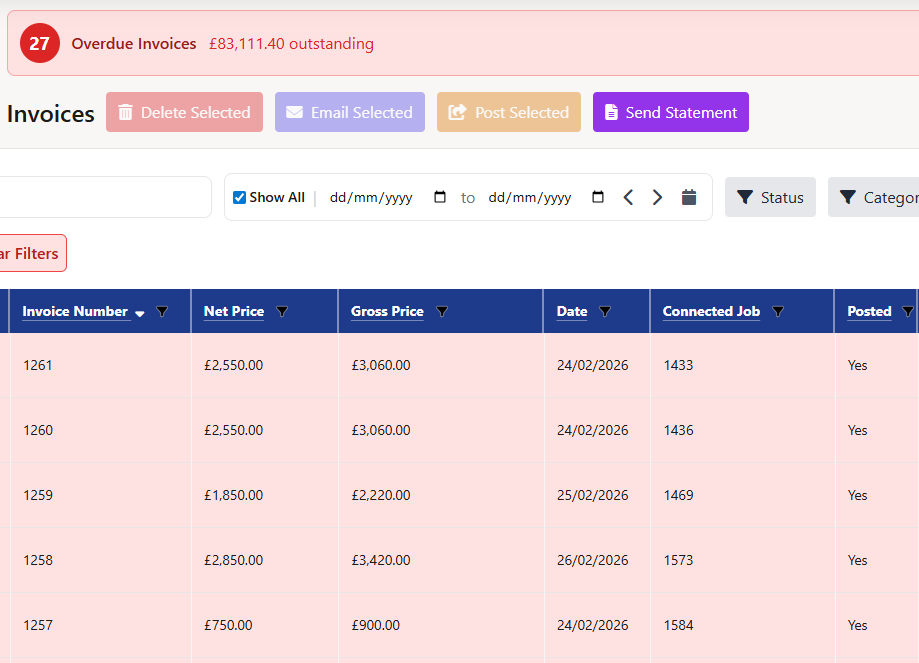
Field service invoicing software showing invoice list with overdue tracking, payment status and Xero sync

Professional Branded PDF Invoices

Every invoice generates as a pixel-perfect PDF via AWS EC2 Puppeteer (headless Chrome). Your logo, colours, fonts, and layout — exactly as designed. Customers receive polished, professional documents that reflect your brand.

Build templates using the drag-and-drop canvas designer or the quick simple builder — no design skills needed. Set a default, or pick a template per invoice. Preview thumbnails make selection easy.

  • Canvas-based visual template designer (advanced & simple modes)
  • Unlimited saved templates per business
  • Labour, materials & miscellaneous table layouts
  • Subtotals with VAT, DRC notice & CIS deduction built in
  • Multiple font options, colour pickers, and layout controls
  • PDF stored to AWS S3 for instant re-download & email attachment
  • Template thumbnails for easy visual selection
  • Duplicate, edit, or delete templates at any time
Professional field service invoice PDF with CIS deduction and domestic reverse charge notice built in

Queue-Based Email — Never Wait, Never Miss

Invoice emails are sent via an AWS SQS + Lambda queue — your browser never waits. Click Send and you're done instantly. The system handles delivery in the background, with full retry logic and error reporting.

Email invoices individually or bulk-email hundreds at once from the invoice list. Every send is logged in a full communications history per invoice — ideal for chasing overdue payments and resolving disputes.

  • Bulk email — send to hundreds of customers in one click
  • Customisable subject line and email body per send
  • CC support & multiple recipients
  • Email template system with merge tokens
  • Full comms history per invoice (to, subject, date, status)
  • Queue status, retry count & error detail logging
  • PDF invoice automatically attached to every email
  • Email count & last sent date visible in invoice list
Communications History — INV-00614
✓ Delivered 27/02/2026 09:14
To: accounts@acmeprops.co.uk
Subject: Invoice INV-00614 from Field Ascend
Sent by: Sarah Admin
✓ Delivered 14/02/2026 14:32
To: accounts@acmeprops.co.uk
Subject: Reminder: Invoice INV-00614 now due
📊 2 emails sent • Last sent 27/02/2026

Track Payments & Spot Overdue Instantly

Mark invoices paid with a single click, recording the exact payment date. Field Ascend automatically flags overdue invoices when the due date passes — no manual chasing needed. Always know exactly how much is outstanding and who owes what.

  • Mark paid/unpaid with payment date recorded
  • Auto-flagging when due date passes unpaid
  • Filter by overdue-only with total outstanding value
  • Overdue badge & count always visible in list header
  • Filter by date range, status, category, paid/unpaid
  • Sortable columns — due date, amount, customer, status
  • CSV export respecting current filters
  • Posted timestamp & posted-by admin recorded
Invoice List
⚠ 3 Overdue — £2,180.00
INV-00611 — Apex LiftsOverdue £850
INV-00612 — BuildCo LtdOverdue £730
INV-00613 — City FMOverdue £600
INV-00614 — Acme PropsDue 29/03
INV-00610 — Metro Manage
Total Outstanding£2,180.00

A Full Credit Note System — Not an Afterthought

Field Ascend includes a complete credit note module that mirrors every feature of the invoice system. Raise credits, link them to specific invoices, email them to customers, and sync to your accounting system — all in the same familiar interface.

📝

Create & Link to Invoices

Raise credit notes linked to specific invoices. Credits reduce the customer's balance and create a clean audit trail. Link credits and invoices in the lifecycle flowchart for full visibility.

🎨

Branded PDF Templates

Separate canvas-based PDF template system for credit notes — same builder, same quality. Set a default or select per credit note. Preview thumbnails included.

📧

Email & Comms History

Email credit notes individually or in bulk. Full communications history per credit note — same queue-based AWS delivery as invoices. No separate system to manage.

🔗

Accounting System Sync

Credit notes posted to Xero, QuickBooks, Sage, FreeAgent and Zoho Books in one click. Posted status prevents double-posting. Bulk post from the list view.

🗑️

Soft Delete & Recycle Bin

Deleted credit notes go to a recycle bin with full restore capability. Nothing is lost accidentally. Purge permanently only when you're certain.

🔁

Bulk Actions

Bulk delete, bulk email, and bulk post to accounting. Manage your entire credit note backlog efficiently from one view with column filtering and sorting.

Professional Customer Statements in Seconds

Generate outstanding or date-range activity statements for any customer — complete with aging analysis, totals, and a full invoice list. Send directly to the customer by email from Field Ascend, or download as a PDF.

Statement templates use the same canvas-based PDF builder as invoices — your branding, your layout. The statement system pulls live data including credit note offsets and calculates the true balance due automatically.

  • Outstanding statements (overdue invoices as at a date)
  • Activity statements (all invoices in a date range)
  • Aging analysis: Current / 30 / 60 / 90+ days
  • Credit note offsets automatically included
  • Queue-based email delivery with comms history
  • Canvas PDF template builder — same system as invoices
  • Bank details section for remittance instructions
  • DRC notice support for applicable customers
Statement — Acme Properties Ltd — Outstanding
Statement Date27/02/2026
INV-00611 (due 15/01)£850.00 Overdue
INV-00612 (due 01/02)£730.00 Overdue
INV-00614 (due 29/03)£726.60 Current
Credit CN-0041-£120.00
Balance Due£2,186.60
Overdue£1,460.00
📧 Email Statement ⬇ Download PDF

Full DRC & CIS Support Built In

Field Ascend is the only service management software for contractors that handles both Domestic Reverse Charge and Construction Industry Scheme deductions natively — no workarounds, no manual adjustments. Just set it up and it works.

🔄 Domestic Reverse Charge (DRC)

DRC transfers VAT accountability from the supplier to the customer — mandatory for construction and building services businesses registered for the Construction Industry Scheme. Field Ascend handles the entire DRC workflow automatically.

  • Set DRC as tenant-level default for all invoices
  • Override per customer — set DRC as standard for specific accounts
  • Override per individual invoice — full flexibility
  • Correct DRC notice printed automatically on PDF invoices
  • Passed correctly to Xero, QuickBooks, Sage, FreeAgent & Zoho Books
  • DRC Notice section in PDF template builder — fully customisable
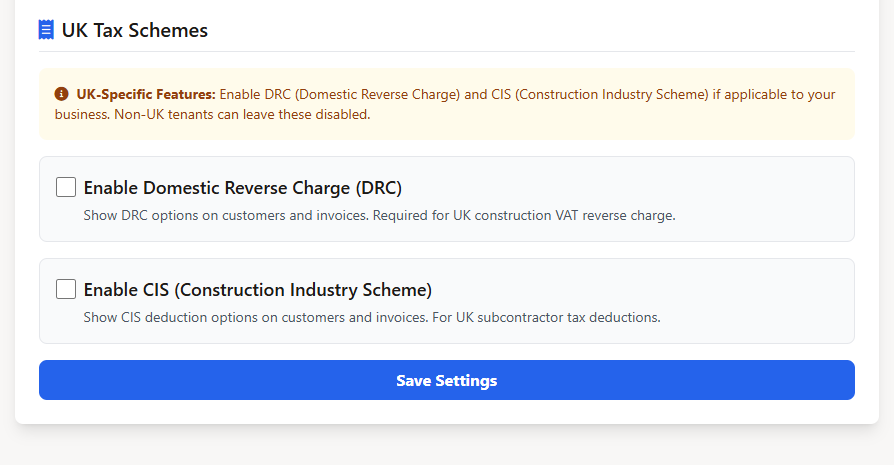
  • Tenant feature flag — hide DRC entirely for non-UK businesses

🏗️ Construction Industry Scheme (CIS)

CIS requires contractors to deduct tax at source from subcontractors' payments — typically 20% or 30%. Field Ascend automates the calculation, displays the balance due, and passes CIS deductions correctly to all accounting integrations.

  • Set CIS rate per customer (20% standard or 30% higher rate)
  • Auto-calculated CIS deduction on every invoice
  • Balance due displayed clearly on PDF invoices and in UI
  • Override CIS per individual invoice when needed
  • CIS passed as a negative line item to Xero, QuickBooks, Sage, FreeAgent & Zoho
  • CIS deduction and rate shown as merge tags in PDF builder
  • Tenant feature flag — hide CIS entirely for non-UK businesses

Both features include cascading defaults: set once at the tenant level, override at the customer level, or override again on any individual invoice. Data is preserved safely even if you later disable the feature globally.

Example: CIS and Domestic Reverse Charge on Invoices

Below is how a typical invoice changes when Domestic Reverse Charge or CIS applies. Field Ascend calculates these automatically — the correct figures appear on the PDF and are posted to your accounting system.

Line Standard Invoice With DRC With CIS (30%)
Net Total £1,000.00 £1,000.00 £1,000.00
VAT (20%) £200.00 £0.00 * £200.00
CIS Deduction −£300.00 **
Amount Due £1,200.00 £1,000.00 £900.00

* DRC: VAT is not charged on the invoice. The customer accounts for VAT to HMRC under reverse charge rules. A notice is printed on the PDF automatically.
** CIS: The customer deducts 30% of the net value (£300) and pays it to HMRC on the subcontractor's behalf. The deduction is posted as a negative line item to your accounting system.
Values are illustrative only.

Post to Your Accounts in One Click

Connect Field Ascend to your accounting system and eliminate double-entry forever. Post invoices, credit notes and customer data directly — with DRC, CIS and tax mappings handled automatically.

One-Click Posting

Post any invoice to your accounting system directly from the invoice editor or invoice list. Bulk post multiple invoices at once — Field Ascend skips already-posted invoices automatically.

🚫

No Double-Posting

Every invoice tracks its "posted" status per integration. Posted invoices are clearly flagged. Un-post if needed with a clear warning to void the matching entry in your accounting system.

🗂️

Account Code Mapping

Map labour, materials, and miscellaneous line items to your accounting nominal codes per integration. Tax rate mapping ensures VAT is posted correctly every time.

🔄

OAuth2 & Token Auto-Refresh

Secure OAuth2 connections with automatic token refresh — you'll never be asked to re-authenticate unexpectedly. Webhooks keep your data in sync in near real-time.

🇬🇧

DRC & CIS Handled Correctly

DRC invoices post with the correct zero-rate tax type per accounting system. CIS deductions post as negative line items. No manual adjustments needed in Xero, QuickBooks, Sage, FreeAgent or Zoho.

📋

Central Integration Hub

All integrations managed from one screen — connect, configure, map accounts, test the connection, and disconnect cleanly. Full visibility of sync status across all linked systems.

Explore All Accounting Integrations →

PPM Contract Invoice Queue

For maintenance management software UK users, Field Ascend includes a dedicated PPM invoicing queue that shows every maintenance contract with invoices due. No more end-of-month scramble to work out what to bill.

Supports all billing frequencies and timing modes — monthly in advance, quarterly in arrears, annually, and more. Generate invoices individually or in bulk for the entire queue, then email or post to accounting in one go.

  • Dashboard showing all contracts with invoice due
  • Total pending value visible at a glance
  • Supports 4 billing frequencies × 2 timing modes (8 combinations)
  • Contract billing enabled/disabled per contract
  • Next invoice date and due flag per contract
  • Respects per-customer payment term overrides
  • Bulk invoice generation in one click
  • Attach PPM check report PDF to invoice email automatically
PPM Invoice Queue — February 2026
4 contracts ready to invoice £6,400.00 pending
Apex Lifts — Monthly£1,200.00
BuildCo Facilities — Quarterly£2,800.00
City FM Group — Monthly£900.00
Metro Manage — Monthly£1,500.00
Generate All Invoices Post All to Xero

Everything Else You'd Expect — and More

💰

Staff Commission Tracking

Allocate a percentage of each invoice's net value to one or more staff members. Per-staff commission rates, approval workflows, and a full lifecycle from pending to approved. Commission data stays confidential — not visible on the invoice itself.

📤

Bulk Actions & CSV Export

Bulk delete, bulk email, and bulk post to accounting from the invoice list. CSV export respects your current filters and visible columns — ideal for finance reviews and reconciliation. Customisable visible columns with saved preferences per user.

🗑️

Recycle Bin & Data Safety

Deleted invoices go to a recycle bin with full restore capability. Restore also re-links associated credit notes. Permanently purge only when certain. Nothing important is ever lost accidentally.

🌍

Multi-Currency

Per-invoice currency code inherited from the job or customer. Currency symbol displayed correctly across invoices, PDFs, and accounting integrations. Essential for UK businesses serving international clients.

🔄

Invoice & Document Lifecycle

Every invoice links visually to its source job, quote, purchase order, and credit notes in the lifecycle flowchart. Click any node to navigate instantly. Full audit trail for accountant reviews and customer disputes.

⚙️

Invoice Settings

Configure default payment terms, invoice prefix, sequential numbering, credit note prefix, VAT defaults, DRC/CIS defaults, category-based labour exclusion rules, and per-tenant feature flags. Every setting is per-tenant for complete isolation.

Works for Every Trade & Maintenance Business

From HVAC contractors needing CIS-compliant invoicing to lift maintenance companies managing large PPM contracts — Field Ascend's invoicing module adapts to your industry.

HVAC Contractors Plumbing Businesses Electrical Contractors Lift Maintenance Construction Facilities Management Boiler & Heat Pump Drainage & Water PAT Testing Subcontractors
View all 35+ industries →

Built for UK Tax Rules

Field Ascend is contractor invoicing software UK businesses can rely on for HMRC compliance. CIS deductions, Domestic Reverse Charge, audit-ready comms history, credit notes, customer statements and accounting integrations are all included as standard — not bolt-on extras.

  • CIS at 20% or 30% with auto-calculated balance due
  • Domestic Reverse Charge with cascading defaults
  • Full email comms history per invoice and credit note
  • Credit notes with branded PDF templates and accounting sync
  • Outstanding and activity customer statements
  • Six accounting integrations with correct DRC/CIS mapping

Frequently Asked Questions

How does Field Ascend create invoices from jobs?
When a job is completed, Field Ascend auto-populates an invoice with labour times, materials, and miscellaneous line items directly from the job sheet. You can create a full invoice in one click — no manual re-entry. Optionally copy the job description and work-done notes onto the invoice automatically.
Does Field Ascend support Domestic Reverse Charge (DRC)?
Yes. Field Ascend has full DRC support built in. Set DRC as a tenant-level default, override per customer, or override per individual invoice. The DRC notice appears automatically on PDF invoices and is passed correctly to Xero, QuickBooks, Sage, FreeAgent and Zoho Books. The feature can be hidden entirely for non-UK businesses.
Does Field Ascend support CIS deductions?
Yes. CIS deductions are fully supported. Set the CIS rate per customer (typically 20% or 30%), and Field Ascend automatically calculates the deduction and shows the balance due on the invoice PDF. CIS deductions are passed as negative line items to all supported accounting integrations. Like DRC, CIS can be disabled entirely for non-UK tenants.
Which accounting systems does Field Ascend integrate with?
Field Ascend integrates with Xero, QuickBooks, Sage Accounting, Sage 200, FreeAgent, and Zoho Books via OAuth2. Post invoices in one click from the invoice list, or bulk post multiple invoices at once. Posted status is tracked per invoice to prevent double-posting. Each integration also handles DRC and CIS correctly.
Can I send invoices by email directly from Field Ascend?
Yes. Email invoices individually from the edit view, or bulk email hundreds at once from the invoice list. Emails are sent via an AWS SQS + Lambda queue so the UI never blocks. Full communications history per invoice shows delivery status, send date, recipients, subject and body. The invoice PDF is automatically attached.
Does Field Ascend include credit notes and customer statements?
Yes. Field Ascend includes a full credit note module with its own PDF templates, email delivery, accounting system sync, and recycle bin. Customer statements can be generated as outstanding or date-range activity statements, with professional PDF templates and direct email delivery — all using the same queue-based email system as invoices.
Can I automatically invoice PPM maintenance contracts?
Yes. The PPM Invoice Queue shows all maintenance contracts with invoices due. It supports all billing frequencies (monthly, quarterly, annually etc) and timing modes. Generate contract invoices individually or in bulk, then email or post to your accounting system in one click. Perfect for maintenance businesses with recurring monthly billing.
Can I create staged or partial invoices?
Yes. Field Ascend supports partial invoicing — you can bill any percentage of a job's total value. This is useful for staged payments on larger projects, such as a deposit upfront, a progress payment, and a final invoice on completion.
Can I lock an invoice price to an accepted quote?
Yes. When creating an invoice from a job that has an accepted quote, you can lock the invoice total to the quoted price. This ensures the customer is billed exactly what was agreed, regardless of any changes to labour times or materials recorded during the job.
Does Field Ascend support custom invoice numbering?
Yes. Each tenant can set a custom invoice prefix (e.g. INV-, FA-) and sequential numbering starting from any number. Credit notes have a separate prefix and sequence. All numbering is per-tenant for complete isolation.
Can I include PO numbers and customer references on invoices?
Yes. Every invoice has dedicated fields for the customer's purchase order number and their own reference. These appear on the PDF and are passed through to accounting integrations when posting.
Can I send bulk statements to multiple customers at once?
Statements can be generated and emailed individually per customer. You can produce outstanding or date-range activity statements and email them directly. Bulk generation across multiple customers in a single action is not currently available.
What happens if an invoice has already been posted to my accounting system?
Field Ascend tracks the posted status of every invoice per integration. Already-posted invoices are automatically skipped during bulk posting. You can un-post if needed, but a clear warning reminds you to also void the matching entry in your accounting system.
Related Features You'll Also Love

AI Quote Generation 🔗 Accounting Integrations 🧾 Expense Tracking 🔄 Document Lifecycle 🔧 PPM Scheduling 💼 Job Management ⏱️ Timesheet Software 🚀 All Features →

Ready to Get Paid Faster?

Join UK field service businesses already using Field Ascend to invoice faster, eliminate double-entry, and stay compliant with DRC and CIS. Your first 30 days are completely free.

Start Your Free Trial

Set up in minutes • UK support team