Parts, subcontractor invoices, fuel, site materials - expenses pile up fast on field service jobs. Field Ascend puts them in one place, linked to the jobs they belong to, so you always know where the money went.
30-day free trial · All features included · Cancel anytime
Same URL. Different jobs. Spend is company cost on the job. Expense Claims is the office queue when staff or engineers need money back. The nav label is Expenses.
Company card and business costs: supplier invoices, paid purchase orders, fuel, site materials. Link them to a job so labour, materials, and extras sit on the same profitability picture.
The rest of this page is Spend: PO conversion, VAT receipts, categories, and the cashflow chart.
Office review for staff and engineer reimbursements. Parking, consumables, and other out-of-pocket costs with a receipt. The header title is Expense Claims. References start with EC-.
Off until you turn it on under Setup → Spend Options → Expense claims. If the nav chip is hidden, show it under Header Options.
Engineers submit from the latest app: Dashboard → Expenses, or Add Expense on a job. After the feature is on, the office can Add Claim on someone's behalf.
Approve or reject. A reject needs a reason. The app then shows Fix & re-submit. Own money: reimburse through payroll. Company card: record only, no reimbursement. Approving writes a matching Spend row. Reopen voids that Spend row. Approved personal claims appear on the timesheet payroll export as Reimbursable Expenses when that column is in the layout.
Different people in your business care about expenses for different reasons. Field Ascend gives each of them exactly what they need.
See real-time cashflow tracking across the entire business. Know which jobs are profitable and which are eating margin - before the accountant tells you three months later.
Log expenses, convert purchase orders, manage the expense approval workflow, and keep receipts organised - without leaving the platform you already use for scheduling and jobs.
Once Expense Claims is on, submit from the latest engineer app: Dashboard → Expenses, or Add Expense on a job. Attach a receipt photo and get on with the next job.
Every expense has a receipt, a category, a VAT breakdown, and a job link. Export filtered data for your accountant or pull it into your accounting integration. Audit-ready by default.
When expenses are linked to jobs, you stop guessing and start seeing the true picture. Here's what that looks like in practice.
Illustrative example. Your numbers will vary.
Without job-linked expenses, that £786.50 is invisible. You invoiced £2,400 and assumed it was profitable. With Field Ascend, you know it is - and by exactly how much.
Eight capabilities that turn expense admin from a chore into a competitive advantage - all built into the same platform where your jobs, quotes, and invoices already live.
Tie any expense to a specific job. Ad-hoc parts, parking charges, and supplier invoices - everything rolls up into the job's true cost.
Why it matters: accurate job costing and real job profitability figures, not guesswork.
Use purchase order software to keep supplier, amounts, VAT and job links aligned before costs become expenses.
Why it matters: no re-typing means no errors and faster purchase order tracking.
Upload photos or PDFs via drag-and-drop or camera. Multiple files per expense. Everything stored securely in the cloud.
Why it matters: receipts are always findable - for HMRC, audits, or your accountant at year end.
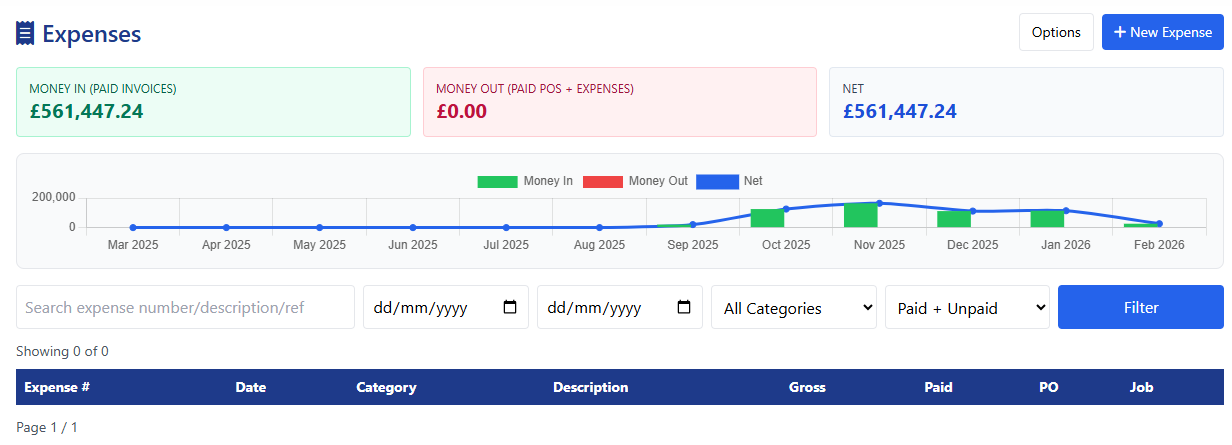
Paid invoices (money in) and paid expenses plus POs (money out) shown side by side in a 12-month chart. One screen. One truth.
Why it matters: spot trends early and make confident decisions about pricing, hiring, or capital spend.
Create categories that match your business - fuel, materials, subcontractors, tools, PPE, whatever you need. Sort, rename, or deactivate freely.
Why it matters: understand exactly where money goes, broken down the way you think about it.
Expenses move through a clear flow: draft → submitted → approved (or rejected). Every status change is logged with timestamps.
Why it matters: managers stay in control without creating bottlenecks.
Select a tax rate and Field Ascend calculates net, VAT, and gross automatically. Multiple rates and multi-currency supported.
Why it matters: VAT on expenses is handled correctly from day one - less manual maths, fewer mistakes. The sales side is covered too: see our VAT & CIS invoicing software.
Find any expense by number, supplier, description, or payment reference. Filter by date, category, or paid/unpaid. Export for accountants or internal reviews.
Why it matters: less time hunting, more time on work that earns money.
Logging a fuel receipt or converting a paid purchase order takes seconds, not minutes.
Hit "New Expense", fill in the date, category, supplier, and amount. Link it to a job if relevant. The expense number is generated automatically.
Upload receipt images or PDFs - drag-and-drop or camera. Attach the supplier invoice, delivery note, and payment confirmation together on one record.
Move from draft to submitted. If your business uses approvals, a manager reviews and approves (or rejects) with one click. Notes at every stage.
Record the payment reference. The expense immediately appears in your cashflow dashboard alongside invoices and POs - full financial picture, no spreadsheets.
Most expense tools sit outside your main system. You log costs in one place, invoices in another, purchase orders somewhere else, and then try to stitch them together at month end. That's where errors creep in and time gets wasted.
In Field Ascend, expenses are part of the same workflow as everything else. A job links to its quote, its invoice, its purchase orders, supplier invoice evidence, and its expenses. The lifecycle flowchart shows you exactly how every financial document connects - click any node and you're straight into the record.
That means less double entry, fewer reconciliation headaches, and a clear audit trail from the original quote through to the final cost. If you sync with Xero, QuickBooks, Sage, FreeAgent, or Zoho Books, invoices post automatically and payments flow back - so the cashflow dashboard is always up to date.
For contractors who need the visibility of an ERP system without the complexity, this is the practical alternative: scheduling, jobs, quotes, invoicing, purchase orders, expenses, timesheets, PPM, and asset management - all in one platform, all connected.
The best way to understand how expense tracking fits your business is to try it. No commitment, cancel anytime.
Yes. Every expense can be tied to a specific job, giving you a true picture of job costing - including ad-hoc purchases, supplier invoices, and subcontractor costs, not just the quoted labour and materials.
When a PO is marked as paid, click "Create Expense from PO". Field Ascend pre-fills the supplier, amount, VAT, job link, and payment details. Review, adjust if needed, and save. One click, no re-typing.
Yes. Upload multiple receipt images or PDFs per expense - drag-and-drop or device camera. Files are stored securely in the cloud, organised by expense, and always available for HMRC enquiries, audits, or year-end.
It combines paid invoices (money in) with paid expenses and paid POs (money out) into a single 12-month bar chart. Net position is shown at a glance. No exporting, no cross-referencing - one screen, one truth.
Yes. Expenses, purchase orders, invoicing, and cashflow reporting are included at every pricing tier. No add-on costs, no hidden modules.
Yes. Engineers submit expenses via the engineer web portal. Managers review and approve from the admin side. The approval workflow keeps things transparent without slowing anyone down.
Each expense moves through a clear status flow: draft → submitted → approved (or rejected). Managers can add notes at each stage. Every status change is timestamped and logged for a full audit trail.
Yes. Create an expense, categorise it under subcontractors (or any custom category), and link it to the relevant job. The cost is included in that job's profitability calculation. You can also convert a subcontractor PO into an expense with one click.
Yes. Select the appropriate VAT rate and the system calculates net, VAT, and gross automatically. Multiple rates are supported, and the VAT breakdown is stored per expense for your records.
Expenses linked to jobs give you the data you need. See exactly what was spent and include those costs when raising the customer invoice. The link between expense, job, and invoice provides a clear audit trail for recharging.
Expenses are part of the full document lifecycle. They link to jobs, which connect to quotes, invoices, purchase orders, and credit notes. The lifecycle flowchart gives you a visual map of every connection.
No. There is no cap on the number of expenses you can create or receipts you can upload. Cloud storage is included at every tier.
Spend is company costs linked to jobs: supplier invoices, purchase orders, receipts, and cashflow. Expense Claims is a separate office review queue for staff and engineer reimbursements (parking, consumables, out-of-pocket with a receipt). The header title is Expense Claims. The nav label is Expenses. It stays off until you turn it on under Setup → Spend Options → Expense claims. Show the Expenses nav chip under Header Options if it is hidden. Engineers submit from the latest app: Dashboard → Expenses, or Add Expense on a job. After the feature is on, the office can Add Claim on someone's behalf. The office approves or rejects. A reject needs a reason, and the app shows Fix & re-submit. Own money claims reimburse through payroll. Company card claims are record only, with no reimbursement. Approving creates a matching Spend row. Reopen voids that Spend row. Approved personal claims appear on the timesheet payroll export as Reimbursable Expenses when that column is in the layout. References start with EC-. Both products share this page. There is no second URL.
Start your 30-day free trial. Expense tracking, invoicing, scheduling, and 40+ features - all included.
Start Your Free Trial