VAT, CIS and Domestic Reverse Charge - Built Into Every Job
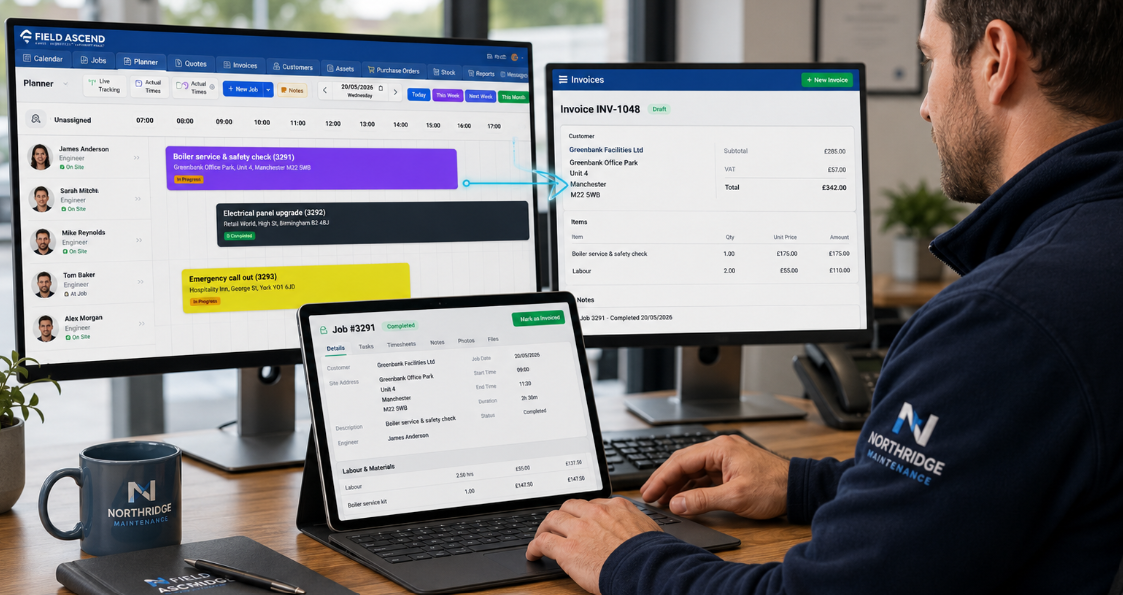
Field Ascend is VAT and CIS invoicing software built into the same field service management software that runs your jobs. Labour, materials and misc costs flow from the completed job straight onto the invoice - with the right VAT scheme, reverse charge wording and CIS deduction applied automatically.
No spreadsheets, no manual VAT adjustments, no separate CIS calculator. One invoice, correct first time, posted to your accounting software in one click.
VAT schemes, DRC and CIS included with Field Ascend. VAT returns and CIS300 submissions stay with your accounting software or accountant.
What is VAT and CIS invoicing software?
VAT and CIS invoicing software applies the correct VAT scheme, Domestic Reverse Charge treatment and Construction Industry Scheme deduction to each invoice automatically. Field Ascend goes further: because the invoice is built from the completed job, the customer's VAT treatment and CIS status are already known - so gross, deduction and amount due are right the moment the invoice exists, and the same figures post to Xero, QuickBooks, Sage, FreeAgent or Zoho Books without re-keying.
Every UK Tax Scenario, One Invoice Engine
Standard VAT, reduced rate, zero-rated, exempt, reverse charge, CIS at 20% or 30% - configured once, applied automatically on every invoice raised from a job, quote or contract.
Named tax schemes
Create multiple named VAT schemes - standard, reduced, zero-rated, exempt - and set one as the default. Every new invoice line picks up the right rate.
Per-customer VAT treatment
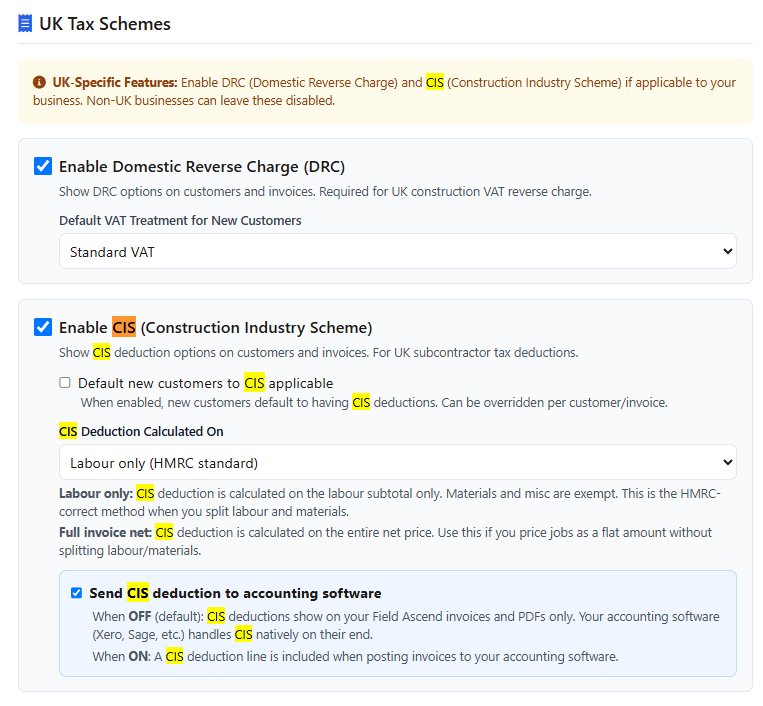
Set each customer's default treatment: standard VAT, Domestic Reverse Charge or exempt. Per-customer effective rates mean recurring work stays correct without edits.
DRC done properly
Reverse charge invoices carry the correct treatment and customer-facing wording on the PDF - VAT is not charged, and the customer knows to account for it.
Automatic CIS deductions
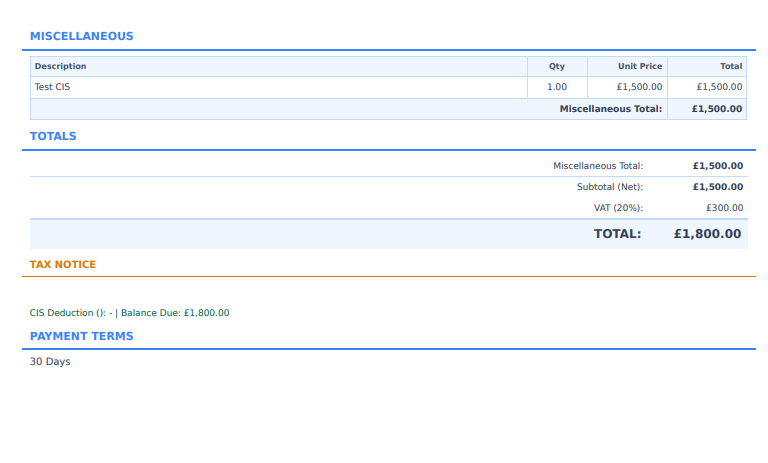
CIS calculated at the customer's rate - typically 20% or 30% - with gross, deduction and amount due shown clearly on the invoice PDF.
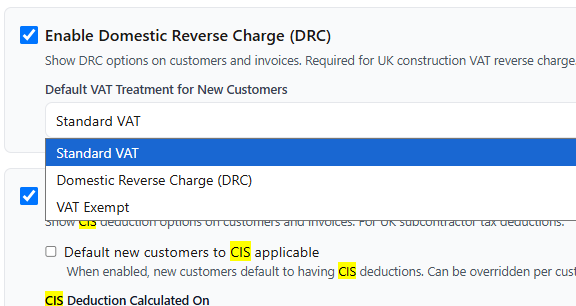
Configurable CIS basis
Calculate the deduction on labour only or on the full invoice net - whichever matches how your contracts are agreed and verified.
Clean accounting handoff
One-click posting to Xero, QuickBooks, Sage, FreeAgent and Zoho Books with tax rate and nominal code mapping. CIS deductions are passed through, not lost.
VAT invoicing software UK contractors configure once
Set up your tax schemes by name and percentage, mark the default, and let the invoice engine do the rest. Different customers on different treatments? Their invoices start correct automatically.
- Multiple named schemes: standard, reduced, zero-rated, exempt
- One default scheme for everyday invoicing
- Per-customer effective rates for special arrangements
- Per-customer VAT treatment defaults - standard, DRC or exempt
- Tax handled the same across invoices, credit notes and statements
Domestic reverse charge invoicing software that gets the wording right
DRC transfers VAT accountability from the supplier to the customer for many construction services. Get the treatment or the wording wrong and invoices bounce back - or worse, VAT is charged when it should not be.
- Enable DRC once, then default the treatment per customer
- VAT correctly not charged on reverse charge invoices
- Customer-facing DRC wording printed automatically on the PDF
- Override per invoice when a one-off job needs different treatment
- Correct DRC treatment carried through to your accounting software
CIS deduction software that shows the working
Under the Construction Industry Scheme, contractors deduct tax at source from subcontractor payments. Field Ascend calculates the deduction automatically and lays it out so the customer - and your accountant - can see exactly what happened.
- CIS rate set per customer - typically 20% verified or 30% unverified
- Basis configurable: labour-only or full invoice net
- Gross → CIS deduction → amount due, clearly shown on the invoice PDF
- Deductions passed through to accounting integrations automatically
- Works alongside the full invoicing workflow - credit notes, statements and comms history included
From completed job to compliant invoice - zero re-keying
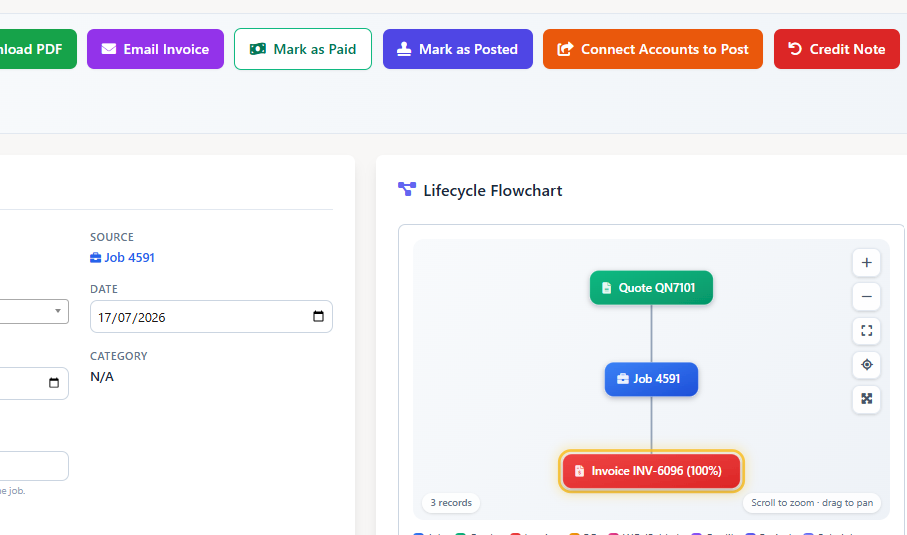
The tax engine sits on top of invoicing built from real job data. Labour times, materials and misc costs flow straight in from the completed job, so the numbers the tax is calculated on are the numbers the engineer actually recorded.
- Invoices built from completed jobs - labour, materials and misc flow in
- Branded PDF templates you control in the template builder
- Credit notes linked to their original invoices
- Customer statements and full comms history
- Expenses record net, VAT and gross on the purchase side too
For the full invoicing workflow - templates, delivery, payment tracking - see our field service invoicing software page.
Labour-Only or Full Net - Your CIS Basis, Your Choice
CIS contracts differ. Field Ascend supports both common deduction bases, configured once at account level, so every invoice follows the same agreed rule.
Labour-only basis
The CIS deduction is calculated on the labour value only. Materials and other costs are invoiced in full - the common arrangement where the subcontractor supplies materials at cost.
Full net basis
The CIS deduction is calculated on the whole invoice net. Simpler where contracts treat the full value as subject to deduction - Field Ascend does the maths either way.
Which basis applies to your contracts is a matter for you and your accountant - Field Ascend makes whichever you choose automatic and consistent. Figures above are illustrative only.
DRC and CIS - Together on the Same Invoice
The real-world case most generic field service tools can't handle natively: a construction subcontractor invoice that is under reverse charge AND subject to a CIS deduction at the same time.
Why combined DRC + CIS matters
If you subcontract within the construction industry, many of your invoices need both treatments at once: no VAT charged (reverse charge), with the correct wording printed, and a CIS deduction calculated on the agreed basis with gross, deduction and amount due shown. Field Ascend applies both on one invoice, automatically, from the customer's stored settings.
- Reverse charge treatment and wording applied - VAT not charged
- CIS deduction calculated on labour-only or full net, at the customer's rate
- Gross → deduction → amount due laid out on the branded PDF
- The whole thing posts to Xero, QuickBooks, Sage, FreeAgent or Zoho Books with the deduction passed through
- No workarounds, no manual credit lines, no editing invoices after export
From Job Complete to Accounts Posted
One flow, five steps, no double-entry.
Hands Off Cleanly to Your Accounting Software
Field Ascend owns the operational side - correct invoices, every time. Your accounting software owns the filing. Tax rate and nominal code mapping per integration means what lands in your accounts is ready to use, not ready to fix.
Honest boundary: Field Ascend does not submit VAT returns, Making Tax Digital filings or CIS300 returns to HMRC. It makes sure every invoice is operationally correct and hands clean data to the software - or the accountant - that files.
Frequently Asked Questions
Direct answers for UK contractors comparing VAT and CIS software for contractors.
What is VAT and CIS invoicing software?
Software that applies the correct VAT scheme, Domestic Reverse Charge treatment and CIS deduction to each invoice automatically. Field Ascend builds the invoice from the completed job, applies the customer's stored tax settings, and posts the result to your accounting software.
Can DRC and CIS apply on the same invoice?
Yes - and that's the point. Reverse charge treatment and wording plus an automatic CIS deduction, together on one invoice, calculated from the customer's settings. Most generic field service tools can't do both natively.
Is CIS calculated on labour only or the full invoice?
You choose. Configure the basis as labour-only or full invoice net at account level. The rate is set per customer - typically 20% verified or 30% unverified - and calculated automatically on every invoice.
Does Field Ascend file VAT returns or CIS300 to HMRC?
No. Field Ascend handles the operational invoicing side and passes clean, correctly-coded data to Xero, QuickBooks, Sage, FreeAgent or Zoho Books. Returns and MTD submissions are filed from your accounting software or by your accountant.
How does the DRC invoice wording work?
When an invoice is under reverse charge, VAT is not charged and the customer-facing DRC wording prints on the PDF automatically, so the customer knows to account for the VAT themselves. Treatment defaults are stored per customer.
Can different customers have different VAT treatments?
Yes. Multiple named tax schemes with a default, per-customer effective rates, and per-customer treatment defaults (standard VAT, DRC or exempt). New invoices for each customer start correct automatically.
Does it handle VAT on purchases too?
Yes. Expense tracking records net, VAT and gross on the purchase side, so both directions of your VAT picture live in one system alongside jobs and invoices.
Is this part of a bigger invoicing system?
Yes. VAT, DRC and CIS sit inside Field Ascend's full field service invoicing software - branded PDF templates, credit notes, customer statements, comms history and one-click accounting posting.
Related Field Ascend Features
Stop Fixing Tax After the Invoice Goes Out
Set up your VAT schemes, DRC treatment and CIS rules once. Every invoice after that is correct the moment it's raised - and posted to your accounts in one click.
Start your 30-day free trial