SMS Notifications Software for Field Service Teams

"Your engineer is on the way" — sent the moment he sets off, not when someone remembers.

Field Ascend texts your customers automatically from your own sender name. When an engineer taps Start Travel, when a visit is booked in, when an appointment moves, when an invoice falls overdue — the right person gets the right message, triggered by real job data rather than by a member of your office staff working down a list.

Built into the platform, not bolted on. No separate messaging account, no API keys, no second subscription — just prepaid credits, editable templates and delivery receipts logged against the job.

30-day free trial · Texting included on all plans · Pay only for the credits you use

Key Takeaways — SMS Notifications Software

What Is SMS Notifications Software?

SMS notifications software sends your customers automatic text message updates about their job — that the engineer is on the way, that an appointment has been booked or moved, or that an invoice has fallen overdue. The difference between this and a mass-texting tool is where the trigger comes from: because Field Ascend already holds the job, the engineer and the contact, the text fires from what genuinely happened in the field. Nobody has to remember, and nobody has to copy a mobile number into a separate app.

Why Field Service Teams Text Their Customers

Customer Texting in Detail

Email gets opened eventually. A text gets read in minutes — which is exactly what you need when the engineer is twenty minutes away and nobody is home. Here's how it works inside Field Ascend.

Your Company Name on Every Message

Set your sender name once and every UK text you send arrives from it — up to 11 characters, so your customer sees your company rather than an unfamiliar mobile number they'll assume is spam. Recognition matters: a text from a name gets read, a text from a random number gets ignored.

  • Alphanumeric sender name — your business name in place of a phone number on UK messages
  • Live segment counter — the editor counts characters and segments as you type, so you know the cost before you send
  • Test send built in — fire a real message to your own mobile before a single customer sees it
  • Nothing to integrate — no third-party messaging account, no API keys, no second subscription

Setup sits alongside the rest of your platform settings — if you can configure an email template, you can configure this.
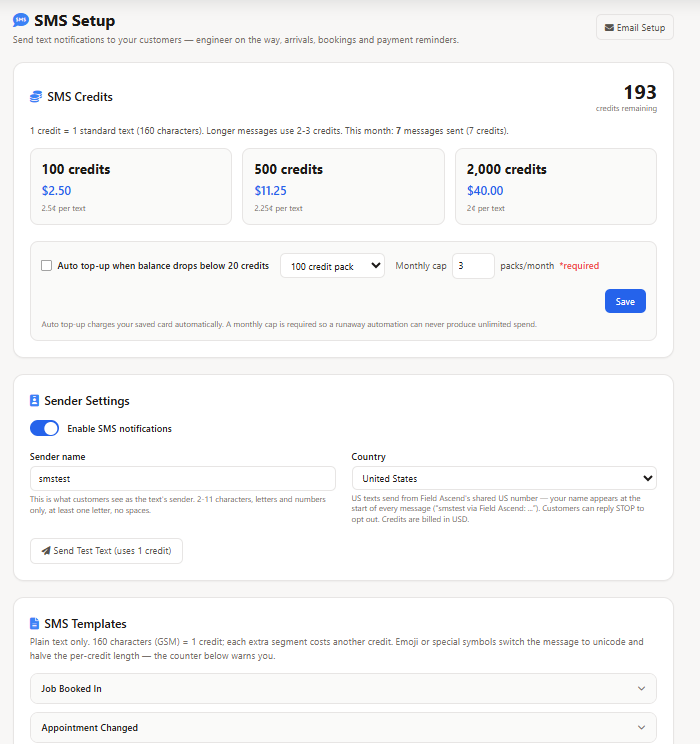
SMS notifications software setup screen showing the company sender name, credit balance and editable message templates

Texts That Send Themselves, From Real Job Events

The point of building texting into the platform is that nobody has to trigger it. An engineer taps Start Travel in the mobile app and the on-the-way text is already gone. He arrives on site and the arrival message follows. A visit gets booked or moved on the planner and the customer is told without anyone opening a message editor.

  • Engineer on the way — fires the moment travel starts, with the engineer's name and expected arrival
  • Engineer arrived — confirms the visit has begun
  • Job booked in — one confirmation once the schedule has settled, not one per edit
  • Appointment changed — the new time, sent automatically when a confirmed visit moves
  • Payment reminder — sent the day after an invoice passes its due date, with a payment link

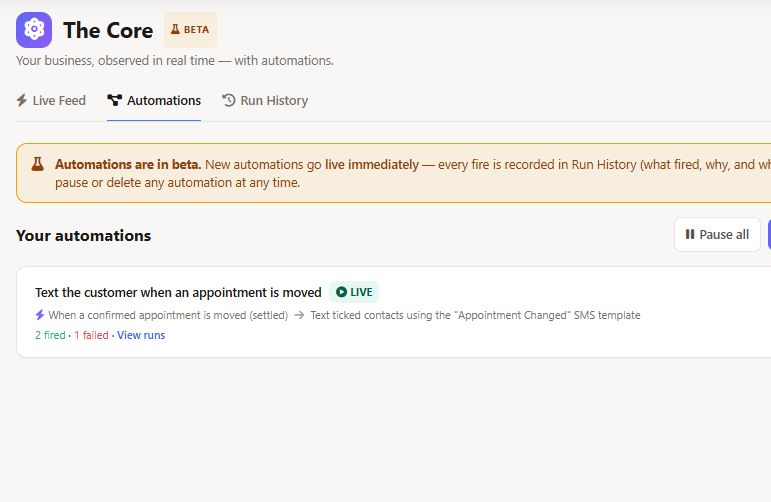
Each one is an automation rule you switch on and edit, part of the same engine behind the Core. No rule, no text — you're never surprised by a message you didn't authorise.

Automation rule builder configuring an SMS notification to send when a field service engineer starts travelling to a job

Templates You Control, Merged With Live Job Data

Every message runs from a template you can edit, with merge fields pulling the engineer's name, the appointment window, the job reference, the site address and the invoice total straight from the record. Write it once in your own tone of voice and it stays consistent across every engineer and every job.

  • Editable templates — one per notification type, worded the way your business speaks
  • Merge fields — engineer, time window, job number, site, invoice total and payment link
  • Segment-aware — the counter warns you when wording tips a message into a second segment
  • Payment links — reminders can carry a direct link for online invoice payment

The result on the customer's phone is short, specific and useful — the opposite of the vague "your appointment is scheduled" text most people ignore.
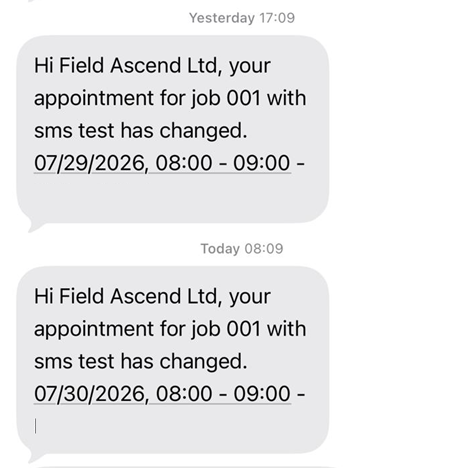
Customer's mobile phone showing an on-the-way text message from a field service company with the engineer's name and arrival time

Consent, Opt-Outs and STOP — Handled Properly

Texting people is a regulated business, and getting it wrong is expensive. Field Ascend treats consent as a per-contact, per-notification setting sitting next to that contact's email preferences — so the site caretaker can get on-the-way texts while only the finance contact receives payment chasers.

  • Per-contact opt-in — texts are chosen per person and per notification type, never assumed
  • Automatic STOP handling — a reply of STOP unsubscribes immediately and flags the contact in Field Ascend
  • START re-subscribes — customers can opt back in themselves, HELP returns an information message
  • Skipped safely — a contact with no mobile number, or with texts switched off, is passed over silently

Opt-outs are respected everywhere, so a customer who leaves once isn't texted again by a different rule. See how contact preferences work across channels in the customer portal.
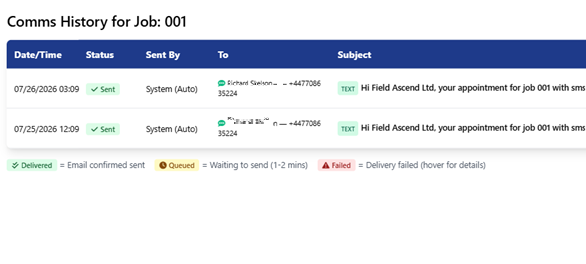
Job communications history showing sent text messages with delivery status against a field service job

Prepaid Credits With a Cap You Set

Texting is pay-as-you-go on prepaid credits rather than a fixed monthly bundle you either overrun or waste. Buy a pack, spend it, top it up — and if you'd rather not think about it, switch on auto top-up with a monthly cap so the spend can never surprise you.

  • Packs of 100, 500 or 2,000 — the larger the pack, the lower the price per credit
  • One credit per segment — the counter shows the cost before you send, no guessing
  • Automatic refunds — credits are returned when a message fails or can't be delivered
  • Auto top-up with a cap — set a monthly limit and it will never be exceeded
  • Low balance warnings — you're told before you run out, not after

Credits are bought in the platform on your saved card, appearing alongside your licence on the same billing page. Full details on pricing.
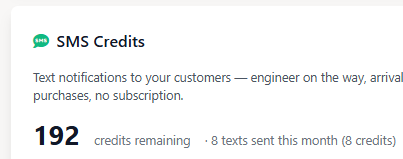
SMS credit balance and prepaid credit packs with auto top-up and monthly cap settings in field service software

Why Texting Belongs Inside Your Job Management Software

Plenty of businesses bolt a standalone texting tool onto the side of their operation. It works, briefly — until someone has to keep two contact lists in step, or explain why the customer got a text about a job that was cancelled an hour earlier. Texting inside your job management software avoids all of it.

One Contact List, Always Current

The mobile number the text goes to is the number on the customer record. Change it once and every future message follows. No exports, no syncing, no stale spreadsheet of numbers from last year.

The Trigger Is the Truth

The on-the-way text fires because an engineer genuinely started travelling — recorded in the app, on the timesheet, on the job. It can't be sent for a visit that isn't happening.

Fewer Wasted Journeys

A no-access visit costs you the travel, the labour and the slot. A text twenty minutes out is the cheapest insurance against an empty property that exists.

Invoices Paid Sooner

An overdue email sits unread in a full inbox. A text with a payment link gets looked at — which is why the overdue reminder pairs so well with invoicing and recurring invoices.

Proof You Told Them

Delivery receipts are written back against the job, so a disputed visit comes down to a timestamped record rather than someone's recollection of a phone call.

Included, Not Upsold

Texting comes with Field Ascend — jobs, quoting, PPM, invoicing, the engineer app and every other feature. You buy credits for the messages you actually send, and nothing else.

Built for Trades Where Turning Up Matters

If your customer has to be in for the visit, a text is the difference between a completed job and a wasted morning. Field Ascend keeps customers informed across reactive and planned work alike.

Frequently Asked Questions

What is SMS notifications software for field service?

SMS notifications software sends customers automatic text message updates about their job — that the engineer is on the way, that an appointment has been booked or moved, or that an invoice is overdue. Because Field Ascend already holds the job, the engineer and the contact, the text is triggered by what actually happens in the field rather than by someone remembering to send it.

Does the text come from my company name or a random number?

In the UK your texts are sent from your own alphanumeric sender name — up to 11 characters, so customers see your company name in place of a phone number. You choose it during setup and it appears on every message you send.

What triggers an automatic text message?

Real events in your job data. When an engineer taps Start Travel in the mobile app, an on-the-way text can go out. When they arrive on site, an arrival text can follow. Booking a visit, moving a confirmed appointment or an invoice passing its due date can each trigger their own message. You choose which events are switched on, and no text is sent without a matching rule.

How much does each text cost?

Texts run on prepaid credits, bought in packs of 100, 500 or 2,000 — the larger the pack, the lower the price per credit. One credit covers one message segment, and a live counter in the message editor shows how many segments your wording will use before you send. If a message fails to deliver, the credits are returned automatically. See pricing for current pack prices.

What happens if a customer replies STOP?

Opt-outs are handled automatically. A customer replying STOP is unsubscribed immediately at the network level and the matching contact is flagged as opted out in Field Ascend, so no further texts are attempted. Replying START re-subscribes them. HELP returns an automatic information message. Nothing needs to be actioned by your office.

Can customers choose which texts they get?

Yes. Text notifications are set per contact and per notification type, exactly like email preferences. One site contact might receive only on-the-way texts while the finance contact receives only payment reminders. A contact with no mobile number, or with texts switched off, is simply skipped.

Can I see whether a text was actually delivered?

Yes. Every message is logged against the job with its delivery status, so the office can see that the customer was told, when they were told and whether the network confirmed delivery. Failed and undelivered messages are shown with their reason and the credits refunded.

Can I text customers outside the UK?

Yes. Field Ascend supports sending to the UK, the United States and Australia, with the correct sender type applied automatically for each destination. UK and Australian messages use an alphanumeric sender name, while US messages are sent from a verified toll-free number with your company name carried in the message text, as American carrier rules require.

Do I need a separate SMS provider account?

No. Texting is built into Field Ascend. There is no third-party messaging account to open, no API keys to paste in and no separate monthly subscription — you set your sender name, buy credits and start sending. It works the same way invoicing and email do: part of the platform, not an add-on.

Stop Fielding "Where Is He?" Calls

Start your free trial today. Full access to customer texting, the visual planner, jobs, invoicing, the engineer app and every other feature.

Start Free Trial