Online Invoice Payments

Let customers pay field service invoices online

Last updated: 22 July 2026

What are online invoice payments? Field Ascend gives each eligible invoice a secure, tokenised Pay Now link that opens Stripe-hosted checkout. The customer pays online, Stripe confirms the result, and Field Ascend records the payment and marks the invoice paid.

The link can travel with the invoice rather than in a separate message: in the email, on the PDF when its template includes the Pay Online block, inside the customer portal, or from the admin Copy Payment Link action. That gives customers a clear route from receiving the bill to settling it.

It extends Field Ascend's field service invoicing software without changing who receives the money. Your Stripe account takes the direct charge; Field Ascend does not hold customer funds or card details.
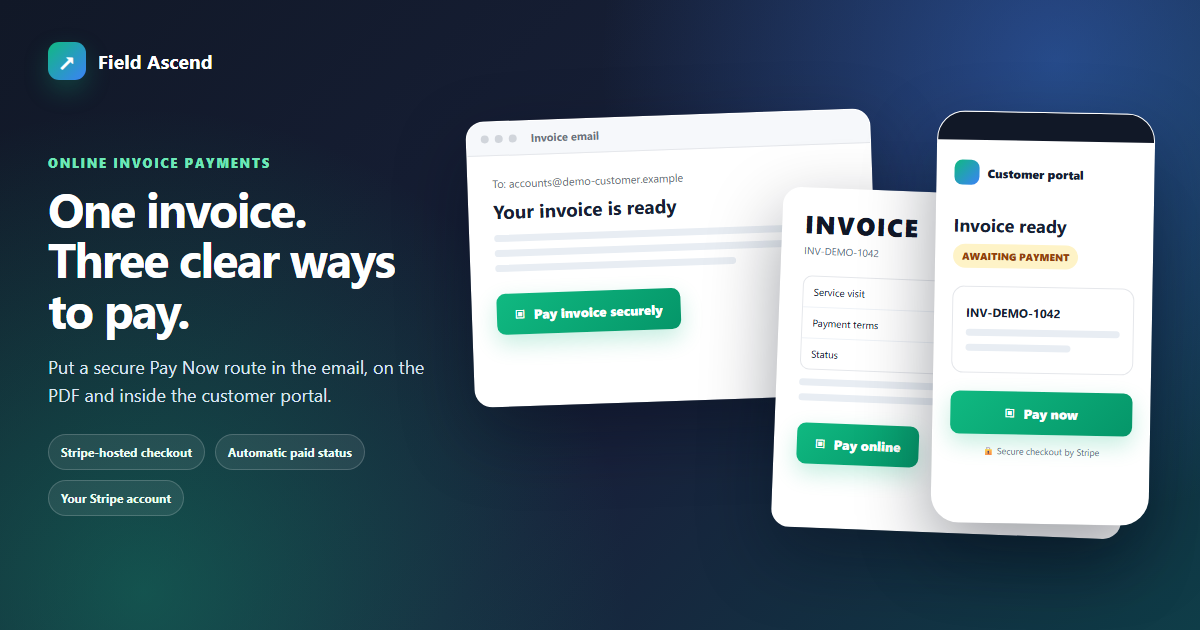
Field Ascend online invoice payment link shown in a customer email, invoice PDF and customer portal

From issued invoice to confirmed payment

Online payment is an invoice collection step, not a separate payment request system. Your office raises an invoice through the normal quote, job, recurring or manual invoice workflow. Once Stripe is connected and the payment link is included in the chosen channel, the customer can move from the invoice to hosted checkout without asking for bank details or calling the office.

Field Ascend uses Stripe Connect Standard accounts and direct charges. The payment goes from the customer into your organisation's Stripe account, then to your bank under Stripe's payout arrangements. Stripe handles hosted checkout, account verification, card details and payouts. Field Ascend receives the payment result needed to update the invoice; it does not become the merchant holding the money.

This is deliberately invoice-only. There is no payment link on a quote. If you need a deposit or staged collection, create the relevant invoice first, then let the customer pay that invoice online.

1. RaiseCreate or issue the invoice from the agreed work, quote or billing plan.
2. SharePlace the secure Pay Now link in the email, PDF or customer portal.
3. PayThe customer completes Stripe-hosted checkout using an available method.
4. ConfirmStripe sends the successful payment event to Field Ascend by webhook.
5. ReconcileField Ascend records payment, updates status and queues supported accounting handoff.

Put the same Pay Now route where customers look

A payment option only helps when it is easy to find. Field Ascend can surface the secure, tokenised invoice link across the documents and screens customers already use. Your team controls the email and PDF presentation, while the customer portal keeps open invoices and their payment route available after the original email has moved down the inbox.

Invoice email

Add {payment_link} to the invoice email content. When the invoice is sent, the customer receives its secure Pay Now link with the message.

Invoice PDF

Add {{payment_link}} through the Pay Online block in the invoice PDF template. If that block is not in the template, the PDF does not show the link.

Customer portal

Customers can open an invoice in their portal and use its payment option there, which is useful when they return later or need another copy.

Admin copy action

Copy Payment Link gives an authorised admin a quick way to place the invoice URL into a genuine one-to-one customer conversation when needed.

The link belongs to the invoice, so staff do not need to create a second payment record before sending it. Keep invoice contact details and templates current, and the collection route stays part of the same customer communication.

Connect your own Stripe account

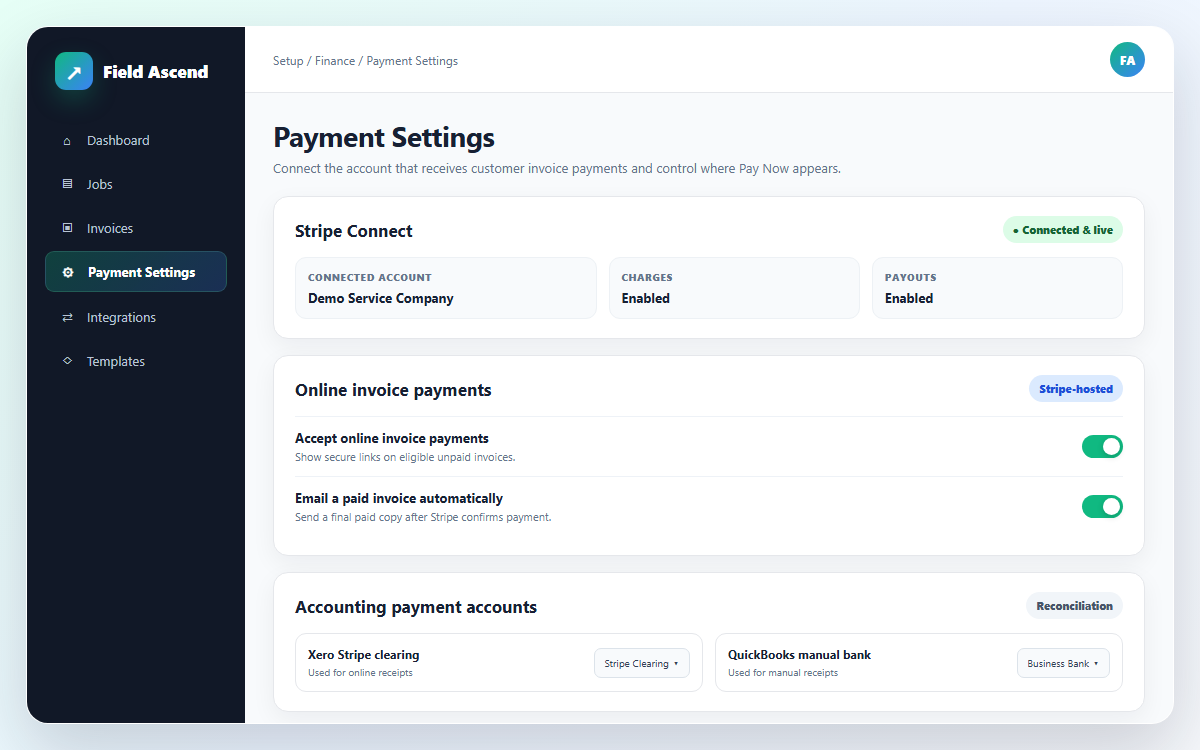
An admin connects Stripe from Setup > Payment Settings. The connection uses a Stripe Connect Standard account, and Stripe may require the organisation to complete verification before live payments are available.

Because charges are direct, customers pay your Stripe account rather than Field Ascend. Stripe controls KYC, checkout and payout timing. Field Ascend neither stores the card details entered at checkout nor receives the funds on your behalf.

  • Cards, Apple Pay and Google Pay are normally available
  • Other methods depend on your Stripe account and availability
  • Stripe account verification must be completed where required
  • Payment and payout terms remain between your organisation and Stripe

This gives businesses using field service management software a connected payment journey while keeping the financial relationship clear.

Field Ascend Payment Settings screen for connecting and verifying a UK organisation's Stripe account

Let Stripe's confirmation close the invoice

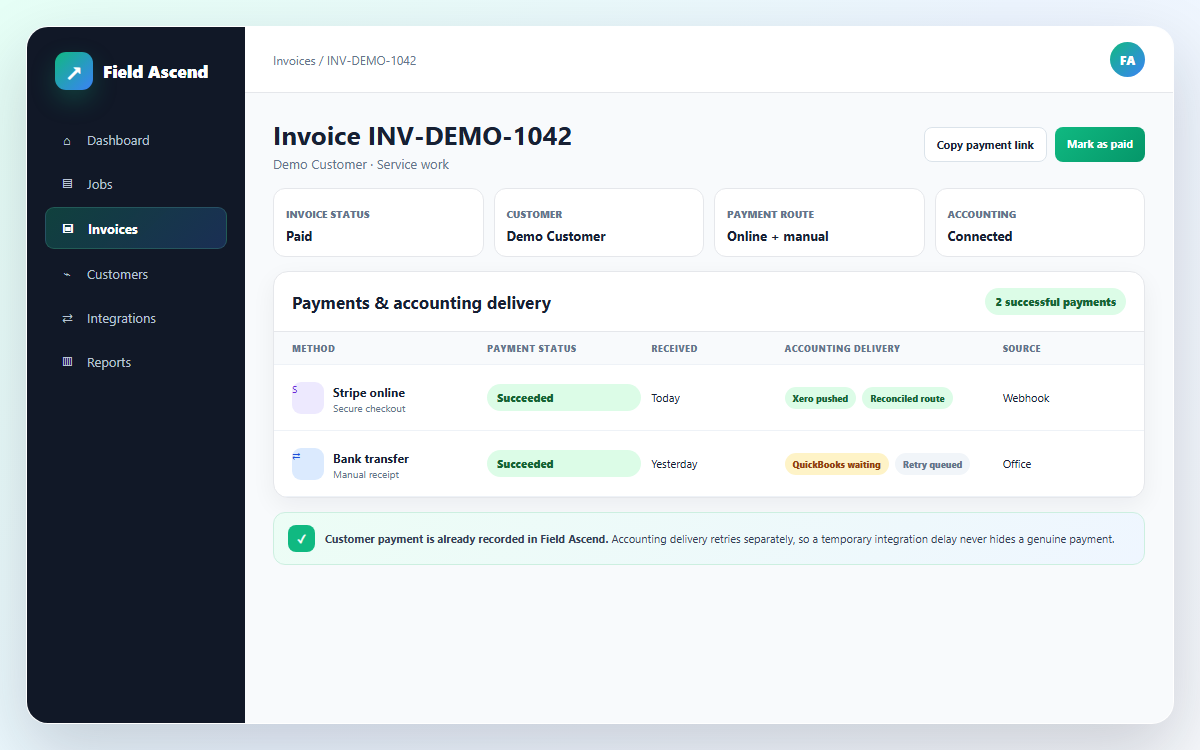
Field Ascend does not repeatedly check a timer to guess whether payment happened. Stripe sends a webhook after a successful checkout. That event writes a payment row to the Field Ascend ledger and marks the invoice paid. If enabled, the system can also email the paid invoice to the customer.

Where Xero or QuickBooks is connected, Field Ascend can push the payment record after the invoice itself has been posted. Stripe payments use the configured clearing account so the accounts trail reflects funds moving through Stripe before payout.

  • Successful webhook drives the local paid status
  • Payment ledger keeps the amount and route visible
  • Accounting push waits until the invoice exists there
  • Transient or not-ready items retry every five minutes
  • Full refunds in Stripe can mark the invoice unpaid

The retry outbox removes the need to race invoice posting against payment confirmation, without pretending that unsupported accounting systems have updated.

Invoice payment ledger and accounting sync status for Stripe, Xero and QuickBooks payments

Online, manual and accounting payment records

Not every customer pays online, and a paid invoice still needs an honest accounting trail. Field Ascend keeps Stripe-confirmed and office-recorded payments in the payment ledger, while the destination account and integration support depend on how the money arrived.

Payment route Field Ascend result Accounting treatment
Stripe Pay Now Webhook writes the payment row and marks the invoice paid. Xero or QuickBooks payment push can use the configured Stripe clearing account once the invoice is posted.
Manual Mark as Paid Admin selects Bank transfer, Cash, Card, Cheque or Other; Field Ascend writes a payment row. Supported Xero or QuickBooks payment push uses the configured bank account, not the Stripe clearing account.
Invoice not ready or transient error The local payment remains recorded instead of being lost. The background outbox retries supported payment handoff every five minutes.
Zoho, Sage or FreeAgent The Field Ascend invoice still marks paid when the payment is confirmed or recorded. Automatic payment push is not yet supported, so the payment must be entered there manually.

This distinction matters at reconciliation time. It avoids sending a manual bank transfer into a Stripe clearing account, and it avoids suggesting that an external ledger is complete when that integration does not yet support automatic payment records.

Deposits and stage payments start with an invoice

Field Ascend does not put payment links on quotes. A customer accepting a quote is different from a customer paying an invoice, and keeping those records separate makes the amount due unambiguous.

For deposits or stage billing, use the existing quote and job invoicing flow to raise a partial amount, a percentage invoice or the remaining balance. Once that invoice exists, it can carry the same Pay Now link as any other eligible invoice.

This also works alongside recurring invoice software: the billing route creates the invoice, and online payments provide a way to settle it. Payment links do not create the underlying bill or decide what portion is due.

A good fit when

  • You want customers to pay issued invoices without requesting bank details
  • Your organisation can open and verify its own Stripe account
  • You want confirmed payments visible against the Field Ascend invoice
  • You use Xero or QuickBooks and can configure the correct accounts

Know the limits

It is not a quote checkout, Field Ascend does not hold funds, available methods are controlled by Stripe, and Zoho, Sage and FreeAgent payments still need manual recording in those systems.

A practical setup checklist

Set up the collection and reconciliation path together. A visible Pay Now button is only one part of a reliable payment workflow; the Stripe account, invoice templates, webhook result and accounting accounts all need to describe the same route.

1. Connect Stripe

Open Setup > Payment Settings and connect the organisation's Stripe Standard account. Complete Stripe verification before relying on live collection.

2. Set accounts

If using Xero or QuickBooks, configure the Stripe clearing account and the bank account used for manual payments.

3. Update templates

Add {payment_link} to invoice emails and {{payment_link}} through the PDF Pay Online block wherever customers should see it.

4. Check the journey

Review the email, PDF, portal and admin copy action so staff know where the link appears and where it does not.

Before a broad rollout, use an appropriate test invoice to confirm the customer-facing wording, Stripe checkout, paid status and any configured accounting handoff. Tell the accounts team that Stripe payments use a clearing account while manual Mark as Paid entries use the configured bank account. That small operational note prevents avoidable reconciliation work later.

Frequently asked questions

What are online invoice payments in Field Ascend?

Online invoice payments let a customer open a secure, tokenised Pay Now link from a Field Ascend invoice and complete Stripe-hosted checkout. Stripe confirms a successful payment to Field Ascend by webhook, which creates a payment ledger row and marks the invoice paid.

Where can the invoice payment link appear?

A Pay Now link can appear in the invoice email through {payment_link}, in the invoice PDF through {{payment_link}} when the PDF template includes the Pay Online block, in the customer portal, and in the admin area through Copy Payment Link.

Does Field Ascend hold the payment or card details?

No. Field Ascend uses Stripe Connect Standard with direct charges. Money moves from the customer to your organisation's Stripe account and then to your bank according to Stripe's payout schedule. Field Ascend does not hold the funds or card details; Stripe hosts checkout and handles verification and payouts.

Can customers pay quotes or deposits through a payment link?

Payment links are for invoices, not quotes. For a deposit or stage payment, use Field Ascend's existing quote or job invoicing flow to create a partial, percentage or remaining-value invoice. The customer then pays that invoice through its Pay Now link.

Does an invoice update as paid automatically?

Yes, after Stripe sends a successful webhook. Field Ascend writes the payment to its ledger, marks the invoice paid and can optionally email the paid invoice. This is event-driven by Stripe's confirmation, not a timer.

Do Stripe payments sync to Xero and QuickBooks?

They can when the relevant integration and accounts are configured and the invoice has already been posted. Stripe payments use the configured clearing account. If the invoice is not ready or a transient error occurs, a background outbox retries every five minutes.

Can the office record payments made outside Stripe?

Yes. Mark as Paid supports Bank transfer, Cash, Card, Cheque and Other, and writes a payment row in Field Ascend. Where Xero or QuickBooks payment push is configured, manual payments use the configured bank account rather than the Stripe clearing account.

Which payment methods and refunds are supported?

Cards, Apple Pay and Google Pay are normally available through Stripe-hosted checkout. Other methods depend on your Stripe account and availability. A full refund completed in Stripe can mark the Field Ascend invoice unpaid.

How much does Field Ascend cost?

Field Ascend starts from £10 per user per month with all features included. Stripe's own payment processing fees and account terms are separate. See the Field Ascend pricing page and Stripe's current terms for the latest costs.

Give every invoice a clearer route to payment

Connect your Stripe account, place Pay Now where customers can find it, and keep confirmed payments tied to the invoice and supported accounting workflow.

Start your free 30-day trial