Capture every customer enquiry - phone calls, emails, website forms, webhooks, and self-service requests from your customer portal - into a single ticket queue built directly into your field service management software. Prioritise, assign, and convert tickets to quotes or jobs with one click. Never lose a lead again. See why your customers want a self-service portal for how customer requests flow into your ticket queue.
Field Ascend's built-in field service ticketing system gives UK contractors and maintenance businesses a centralised work order management system for tracking every inbound request. If you run an HVAC, electrical, or plumbing operation, your team can triage enquiries faster and dispatch engineers sooner with our field service dispatch software.
Full access for 30 days · Ticketing included on all plans · Cancel anytime
Field Ascend is a field service ticketing system that captures enquiries from phone calls, email, web forms, webhooks, and QR code request links scanned on site, then converts them into quotes or jobs in one click - with full lifecycle tracking from first contact through to invoice.
A field service ticketing system is a centralised inbox for every customer request, complaint, and service enquiry your business receives. Unlike a standalone helpdesk tool, Field Ascend's ticketing module is built directly into your field service management software UK platform - meaning tickets sit alongside your jobs, quotes, invoices, purchase orders, and credit notes in one unified system.
For service management software for contractors, this integration is critical. When a customer phones in about a broken boiler, your office staff create a ticket in seconds. When a website visitor submits an enquiry form, a ticket is created automatically. When the work needs scheduling, one click converts that ticket into a fully populated job - carrying across customer details, site address, equipment information, and the original description. No re-keying, no lost context.
The outcome is faster response times, fewer missed enquiries, and a complete audit trail from first contact through to invoice. Every ticket flows through the same lifecycle flowchart as your jobs and quotes, giving you full visibility over your pipeline.
These terms overlap, but they mean different things in practice:
In Field Ascend, the flow is: ticket → triage → job or quote → engineer dispatch → invoice. The ticketing module handles the intake; everything else is already built into the platform.
UK field service businesses typically use ticketing to handle:
Your customers may phone, email, fill in a web form, or scan a code on the wall. Every enquiry lands in the same ticket queue. Field Ascend's field service dispatch software ensures nothing slips through the cracks.
Office staff create tickets manually during calls. Voice dictation support lets you speak the description instead of typing. Link to existing customers or create new ones on the fly.
Turn on Email to Ticket under Setup, Ticket Options, and copy the address. Forward a mailbox to it (Gmail, Microsoft 365, Outlook, or any system that can send mail). The subject becomes the ticket title, the message the description, and a known sender is linked to the customer. Replies you send from the ticket come back onto the same ticket.
Embed a branded "Contact Us" widget on your website with a single line of JavaScript. Visitors submit enquiries that appear as tickets in your dashboard instantly. Attach a form you designed in Surveys and the widget shows your questions, human check included.
Connect your existing web forms, CRM, or third-party tools via a secure token-authenticated webhook. JSON payloads are validated, rate-limited, and converted to tickets automatically.
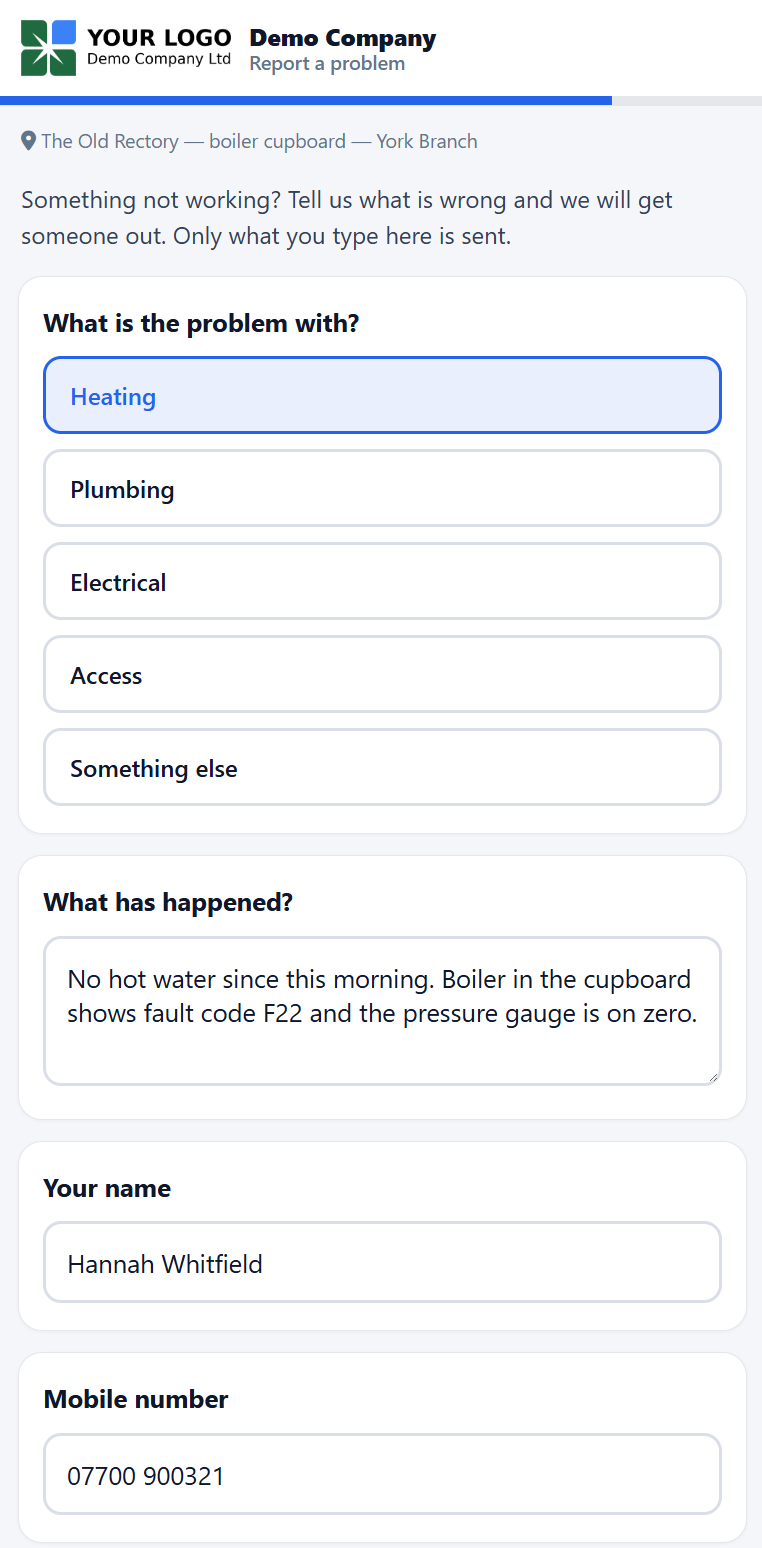
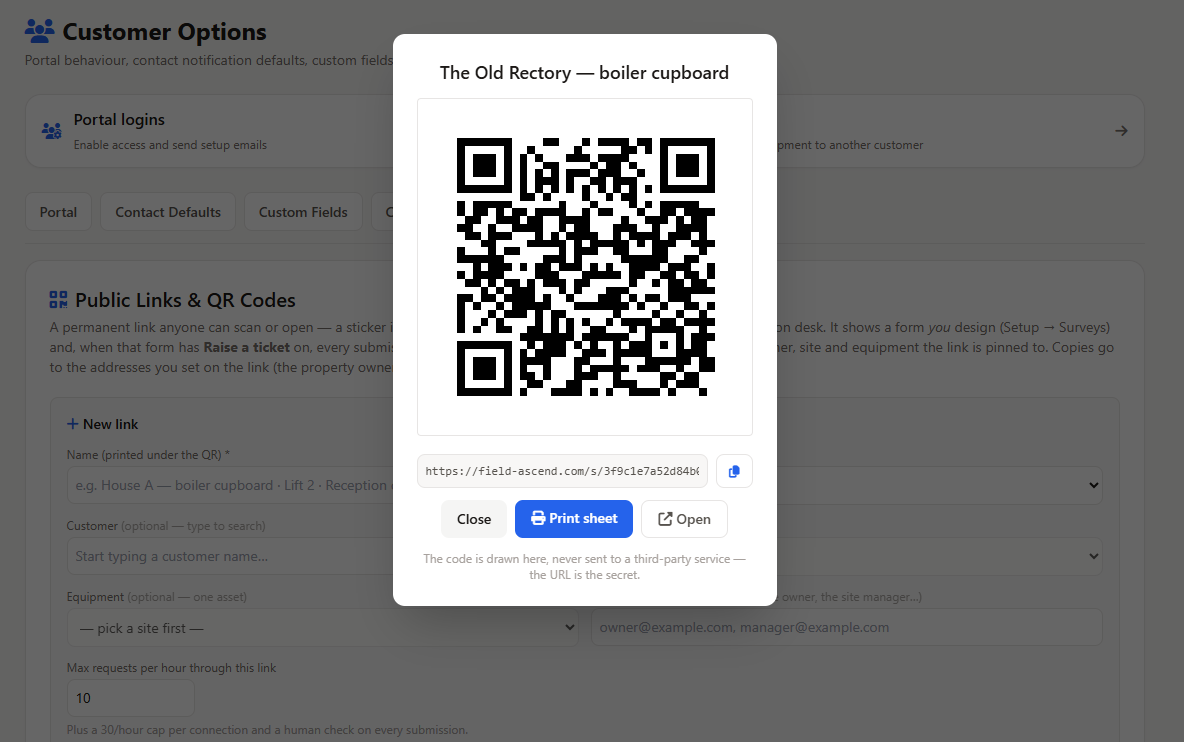
Print a permanent code for a property, plant room, or asset. Anyone who scans it fills in a short form on their phone, with no login, and a ticket is raised pinned to that customer, site, and equipment. How QR code fault reporting works.
Stick a QR code in the boiler cupboard of a holiday let, on a lift car, or at a reception desk. Whoever finds the fault scans it, fills in a short form on their phone, and a ticket lands in your queue already pinned to the right customer, site, and asset. No account, no app, no password. It is built for the properties where the people on site are guests, tenants, or agency staff rather than your customer, and the owner may be in another country.
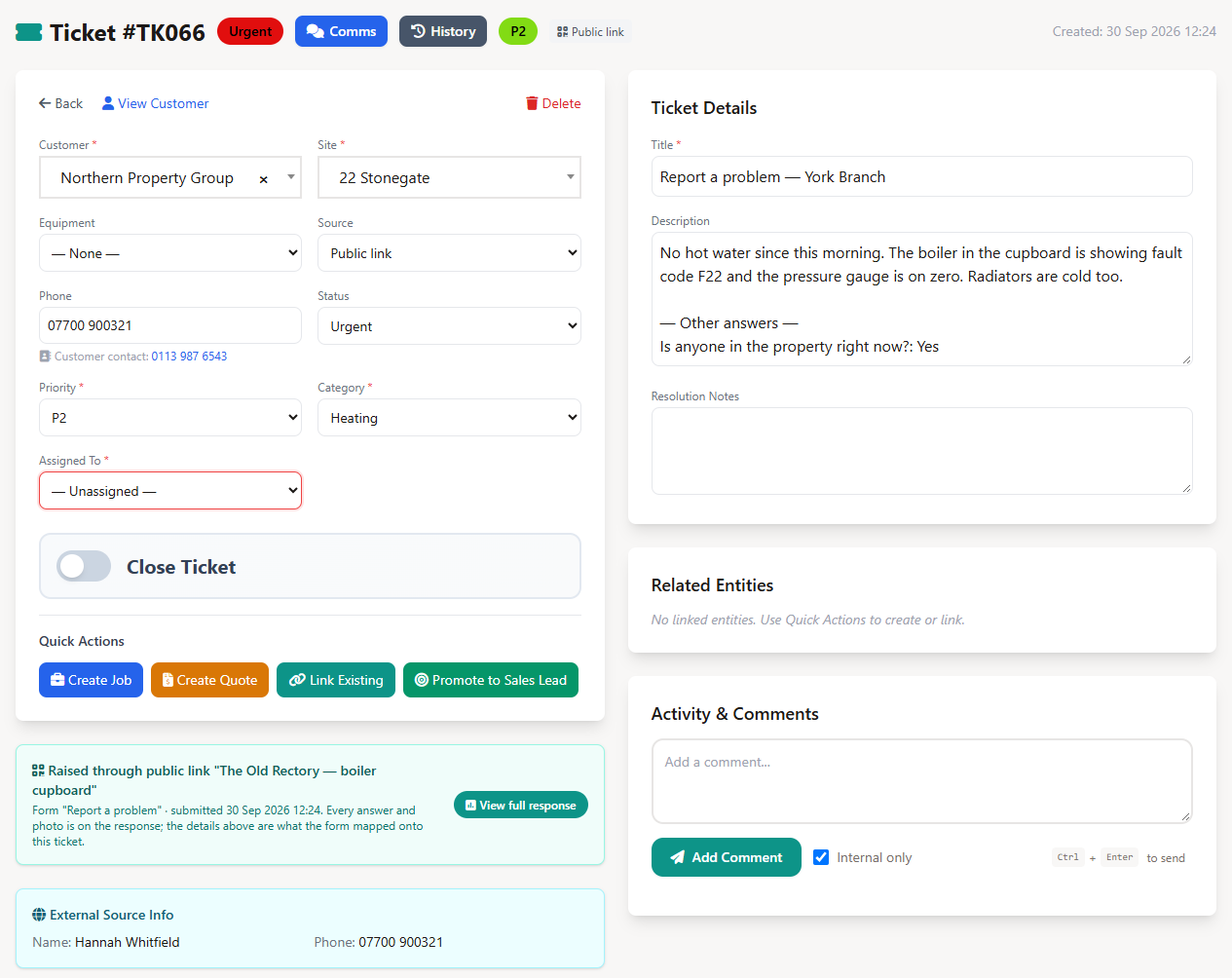
The ticket arrives with the source Public link, the customer, site, and equipment the code was pinned to, the reporter's name and phone number, the category and priority you mapped, the description in their own words, and any photos. Your normal ticket rules still apply: starting status, auto-assignment, then one click to a job or quote. Nothing is booked automatically. The office decides what becomes a job.
Every request can also be emailed to the addresses on the link, so an owner abroad sees the same report the moment it is sent, with the ticket number, the property, and what was written. When the form asks for an email address, the reporter can receive a receipt too.
A printed code cannot expire like an emailed link, so the protection sits around it instead:
Field Ascend's work order management system turns incoming enquiries into completed, invoiced work in four steps.
A customer enquiry arrives via phone, email, website, or webhook. It's logged with customer details, priority, and category.
Your team reviews, sets priority, assigns to an admin or engineer, and adds internal notes. Link to existing jobs or projects if relevant.
One click creates a fully populated job or quote. Customer, site, equipment, and description carry across automatically.
Engineers complete the work via the mobile app. Generate an invoice and sync to your accounting software.
When you click "Convert to Job" or "Convert to Quote", the following data is carried across automatically - no re-keying required:
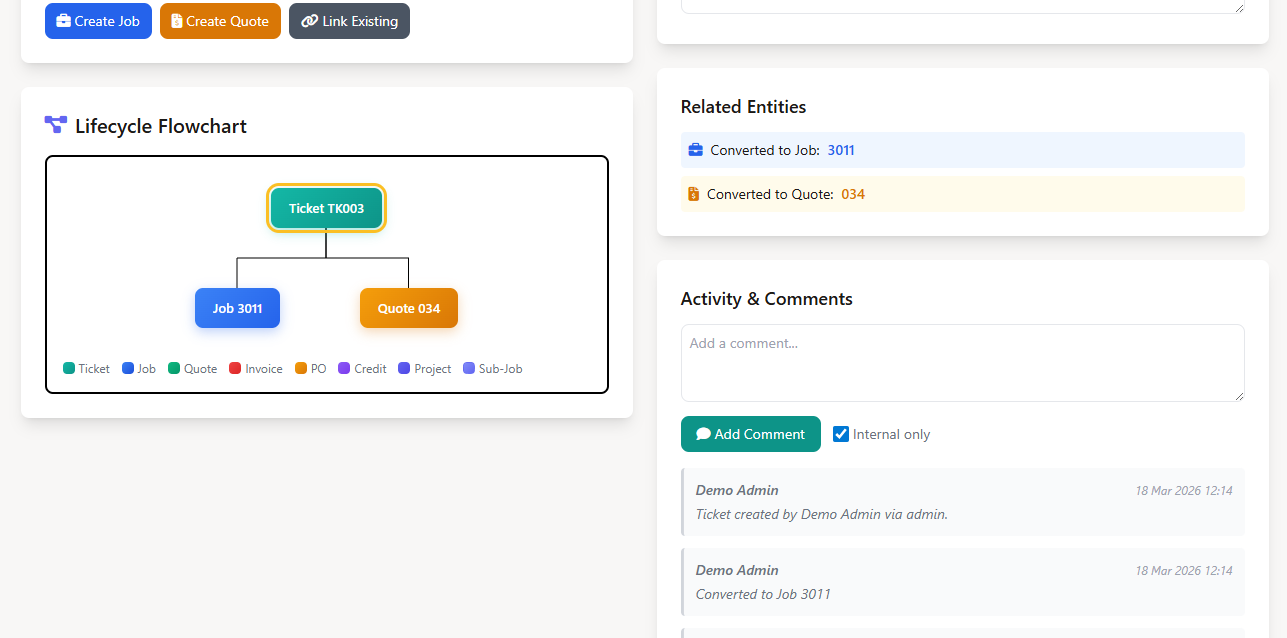
Every ticket is a first-class entity in Field Ascend's lifecycle flowchart. See exactly how enquiries flow through your business - from the initial ticket, through to quotes, jobs, invoices, purchase orders, and credit notes. Click any node to navigate directly to that document.
Every feature is designed specifically for job management software UK teams who need to move fast and never miss an enquiry.
Configure your own ticket statuses (Open, In Progress, Awaiting Parts, Resolved), categories (Emergency, Maintenance, Warranty), and priorities with colour coding. Tailor the system to match how your team actually works.
Convert any ticket into a job or quote with a single click. Customer details, site address, equipment, and description populate automatically. The ticket and job remain linked on the lifecycle flowchart for full traceability.
Link tickets to existing jobs, quotes, invoices, purchase orders, credit notes, and projects. Perfect for tracking follow-up enquiries, customer complaints about existing work, or additional requests on ongoing contracts.
Full audit trail of every action taken on a ticket - status changes, assignments, comments, and conversions. Your team can add internal notes and track resolution progress without leaving the ticket.
Fuzzy search across all entities - customers, sites, jobs, quotes, invoices, tickets - from a single search bar. Find related records instantly when creating or reviewing tickets.
Speak ticket titles and descriptions using built-in speech-to-text. Ideal for busy office staff handling phone calls - dictate the customer's request while you're still on the call.
At-a-glance stats show open tickets, resolved today, website submissions, and totals. Filter by status, priority, category, source, date range, and assignment. Bulk actions let you update multiple tickets at once.
When a ticket arrives by email or from a website form, Field Ascend matches the sender's email to a contact or customer on the account. If nothing matches, the office can create the customer from the ticket.
Token-authenticated webhooks with per-token and per-IP rate limiting, honeypot fields, and CORS support. Your external integrations are protected from abuse and spam by default.
Most field service management software UK platforms treat ticketing as an afterthought. Field Ascend builds it into the core of your operation.
No separate helpdesk subscription. No integration headaches. Ticketing lives alongside your jobs, quotes, and invoices in one platform - sharing the same customers, sites, and equipment records.
Tickets appear on the same lifecycle flowchart as every other document. Trace any enquiry from first contact through quote acceptance, job completion, and final invoice.
An HVAC contractor, an electrician, a plumber, a lift maintenance company, or a facilities management firm - the ticketing system adapts to your workflow.
Ticketing, webhooks, the website widget, and email to ticket are included on every Field Ascend plan at no extra cost. See pricing for details.
Our support team understands UK field service operations. We'll help you configure ticket categories, set up website integrations, and train your team. Get in touch.
Track ticket volumes by source, average resolution time, conversion rates, and team workload. Use the AI dashboard to build custom ticket analytics tiles.
The ticketing system works alongside these Field Ascend features to give you a complete service management software for contractors solution.
A field service ticketing system captures customer enquiries, complaints, and service requests from multiple channels - phone calls, emails, website forms, and webhooks - into a single queue. Each ticket can be tracked, prioritised, assigned, and converted into a job or quote within your field service management software.
With one click you can convert any ticket into a fully populated job or quote, carrying across customer details, site information, equipment data, and the original enquiry description. The lifecycle flowchart tracks the full chain from ticket to job to invoice.
Yes. Field Ascend offers four external routes: an embeddable JavaScript widget for your website, a secure webhook API for custom forms, email forwarding to an address you switch on yourself, and public request links printed as QR codes. All four create tickets automatically. Public request links use the customer, site, and equipment pinned to the link.
Yes. A public request link, usually printed as a QR code, opens a short form on their phone with no login. The submission creates a ticket pinned to the customer, site, and equipment you chose when you made the link. It suits holiday lets, managed blocks, and shared buildings where the person who spots the fault is not your customer.
Yes, if you want them to. Each public link has its own list of copy addresses, and every request is emailed to them with the ticket number, the property, and what was written, so an owner abroad sees exactly what your office sees. When the form asks for an email address, the person reporting the fault can receive a receipt as well.
The link is a random 32-character token with nothing to guess, every submission passes a human check, each link is capped at a number of requests per hour that you choose (10 by default) with a further cap per connection, and any link can be revoked in one click and reprinted. Requests only ever raise tickets. The office decides what becomes a job.
Yes. The ticketing system is included at no extra cost on all Field Ascend plans. There are no add-on fees for external integrations, webhook access, or the embeddable widget. See our pricing for full details.
Engineers can view tickets assigned to them and see the full history when a ticket has been converted to a job. Admin staff manage the ticket queue from the web dashboard, converting tickets to jobs which then appear on the engineer's mobile app with all the context from the original enquiry.
Yes. You can link any ticket to existing jobs, quotes, invoices, purchase orders, credit notes, and projects. This is perfect for tracking follow-up enquiries, customer complaints about existing work, or additional requests related to ongoing projects. Everything appears on the lifecycle flowchart.
Any field service business that handles inbound customer requests benefits from ticketing. This includes HVAC, plumbing, electrical, lift maintenance, facilities management, and dozens more industry sectors.
Start your 30-day free trial with full access to the ticketing system and all features.
Start Your Free Trial