🚨 Automatic Siren Alerts 🛡️ H&S Support 📍 GPS Verified ⚡ 60s Auto-Escalation

Lone Working Software
with Automatic Siren Alerts

Protect your field workforce with FSM software with lone working built-in. When engineers miss check-ins, a loud siren alert sounds on their phone—even bypassing Do Not Disturb. No response in 60 seconds? Automatic escalation to supervisors.

Start Free Trial

🚨 Automatic Siren Alerts to Engineer Phones

Unlike basic check-in apps, Field Ascend proactively alerts engineers when they haven't shown activity. A loud siren sounds on their phone with a simple two-button response.

How Siren Alerts Work

When an engineer doesn't show activity within your configured threshold, they receive an immediate siren alert on their phone. The alert bypasses Do Not Disturb mode and displays a full-screen prompt with two options:

  • "I'm OK" — Confirms safety, resets the check-in timer
  • ! "Need Help" — Immediately escalates to supervisors with GPS location
  • 60-second countdown — No response auto-escalates to emergency
  • 🔇 Bypasses Do Not Disturb — Critical alerts always get through
  • 📱 Works in background — Vibrates and sounds even if app is closed
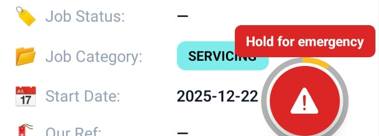
Lone working panic button and siren alert on Field Ascend mobile app

Hold-to-activate panic button prevents accidental triggers
Office Kiosk Mode

Display real-time engineer safety status on office monitors. Auto-scrolling list, live map, and audio alerts for emergencies.

🔄

Auto-Refresh
Every 30s

📜

Auto-Scroll
Engineer List

🔔

Audio Alerts
for Emergencies

🖥️

Portrait &
Landscape Modes

12+

Data Sources Monitored

60s

Auto-Escalation Timeout

24/7

Continuous Monitoring

100%

Audit Trail Coverage

30s

Dashboard Refresh

Lone Working App Features

Field Ascend's lone working software for engineers monitors activity across 12+ data sources and proactively alerts engineers when they need to confirm their safety.

🔔

Automatic Siren Alerts

When an engineer misses check-ins, a loud siren sounds on their phone—even bypassing Do Not Disturb mode. They can respond "I'm OK" or "Need Help" directly from the alert. No response within 60 seconds triggers automatic emergency escalation.

🆘

Hold-to-Activate Panic Button

Engineers can trigger an emergency by holding the panic button for 3 seconds. This prevents accidental triggers while still providing instant access to help. Supervisors receive immediate email alerts with exact GPS coordinates.

📊

Live Safety Dashboard

Real-time monitoring of all field engineers on an interactive map. See who's active, who's in warning status, and who needs immediate attention. Colour-coded status indicators make it easy to spot issues at a glance.

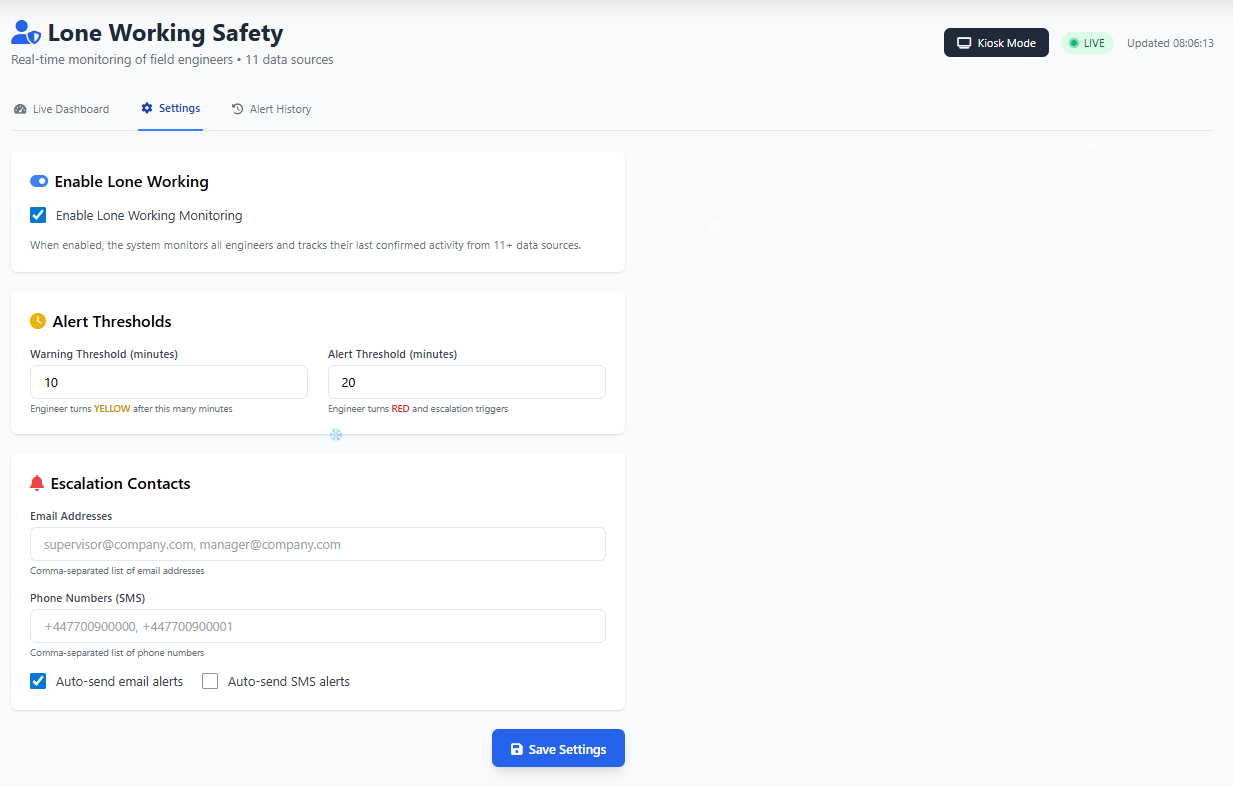
Configurable Alert Thresholds

Set warning and alert thresholds in minutes. When an engineer hasn't shown activity within your configured time, the system automatically escalates—first to warning (yellow), then to alert (red), then siren to phone.

📍

GPS Movement Detection

Secondary safety indicator that detects if an engineer is moving (driving). If they haven't checked in but are travelling at speed, the system recognises they're likely safe and adjusts the alert level accordingly.

📧

Email Escalation Workflows

Automated email alerts to supervisors when engineers miss check-ins or trigger panic alerts. Enterprise-grade email delivery ensures critical safety alerts are never lost to spam filters.

📱

Kiosk Mode for Office Displays

Fullscreen dashboard mode designed for office monitors. Auto-scrolling engineer list, live clock, audio alerts for new emergencies, and landscape/portrait orientation options.

📋

Full Audit Trail

Every safety event logged with timestamps—check-ins, panic alerts, siren responses, acknowledgements. Track when engineers started travel, arrived on site, completed jobs, and every interaction in between.

🔗

Integrated with Job Flow

No separate lone working app needed. Safety monitoring happens automatically as engineers use the mobile app for their normal work—Start Travel, Arrive, Complete, photos, notes, signatures all count as check-ins.

See Lone Working in Action

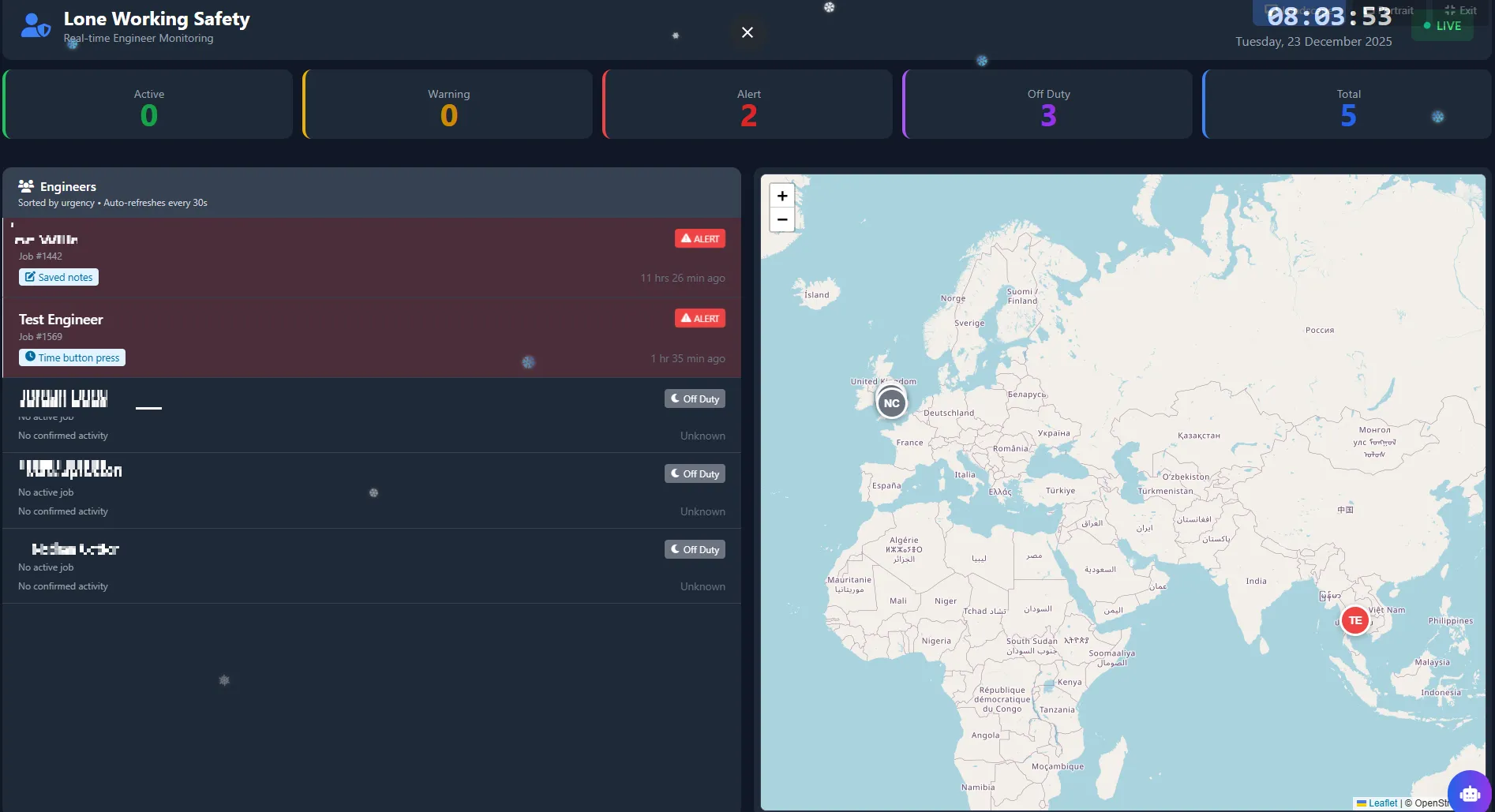
Lone Working Dashboard showing live engineer status and map with real-time safety monitoring

Live Safety Dashboard

Real-time monitoring with map, engineer list sorted by urgency, and configurable thresholds.

Lone Working Kiosk Mode for office displays with auto-scrolling engineer list

Office Display Kiosk Mode

Fullscreen mode with large stats, auto-scrolling list, and audio alerts for office monitors.

How Lone Worker Safety Software Works

  1. 1

    Engineers Work Normally

    Your engineers use the Field Ascend mobile app as usual—starting travel, arriving on site, taking photos, capturing signatures. Every action they take automatically confirms their safety.

  2. 2

    System Monitors Activity

    The lone working system tracks the last confirmed activity for each engineer across 12+ data sources. GPS pings, button presses, notes, photos, signatures, materials, check-in responses—all count as safety confirmations.

  3. 3

    Automatic Siren Alert

    When an engineer hasn't shown activity within your threshold, a loud siren alert sounds on their phone—even bypassing Do Not Disturb. They see a full-screen prompt with "I'm OK" and "Need Help" buttons. The siren plays for 60 seconds while awaiting response.

  4. 4

    Auto-Escalation or Confirmation

    If the engineer taps "I'm OK", the timer resets and they continue working. If they tap "Need Help" or don't respond within 60 seconds, the system automatically creates an emergency and notifies supervisors via email with the engineer's last known GPS location.

  5. 5

    Full Visibility & Records

    The live dashboard shows all engineers on a map with status indicators. Full audit trails of every check-in, alert, and response help support your H&S workflows. Optional kiosk mode for office displays ensures someone is always watching.

Why Choose FSM Software with Built-in Lone Working?

Standalone lone working apps require engineers to remember a separate app. With Field Ascend's integrated approach, safety monitoring happens automatically.

No Separate App Required

Engineers don't need to download, learn, or remember to use a separate lone working app. Safety monitoring is built into their normal job workflow.

💰

No Extra Subscription

Lone working is included in Field Ascend—no separate per-user fees for safety features. One platform, complete protection.

🔔

Proactive Siren Alerts

Unlike basic timer apps that only notify supervisors, Field Ascend proactively alerts the engineer with a loud siren—giving them a chance to confirm safety before escalation.

🔄

More Data, Better Safety

Because we monitor job activity (not just check-in buttons), we have 12+ data sources confirming engineer safety—far more reliable than simple timer-based systems.

Frequently Asked Questions

What is lone working software for engineers?

Lone working software for engineers is a safety system that monitors field workers who work alone at customer sites, in basements, or remote locations. Field Ascend includes automatic siren alerts, hold-to-activate panic buttons, GPS tracking, and escalation workflows to help you manage lone worker safety in line with UK Health & Safety guidance.

What happens if an engineer doesn't respond to a safety check?

When an engineer misses check-ins, a loud siren alert sounds on their phone—even bypassing Do Not Disturb mode. They have 60 seconds to respond "I'm OK" or "Need Help". If there's no response, the system automatically creates an emergency and notifies supervisors via email with the engineer's last known GPS location.

How does the panic button work?

The panic button requires a 3-second hold to activate—this prevents accidental triggers. Once activated, supervisors are immediately notified via email with the engineer's exact GPS coordinates, job details, and site information. The engineer can cancel within a short window if triggered accidentally.

Will siren alerts work if the phone is on silent or Do Not Disturb?

Yes! On Android devices, Field Ascend's safety siren alerts are configured to bypass Do Not Disturb mode. The alert uses maximum notification priority, aggressive vibration patterns, and loud alarm sounds to ensure critical safety alerts always get through.

Is the lone working feature included in Field Ascend pricing?

Yes, lone working is included in Field Ascend at no extra cost. There's no separate per-user fee for safety features—you get complete field service management with built-in lone worker protection in one subscription.

📋 Compliance Note Field Ascend helps you organise records, alerts, and audit trails for lone worker safety. Your business remains responsible for meeting Health & Safety and lone worker legal requirements. We recommend consulting your H&S advisors to ensure your lone working policy meets all applicable regulations.

Protect Your Engineers Today

Join businesses already using Field Ascend's automatic siren alerts and panic button to keep their field workforce safe.

Start Your Free Trial