If you're still scheduling engineers with spreadsheets, whiteboards, or "whoever answers the phone first," you're leaving money on the table. UK field service businesses that switch to proper engineer scheduling software typically see 15-25% improvements in engineer utilisation within the first few months.
This guide explains what engineer scheduling software actually does, why it matters for UK businesses specifically, and how to choose the right platform for your team.
Quick Stats: Why Scheduling Matters
- 40% of engineer time is often spent travelling between jobs
- £150-300 per day cost of a typical field engineer (salary + vehicle + tools)
- 15-25% productivity gain when moving from manual to intelligent scheduling
- 30% reduction in emergency overtime with better capacity planning
What is Engineer Scheduling Software?
Engineer scheduling software is a digital platform that helps you assign the right engineer to the right job at the right time. But modern platforms do far more than just fill calendar slots.
The best engineer scheduling software UK businesses use considers multiple factors simultaneously:
- Location and travel time – Where is the engineer now? How long to reach the job site?
- Skills and certifications – Does this engineer have the qualifications needed?
- Current workload – Are they already booked? What's their capacity?
- Territory zones – Is this job within their assigned area?
- Job priority – Is this urgent or can it wait?
- Customer preferences – Does this client prefer a specific engineer?
Instead of juggling these factors manually, the software presents you with intelligent suggestions - or even automates the assignment entirely based on your rules.
The Cost of Poor Scheduling
Before investing in scheduling software, it helps to understand what bad scheduling actually costs your business. The numbers are often worse than you think.
Excessive Travel Time
Without location-aware scheduling, engineers criss-cross your service area instead of working efficiently within zones. That's fuel, wear, and most critically - billable hours lost to the road.
Skills Mismatches
Sending an engineer without the right certification means either turning away work or sending a second engineer. Both scenarios cost money and frustrate customers.
Reactive Chaos
Without visibility of engineer workload, emergency callouts disrupt entire schedules. Planned work gets pushed, customers are let down, and overtime costs spiral.
Admin Overhead
Manual scheduling takes hours of phone calls, text messages, and spreadsheet juggling. That's expensive office time that could be spent growing the business.
Key Features of Engineer Scheduling Software
Not all scheduling platforms are equal. Here's what to look for when choosing engineer scheduling software UK businesses can rely on:
1. Visual Drag-and-Drop Planner
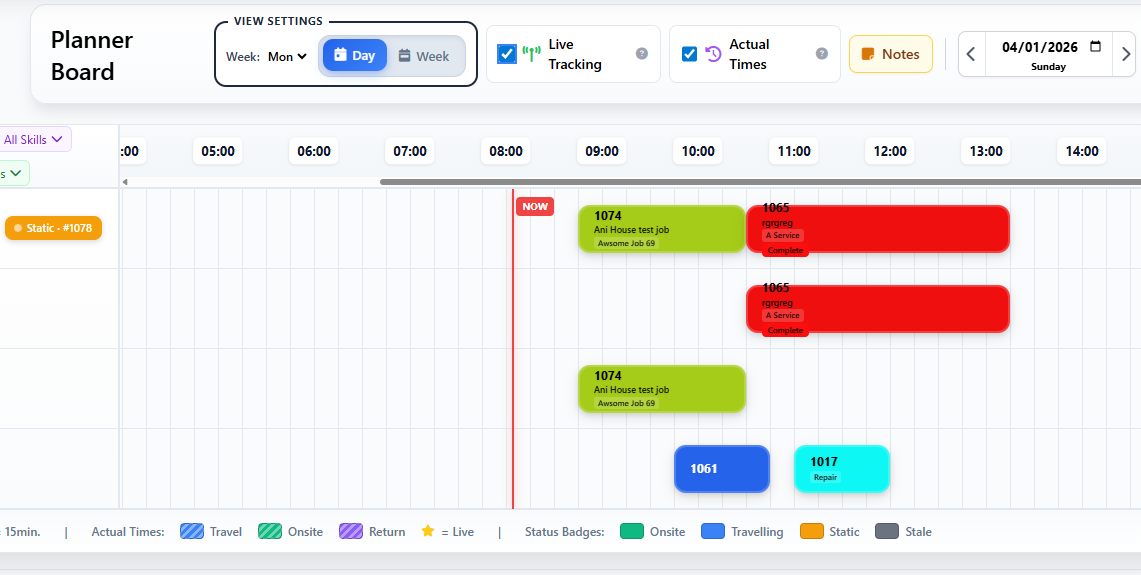
The foundation of any scheduling system is the visual planner board. You should be able to see all your engineers on one screen, with their scheduled jobs displayed as blocks on a timeline.
Good planners let you:
- Drag jobs between engineers to reassign
- Resize job blocks to adjust duration
- See gaps in the schedule at a glance
- Switch between day, week, and month views
- Filter by engineer, job type, or customer
But the best planners go further with features that give you real-time operational awareness:
The "Now Line" – See Where You Are in the Day
A vertical line that moves across the planner in real-time, showing exactly where you are in the current day. At 10:30am, the Now Line sits at 10:30am on the timeline. This simple visual makes it instantly obvious:
- Which jobs should have started but haven't
- Which engineers are running behind
- How much time is left in the working day
- Whether there's capacity for an urgent callout
Without the Now Line, you're constantly checking clocks and doing mental arithmetic. With it, the current state of play is immediately visible.
Live Tracking on the Planner Board
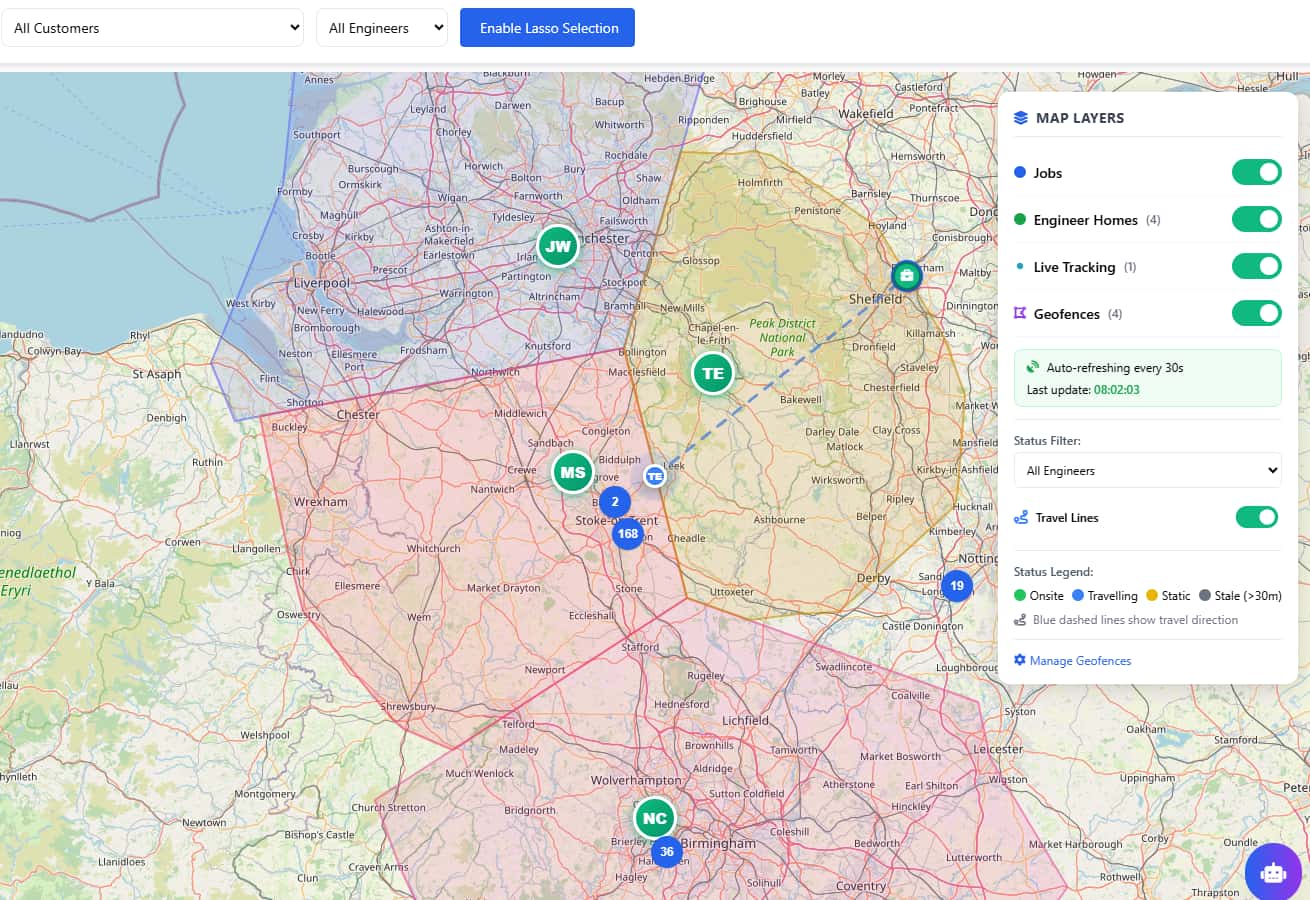
The best scheduling software integrates live GPS tracking directly into the planner view. As engineers move between jobs, you see their real-time position - not on a separate map screen, but right alongside their scheduled work.
This means dispatchers can:
- See if an engineer is travelling to their next job or still on site
- Spot when someone is stuck in traffic or running late
- Verify actual locations match scheduled jobs
- Make informed decisions about reassignments without phone calls
When a customer rings asking "where's my engineer?", you have the answer instantly - no need to call the engineer and interrupt their work.
The "Actual Times" Button – Planned vs Reality
Here's a feature that separates professional scheduling software from basic calendars: the ability to toggle between planned times and actual times.
When you plan a job for 9:00-11:00am, that's what appears on the planner initially. But what actually happened? The engineer arrived at 9:15am and finished at 11:45am. The Actual Times view shows you this reality.
Why does this matter?
- Accurate job costing – Bill for actual time worked, not estimates
- Better future estimates – Learn how long jobs really take
- Identify bottlenecks – See patterns of delays across your team
- Timesheet verification – Ensure recorded hours match reality
- Customer disputes – Have evidence of actual arrival/departure times
One click toggles between the planned schedule and what actually happened - giving you the full picture for reporting, invoicing, and continuous improvement.
Pro Tip: Use Both Views Together
Start your day in Planned view to see what should happen. Mid-afternoon, switch to Actual view to see how reality compares. End of week, use Actual view to verify timesheets and generate accurate invoices. This workflow turns your planner from a simple calendar into a powerful operational tool.
2. Skills-Based Matching
Your engineers have different qualifications - Gas Safe, NICEIC, F-Gas, PASMA, and so on. The best scheduling software tracks these certifications and only suggests engineers qualified for each job type.
Look for platforms that:
- Store qualification data per engineer
- Show skill badges visually on the planner
- Warn or block when assigning unqualified engineers
- Alert you before certifications expire
3. Territory and Geo-Fencing
Geo-fencing lets you define zones for each engineer - whether by postcode area, travel time radius, or custom polygon shapes. Jobs within an engineer's territory are prioritised in suggestions.
This dramatically reduces travel time because engineers work within defined areas instead of crossing paths with colleagues.
Pro Tip: Travel Time Isochrones
The most advanced platforms use "isochrones" - zones defined by actual travel time rather than straight-line distance. An engineer might cover 20 miles in rural Devon but only 5 miles in central London. Isochrones account for real road networks and traffic patterns.
4. Real-Time Availability View
When a customer calls with an urgent job, you need to know who's available right now. Live tracking shows engineer locations on a map, while the planner shows current workload.
The combination lets dispatchers make instant decisions without phoning around the team.
5. Mobile App Integration
Scheduling software is only half the equation. Your engineers need a mobile app that shows their schedule, job details, and any changes in real-time.
When you reassign a job on the planner, it should appear on the engineer's phone within seconds - with push notifications for new work or schedule changes.
6. Capacity Planning
Beyond day-to-day scheduling, good platforms help you plan ahead. How many jobs can you realistically book next week? Do you have enough capacity for that new maintenance contract?
Capacity views aggregate available hours across your team, helping you quote accurately and avoid overpromising.
How to Implement Engineer Scheduling Software
Switching from manual scheduling to software isn't just about buying a tool - it's about changing how your team works. Here's a practical implementation approach:
Document Your Current Process
Before changing anything, understand how scheduling works today. Who makes decisions? What information do they need? Where are the bottlenecks? This baseline helps you measure improvement.
Set Up Engineer Profiles
Enter your engineers into the system with their skills, certifications, and working hours. Define territories if you use them. This data powers the intelligent matching.
Import Existing Jobs
Move your current schedule into the new system. Most platforms can import from spreadsheets or other software. This lets you see your existing workload in the new interface.
Train Your Dispatchers
The people who schedule work need to understand the new tool. Focus on the core workflow: creating jobs, assigning engineers, handling changes. Advanced features can come later.
Roll Out to Engineers
Give engineers the mobile app and show them how to view their schedule. Start simple - just viewing jobs at first. Add features like time logging and job completion as they get comfortable.
Refine Your Rules
After a few weeks, review how the automated suggestions are working. Adjust territory boundaries, skill requirements, and priority rules based on real-world results.
Scheduling for Different Job Types
Different work requires different scheduling approaches. Good software handles all these scenarios:
Reactive / Emergency Work
Urgent callouts need fast dispatch. The system should show who's nearest and available, allowing quick assignment without disrupting the full schedule.
Planned Maintenance (PPM)
PPM jobs are scheduled weeks or months ahead. The software should auto-generate these based on service intervals and slot them into available capacity.
Project Work
Multi-day installations or projects need block booking across several days. Look for project views that show work spanning multiple dates.
Two-Person Jobs
Some work requires two engineers. The scheduler should handle pairing, ensuring both are available and qualified for the job.
Industry-Specific Scheduling Needs
Different trades have unique scheduling requirements:
- HVAC contractors – Seasonal peaks (boiler season in winter, AC in summer) require flexible capacity management
- Electrical contractors – Certification tracking for different voltage ratings and installation types
- Lift maintenance – LOLER compliance deadlines drive scheduling priorities
- Plumbing services – Emergency callouts demand rapid dispatch capability
- Facilities management – Multi-discipline scheduling across different trade types
Measuring Scheduling Success
How do you know if your scheduling software is working? Track these metrics:
- Jobs per engineer per day – Are engineers completing more work?
- Travel time percentage – What proportion of the day is spent driving?
- First-time fix rate – Are the right engineers being sent (with the right skills)?
- Schedule adherence – Are jobs being completed on their planned dates?
- Overtime hours – Is better planning reducing emergency overtime?
- Customer satisfaction – Are appointment windows being met?
Frequently Asked Questions
What is engineer scheduling software?
Engineer scheduling software is a digital tool that helps businesses assign jobs to field engineers based on location, skills, availability, and workload. It replaces manual scheduling with intelligent dispatch, reducing travel time and improving productivity.
How does scheduling software reduce travel time?
By considering engineer location, job proximity, and territory zones when assigning work. Jobs are grouped geographically, and engineers work within defined areas instead of criss-crossing the service region.
Can scheduling software handle emergency callouts?
Yes. Good engineer scheduling software UK shows real-time availability and engineer locations, allowing dispatchers to quickly identify the nearest available engineer and assign urgent work without disrupting planned schedules unnecessarily.
What features should I look for?
Key features include drag-and-drop scheduling, skills-based matching, territory management, real-time tracking, mobile app integration, and UK accounting software integration. Offline capability in the mobile app is essential for engineers working in signal-poor areas.
How long does implementation take?
Most businesses are up and running within 1-2 weeks. Basic scheduling can start on day one; advanced features like automated dispatch rules typically follow after a few weeks of refinement.
Does Field Ascend include engineer scheduling?
Yes. Field Ascend includes a full visual planner board, skills-based matching, territory geo-fencing, real-time tracking, and mobile app integration - all included in every subscription with no add-on fees.
Conclusion: Scheduling as Competitive Advantage
In a competitive market, the businesses that win are the ones that use their engineers most efficiently. Engineer scheduling software isn't just about filling calendar slots - it's about maximising the value of every engineer hour.
The right platform reduces travel time, ensures skills match requirements, handles emergencies without chaos, and gives you visibility across your entire operation. For UK field service businesses, that translates directly to better margins, happier customers, and a more sustainable workload for your team.
Ready to see how intelligent scheduling could transform your dispatch? Start a free trial and experience the difference firsthand.