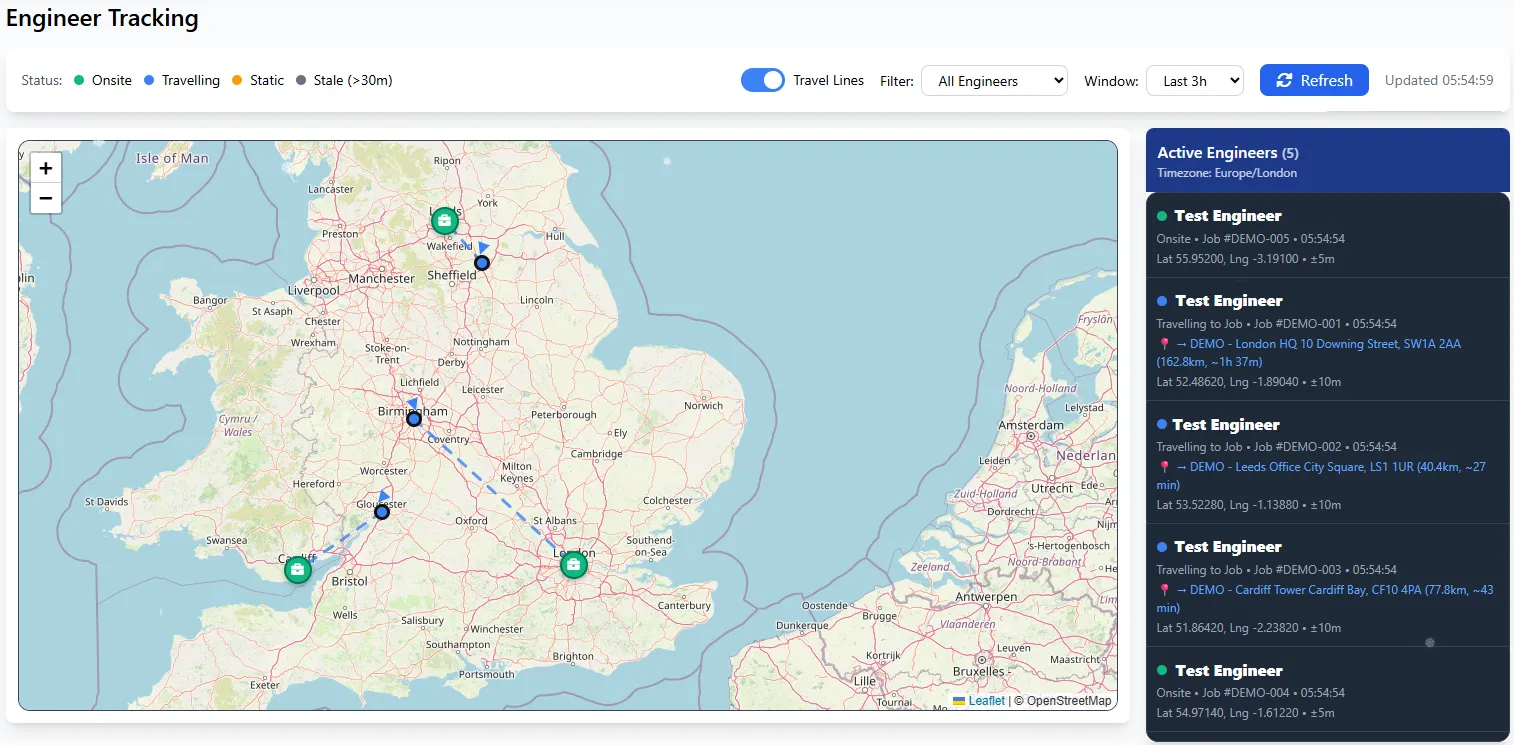
Know exactly where your engineers are - and where they're headed. As field service management software with GPS tracking built in, Field Ascend shows your entire workforce on interactive Leaflet maps with travel direction lines, distance estimates, and live ETAs. Status indicators, speed data, and historical route playback all in one view.
Start Free Trial
Dispatchers across the UK spend hours on "where are you?" calls. With FSM software with tracking built in, you can see every engineer's position, status, and current job at a glance - no phone calls needed.
See exactly where each engineer is headed. Blue dashed lines show the route from their current position to the job site or home address, with distance and ETA estimates displayed in real-time.
Interactive OpenStreetMap-based interface with smooth zoom, pan, and auto-fit to your engineers. Click any marker to see detailed status, current job number, and last ping time.
The Field Ascend mobile app sends GPS coordinates automatically as engineers work. Updates appear on your map within seconds - no manual check-ins required.
Distinct markers show where engineers are headed - home icons when travelling home, job icons when heading to a site. Instantly see the full picture at a glance.
The tracking map refreshes automatically every 30 seconds. Watch engineers move between jobs in near real-time without lifting a finger.
Filter the map by status: All, Travelling Only, Travelling to Job, Travelling Home, Onsite, or Static. Toggle travel lines on/off with a single click.
With field service software with GPS tracking, you instantly see who's available, who's travelling, and who might need a welfare check. Each status is colour-coded for rapid visual scanning.
The side panel lists all active engineers with their current status, job number, and last update time. Click any name to instantly zoom and centre the map on their location.
Need to verify mileage claims or audit an engineer's day? Historical route playback shows exactly where they've been, when. Perfect for compliance and optimisation.
Compare actual routes against claimed mileage. Spot discrepancies before they become payroll issues. Export data for expense reconciliation.
Prove site attendance for regulatory requirements. Generate evidence for disputes or insurance claims. Store route data securely per your retention policy.
Identify inefficient travel patterns. See where engineers are doubling back or taking longer routes. Use insights to improve scheduling and job allocation.
Live tracking isn't an isolated feature - it's woven into every part of Field Ascend. See tracking data on the planner, trigger lone working alerts, and verify timesheet entries automatically.
Toggle the tracking overlay on the planner to see engineer positions alongside scheduled jobs. Spot who's running late and reassign instantly.
Location data feeds into smart matching. The system knows who's nearby when suggesting engineers for urgent callouts.
GPS position is sent with every check-in and panic alert. If an engineer triggers SOS, you know exactly where they are.
Tracking data validates whether engineers are within their assigned territories. Get alerts when boundaries are crossed.
Whether you run a small maintenance crew or manage hundreds of engineers across the UK, our engineer tracking software UK teams rely on scales to fit. No per-engineer limits, no hidden GPS fees.
Know which engineer is closest to an emergency callout. Reduce response times and keep customers informed with accurate ETAs.
Track multi-day projects across multiple sites. See which engineer arrived when, and prove attendance to clients.
Manage engineers across multiple client sites. Show FM clients real-time visibility of who's on their premises.
Engineers using the Field Ascend mobile app automatically send GPS pings to the server. These appear on an interactive Leaflet map in real-time, showing each engineer's current location, status (travelling, on-site, static), speed, and heading. The map auto-refreshes every 30 seconds.
Field Ascend is designed to support GDPR-compliant tracking practices. The system only tracks engineers during working hours when logged into the app, stores location data securely, and allows configurable data retention policies. However, as the data controller, your organisation remains responsible for ensuring legal compliance - including informing engineers, obtaining consent where required, and setting appropriate retention periods.
Yes. Historical route playback lets you view an engineer's movements over any time period. This is useful for auditing, mileage verification, and route optimisation. Filter by 1 hour, 3 hours, 8 hours, or 24 hours to see movement patterns.
Green (On-site) means the engineer is at a job location. Blue (Travelling) means they're in transit to a job or returning home - you'll also see a direction line showing their destination with distance and ETA. Amber (Static) means the engineer hasn't moved recently. Grey (Stale) means no GPS ping received in over 30 minutes - usually indicating the app is closed or no signal.
The mobile app queues GPS events when offline and syncs them when connectivity returns. You'll see the engineer's last known location, and once they're back online, their position updates immediately. This ensures no data is lost in areas with poor signal.
When an engineer is travelling, a blue dashed line appears on the map showing their route from current position to their destination - either a job site or their home address. You'll also see the straight-line distance and an estimated arrival time based on their current speed. This makes it easy to give customers accurate ETAs and monitor progress.
Yes. Use the status filter to show only engineers who are Travelling, Onsite, or Static. You can also toggle travel direction lines on/off, and filter by time window (1h, 3h, 8h, 24h). Click any engineer in the side panel to instantly zoom to their location on the map.
Start your free trial and get real-time visibility of your field team within minutes.
Start Free Trial