Choosing the best FSM software for a UK business changes how the whole operation runs. For HVAC, electrical and maintenance teams, the right platform takes the friction out of scheduling, gets rid of paper, gives engineers back time on site and keeps customers informed.
But with dozens of options available, how do you find the best FSM software for your needs? This guide is specifically written for UK businesses - covering UK accounting integrations, compliance requirements, and features that matter most to British trade and service companies.
In this buyer guide, we'll break down exactly what to look for in field service management software UK businesses need, from offline mobile working and scheduling to PPM, accounting, pricing and support.
⚡ TL;DR – What Makes Great Field Service Software?
- Mobile-first with genuine offline capability
- Intelligent scheduling that considers skills, location and availability
- PPM automation for planned preventive maintenance
- UK accounting integration (Xero, Sage, QuickBooks)
- Transparent pricing without hidden fees
- UK-based support that understands your business
Best fit: who this FSM software guide is for
This guide is most useful for UK service teams that are outgrowing manual processes and looking for connected field service management software. Plumbing firms should start with plumbing field service management software rather than scoring that trade from this guide. Typical readers include:
What UK Businesses Should Look For
UK field service companies have specific requirements that generic or US-focused platforms often overlook. When evaluating FSM software for a UK business, check that the platform supports:
- VAT handling – Correct UK VAT rates applied automatically on quotes, invoices, and credit notes
- UK accounting integration – Native connections to Xero, Sage, or QuickBooks for seamless bookkeeping
- Service contracts and PPM – Recurring planned preventive maintenance scheduling with automated reminders
- Purchase order management – PO numbers, supplier tracking, and approval workflows
- Audit trails – Timestamped records of all job activity for compliance and dispute resolution
- Customer statements – Aged debt and account balance reporting for your customers
- Industry compliance – Support for Gas Safe, NICEIC, LOLER, and similar UK regulatory requirements
- Offline mobile capability – Full functionality in basements, plant rooms, and rural sites where UK mobile coverage drops out
Essential Features the Best Platforms Share
Not all FSM platforms solve the same operational problems. These are the must-have features to check before your team commits:
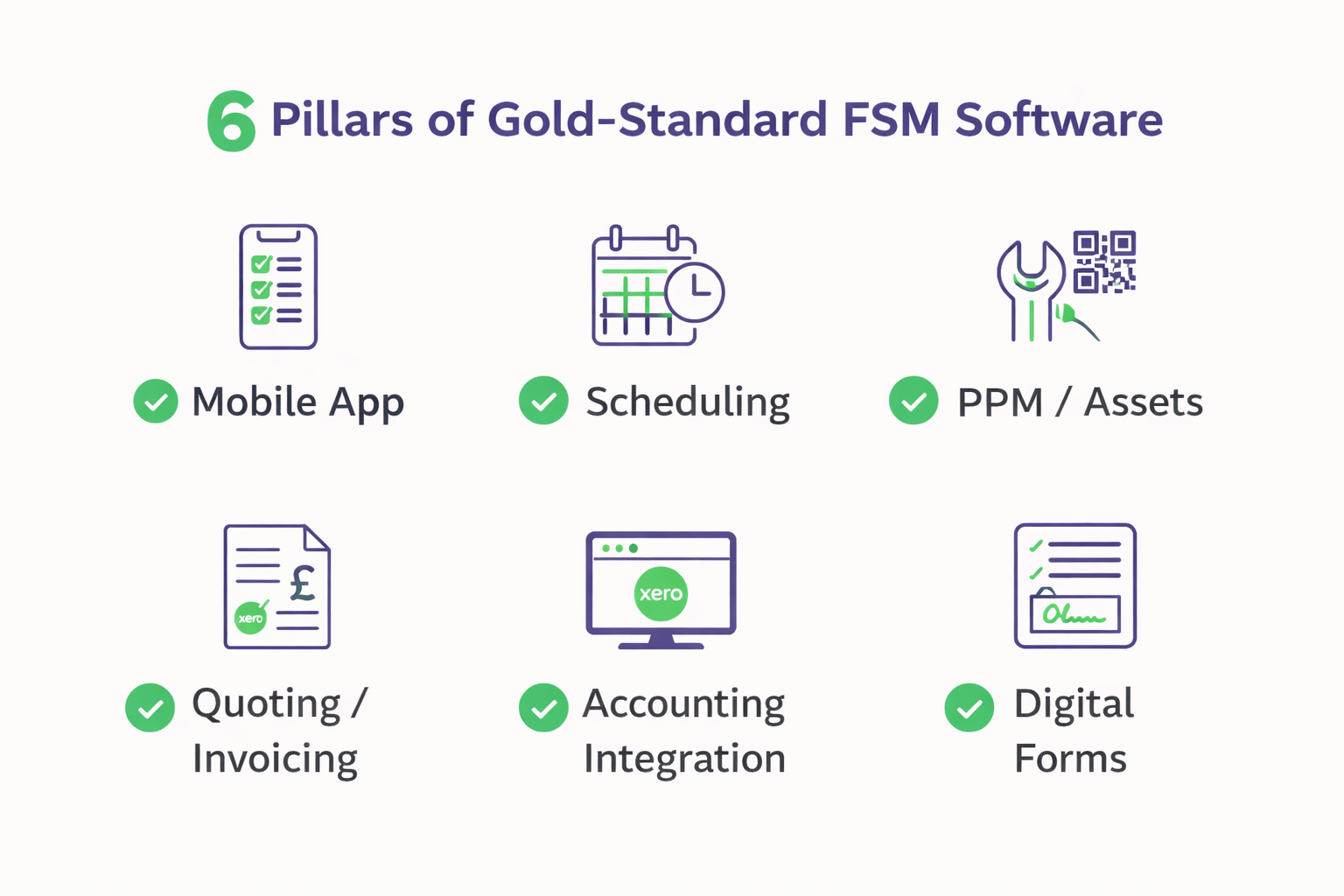
1. Mobile App with Offline Capability
Your engineers work in basements, plant rooms, and remote sites where mobile signal is unreliable. The best FSM software includes a mobile app where the job runs fully offline, so engineers can view jobs, complete check sheets, capture photos, and collect signatures even without connectivity.
When signal returns, everything syncs automatically. This is non-negotiable for UK field service businesses.
2. Intelligent Job Scheduling
Manual scheduling wastes time and leads to inefficient routes. The best field service scheduling software uses intelligent dispatch that considers:
- Engineer location and current workload
- Skills and certifications required for the job
- Travel time and route optimisation
- Job priority and SLA requirements
- Customer preferences and access windows
Look for geo-fencing and territory management features that automatically assign jobs to engineers within defined areas. This is particularly valuable for job management software for engineers covering large territories.
3. PPM Scheduling and Asset Tracking
For businesses running planned preventive maintenance contracts, PPM scheduling software is essential. The best platforms automate:
- Recurring job creation based on service intervals
- Customer notifications and reminders
- Compliance tracking and certificate generation
- Asset registers with full service history per piece of equipment
- QR code scanning for instant asset identification
4. Quoting and Invoicing
Speed up your cash flow with integrated quoting and invoicing. The best FSM software lets you:
- Create professional quotes from completed jobs
- Use AI-powered quote generation based on historical data
- Track quote approvals and convert to jobs automatically
- Generate invoices from completed work
- Push invoices to your accounting software
5. UK Accounting Integration
Eliminating double-entry saves hours every week. The best FSM platforms for UK businesses integrate with:
- Xero – The most popular cloud accounting software for UK SMEs
- Sage – Widely used by established UK businesses
- QuickBooks – Popular with smaller businesses and sole traders
6. Digital Forms and Check Sheets
Replace paper-based job sheets with digital forms. Engineers complete work on their mobile device, capture photos, collect signatures, and generate professional reports automatically. No more illegible handwriting or data entry back at the office.
7. Customer Portal
A customer portal gives customers self-service access to:
- Request new jobs or report issues
- View upcoming scheduled work
- Access service history and certificates
- Track engineer arrival times
- Approve quotes online
Comparison Checklist: How to Score Each Platform
When comparing FSM options, use this checklist to evaluate each platform. You can also check independent review sites like Capterra to compare platforms and read user feedback.
| Feature | Must Have | Why It Matters |
|---|---|---|
| Offline mobile app | ✓ | Engineers work in areas with no signal |
| Intelligent scheduling | ✓ | Reduces travel time, increases productivity |
| PPM automation | ✓ | Essential for maintenance contracts |
| Asset tracking | ✓ | Full service history per equipment |
| UK accounting integration | ✓ | Eliminates double-entry, speeds invoicing |
| Digital signatures | ✓ | Proof of work completion |
| Photo capture | ✓ | Before/after documentation |
| Custom forms | ✓ | Industry-specific requirements |
| Free trial | ✓ | Test before you commit |
| UK-based support | ✓ | Understands UK business requirements |
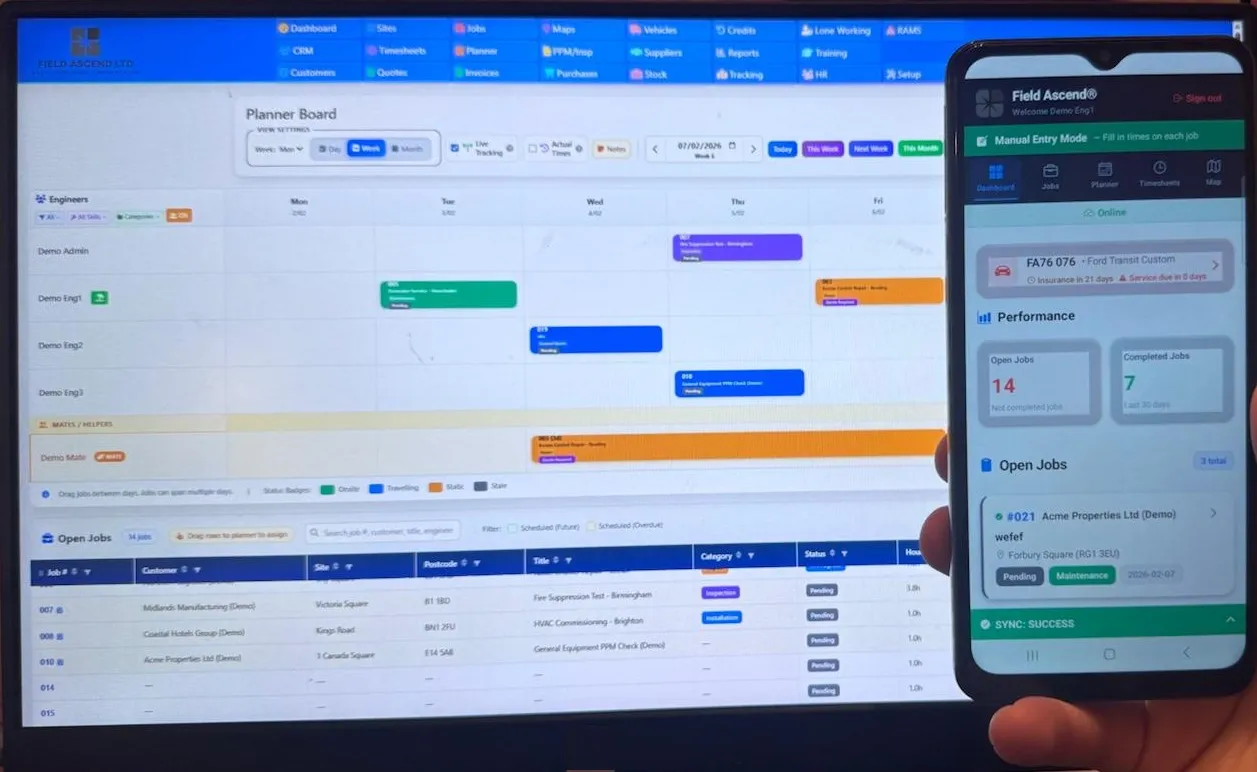
What to Look for in FSM Software in 2026
The FSM market has shifted considerably heading into 2026, and buyers who evaluated software even twelve months ago will find parts of the landscape unrecognisable. AI is becoming increasingly useful in this space - the stronger platforms now use it to draft quotes from historical job data, surface patterns in reporting that would take a human analyst hours to spot, and flag scheduling conflicts before they cost you a wasted van journey. Platforms without meaningful AI in their quoting or analytics workflows can feel a step behind for many teams.
Offline mobile capability has moved from a differentiator to a baseline expectation. If your engineers work in plant rooms, basements or rural postcodes - and in the UK, that covers a lot of the country - the app needs to function without signal. Not a read-only cache of job titles, but complete workflows: check sheets, photos, signatures and notes, all syncing once connectivity returns. This matters most for reactive maintenance, where an engineer may arrive at a site, lose signal on entry, and need to capture everything before moving on to the next call.
Planned preventive maintenance is another area where the gap between strong and mediocre platforms has widened. Strong FSM software in 2026 handles recurring PPM schedules with asset-level tracking, automated reminders and compliance documentation that satisfies auditors without creating admin overhead. For regulated trades, that often means built-in support for F-Gas refrigerant logs, PAT testing records, LOLER thorough examination certificates and Gas Safe documentation - rather than third-party workarounds or manual spreadsheets sitting outside the system.
Pricing transparency matters more than ever. Some vendors fragment their offering into base plans, per-feature add-ons, integration surcharges and tiered support levels. Clearer pricing - where the modules and integrations you actually need are bundled rather than scattered across upgrades - makes it easier to compare platforms on a like-for-like basis. When weighing up the true cost of FSM software, ask what the price covers in total, not just the headline figure on the pricing page.
Questions to Ask Before You Buy
Before committing to any platform, put these questions to every vendor on your shortlist. Start with pricing: ask what is included in the base price and whether scheduling, invoicing, PPM, and integrations carry additional charges. A platform that appears affordable at first glance can quickly become expensive once you add the modules your business actually needs to function day-to-day.
Ask whether the mobile app works offline - genuinely offline, not merely cached. Your engineers should be able to complete full job workflows in a basement with no signal and have everything sync automatically when they surface. Ask how PPM scheduling works and whether the platform can automate recurring maintenance across different service intervals, asset types, and customer sites without manual intervention each time a job comes due.
Integration with your accounting software is worth confirming early. Native connections to Xero, QuickBooks, or Sage that push invoices and sync customer records in real time will save hours of double-entry every week. For UK businesses specifically, ask about CIS reverse charge handling and whether VAT is applied correctly across quotes, invoices, and credit notes - getting this wrong creates problems at the year end that far outweigh any time saved elsewhere.
Finally, ask where the support team is based. A UK-based team that understands DRC regulations, Gas Safe requirements, and the realities of running a British field service business will resolve issues faster than an overseas helpdesk reading from a generic script. When something goes wrong on a Monday morning and your engineers are waiting, response time and domain knowledge matter far more than a chatbot.
Best FSM Software by Industry
Different industries have unique requirements. The best platforms adapt to your specific workflow:
HVAC & Heating
F-Gas compliance, Gas Safe tracking, boiler service scheduling, refrigerant logging, and emergency callout management.
⚡ Electrical Contractors
EICR scheduling, certificate generation, emergency lighting testing, PAT testing integration, and multi-site contract management.
Plumbing Software UK
Emergency callout dispatch, water regulations compliance, parts tracking, and recurring maintenance contracts.
Lift Maintenance
LOLER inspection scheduling, thorough examination tracking, certificate management, and emergency callout response.
Facilities Management
Multi-discipline scheduling, SLA tracking, client portals, compliance dashboards, and CAFM integration.
More Industries
View all 35+ industries we support, from security systems to commercial kitchen equipment.
How Much Does the Best FSM Software Cost in the UK?
Pricing for FSM software varies significantly. Here's what to expect:
- Entry-level/SME solutions: £10-30 per user per month
- Mid-market platforms: £30-60 per user per month
- Enterprise solutions: £60-150+ per user per month
The best platforms offer transparent pricing without hidden fees. Watch out for:
- Setup fees (can be £500-5000+)
- Training charges
- Per-transaction fees
- Integration add-ons
- Support tier charges
Field Ascend Pricing
See Field Ascend pricing from £10 per user per month with no setup fees and no hidden charges. Start with a 30-day free trial to evaluate the platform before committing.
Why UK Businesses Choose Field Ascend
Field Ascend is built for UK trades and maintenance businesses, designed for British service companies. Here is what teams typically value:
- Offline-first mobile app: Complete job workflows without signal - useful for basements and plant rooms
- PPM scheduling: Recurring planned maintenance with asset-linked check sheets and QR scanning
- AI-assisted quoting: Draft quotes quickly using your historical job data
- Native Xero integration: Push invoices and sync customers without double-entry
- UK-based support: A team that understands UK compliance requirements
- No hidden fees: Transparent pricing, 30-day free trial, cancel anytime
As mobile workforce management and job management software for engineers, Field Ascend gives your field team what they need on their phone or tablet - job details, asset history, check sheets, photos and signatures - and is designed to keep working when the signal drops.
How to Choose the Right Platform
Follow these steps to find the right field service management software UK for your business:
Step 1: Define Your Requirements
List your must-have features based on your industry and workflow. Consider reactive work, planned maintenance, compliance needs, and integration requirements.
Step 2: Shortlist 2-3 Options
Research platforms that serve your industry and offer the features you need. Read reviews, check case studies, and ask for recommendations from other UK businesses.
Step 3: Request Demos
See each platform in action with your actual use cases. Ask about offline capability, PPM workflows, and UK-specific features.
Step 4: Run a Trial
Test your shortlisted options with real data and real users. Involve your engineers - they're the ones who'll use it daily.
Step 5: Check Support and Training
Understand what support is included, response times, and training resources. UK-based support is valuable for UK-specific requirements.
Step 6: Review Pricing Carefully
Get a full breakdown of costs including setup, training, integrations, and support. Avoid platforms with complex per-transaction pricing.
Frequently Asked Questions
What is FSM software?
FSM software, or field service management software, is a system designed to help businesses run their mobile workforce. Our plain guide to what FSM software is covers the term in depth. It typically covers scheduling, dispatch, work orders, mobile engineer apps, PPM, asset history, quoting, invoicing and reporting in one connected platform.
Is FSM software the same as field service management software?
Yes. FSM is simply the abbreviation for field service management. The two terms are used interchangeably and refer to the same category of software designed to help service businesses manage jobs, engineers and customers.
What should the best FSM software include?
Strong FSM software typically includes a mobile app that works offline, intelligent scheduling and dispatch, PPM scheduling, an asset register with service history, quoting and invoicing, reporting, and integrations with accounting tools such as Xero. For UK teams, VAT handling and support for UK compliance requirements are also useful.
Is FSM software suitable for small UK contractors?
Yes. FSM software is well suited to small and growing UK contractors who are moving away from spreadsheets, paper job sheets or generic CRMs. Many platforms scale from a handful of engineers up to larger teams, so contractors can start small and add users as the business grows.
Does FSM software help with PPM?
Yes. Most modern FSM platforms include PPM (planned preventive maintenance) features. This typically includes recurring job creation based on service intervals, asset-linked check sheets, automated reminders and compliance documentation. See our PPM software page for more detail.
Does FSM software work for mobile engineers?
Yes. FSM software is designed around mobile engineers. A good mobile engineer app provides job details, asset history, check sheets, photo capture and signatures, and ideally works offline so engineers can complete work in plant rooms, basements and rural areas with poor signal.
What is the best field service software in the UK?
The best field service software for a UK business depends on your specific industry, team size and requirements. Useful features to look for include offline mobile capability, UK accounting integration (Xero, Sage) and support for UK compliance requirements. Field Ascend is a strong choice as field service software for UK SMEs, with an offline-first approach, PPM features and transparent pricing with no hidden fees.
What should UK businesses look for in FSM software?
When choosing field service management software UK teams rely on, prioritise mobile offline capability, intelligent scheduling, PPM automation and native UK accounting integration. Field Ascend is designed for UK trade and maintenance businesses, with features built around UK compliance requirements and business practices.
How much does FSM software cost?
FSM software typically costs around £10-£50 per user per month for SME solutions. Enterprise platforms cost more. Field Ascend offers transparent pricing from £10 per user per month with no hidden fees.
Do I need mobile app offline capability?
For most UK field service businesses, yes. Engineers regularly work in basements, plant rooms and remote sites with poor connectivity. Offline capability helps keep engineers productive regardless of signal.
Can FSM software integrate with Xero?
Many platforms include native Xero integration for syncing customers, pushing invoices and reducing double-entry. Field Ascend integrates directly with Xero.
Is job management software for engineers worth it?
For many teams, yes. Job management software for engineers can help reduce paperwork, speed up invoicing and improve customer service. The return on investment depends on setup and usage, but most teams see measurable benefits within a few months through reduced admin time, fewer missed jobs and faster payment cycles.
How long does it take to set up FSM software?
Most cloud-based FSM platforms can be set up within a day. You typically create your account, add engineers and customers, and configure your job types and service workflows. Some providers also offer data import tools so you can migrate existing records from spreadsheets rather than re-entering everything manually.
Can I import existing customer and job data?
Yes, most FSM platforms support data import from CSV or Excel files. This lets you bring across customer records, site details, equipment registers and historical job information without starting from scratch.
Does the mobile app work without an internet connection?
It depends on the platform. Some FSM apps only cache basic job information when offline. The strongest platforms offer full offline capability - engineers can view job details, complete check sheets, capture photos and collect signatures with no signal at all. Data syncs automatically when connectivity returns.
Who is FSM software best suited for?
FSM software is designed for businesses that send engineers or technicians to customer sites. Common industries include HVAC, electrical, plumbing, lift maintenance, fire and security, facilities management and commercial catering equipment. It suits sole traders through to companies with large engineering teams.
Can multiple office users and engineers access FSM software at the same time?
Yes. FSM software is designed for concurrent multi-user access. Office staff manage scheduling, quoting and invoicing from a web dashboard, while engineers access their assigned jobs via the mobile app - all updated in real time.
Conclusion
Finding the best field service software for a UK business comes down to understanding your specific needs, evaluating the key features and testing platforms with real workflows. The right choice can transform day-to-day operations - improving engineer productivity, reducing paperwork, speeding up invoicing and helping you deliver a better customer experience.
For UK businesses, prioritise genuine offline working, accounting connections and support for industry-specific compliance. Shortlist platforms that combine those with PPM and asset tracking, then test them against your own jobs. Start with a free trial to see how it fits your team.
Ready to see how Field Ascend works as FSM software for UK teams? Start your free 30-day trial today.
Compare Field Ascend on Independent Review Sites
Field Ascend is listed on Capterra and G2, independent software comparison platforms where businesses can evaluate field service management tools side by side.
You can compare features, pricing, and user feedback to help inform your decision. View Field Ascend on Capterra to see how it compares.