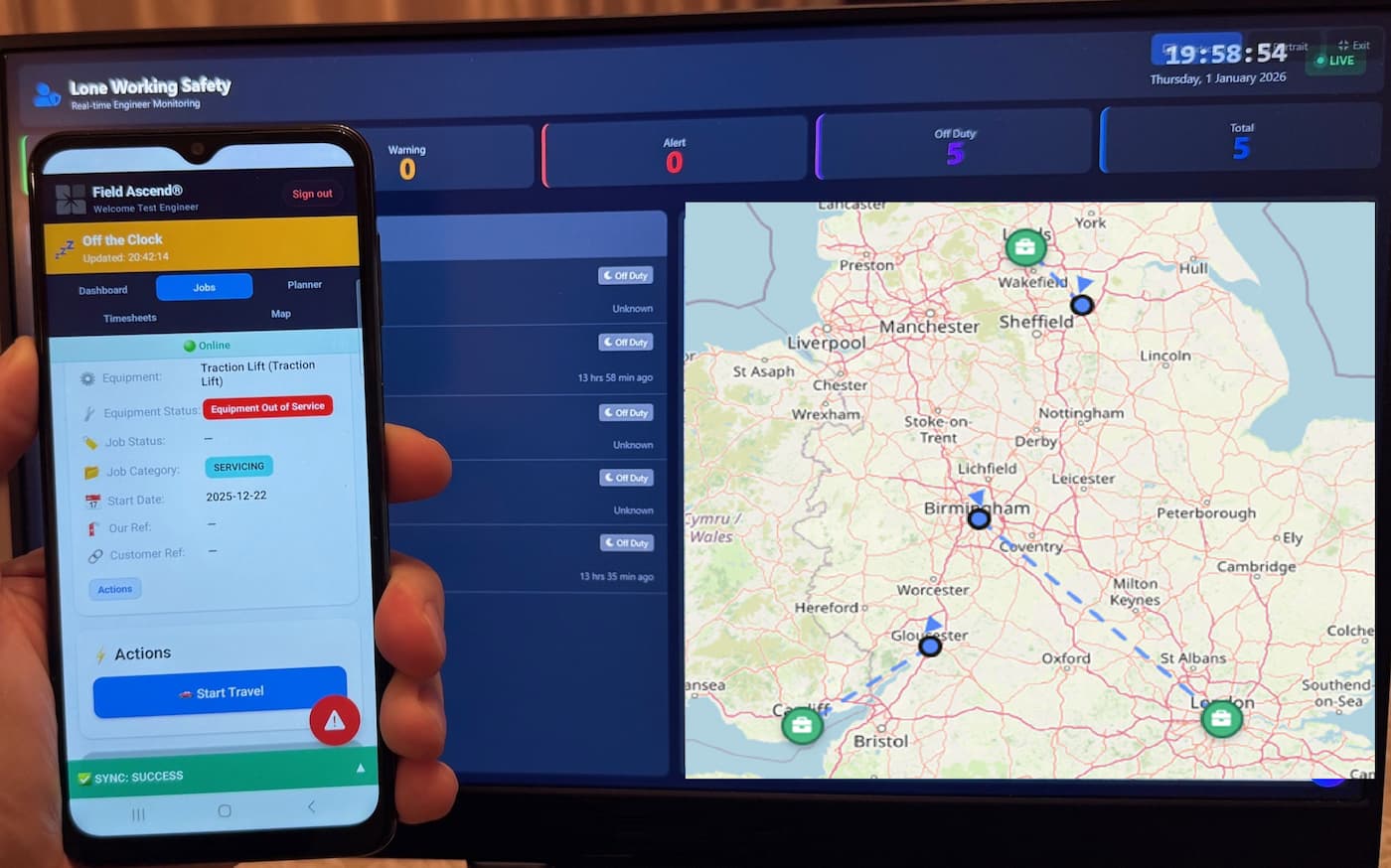
Running a growing trade business is hard enough without wrestling with clunky software that fights you at every step. You need to schedule jobs, keep engineers informed, get paid on time, and maybe - just maybe - finish work at a reasonable hour.
Field service software for small business now covers a wide range of needs, but product depth, pricing and implementation support vary considerably. This guide helps you compare them against the workflows a growing UK trade business actually needs.
What Does Field Service Software Offer a Small Business?
Field service software (sometimes called job management software) is a platform that helps you manage engineers, schedule jobs, track time, and handle invoicing - all from one place. Instead of juggling WhatsApp groups, paper job sheets, and spreadsheets, everything lives in one system.
For a full platform overview, see our main product page. This guide focuses specifically on what matters when a growing business moves from disconnected tools to one operational platform.
Do you need it? If you answer "yes" to two or more of these, you're probably ready:
- You've lost a job sheet in the last month
- It takes more than 24 hours to invoice after job completion
- You've double-booked an engineer or missed a scheduled job
- Engineers call the office multiple times daily asking "what's next?"
- You're spending evenings catching up on admin
5 Signs You've Outgrown Spreadsheets
Spreadsheets are brilliant until they're not. Here's when they start costing you money:
- Version chaos: "Which spreadsheet is the latest one?" Nobody knows. Jobs fall through cracks.
- No mobile access: Engineers can't update jobs from site. You're relying on phone calls and memory.
- Invoice delays: Job details live in someone's head until they get back to the office. Days pass.
- No audit trail: When did that job status change? Who updated it? Shrugs all round.
- Scaling pain: Every new engineer makes the spreadsheet more unwieldy. Growth feels impossible.
Must-Have vs Nice-to-Have Features
Some platforms are packed with features you'll never use - and they charge accordingly. Here's what actually matters for a growing trade business with office staff and engineers in the field:
| Feature | Priority | Why It Matters |
|---|---|---|
| Job scheduling | Must-have | See who's where, assign jobs quickly, avoid double-booking |
| Mobile app | Must-have | Engineers get job details, capture photos, signatures, time |
| Offline mode | Must-have | Works in basements, tunnels, rural areas - essential for UK trades |
| Invoicing | Must-have | Generate invoices from completed jobs, send same-day |
| Customer records | Must-have | One place for customer details, site history, communication |
| Accounting sync | Nice-to-have | Xero/Sage integration eliminates double-entry |
| PPM scheduling | Nice-to-have | Essential if you run maintenance contracts |
| Asset tracking | Nice-to-have | Useful for larger operations with equipment registers |
| GPS tracking | Nice-to-have | Increasingly valuable as the team grows - visibility across every engineer |
| Territory geo-fencing | Nice-to-have | More relevant when scaling up |
Small Business Tip
Start with the workflows that remove repeated admin: scheduling, mobile job capture and invoicing. Add more advanced processes once those foundations are working consistently.
What Affects Pricing (And What to Watch Out For)
Field service software pricing varies wildly. Here's what actually affects cost and the traps to avoid:
Common Pricing Models
| Pricing Model | How It Is Charged | Watch Out For |
|---|---|---|
| Per user/month | A fixed fee for each paid user | Check the minimum user count and which roles require a licence |
| Flat monthly fee | One account fee | Check user, feature, storage and job-volume limits |
| Per job/transaction | A usage fee multiplied by activity | Model the cost at current and forecast job volumes |
| Setup/implementation | A one-off quoted fee | Confirm what data import, configuration and training include |
What Drives the Price Up
- Number of users – Each office admin and engineer typically counts as a user
- Feature tiers – Some vendors lock invoicing or integrations behind expensive plans
- Storage/media – Photo storage can add costs on cheaper platforms
- Support level – Premium support often costs extra
- Contract length – Monthly flexibility usually costs more than annual commitment
What Field Ascend Costs
£10 per user per month. Standard product features included in Pro. No setup fee or per-job charge. Minimum 3 users - so a 3-person team costs £30/month. See full pricing.
Job Management vs Field Service Management Software
These terms get used interchangeably, but there are differences worth understanding:
Job management software typically covers the basics: scheduling jobs, assigning them to people, and tracking completion. It's calendar-centric - think of it as a shared diary with job details attached.
Field service management software for small business goes further. It adds a mobile app for engineers, offline capability, customer/site management, invoicing, and often integrations with accounting tools. It's designed specifically for businesses where workers are out at customer sites rather than in an office.
For small teams: The distinction often doesn't matter. What matters is whether the tool solves your actual problems. If you need engineers to capture photos and signatures on-site, you need the field service features. If you just need to know who's doing what job tomorrow, simpler job management might suffice - though you'll likely outgrow it quickly.
For a comprehensive look at what's included in a full platform, see our job management software page.
Moving from Spreadsheets and WhatsApp
The migration from informal systems to proper software doesn't have to be painful. Here's a realistic approach:
- Export what you have: Pull customer lists from your spreadsheet, even if messy. Most software accepts CSV imports.
- Don't aim for perfection: Import the basics (customer name, address, phone). You can clean up data as you go.
- Run in parallel briefly: Keep your old system running for a week while you test. Don't burn bridges immediately.
- Start with new jobs only: Enter new jobs in the software. Don't try to backfill years of history on day one.
- Get engineers on the app early: The mobile app is where the real value is. Prioritise this over office admin features.
- Move WhatsApp groups last: Once jobs and updates flow through the app, the WhatsApp groups naturally become redundant.
⏱️ Typical Migration Timeline
- Day 1-3: Import customers, set up users
- Week 1: Test with a few real jobs
- Week 2-3: All new jobs through the system
- Week 4: Full rollout, retire old methods
Why Offline Mode Matters for UK Trades
This is non-negotiable for UK trade work, yet many platforms only offer "works online" with some caching. That's not enough.
Where engineers actually work: Basements, lift shafts, plant rooms, rural farms, new-build sites without internet, shopping centres with terrible signal. If your field service software UK relies on constant connectivity, it'll fail in exactly the places your engineers spend their time.
What true offline means: Engineers can view job details, complete check sheets, take photos, capture signatures, and log time without signal. Work is saved locally and queued to sync when connectivity returns, so engineers can keep working rather than waiting for a connection.
Proof of work matters: Photos and signatures captured on-site are your evidence that work was done, done correctly, and signed off by the customer. If engineers can't capture this because there's no signal, you've lost that proof. This matters for disputes, compliance, and getting paid.
Field Ascend uses true offline-first architecture - everything stores locally on the device and syncs in the background. Learn more about our mobile app for engineers.
Example Workflow: Quote to Invoice
Here's how a typical job flows through field service software:
- Quote: Customer enquiry comes in. You create a quote in the system with labour, materials, and description.
- Accepted: Customer approves. One click converts the quote to a job - all details carry over.
- Job Created: Job appears on the planner board, ready to be scheduled.
- Assigned: Drag the job to an engineer's calendar. They get notified on their phone.
- Engineer On-Site: Engineer arrives, marks "on-site" in the app. Timer starts automatically.
- Job Sheet + Photos: Engineer completes work, takes before/after photos, adds notes.
- Signature: Customer signs on the engineer's phone. Proof of completion captured.
- Invoice: Job marked complete. Office generates invoice from completed job data - same day.
No paper changing hands. No re-keying job details. No chasing engineers for what they did. See the full feature list for everything included.
12 Questions to Ask Any Vendor
Before you commit to any field service software, get answers to these:
- Is there a free trial? You need to test with your actual data and team, not watch demos.
- Does the mobile app work offline? Ask specifically: "Can engineers complete job sheets with no signal?" Watch for hedging.
- What's the total monthly cost for my team size? Include all users. Ask about hidden fees.
- Are there minimum user requirements? Field Ascend has a 3-user minimum; some platforms require 5-10.
- What happens if I exceed limits? Storage limits, job limits, user limits - know where the caps are.
- Can I import my existing data? Customer lists, job history, equipment records.
- Does it integrate with Xero/Sage/QuickBooks? Is it real-time sync or manual export?
- Is support included or extra? Some vendors charge for phone support.
- Is support UK-based? Time zones and understanding of UK trades matter.
- What's the contract length? Monthly flexibility or annual lock-in?
- What happens if I need to cancel? Can you export your data? Is there a notice period?
- How long has the company been operating? You don't want to migrate data twice if they disappear.
Common Mistakes Small Businesses Make
Don't fall into these traps:
- Buying bloated software "to grow into" – You'll pay for complexity you won't use for years. Better: choose a platform that fits now and scales with you, so you never migrate twice.
- Ignoring the mobile experience – Your engineers will use the app every day. If it's clunky, they won't use it properly - and you'll lose the value.
- Underestimating offline needs – UK trade work means basements, plant rooms, and rural areas. "Works online" isn't good enough.
- Skipping the free trial – Always test with your real jobs and team before committing money.
- Forgetting about training – The best software is useless if your team doesn't use it properly. Budget time for getting everyone comfortable.
- Trying to migrate everything at once – Start with new jobs. Import basics. Don't try to recreate 5 years of history on day one.
Ready to Try It on Your Own Jobs?
Field Ascend offers a 30-day free trial with access to the standard product features. Import your data and see if it fits your workflow.
Start Your Free Trial →Why Field Ascend Works for Growing Teams
Field Ascend is built for UK trade businesses with office and field teams, and it works particularly well for growing businesses because:
- Grows with you – The same platform supports growing teams and large multi-depot operations
- Core features included – Pro includes the connected office-to-field workflow without hidden core modules
- True offline mobile app – Works in basements, tunnels, and anywhere with poor signal
- Xero integration – 2-way sync eliminates double-entry
- UK-based support – Real humans who understand UK trades
- Simple pricing – £10/user/month, minimum 3 users. That's it.
For larger teams or more complex requirements, see the full platform overview or browse all features. You can also read about the biggest field service challenges UK businesses face and how software addresses each one.
Getting Started: Your First 30 Days
Here's a realistic timeline for implementing field service software:
- Week 1: Sign up, import customers and sites, explore the interface, set up your first few jobs
- Week 2: Add your engineers, get them to install the mobile app, test with real jobs
- Week 3: Connect your accounting software, start invoicing through the system
- Week 4: Full rollout - all jobs through the system, engineers using the app daily
A phased first-month rollout can cover importing core customer data, configuring workflows, adding engineers, testing the mobile app and connecting accounting software. Actual timing depends on data quality, integrations, training needs and the size of the operation.