Offline-first field service engineer software for UK teams

The Field Service Mobile App Your Engineers Will Love

Field Ascend gives your engineers the jobs, site details, equipment context, PPM steps, RAMS, notes, photos, signatures and timesheets they need on site, without relying on perfect signal. It is field service engineer software built for how UK teams really work.

The app is part of the wider Field Ascend field service management software platform, so office teams stay in control while engineers stay productive in the field.

iOS and Android app for engineers, backed by the full office platform

Download for iPhone

Install the Field Ascend Engineers app from the App Store.

Download on the App Store
QR code for the Field Ascend iPhone app

Download for Android

Install the Field Ascend Engineers app from Google Play.

Get it on Google Play
QR code for the Field Ascend Android app
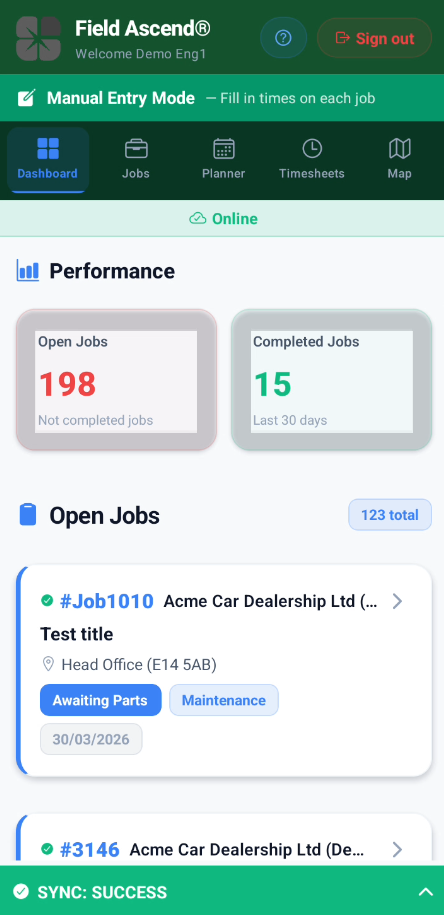
Field service engineer software showing today's job list on a mobile phone

Key Takeaways

  • Primary use: Field service engineer software for engineers working across reactive, quoted and planned maintenance jobs.
  • Core strength: Offline-first app behaviour, so engineers can keep working in plant rooms, lift shafts, basements and weak-signal sites.
  • Built for the real workflow: Jobs, RAMS, equipment, PPM, notes, photos, signatures, materials, site history and completion flow in one app.
  • Configurable controls: GPS, compliance steps, signatures, vehicle checks and other rules can be controlled by business settings and permissions.
  • Joined-up platform: The engineer app connects directly to planning, scheduling, quoting, invoicing and reporting in the wider platform.

What This Field Service Engineer Software Actually Does

If you are searching for field service engineer software, what you usually need is not just a mobile form. You need an engineer app that fits the whole day: seeing the schedule, opening the right job, reviewing site and equipment context, following the required workflow, recording proof of work, and syncing everything back to the office without friction.

Field Ascend gives engineers a fast mobile workspace linked to the wider scheduling and dispatch tools. Engineers can open jobs, follow the lifecycle, complete compliance steps, work through PPM tasks, log materials, capture photos, collect signatures and review equipment records without bouncing between multiple systems.

It also helps teams that need deeper context on site. Engineers can review relevant equipment details, use QR-based asset lookup flows, work with configurable safety and completion rules, and where enabled review recent site history and linked job detail. For businesses that need one joined-up platform rather than a disconnected app, this is mobile software built to support the whole operation.

Why UK Teams Choose the App

Mobile App Features for Field Engineers

This page focuses on the engineer side of Field Ascend. For the wider platform, see the full feature overview. Below are the mobile app capabilities that matter most in day-to-day field work.

📴

True Offline-First Working

Engineers can keep working even when signal drops. Job-critical data is stored locally first, so the app remains usable in low-connectivity environments.

This is ideal for lift shafts, basements, plant rooms, remote sites and buildings with poor reception.

📋

Full Job Workflow on Mobile

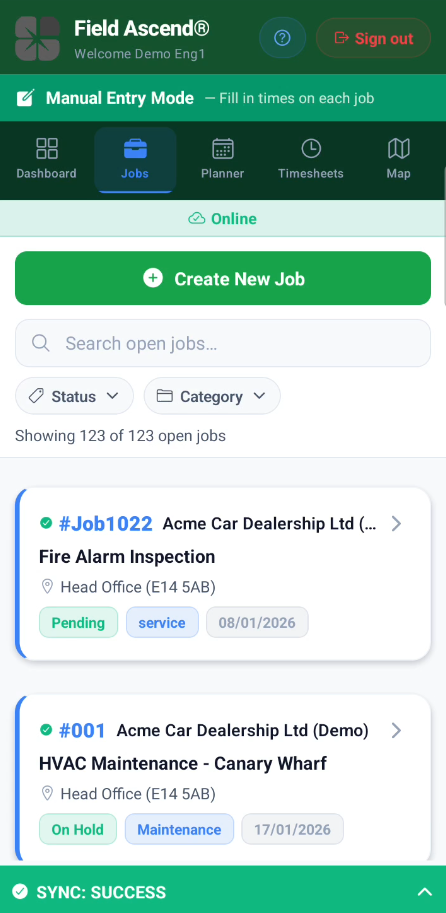
Engineers can move through the job lifecycle from travel to arrival, work in progress and completion, all from the app.

Work done notes, additional work required, section notes, materials, misc items and completion steps stay tied to the job record.

🧭

Planner, Daily View and Timesheets

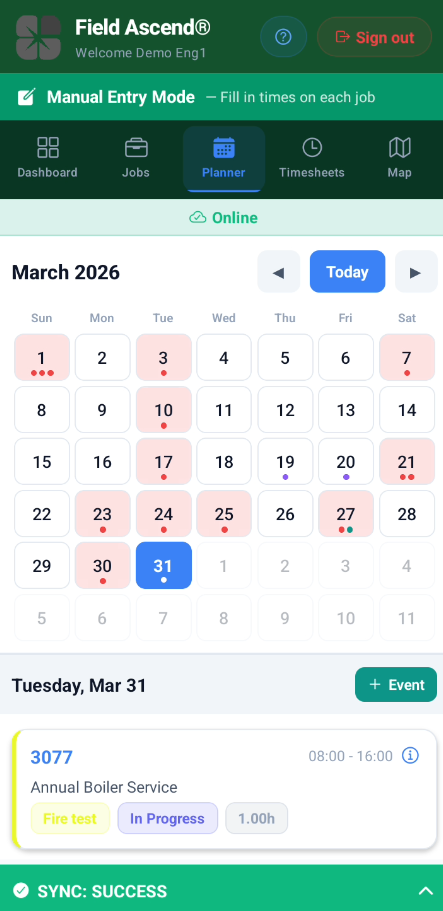
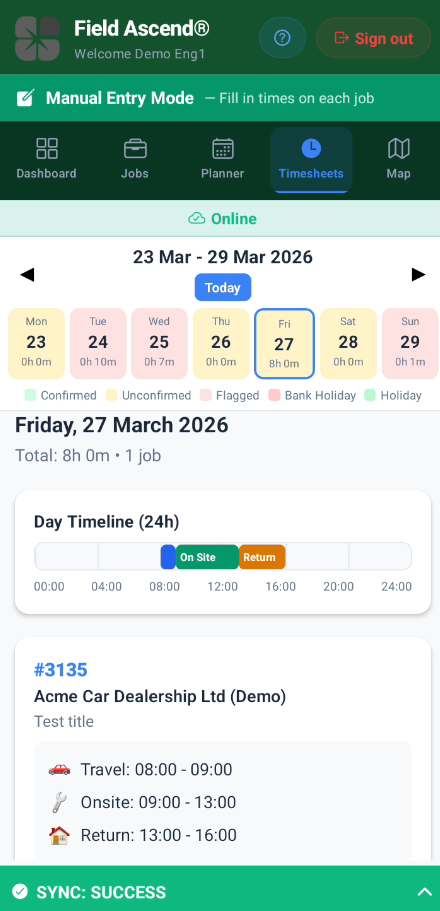
The app gives engineers clear visibility of assigned work and lets them review their own time records and job activity.

For the wider office workflow, it connects directly to the timesheet software and planning tools.

🏭

Equipment, PPM and QR Lookup

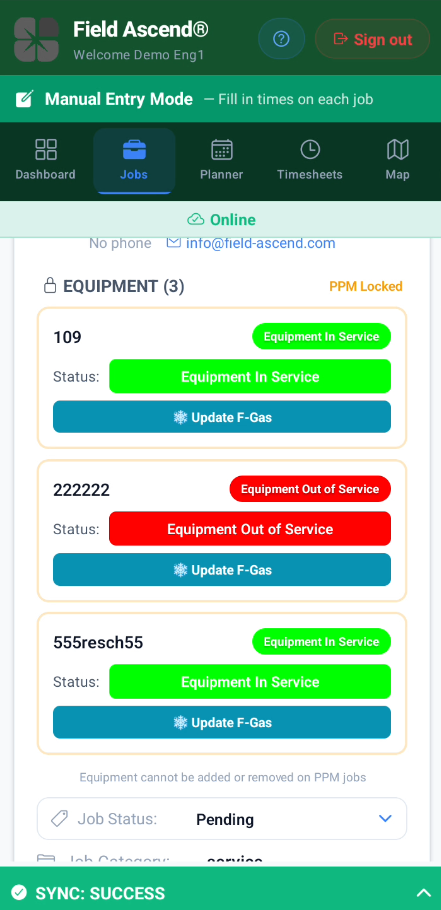
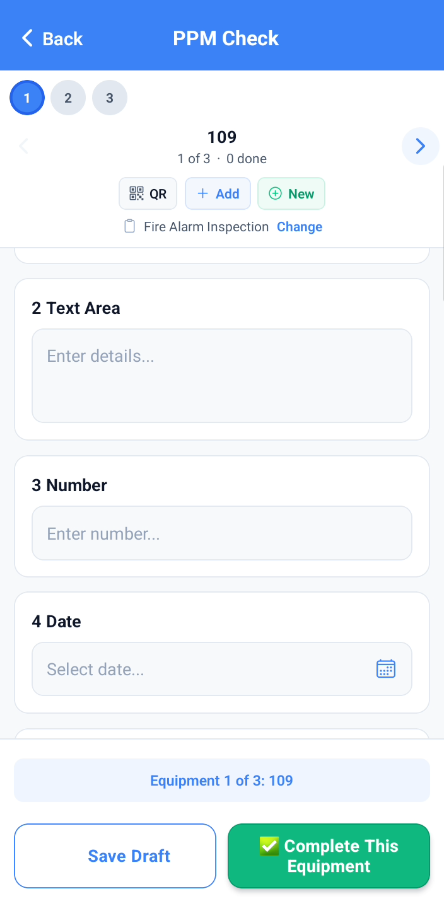
Assigned equipment is visible in the job, including richer context for engineers on site. PPM flows support working through checks against the right asset.

QR-driven equipment lookup helps engineers get to the right record faster when the site has multiple assets.

RAMS, Safety and Completion Rules

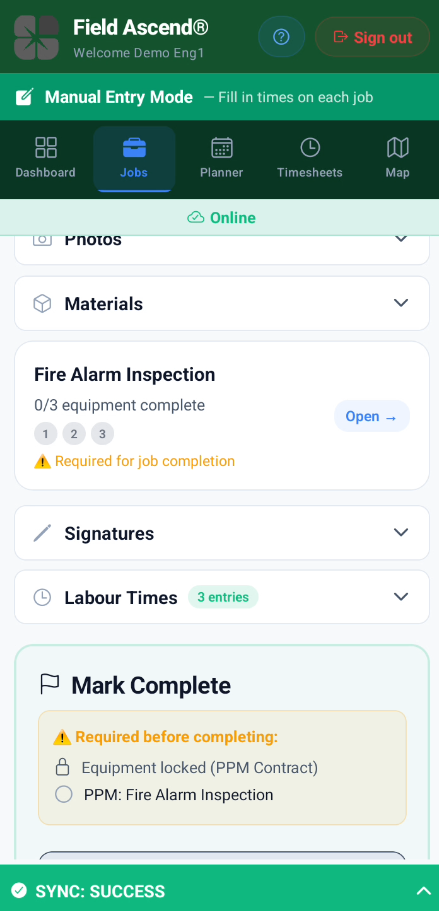
Businesses can require steps such as RAMS acknowledgement, action list completion, equipment status updates, signatures or GPS-related checks before completion.

This makes the app useful for teams that need process discipline, not just note taking.

📸

Photos, Signatures and Proof of Work

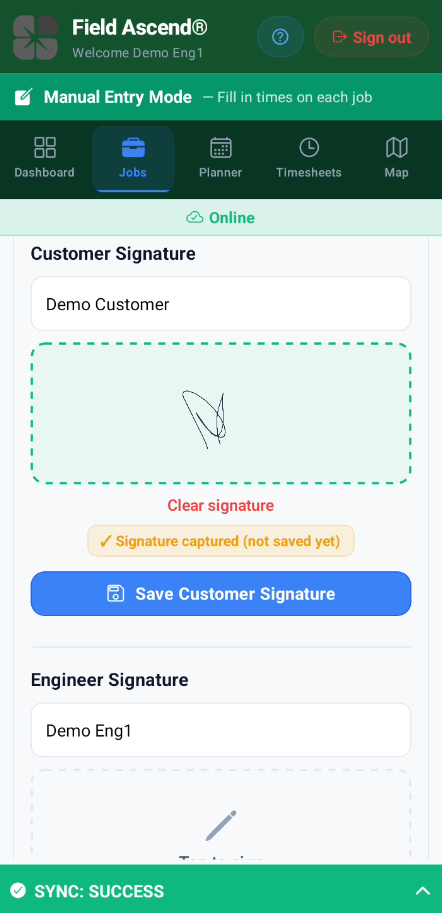
Capture site photos, defect evidence, completion images and digital signatures in the same place as the job itself.

That gives office teams a cleaner handover and customers a stronger record of what was done.

🕘

Site History and Job Context

Where enabled, engineers can review previous work at the same site, including earlier job details, notes, materials, photos and related context.

This helps engineers arrive better informed and reduces duplicated investigation work.

📍

GPS-Aware Workflows

Location and audit behaviour can be configured by the business. This supports more reliable arrival, travel and time evidence without forcing a one-size-fits-all setup.

It sits alongside the wider field service platform for office visibility.

🛡️

Optional Safety, Vehicle and Workforce Tools

Depending on settings and permissions, engineers can also use tools such as vehicle checks, lone working, and other workforce-related controls from the same app experience.

For safety-heavy businesses, that reduces the need for separate point solutions.

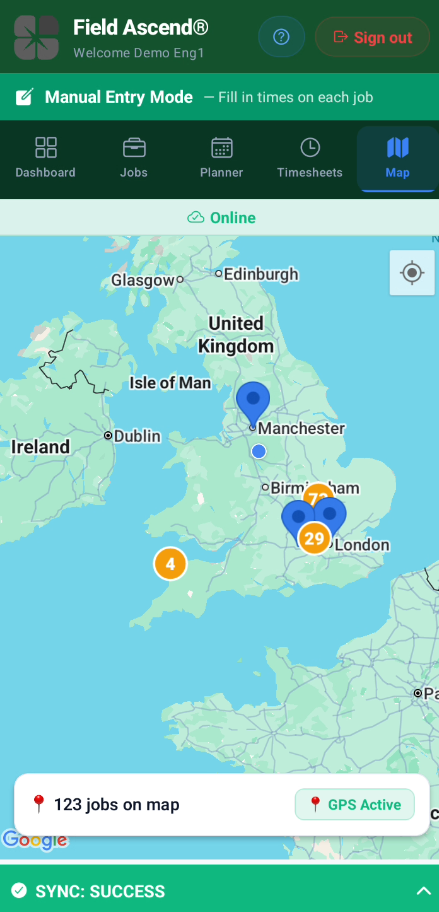
See the App in Action

Real screens from the Field Ascend engineer app, showing the key workflows your team uses every day.

How Engineers Use It During the Day

The app is designed around the real flow of field work, not a generic checklist. Here is the typical engineer journey.

1

Open the Day and Review Assigned Jobs

Engineers sign in, review the day’s work and open each job with the right customer, site and equipment context already attached. Because the app is part of the wider scheduling system, it is aligned with the office plan rather than acting as a disconnected mobile tool.

2

Travel, Arrive and Follow the Required Workflow

Engineers can start travel, arrive on site and move through the job lifecycle. If the business requires it, the app can guide them through RAMS, equipment selection, PPM, or other mandatory steps before the job can be completed.

3

Work Against Equipment and Job Detail

On site, engineers can review equipment details, record work done, log notes, add materials, update statuses and capture photos. Where enabled, site history gives them extra context about previous work at that location.

4

Collect Sign-Off and Finish Cleanly

Digital signatures, final notes and other completion data are captured in the app, giving the office team a clearer handover and a stronger proof-of-work record. That reduces back-and-forth after the engineer leaves site.

5

Sync Back to the Office Automatically

Once signal is available, updates sync back into the platform so planners, admin staff and managers can continue the workflow. That supports faster quoting, invoicing, reporting and follow-up without having to re-key engineer notes.

Built for UK Field Service Sectors

This mobile app is especially useful where engineers need stronger context, better compliance steps and reliable offline performance.

Explore the wider platform via all features, scheduling software and PPM scheduling.

Offline-First: Why It Matters for UK Engineers

Most field service software assumes your engineers have a stable internet connection all day. That assumption falls apart within the first hour of real UK field work. An engineer servicing chillers in a basement plant room beneath a London office block has no signal. A lift engineer working in a concrete shaft four floors underground has no signal. A maintenance team covering rural sites in the Scottish Highlands, mid-Wales or the Norfolk Broads will hit dead zones on every other job. Even routine urban work — underground car parks, hospital sub-basements, new-build sites with no active mast coverage — regularly drops connectivity to zero.

This is exactly why Field Ascend was built offline-first from the ground up. The app does not treat offline as an edge case or a graceful failure mode. It stores all job-critical data locally on the device before anything else happens. Engineers carry on working — filling in job sheets, capturing photos, logging time, completing PPM checks — regardless of what the signal bar says. When connectivity returns, whether that is walking out of a plant room or driving back onto a main road, all queued data syncs automatically in the background. Nothing is lost, nothing needs re-entering, and the office sees updates without chasing. For any field service mobile app to be genuinely useful across the UK, offline has to be the default, not an afterthought.

What Engineers Can Do Without Signal

When the app goes offline, engineers do not hit a wall. They can complete full job sheets including work done notes, section notes and additional work required. They can capture site photos and defect evidence straight from the camera, and collect digital customer signatures on the device. Timesheets keep running accurately — travel, onsite and completion times are all logged locally with no dependency on a live connection. Engineers can scan QR codes to pull up the right equipment record, work through PPM check sheets against assigned assets, and update equipment statuses as they go.

Job history and previous site context, where the business has enabled it, are available on the device as well. Engineers can review RAMS documents, acknowledge safety steps and complete action lists without waiting for a server round-trip. Materials and miscellaneous items can be added to the job record offline too. In short, the entire engineer workflow from arrival through to sign-off works without signal, so there is never a reason for an engineer to stand around waiting for a loading spinner in a basement or a tunnel.

How It Compares to Other Field Service Apps

Most field service apps on the market were designed as web portals first, with a mobile wrapper bolted on afterwards. That means they need a constant internet connection to do anything meaningful. Open a job sheet with no signal and you get a blank screen or a spinning wheel. Try to save a photo or a signature in a lift shaft and it either fails silently or queues in a way that quietly drops data. Engineers learn quickly not to trust these tools, and they revert to paper, WhatsApp photos and scribbled notes — which defeats the entire point of going digital.

The interface problem is just as common. Many platforms try to serve office staff and field engineers from the same screen, so engineers end up navigating dense menus and admin features they will never use. Some businesses end up running separate apps for timesheets, job sheets, compliance documents and photos, which means engineers are switching between three or four tools on every job. That slows them down, increases mistakes and makes adoption a fight rather than a natural transition.

Field Ascend takes a different approach. The engineer app is purpose-built for field work — fast, focused and designed around the actual job lifecycle rather than the office workflow. Jobs, RAMS, equipment, PPM, notes, photos, signatures, materials and timesheets all live in one place. Because the app is offline-first at its core, not as a patch, engineers trust it to work wherever they are. That trust is what drives real adoption, and real adoption is what gives the office accurate data without chasing.

Frequently Asked Questions

What is field service engineer software?

Field service engineer software gives engineers their jobs, site details, equipment context, notes, photos, signatures, check sheets and time capture in one place. Field Ascend combines that engineer app with the office side of scheduling, quoting, invoicing and reporting.

Does the app really work offline?

Yes. Field Ascend is built offline-first, so engineers can continue working when connectivity drops and sync later. That matters for sites where signal is inconsistent or non-existent.

Can engineers see equipment, PPM and previous site work?

Yes. The app supports equipment-focused workflows, PPM activity and, where enabled, previous site history so engineers have better context before and during the job.

Does the app support signatures, photos and certificates?

Yes. Engineers can capture digital signatures and job photos in the app, and sync the completed job data back into the wider platform to support customer documentation and certificate workflows.

Is GPS tracking forced on every business?

No. GPS-related behaviour can be controlled through settings and permissions. That lets businesses decide how strict they want location, audit and time capture rules to be.

Is this just a mobile app, or part of a bigger system?

It is part of the wider Field Ascend platform. If you also need scheduling, quoting, invoicing, portals and office-side visibility, see the full field service management software overview.

Ready to Equip Your Engineers Properly?

Start a free trial or book a demo to see how Field Ascend works for your field team.