On Call Rota Software for Field Service Teams

Drag, drop, done. Every shift covered, every clash caught.

Field Ascend's Rota module is a standalone on-call and shift rota board for field service teams. Plan on-call, standby, duty manager and weekend cover on a Google-Calendar-style drag-and-drop board — with recurring shifts, live clash warnings against approved holidays, sickness and booked jobs, and fairness tallies so no one carries every weekend.

Built as rota software for engineers and office staff alike — everyone from engineers and mates to admins and duty managers goes on the same board, filtered by department.

30-day free trial · Rota board included on all plans

Key Takeaways — On Call Rota Software

What Is On Call Rota Software?

On call rota software is a digital planning board that shows who is covering on-call, standby and duty shifts across your team. Instead of a spreadsheet or a whiteboard in the office, shifts are created by drag-and-drop on a calendar-style board, colour-coded by rota type, repeated automatically on the patterns your team actually works, and checked against holidays, sickness and booked jobs — so cover gaps are caught before the phone rings at 2am with nobody to answer it.

Why Teams Use the Rota Board

The Rota Board in Detail

Staff rota planning for field service is different from a café or a shop floor — cover has to survive callouts, leave, sickness and jobs that overrun. Field Ascend's rota board was built for exactly that.

A Drag-and-Drop Board That Reads Like a Calendar

The rota works like the calendar tools your team already knows — drag a shift onto a person and a day, and it's planned. Every rota type has its own colour, so a glance tells you who's on call, who's standby and who's covering the weekend.

  • Google-Calendar-style board — drag-and-drop shift creation and movement
  • Configurable rota types — On Call, Standby, Duty Manager, Weekend Cover, or your own custom types
  • Colour-coded shifts — each rota type carries its own colour across the board
  • Everyone on one board — engineers, office staff, admins and mates, with department filtering to focus on one team

It sits alongside the visual planner — the planner schedules jobs, the rota plans cover. Together they answer both "who's doing this job?" and "who's holding the phone tonight?"
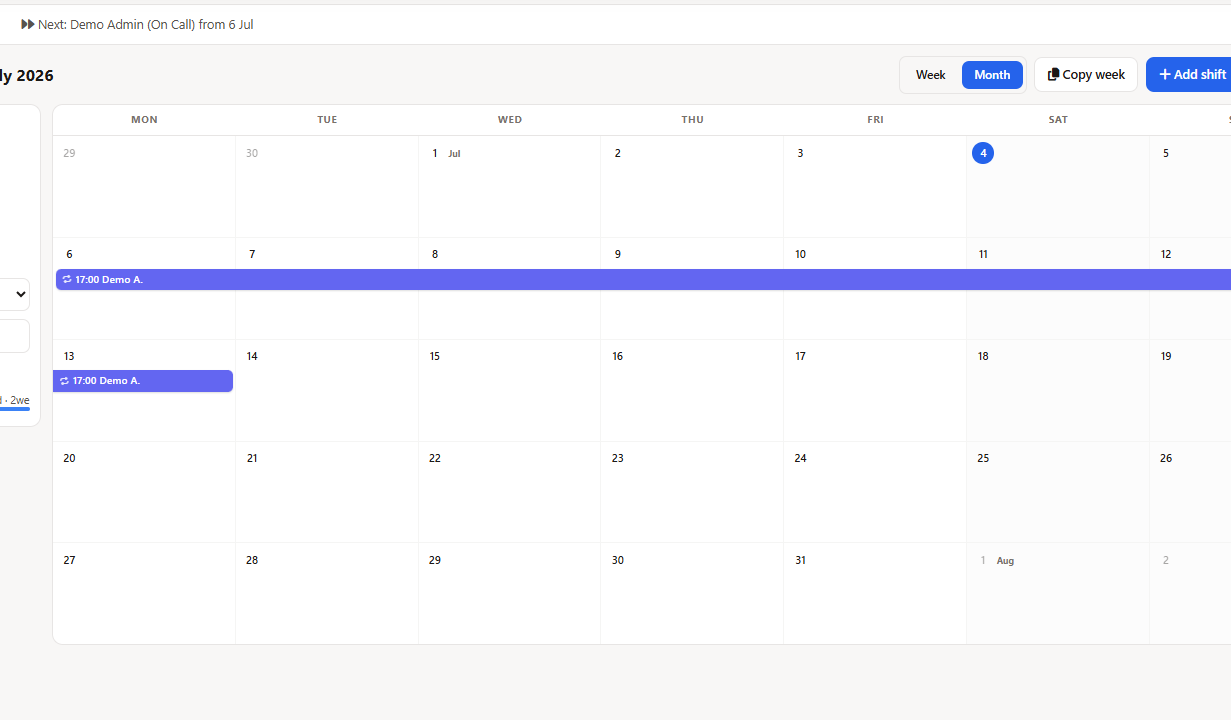
On call rota software board with colour-coded on-call, standby, duty manager and weekend cover shifts in a drag-and-drop week view

Recurring Shifts That Match Real Rotation Patterns

Most field service on-call rotations run on a weekly, fortnightly or 4-weekly cycle. Set the pattern once and the rota fills itself forward — no more rebuilding the same rotation every month in a spreadsheet.

  • Weekly, fortnightly or 4-weekly recurrence — matching the cycles engineering teams actually run
  • Copy-week — duplicate an entire week of cover forward in one action
  • Series-aware deletion — remove a single occurrence (someone swapped a night) or the whole recurring series
  • Optional email notifications — let people know when they've been put on cover

Combined with engineer scheduling software for day-to-day job allocation, the rota keeps the long-range cover picture solid while the planner handles the day's work.

Live Clash Warnings — Holidays, Sickness and Booked Jobs

The most expensive rota mistake is discovering your on-call engineer is on a beach in Spain. Field Ascend checks every shift against approved holidays, recorded sickness and booked jobs, and flags clashes directly on the shift.

  • Approved holiday clashes — a shift placed over booked leave is flagged the moment it lands
  • Sickness awareness — recorded absence shows up against planned cover
  • Booked job conflicts — see when a rota shift collides with scheduled work
  • Warn, don't block — flags are warnings with admin override, because sometimes the clash is intentional

The same absence data drives timesheets and holiday-aware job scheduling, so the rota is checking against the truth — not a copy of it.

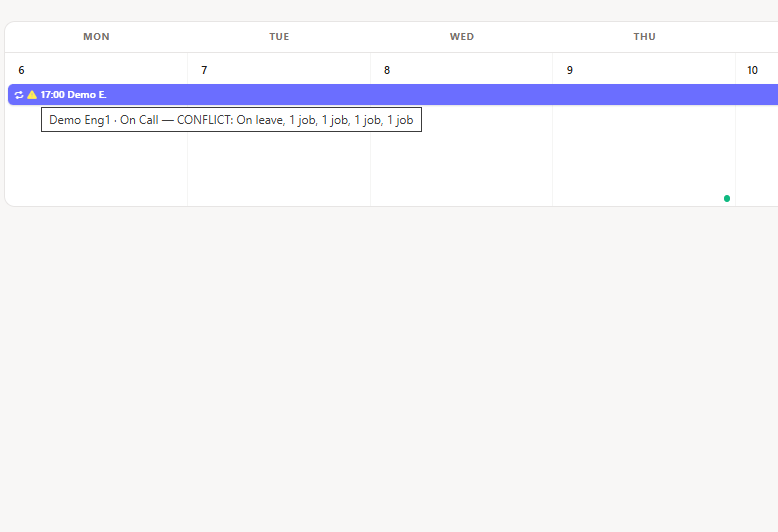
Rota conflict warning flag on an on-call shift that overlaps an engineer's approved holiday, with admin override option

Fairness Tallies and "Who's On Call Now"

On-call cover breeds resentment when it isn't shared fairly. The rota keeps a running tally of how many days — and how many weekends — each person has covered, so planners can balance the load before anyone has to complain.

  • Days and weekends per person — fairness tallies visible while you plan
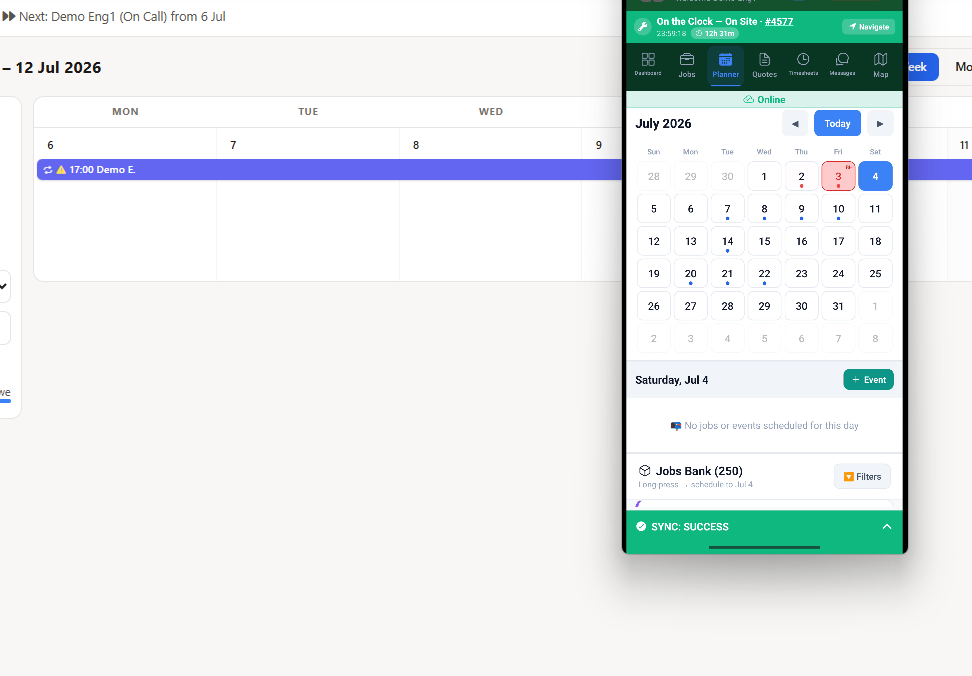
  • "Who's on call now / next" banner — the current and upcoming cover is always one glance away
  • Department filtering — balance the engineering rota and the office duty rota independently

For lone on-call engineers heading out at night, pair the rota with lone working protection — panic alerts, check-ins and escalation for the people your rota sends out alone.

On the Team Calendar — and in Outlook, Google Calendar and Teams

Rota shifts appear automatically as a layer on the company Team Calendar, next to jobs, holidays and planner events. And because the Team Calendar publishes secure iCal subscription feeds, anyone can subscribe from Outlook, Google Calendar or Microsoft Teams.

  • Automatic Team Calendar layer — no double entry, the rota feeds the calendar itself
  • iCal subscription feeds — read-only feeds for the calendars your team already lives in
  • Always current — office changes the rota, subscribed calendars update automatically

Learn more about the field service team calendar and calendar sync and subscription feeds.
On-call field service engineer answering an out-of-hours emergency callout phone call

Why Rota Software Built for Field Service?

Generic staff rota tools plan shifts in a vacuum. Field service cover has to coexist with booked jobs, approved leave, sickness and the reality that engineers get called out. That's the difference a rota inside your job management software makes.

The Rota Knows Your Jobs

Because the rota lives in the same system as your jobs, a shift that collides with scheduled work gets flagged automatically. A standalone rota app can't see your job board — this one can.

The Rota Knows Your Holidays

Approved leave and recorded sickness feed straight into clash checking — the same data behind holiday-aware job scheduling. No exporting holiday lists, no cross-referencing spreadsheets — the warning appears on the shift itself.

One Board for the Whole Business

Engineers, mates, office staff and admins all go on the same rota, filtered by department. Engineering on-call and the office duty manager rota live side by side without stepping on each other.

Weekend Cover Stays Fair

Fairness tallies count days and weekends per person as you plan. When someone asks "why am I always on over Christmas?", you'll have the numbers — and ideally, they won't need to ask.

Everyone Knows Who's On

The "who's on call now / next" banner and calendar subscription feeds mean the office, the engineers and the managers all see the same answer — without ringing round to check.

Part of the Full Platform

The rota is included with Field Ascend's field service management software — jobs, quoting, PPM, invoicing, the engineer app and every other feature — at no extra cost.

Built for Trades Where On-Call Cover Matters

If your customers can ring at 3am — burst pipe, tripped board, failed generator, plant room alarm — someone has to be on the rota. Field Ascend runs on-call cover for reactive trades across the UK.

Frequently Asked Questions

What is on call rota software?

On call rota software is a digital planning board that shows who is covering on-call, standby and duty shifts across your team. Instead of a spreadsheet or whiteboard, shifts are created by drag-and-drop on a calendar-style board, colour-coded by rota type, repeated automatically on weekly, fortnightly or 4-weekly patterns, and checked against approved holidays, sickness and booked jobs so cover gaps are caught before they happen.

Can I create my own rota types?

Yes. Rota types in Field Ascend are fully configurable per company. Standard examples include On Call, Standby, Duty Manager and Weekend Cover, but you can rename them, add your own, and give each type its own colour so the board reads at a glance.

Does the rota warn me about holiday and job clashes?

Yes. When you place or move a shift, Field Ascend checks the person's approved holidays, recorded sickness and booked jobs, and flags any clash on the shift. The flags are warnings rather than hard blocks — an admin can override and keep the shift if the clash is acceptable.

Can rota shifts repeat automatically?

Yes. Shifts can recur weekly, fortnightly or every 4 weeks, which suits the rotation patterns most field service teams run. You can also copy an entire week of cover forward, and delete either a single occurrence or a whole recurring series.

Who can be put on the rota?

Everyone in the business — engineers, office staff, admins and mates. Department filtering lets you view one team's rota at a time, so an engineering on-call rota and an office duty manager rota can live on the same board without clutter.

Can engineers see the rota in Outlook or Google Calendar?

Yes. Rota shifts appear automatically as a layer on the company Team Calendar, and its iCal subscription feeds can be subscribed to from Outlook, Google Calendar or Microsoft Teams. When the office changes the rota, subscribed calendars update automatically.

How does the rota keep cover fair across the team?

Field Ascend keeps a running fairness tally showing how many days and weekends of cover each person has been given. Planners can see at a glance if one engineer is carrying more weekends than the rest and balance future weeks accordingly.

Is the rota included in the Field Ascend price?

Yes. The rota board is included on all Field Ascend plans at no extra cost, alongside the visual planner, jobs, quoting, invoicing and the engineer mobile app. There are no add-on charges. See pricing for details.

Ready to Ditch the Rota Spreadsheet?

Start your free trial today. Full access to the rota board, visual planner, jobs, mobile app and every other feature.

Start Free Trial