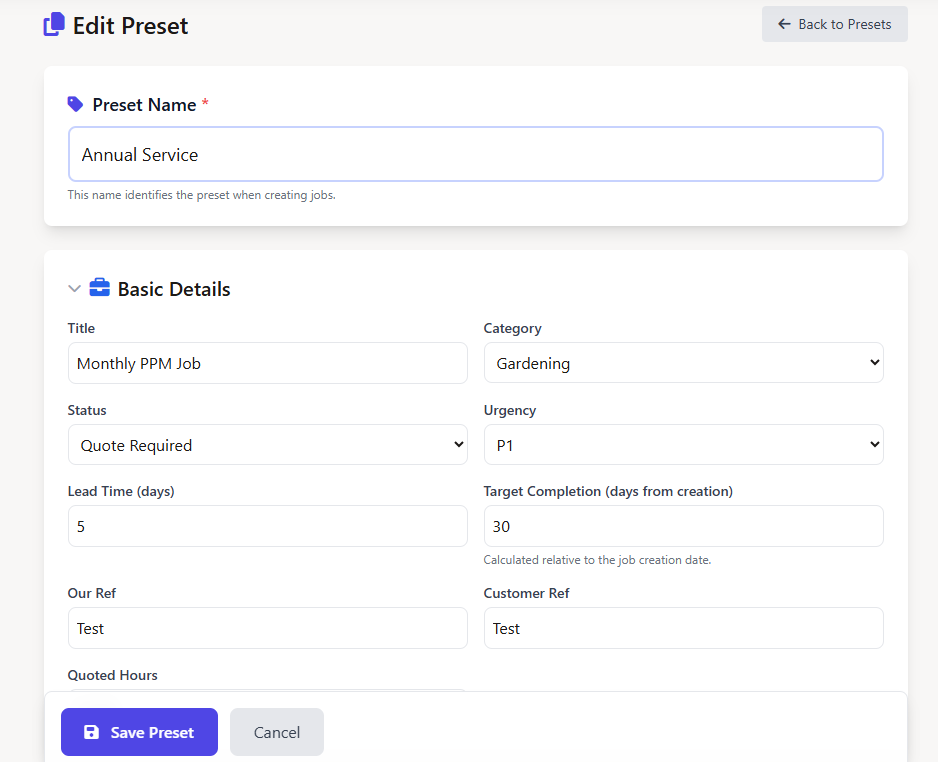
Stop re-entering the same job details over and over. With Field Ascend's job preset templates, your admin team saves a reusable preset once - then creates fully pre-filled jobs with a single click. Title, category, notes, materials, engineers, compliance checks, and certificates all applied instantly.
Part of our complete field service management software platform, job presets eliminate repetitive data entry and ensure consistency across every job your team creates - whether it's an annual service, emergency callout, or planned maintenance visit.
Job presets sit inside a smart split button wherever you create jobs. Click the main button for a blank job - or click the dropdown arrow to choose a preset. The job is created normally, then all preset data is layered on top instantly.
Navigate to Job Options → Job Presets and create a new preset. Give it a name like "Annual Boiler Service" or "Emergency Callout". Fill in whichever fields you want pre-populated - leave the rest blank and they'll be skipped.
On the jobs page, customer page, site page, equipment page, or project page - click the dropdown arrow next to "New Job". Your presets appear in a clean dropdown list. Pick one.
The system creates the job with the correct job number and sequencing, then immediately applies all preset data - title, status, notes, materials, engineers, compliance checks, and certificates. You land on the job ready to tweak and go.
Every field below can be saved in a job preset template. Mix and match - only the fields you populate will be applied.
| Category | Fields | Supported |
|---|---|---|
| Basic Details | Title, Category, Status, Urgency, Lead Time, Target Completion Days, Our Ref, Customer Ref, Quoted Hours | ✓ |
| Notes | Work to be Done, Work Done, Additional Work Required, Notes, Office Notes (Private) | ✓ |
| Materials | Unlimited rows with description, quantity, and unit price | ✓ |
| Miscellaneous | Unlimited line items with description, quantity, and unit price | ✓ |
| Engineers | Pre-assign one or more engineers to the job | ✓ |
| Mates / Helpers | Pre-assign staff members as mates on the job schedule | ✓ |
| Compliance Checks | Attach action list checklists that engineers must complete | ✓ |
| Certificates | Attach certificate templates (LOLER, electrical, custom) to the job | ✓ |
| Risk Assessments | Link RAMS documentation that engineers acknowledge before work begins | ✓ |
Job presets aren't limited to the jobs page. The split button appears on every job creation point in the system - so your team always has quick access to presets regardless of where they're working.
The main jobs list - create a new job or pick from your presets using the split button.
Create a job directly from a customer record with the customer automatically linked.
Add a job from a specific site or site area - location context is preserved alongside preset data.
Create a job for a specific piece of equipment - preset fills in the job type details while the equipment stays linked.
Add sub-jobs under a project with preset data applied. Perfect for standardised work packages within larger projects.
Field service businesses of all sizes use job presets to standardise operations and reduce admin time.
Pre-fill the service checklist, default materials (filters, lubricant), engineer assignment, and "Work to be Done" notes. Every service job starts identically.
Set urgency to P1, status to "Urgent", and pre-attach the emergency lone worker risk assessment. No time wasted when every second counts.
Attach the LOLER certificate template, compliance checklist, and standard inspection notes. Engineers arrive knowing exactly what's required for lift maintenance inspections.
Standard preventive maintenance materials, quoted hours, and compliance checks ready to go. Combine with scheduling for fully automated PPM workflows.
Attach the F-Gas compliance checklist and refrigerant logging certificate. Ensure F-Gas compliance starts from the moment the job is created.
Pre-attach PAT testing or EICR certificate templates, assign qualified electricians, and set the appropriate testing category. Consistent setup every time.
Job preset templates are reusable configurations that pre-fill job details when creating new jobs. Instead of manually entering the same information repeatedly, you save a preset once and apply it with one click. Each preset can include title, category, status, urgency, notes, materials, engineers, compliance checks, certificates, and risk assessments.
When creating a new job, you click the split button dropdown and select a preset. The system creates the job and immediately applies all pre-configured fields - title, status, notes, materials rows, assigned engineers, compliance checklists, and certificates. What used to take 5–10 minutes of manual entry now takes one click.
Yes. Job presets are tenant-scoped, meaning each company on Field Ascend has their own set of presets. You can create unlimited presets for different job types - annual services, emergency callouts, planned maintenance visits, and more.
Yes. The presets management page lets you duplicate any existing preset with one click. This creates a copy you can rename and tweak - perfect for creating variations like "Annual Service (HVAC)" and "Annual Service (Electrical)".
Job presets are an admin-side feature - presets are applied when creating jobs from the web interface. Engineers using the mobile field service app receive the fully pre-filled job with all notes, materials, compliance checks, and certificates already attached and ready for completion.
Start your free trial and build your first job preset in minutes.
Start Free Trial