Field service stock management software

Know what stock you have, where it is, and what changed.

Field Ascend gives UK contractors one connected place to manage stocktakes, van parts, job materials, transfers, purchase order receiving and low stock email alerts.

Built for UK field service teams Mobile engineer stock picking From £10/user/month
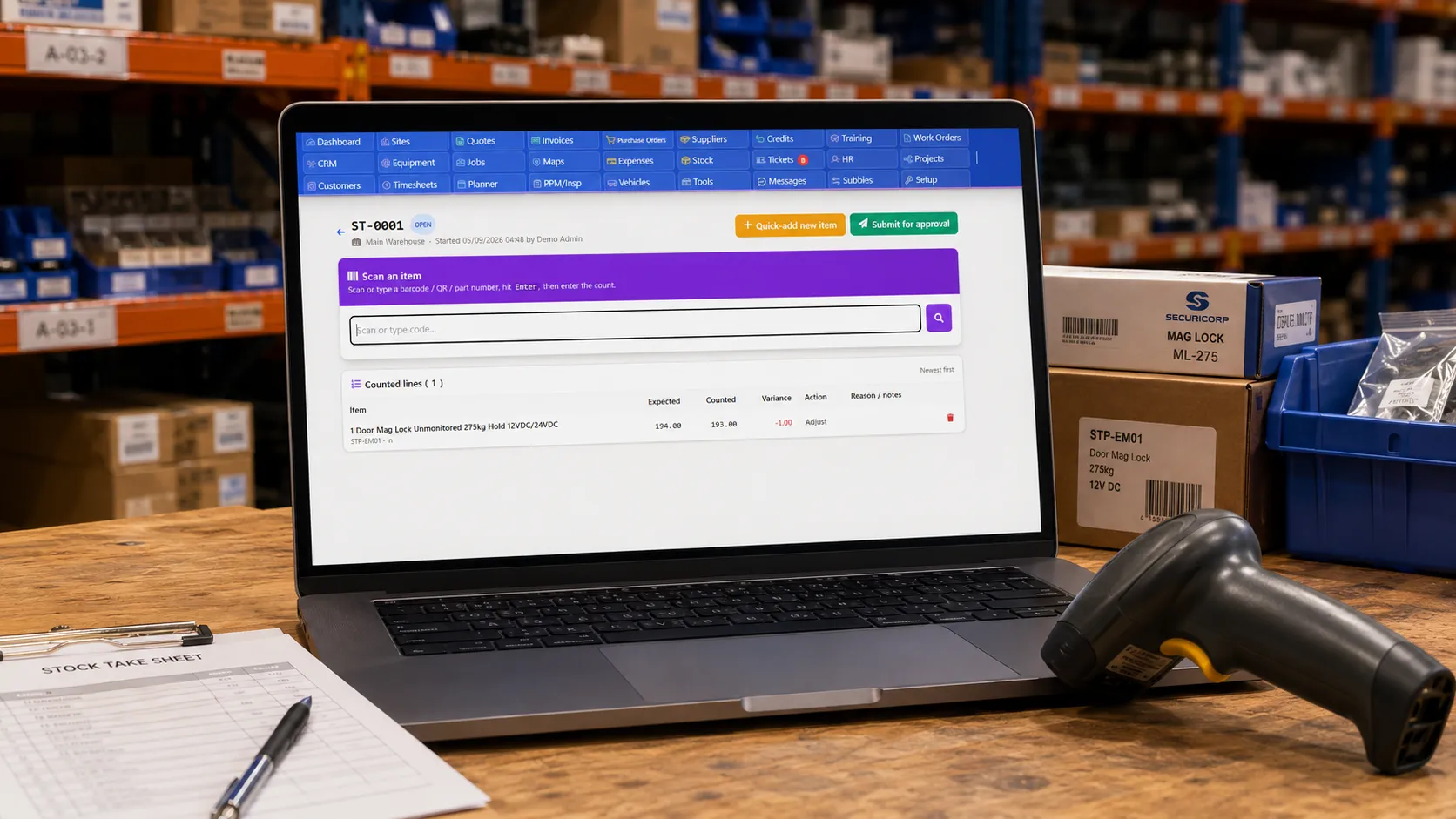
Field service stocktake screen showing counted quantities and stock variance checks

Stock control built into your field service workflow

General stock systems stop at the stores. Field Ascend connects stock to jobs, engineers, customer sites and invoicing so the office can see what was used and where stock is now.

📦

Parts stock catalogue

Manage parts, materials, SKUs, descriptions, suppliers, costs, sell prices, QR codes, barcodes, documents and preferred accessories from one stock catalogue.

🚚

Stores and van stock

Track stock by location, including stores, stock rooms and engineer vans. See where parts are before someone drives across town looking for them.

🛠️

Job stock picking

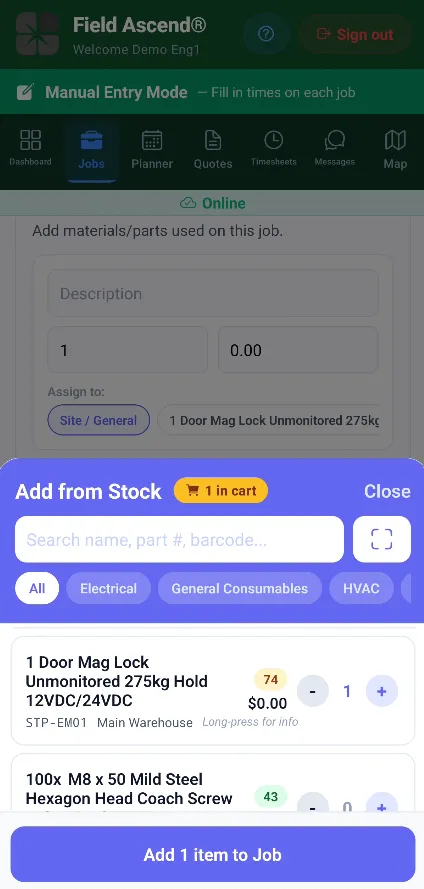
Engineers can scan or select materials from the mobile field service app, attach them to jobs and keep the office updated on what was actually used.

📊

Full movement history

Every receipt, transfer, adjustment, pick, return and write-off creates an audit trail so managers can trace stock movement without digging through spreadsheets.

Connect stock directly to jobs

Parts do not live in isolation. They get used by engineers, at customer sites, on service jobs. Field Ascend ties stock usage to the job so job costing and material history stay connected.

  • Pick stock onto jobs from the office, engineers web portal or mobile app.
  • Return unused items back into stock when the job changes.
  • Prompt for serial numbers when a part creates an installed equipment record.
  • Use accessory prompts for common parts that are normally fitted together.

For teams comparing stock features inside broader field service management software, this is the difference: stock usage is part of the job lifecycle, not a disconnected spreadsheet.

Engineer picking stock onto a field service job from the mobile app
Stocktake screen for counting parts in a stores or van location

Run stocktakes without rebuilding your parts list

Stock drifts. Items get moved, broken, picked, returned or counted wrong. Field Ascend gives office and stores teams a web-based stocktake flow for checking what is physically on the shelf.

  • Start a stocktake for a stores location, van or stock room.
  • Scan or paste item codes, enter the counted quantity and record a reason.
  • Review variances before approving adjustments.
  • Keep an audit trail of who counted, approved and applied each change.

Move stock between stores, vans and job locations

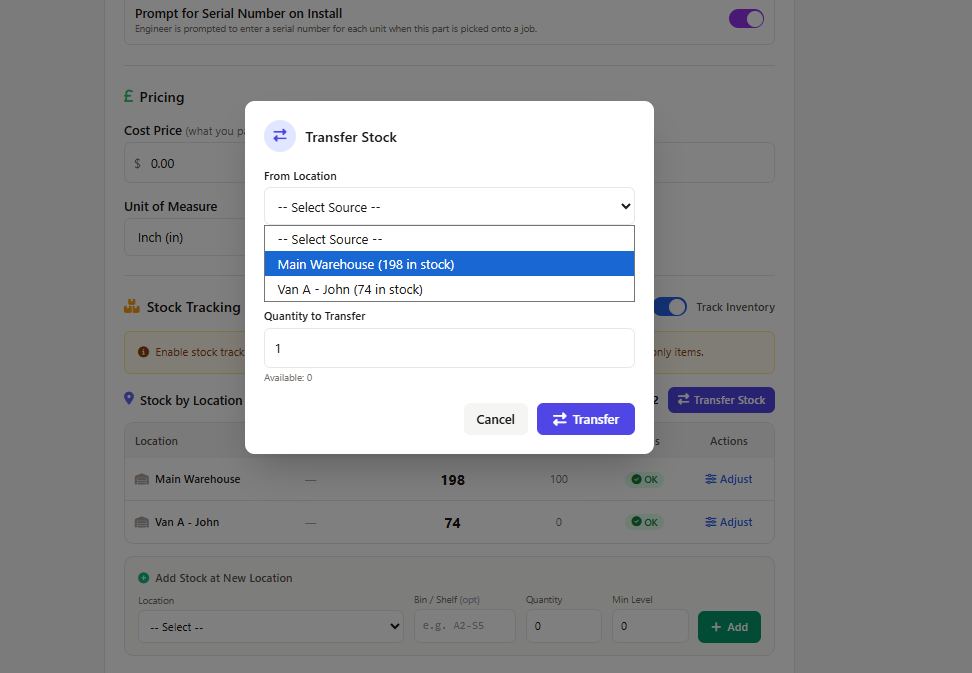
When parts move from stores to a van, the system needs to know. Field Ascend records stock transfers with a matching in-and-out movement so both locations stay accurate.

  • Transfer parts from stores to van, van to stores or between locations.
  • Record who moved the stock and when.
  • Keep transfer movements grouped together for reporting.
  • Use location-aware stock levels when engineers pick materials.
Van stock transfer workflow for moving parts between field service locations
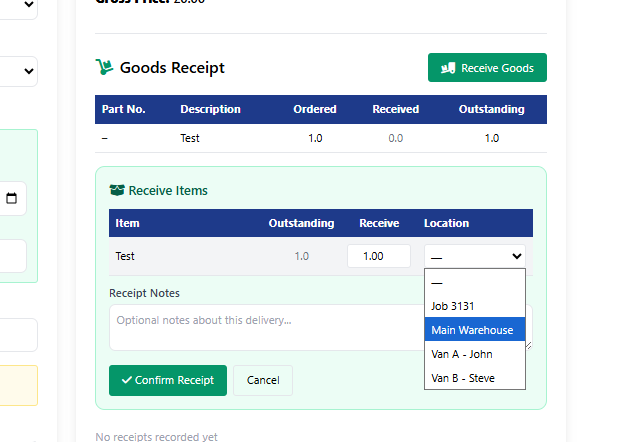
Purchase order receiving screen booking delivered parts into stock

Receive deliveries straight into stock

Book parts into stock when deliveries arrive. Use purchase order receiving when the delivery relates to an order, or ad-hoc receiving when parts arrive outside the normal purchase order flow.

  • Receive against purchase orders and update received quantities.
  • Receive ad-hoc deliveries from suppliers.
  • Record unit cost changes when items are booked in.
  • Write stock movement history automatically as stock increases.

Once stock is available, the same parts can be picked onto jobs, used in quotes or connected to field service invoicing workflows.

Stock visibility for service contractors

Give dispatch, stores, engineers and finance a shared view of parts activity without asking everyone to update a separate spreadsheet.

🔔

Low stock email alerts

Set minimum stock levels and receive email alerts when key parts drop below threshold, so your team can reorder before jobs are delayed.

📈

Usage and value reports

See which parts are moving, which are sitting idle and where stock value is tied up across your field service operation.

🔗

Job and finance context

Keep stock usage close to jobs, invoices and accounting workflows so operations and finance do not drift apart.

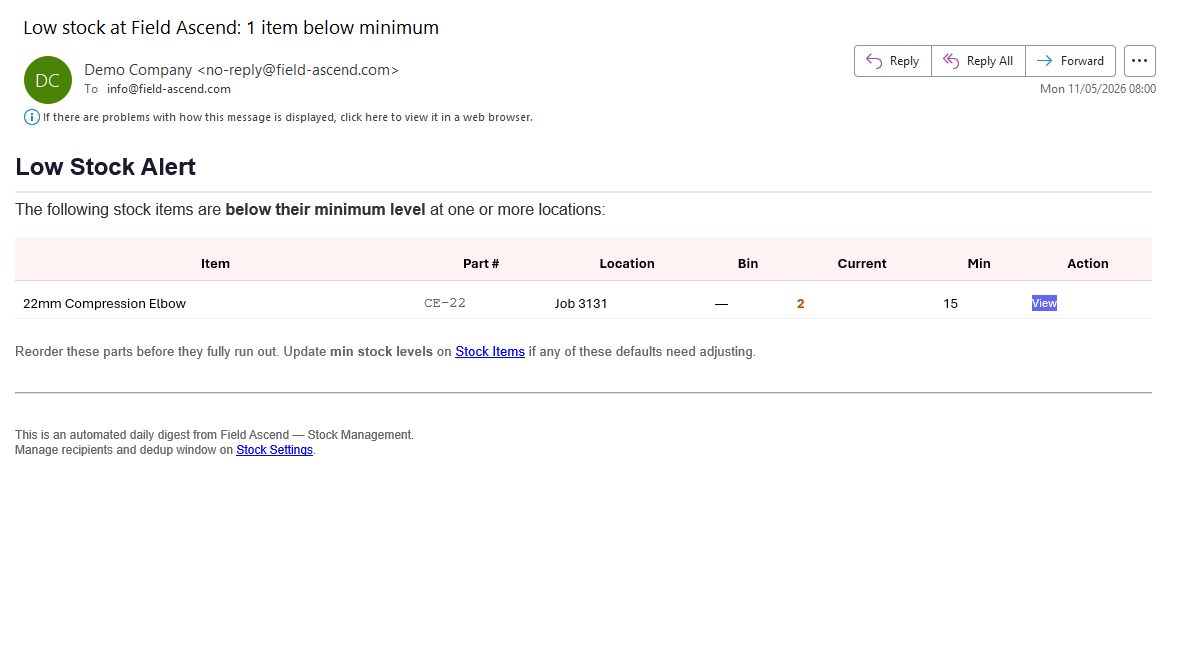
Low stock email alert showing parts below minimum level in Field Ascend

Low stock email alerts before parts run out

Minimum stock levels only help if someone sees the warning in time. Field Ascend can send a low stock email digest when items fall below their minimum level at stores, vans or job locations.

  • Highlight items below their configured minimum stock level.
  • Show the part, location, current quantity and minimum level in the email.
  • Link back to stock items and stock settings for quick follow-up.
  • Help purchasing and operations teams reorder before engineer visits are delayed.

Field service stock management FAQs

Short answers for contractors comparing stock control features inside a field service platform.

What is field service stock management software?

It is software that tracks parts and materials across stores, vans, engineers and jobs. For service contractors, stock management needs to connect directly to field jobs rather than sitting in a separate warehouse-only system.

Can engineers pick stock from the app?

Yes. Engineers can add stock to jobs from the mobile app, including scanning supported stock labels and selecting materials from the available catalogue.

Does Field Ascend support stocktakes?

Yes. Office or stores users can run web-based stocktakes, review variances and apply approved adjustments so stock records match the shelf.

Can deliveries be received into stock?

Yes. Field Ascend supports purchase order receiving and ad-hoc receiving, so delivered parts can be booked into a stores, van or stock room location.

Does Field Ascend send low stock email alerts?

Yes. Field Ascend can send low stock email alerts when parts fall below their minimum level, with item, location, current quantity and reorder context included in the email.

Ready to see your parts, vans and jobs in one place?

Try Field Ascend free for 30 days and see how stock management works alongside scheduling, jobs, engineer updates and invoicing.

Start your 30-day free trial