RAMS Software for Field Service Teams
Build, approve and assign Risk Assessments and Method Statements inside the same field service management software that schedules the work. Engineers complete their own structured checklist or sign the controlled PDF before the stage you choose — and customers can authorise the pack by secure email link or portal when you need it.
Replace disconnected Word files, paper signatures and shared folders with reusable hazards, versioned templates, job-level requirements and frozen completion records.
RAMS tools included with Field Ascend. Your competent person remains responsible for assessment and approval.
What is RAMS software?
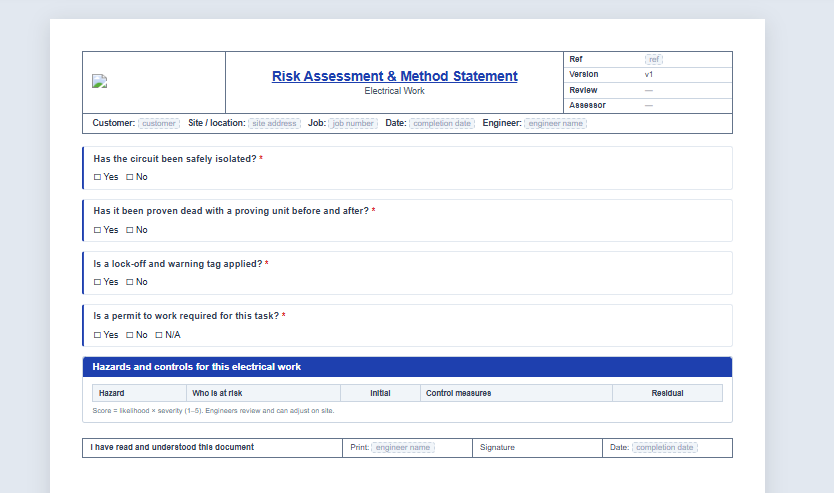
RAMS software digitises the creation, control, assignment and completion of Risk Assessments and Method Statements. Field Ascend goes further by attaching the requirement to the actual job: the office controls which document applies, each engineer completes their own copy, customers can authorise when required, and the signed evidence stays beside the job record, times, notes and customer documents.
One RAMS Workflow From Office to Site
Build the document once, keep it controlled, and make the right version available at the point of work. Checklist answers can queue in the offline-first mobile app; photos and signatures upload when connectivity returns.
Build structured documents
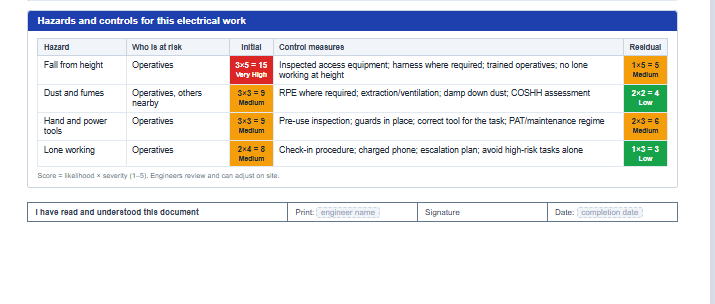
Combine scope, method steps, PPE, a risk matrix key, hazard tables, questions, photos and signature sections in a live document preview.
Import with AI, approve with a human
Convert an existing Word, PDF or photographed document into a structured draft. Review every hazard, score and control before release.
Complete per engineer
Every assigned engineer reads, answers and signs their own required copy. One person's completion never clears another's obligation.
Score hazards consistently
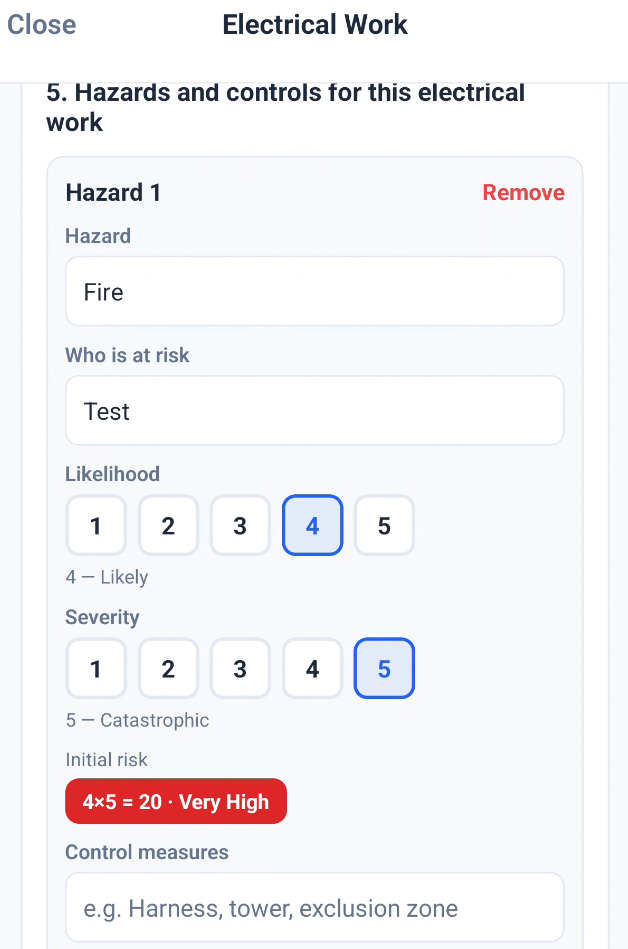
Use your tenant risk matrix for likelihood, severity, initial risk, controls and residual risk, with reusable hazards kept in a controlled library.
Enforce the right stage
Choose before travel, before work or before completion for engineers who have Force RAMS enabled.
Keep frozen evidence
Completion snapshots preserve the questions, answers, matrix and version used at the time, even after the master template changes.
Customer authorisation
Email a secure link — or show the request in the customer portal — so the contact reviews the RAMS, types their name and signs on screen. Built into Field Ascend; no separate e-sign product required.
Ask engineers to sign early
From the job, request a signature from assigned engineers before they travel. They get a push and a dashboard reminder, then complete the RAMS through the normal job flow.
A document builder that reads like the finished RAMS
The Safety Document Builder uses plain-English section cards on the left and a live A4 preview on the right. Build a reusable document rather than wrestling with a generic form designer.
- Text, numbered method steps and emergency arrangements
- PPE tiles, risk matrix key and pre-scored hazard registers
- Yes/no, text, date, dropdown, multi-select, photo and signature inputs
- Conditional sections that appear only when an earlier answer requires them
- Eight quick-start documents: POWRA, working at height, electrical isolation, COSHH, hot works, confined spaces, lone working and general site work
Design themes for the printed RAMS
In Document Builder, open Document settings and pick a Design theme. The live A4 preview is what the PDF prints. Accent colour still applies on top of the theme.
- Rounded, Classic, Soft, Bold, Minimal, Corporate, Outline, Editorial (serif), Compact, and High contrast for mono printing
- Set per document, so a POWRA and a COSHH pack can look different
- Existing documents stay on Standard until you change them
- Completed records are untouched
- Included in the subscription, not an add-on
The correct safety document on the correct job
Assignment is configurable because different service businesses control RAMS differently. Use job categories for repeatable work, let the office pin a document to one job, or allow engineers to select from the approved library.
- Automatic by job category, including templates that apply to every category
- Office-only assignment for strict job-specific packs
- Engineer-select mode when the person at site must choose the relevant assessment
- Draft templates remain hidden from the app and job pickers until approved
- Requirements work alongside the engineer mobile app and job completion controls
Controlled change without rewriting history
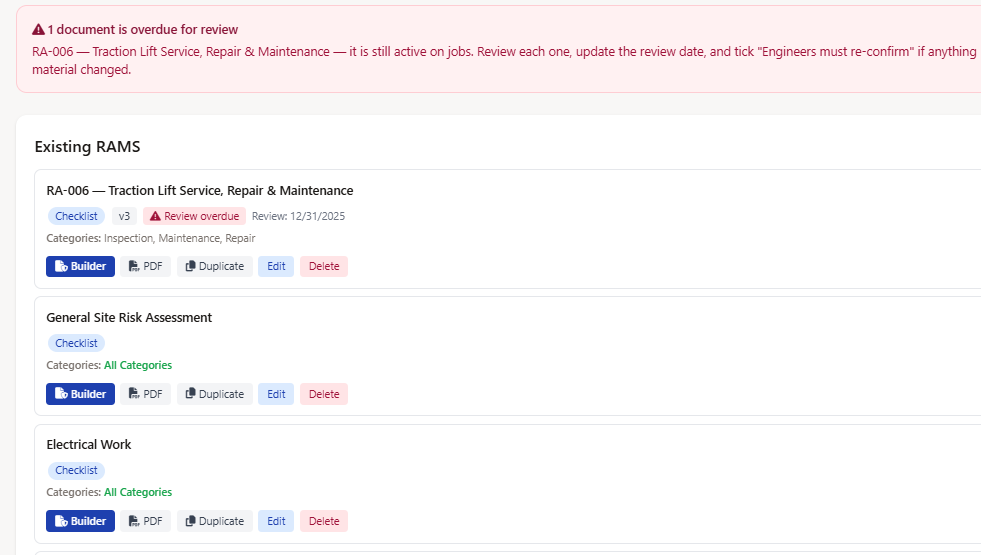
Safety documents evolve. Field Ascend separates the controlled master from the historic evidence so an edit tomorrow cannot silently alter what an engineer completed yesterday.
- Draft and approved status with approving admin and timestamp
- Version number and review due date with overdue warnings
- Duplicate a master into a new draft for a site- or customer-specific variant
- Mark controlled completions for re-confirmation after a material change; mobile enforcement depends on a current app build and fresh sync
- Keep old completions as frozen records while the latest version becomes outstanding
Customer authorisation without a separate e-sign product
When a client or principal needs to authorise the RAMS pack before work, send the request from the job. Contacts review the documents online, type their name and sign on screen. The signed copy stays on the job with name, date and audit trail.
- Secure email link — no customer portal login required
- Optional customer portal card on the job for logged-in contacts
- One signature can authorise every RAMS document in that send
- Optional decline with a reason, office notification, and signed-copy email
- Resend or cancel while a request is still pending
From Template to Signed Job Evidence
A controlled, repeatable process that keeps the office, field team and customer on the same version.
Designed to Support a Safe System of Work
Good software strengthens control and evidence. It does not replace competent people, site judgement or your legal duties.
Important boundary
Field Ascend helps you structure, approve, distribute, complete and retain safety documents. Your organisation must still decide what assessment is suitable, who is competent to approve it, whether the controls are adequate, and what must change when site conditions differ.
- AI imports are saved as drafts and should be checked against the source.
- Engineers can record point-of-work answers, photos, hazards and signatures; they still need to stop and escalate when work is unsafe.
- Review dates and re-confirmation support document control but do not themselves prove legal compliance.
Frequently Asked Questions
Direct answers for UK contractors comparing digital RAMS and field service compliance tools.
What is RAMS software?
It helps create, control, assign and record Risk Assessments and Method Statements digitally. Field Ascend connects every required RAMS to the job and keeps each engineer's completion with the work record.
Can I import an existing RAMS?
Yes. Upload a Word document, PDF or image to the AI RAMS Designer. It creates a structured draft for a competent person to review and approve before field use.
Can I keep using a fixed company PDF?
Yes. Upload a sign-only PDF, choose the page, draw the signature box, and Field Ascend stamps the engineer's signature, name and time into that controlled area.
Can I change how a RAMS document looks?
Yes. In Document Builder open Document settings and pick a Design theme: Rounded, Classic, Soft, Bold, Minimal, Corporate, Outline, Editorial (serif), Compact, or High contrast for mono printing. Accent colour still applies on top. The A4 preview is what the PDF prints. You set this per document. Existing documents stay on Standard until you change them, and completed records are untouched. Themes are included in the subscription.
Can RAMS block work?
Yes. For engineers with Force RAMS enabled, you can enforce the requirement before travel, before work or before completion. The office controls assignment mode and whether non-RAMS job sections stay locked.
Will edits change an old signed record?
No. Completed checklist records use a frozen snapshot. A major update can mark the controlled record for re-confirmation while preserving earlier evidence. Mobile enforcement depends on the engineer using a current app build and completing a fresh sync.
Can customers authorise RAMS?
Yes. Built-in customer authorisation from the job: secure email link and optional customer portal. The contact reviews the documents, types their name and signs on screen. One signature can cover several RAMS in the same send; the signed copy stays on the job. No separate e-sign product required.
Can we ask engineers to sign before the visit?
Yes. On the job RAMS matrix, request a signature from an assigned engineer. They get a push notification and a dashboard reminder, then complete the RAMS in the normal job flow on the app or engineers portal.
Does it work with other safety features?
Yes. RAMS sits alongside lone worker safety, training and certificate tracking, job checklists, photos and the offline-first mobile app.
Related Field Ascend Features
Move RAMS From Shared Folders Into the Job
Build the document, control the version, assign the right requirement and keep each engineer's completed evidence beside the work it covered.
Start your 30-day free trial