Quick Answer
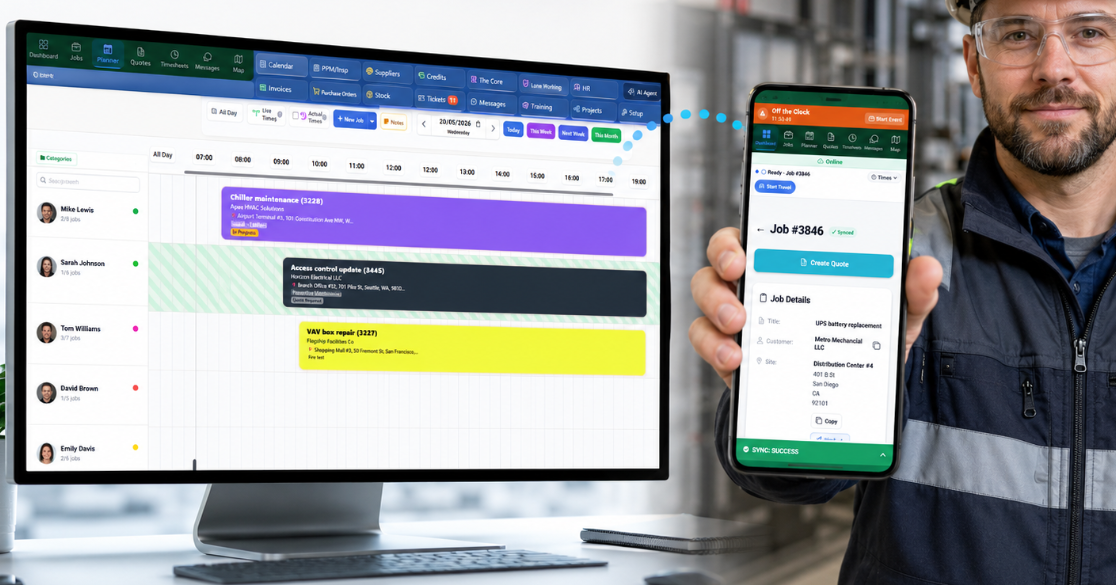
Workforce management software helps a business plan, schedule, track and support its workforce. For contractors, it should do more than shift planning or HR admin. Field Ascend works as workforce management software for field service by connecting technician scheduling, dispatch, mobile work orders, time tracking, job evidence, leave-aware planning and invoice-ready handoff in one field service management software platform.
For a field service business, workforce management is where the customer promise is either kept or broken. The office can plan a perfect week, but the day changes when an emergency call arrives, a technician calls in sick, parts are missing, or a job runs long. Managing the workforce means managing all of that - people, schedules, jobs, sites and time - in one live system.
Workforce Management Software for Field Teams, Not Just HR
A lot of workforce management software is built around HR operations: shift planning, attendance, employee records and labor reporting. Those tools can be useful, but they usually do not understand the realities of field service work.
Contractors need workforce management software that knows what happens after a technician leaves the office. The workforce is tied to jobs, sites, customer assets, preventive maintenance visits, travel, onsite time, parts, photos, signatures and completion evidence. That is the gap Field Ascend is built to cover.
Field Ascend also covers the people side - vacation and leave requests, training and certification records, on-call rotations and timesheets - but always connected to the work itself, not managed in a separate HR silo.
Built-In HR Management for Field Service Teams
Authorized managers get one HR dashboard for the people workflows around field operations, while each employee can use a personal HR view for their own requests, documents and balances. Granular permissions keep personal and management access separate. Each person record can hold a staff photo and personal files.
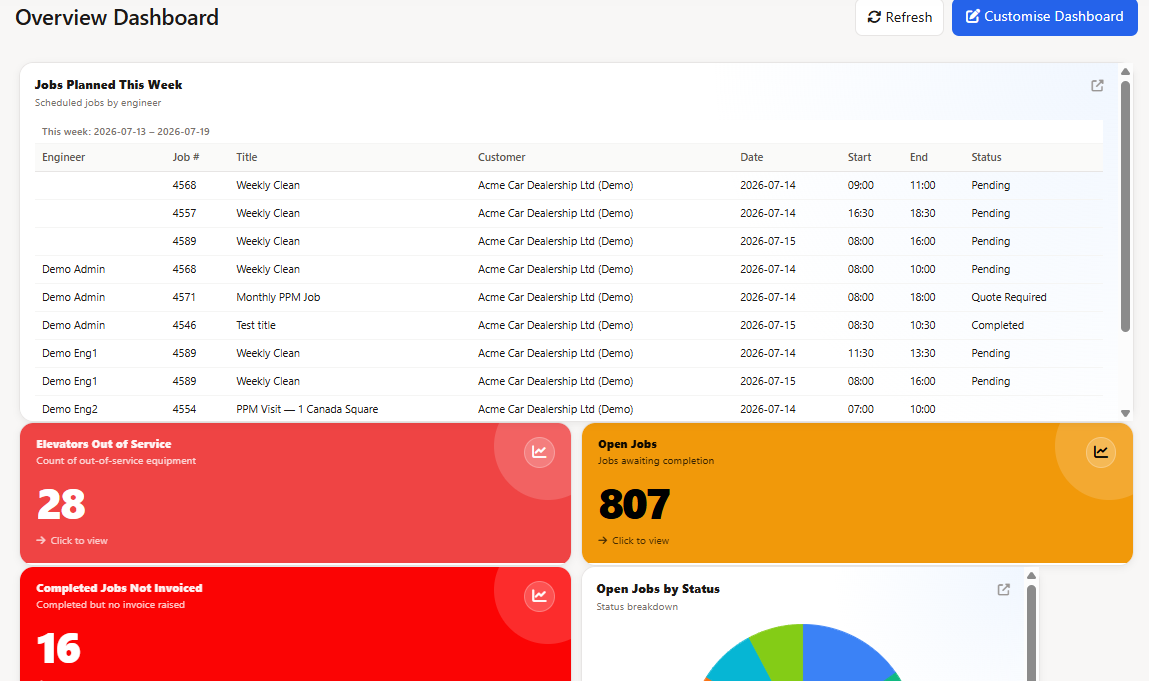
One HR workspace for staff records, actions and compliance - connected to the people already used by scheduling and timesheets.
- Staff and personal HR dashboards - employee profiles, emergency details, leave balances, recent activity and documents requiring action.
- Time off, absence and comp-time workflows - configurable leave types, day- or hour-based entitlement, partial days, proration, carryover, team overlap warnings, blackout periods and optional Bradford-style absence indicators.
- HR document control - publish and assign policies or forms, set due dates, and send for signature. The employee signs, then a manager can add a second countersign. Reminder emails chase unsigned files. Expiration and signature reports show what remains outstanding or due for review. These are HR document signatures, not job or customer signatures on a work order.
- Staff Directory - a phone book so staff can look up colleagues' contact details when the permission is on.
- Training and certifications - evidence, expiration dates, required credentials, renewal alerts and a compliance matrix linked to staff profiles.
- Performance and case records - schedule reviews, record development plans and manage permission-controlled HR cases with status, notes and resolution history.
- Pay setup and payroll handoff - base pay, overtime and premium rules feed reviewed timesheets, with reusable CSV profiles and employee payroll references for external payroll systems. Field Ascend prepares the data; it does not process payroll or produce paychecks.
Generic WFM Software vs Field Ascend
If you search for workforce management software, you will find broad HR and staffing platforms. Field Ascend sits in a more specific category: workforce management software for field service, where the employee schedule has to connect to work orders, customer sites, assets and invoice-ready job data.
| Need | Generic WFM software | Field Ascend |
|---|---|---|
| Work planning | Shift planning, attendance, staff availability and labor coverage. | Technician scheduling, dispatch, work orders, customer sites, assets and recurring service work. |
| Mobile field execution | Often limited to clock-in, shift notes or employee self-service. | Mobile work orders, notes, photos, signatures, forms, materials, job status and offline app capture. |
| Location context | May include attendance location or route visibility, depending on the product. | GPS tracking and GPS-aware job events where configured, used for dispatch context, audit and lone-worker visibility. |
| Leave and availability | Leave requests handled in HR, disconnected from the work schedule. | Leave-aware job scheduling: approved vacation and absence automatically blocks technician availability in the planner. |
| Job evidence | Usually not tied to a service job, asset or invoice workflow. | Job evidence stays with the work order: notes, checklists, photos, signatures, time, equipment and completion detail. |
| Timesheets and billing handoff | Often focused on attendance and payroll preparation. | Time tracking, job labor records, timesheets, billing review and invoice-ready handoff. Field Ascend does not claim to process payroll. |
| Best fit | Office, retail, warehouse, hospitality or general staff scheduling. | Contractors and service businesses managing mobile technicians, customer sites, equipment and field service operations. |
Scheduling and Dispatch: The Center of Workforce Management
Everything in field workforce management starts with the schedule. Who is working, who is available, who has the right skills, and who is closest to the job. Field Ascend gives dispatchers a live team planner where jobs, technicians, leave and on-call rotations sit side by side.
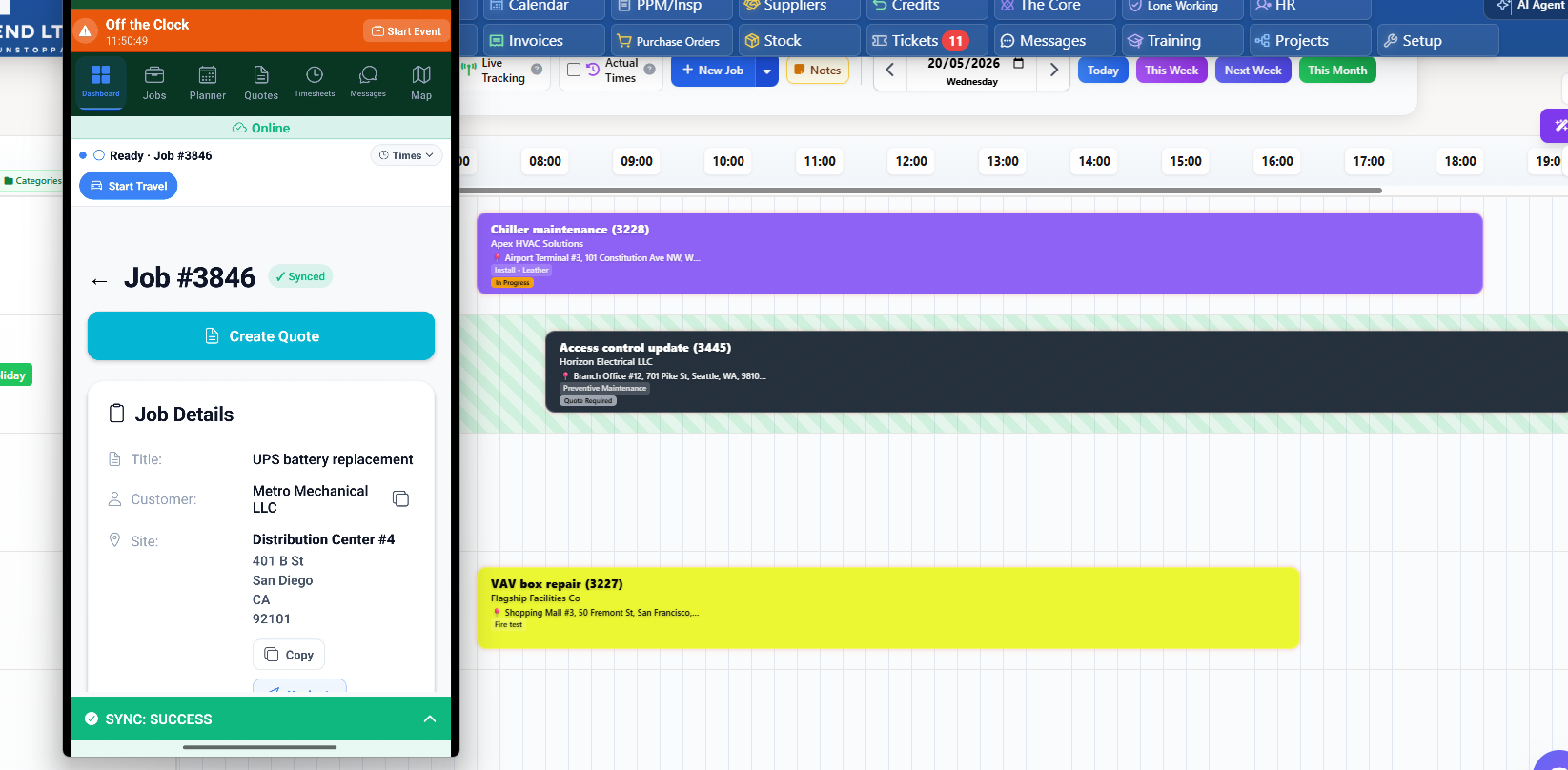
One planner for the whole workforce: technicians, jobs, availability and leave in a single view.
- Technician scheduling with drag-and-drop assignment across days and teams - see scheduling and dispatch software.
- Leave-aware planning - approved vacation and absence automatically blocks availability, so nobody gets scheduled while they are away. See leave-aware job scheduling.
- On-call rotations for after-hours coverage - see on-call rotation software.
- Skills and certifications tracked per technician, so the right person gets the right work - see training and certification tracking. Print a photo ID badge from the same person record when a jobsite wants a checkable company badge.
- Map-based allocation to cut travel time between jobs - see map-based job allocation.
Field Visibility: Where the Workforce Actually Is
Once technicians are on the road, workforce management becomes a visibility problem. Dispatchers need to know who is traveling, who is on site, what has changed and who can absorb the next emergency call.
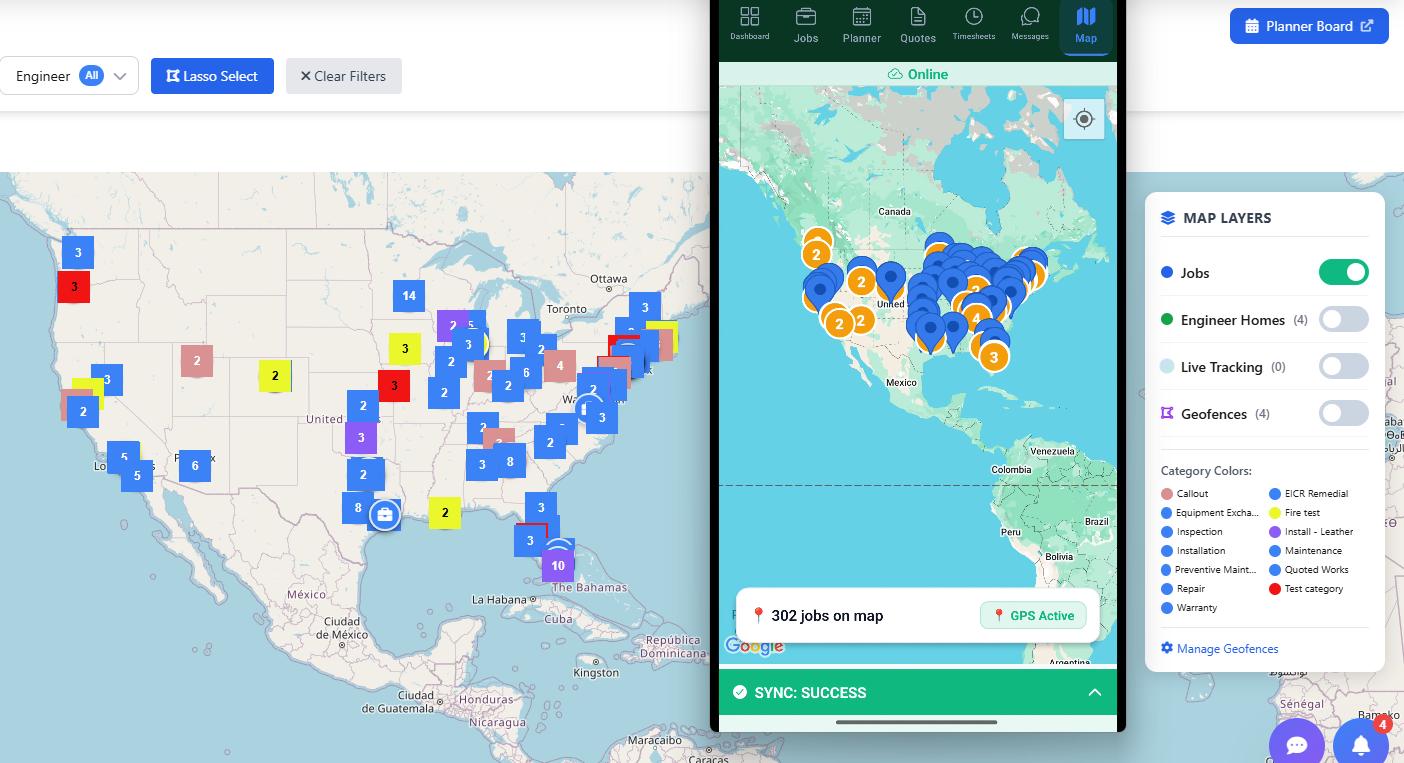
Live dispatch context: technician locations, job pins and status changes as the day unfolds.
Field Ascend supports GPS technician tracking where configured, plus lone worker safety workflows for technicians working alone at remote sites. The point is not surveillance - it is operational clarity and duty of care.
Time Tracking and Timesheets
Time is the currency of workforce management. Travel time, onsite time, overtime and job labor all need to be captured accurately - because they drive job costing, billing review and payroll preparation.
In Field Ascend, technicians record time against jobs as they work - start travel, arrive, complete - and the system builds timesheets from that activity. The office reviews real recorded time instead of reconstructing the week from memory on Friday afternoon.
Overtime, Multi-State Crews and License Expirations
This is where workforce management stops being a scheduling exercise for U.S. contractors. A dispatcher can build a clean week and still create an expensive problem: unplanned overtime, a technician working in a state where their license does not apply, or a certification that lapsed two weeks ago. Field workforce management has to surface those constraints before the truck rolls, not after payroll runs.
Overtime you can actually defend
Under the Fair Labor Standards Act, non-exempt employees earn overtime past 40 hours in a workweek. Several states add daily thresholds on top of that - California, Alaska, Nevada and Colorado among them - so an eight-hour day is not a safe assumption everywhere you work. Emergency call-outs and long travel days are exactly what push a technician over a threshold nobody was watching.
Because travel and onsite time are recorded against the job as the technician works, the hours behind a timesheet are traceable to a specific job, site and time window. Configurable pay rules and reusable payroll export profiles then shape those hours into the format your payroll provider expects. Field Ascend prepares payroll data - it does not process payroll, issue paychecks or give legal advice.
Crews that cross state and county lines
Contractors working across a metro that straddles two states, or bidding public work under prevailing wage rules, need hours attributed to a job and site rather than to a generic shift. Certified payroll reporting on public projects depends on exactly that: which employee, on which project, for how long, at what classification. Job-level labor records give you the underlying detail to build those reports from, instead of reverse-engineering them from a weekly total.
Licenses and certifications that expire quietly
EPA Section 608 certification for refrigerant work, OSHA training, state journeyman and master licenses, manufacturer certifications and site-specific inductions all have expiration dates - and none of them announce themselves. Storing them against the technician record means the compliance matrix shows what is current, what is expiring and what has lapsed, and dispatchers can assign on skills rather than on memory. See training and certification tracking for the detail.
One caveat worth stating plainly
Field Ascend records and organizes the workforce data these obligations depend on - hours by job and site, pay rules, certification status and approval trails. It is not a payroll processor, a tax engine or a substitute for advice from your payroll provider or employment attorney. Treat it as the system of record that makes those conversations short.
See Workforce Management in Practice
A feature list only goes so far. This walkthrough shows the workforce side end to end - scheduling technicians, tracking where the team is, capturing job time in the field and getting hours back to the office.
Full demo: technician scheduling, GPS tracking, job management and timesheets in one field workforce system.
Job Evidence and Invoice-Ready Handoff
The best workforce management software for contractors is not just a staff list. It gives the office and field team one connected workflow from the first schedule decision through to invoice review.
A dispatcher assigns the work. The technician sees the mobile work order. The offline app keeps working if signal drops. Photos, notes, signatures and time tracking become job evidence. The office reviews the timesheet, materials and job record before billing or accounting handoff.
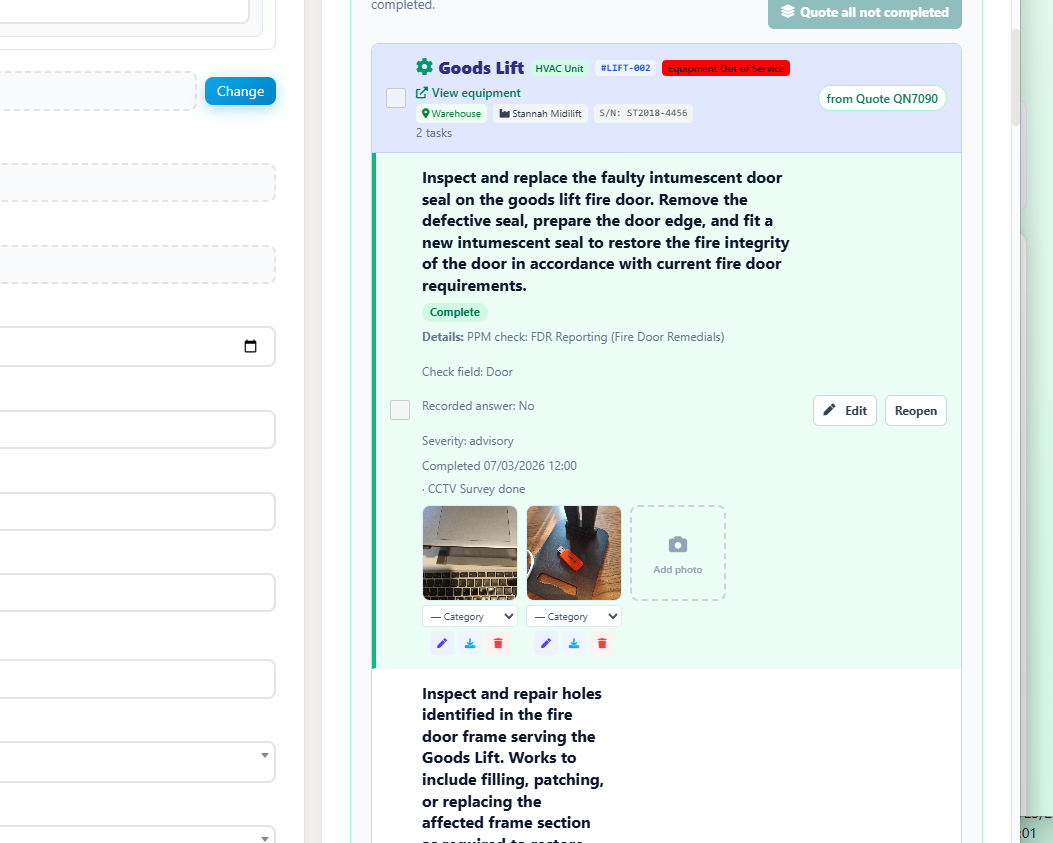
A completed job that needs no chasing: evidence, time and materials ready for invoice review.
For the field execution side - mobile work orders, offline capture, photos and signatures - see the dedicated mobile workforce management guide and the field service mobile app page. For billing, the handoff feeds field service invoicing software directly.
Best Fit for Contractors and Mobile Technicians
Field Ascend is strongest where the workforce is mobile and the job record matters. That includes HVAC, refrigeration, plumbing, electrical, facilities maintenance, property maintenance, equipment service and other contractors where technicians need reliable job information away from the office.
Good fit
- Service businesses with dispatchers and mobile technicians.
- Teams that need technician scheduling connected to work orders.
- Contractors that need photos, signatures, forms and job evidence from site.
- Businesses that need offline app reliability in low-signal locations.
- Teams that want time tracking and timesheets to support billing and invoice review.
- Operations that track sites, equipment, assets and recurring preventive maintenance.
How to Evaluate Workforce Management Software
- Map your workforce reality first. Mobile technicians, customer sites, assets and recurring maintenance need field WFM, not HR WFM.
- Test the schedule against real constraints. Leave, skills, on-call coverage and travel - does the planner see them all?
- Follow one job end to end. Schedule it, dispatch it, complete it on mobile, review the timesheet, prepare the invoice. Count the manual steps.
- Check the offline story. If the field app fails without signal, the workforce data fails with it.
- Check where time goes. Recorded time should flow into timesheets, job costing and billing review without retyping.
The practical test
If one system can tell you who is available next Tuesday, who is qualified for the job, where your technicians are right now, and whether yesterday's completed work is ready to invoice - that is workforce management software doing its job.
Bottom Line
Workforce management software for field service has to connect people to work: schedules to jobs, availability to dispatch, time to billing, and field evidence to the office. Generic HR platforms manage the workforce on paper; field-built platforms manage the workforce where the work happens.
Field Ascend gives U.S. contractors both sides - the office planning layer and the field execution layer - in one connected system, from $13/user/month with a 30-day free trial.