
Stop rebuilding technician hours in spreadsheets. Field Ascend captures travel, on-site, and return time from the mobile app, shows the full day on Gantt-style timesheets, flags GPS exceptions for review, and exports payroll-ready hours from the same field service management software you use for dispatch and work orders.
Built for U.S. contractors who need accurate labor records without chasing paper timesheets, texts, or separate time-tracking tools.
$13/user/month. All features included. 30-day trial.
Timesheets stay connected to work order management, labor costing, and invoicing instead of living in a disconnected spreadsheet.
See how Field Ascend turns technician job time, staff and admin hours, non-job events, GPS audit flags, confirmations and payroll export into one connected workflow inside your field service software.
This walkthrough shows the office review process from pending and confirmed rows through to GPS exception review and payroll export.
Technician timesheet software captures how field labor is spent across travel, on-site work, return time, office work, and non-job activities. For service contractors, it needs to connect to work orders, dispatch, mobile app actions, and payroll review - not just record clock-ins.
Field Ascend is field service software first. Timesheets are part of the same system used for scheduling and dispatch, technician mobile workflows, labor pricing, and customer billing. That makes it a practical choice for field service software for small business teams that have outgrown manual time tracking but do not want a separate HR stack.
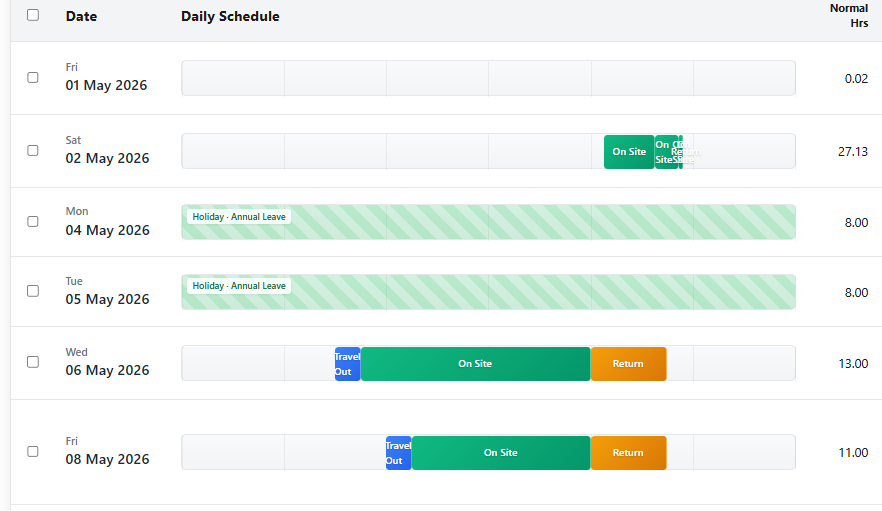
Traditional timesheets are walls of numbers. Field Ascend turns job time into a visual timeline so managers can review labor faster before payroll.
Each day displays as a horizontal timeline. Segments show:
Hover a segment to see exact times, work order number, customer name, and whether the visit was a two-person job.

When a technician has multiple work orders on the same day, Field Ascend checks for impossible overlaps.
GPS timesheet validation is not about micromanagement. It gives your office evidence when a customer disputes attendance or when a manual entry needs review. Pair it with GPS technician tracking software for dispatch and location context.
When technicians tap Start Travel, Arrive, or Complete in the mobile field service app, location context is captured in the background. The system can:
Technicians are not blocked from working. Managers review exceptions and approve, adjust, or document the decision.

Flagged rows appear with a GPS pending badge. Review shows the reason, flag type, and space for notes before approval.
Once reviewed, the entry can move forward to payroll with a clear audit trail - useful for HVAC, plumbing, electrical, and other commercial service teams where labor disputes are common.
Payroll is not only about technicians on work orders. Field Ascend also supports office time, helpers, and scheduled non-job events inside the same review screen.
Travel, on-site, and return segments captured from the mobile app and linked to the work order, customer, and labor pricing rules.
Log admin, dispatcher, warehouse, and helper hours without forcing every employee through the technician app workflow.
Training, parts runs, vehicle checks, and team meetings can appear as scheduled events so paid non-job time is visible before payroll.
That matters for contractor management software buyers who want labor visibility across the business, not just the truck roll. Office staff, technicians, and scheduled internal time all roll into the same review and export workflow.
Configure hourly rates and overtime thresholds, then save the exact CSV structure your payroll platform or payroll service expects for every repeat run. Pay rules live on each person's Payroll page. Every new dial starts off, so nobody's pay changes until you turn a rule on.
Set normal hours, overtime, double time, Saturday, Sunday, and holiday multipliers per staff profile. Field Ascend calculates daily labor cost breakdowns before export. Period Overtime can sit beside Daily Overtime if you also need a weekly or monthly cap.
Select rows, confirm approved time, and prepare a clean payroll batch instead of clicking through one entry at a time.
Choose daily, per-job, or per-person totals, drag columns into order, rename headers, add fixed payment codes, and control delimiters, U.S. date format, header rows, and decimal precision. Formula, Lookup, and Format columns sit alongside mapped fields. Each pay code can have its own column.
Map each technician or staff member to the employee ID used by your payroll system, so exported rows land against the right person without manual cleanup.
Export to Excel, standard CSV, or PDF for ad hoc reporting, or select a saved payroll profile for a repeatable import-ready CSV. Starter layouts include QuickBooks Time, generic day summaries, and period totals per person. Add a totals row, filter rows, and save templates as one-click download tiles. Field Ascend support can lock a layout as Managed by Field Ascend. Duplicate it if you need to edit.
Approved time can feed labor cost visibility on jobs, dashboards, and invoicing inside the wider field service management platform.
Pay overtime after N hours in a week, two weeks, 4 weeks, or a month. That covers typical U.S., Canadian, and Australian weekly overtime, and it can sit beside Daily Overtime. The dial stays off until you turn it on.
Decide whether travel is paid. Exempt it from daily overtime, period overtime, double time, weekend and public holiday rates, or time-band premiums. Travel can count toward the overtime clock, or not. One tick covers travel paid at basic, never overtime.
Price a clock window as a multiplier, a fixed $ per hour, or extra $ per hour on top of basic. Consecutive-day premiums are available too. When Stack Rates is on, multipliers multiply: 1.5 × 1.5 is 2.25x, not 1.5x twice.
Round paid time to 5, 6, 10, or 15 minutes, or always in the employee's favor. Deduct lunch only when the day exceeds N hours. Pay mileage after a number of free miles. People on a company vehicle get none.
Filter to May, review exceptions, confirm clean rows, then export for payroll. That is the workflow small and mid-sized service businesses need when they outgrow text messages and handwritten job sheets.

Hover any overtime figure or total on Timesheets. You get the pricing for that day, one line per rule. The staff portal and staff reports use the same numbers as the office.
Timesheets shows how the day was priced, one line per rule. A person with nothing configured gets a No pay rules badge instead of a silent $0. Days you have adjusted are labeled Payroll:.
Setup → Payroll Settings stores the tenant Pay period. Timesheets and the export then offer This pay period and Last pay period. In Accounts Settings → Labor Cost, set Cost basis to Payroll engine and job labor cost becomes what payroll pays, times that person's On-cost multiplier. Quotes can carry a Role. Nothing moves until you switch the basis.
Technicians do not fill out a separate timesheet app. They work normally in Field Ascend, and time is captured from job actions.
Opens the travel segment and records timing from the mobile workflow.
Closes travel and starts on-site labor for the work order.
Ends on-site time and keeps the visit connected to notes, photos, and signatures.
Everything syncs back to the office automatically, or queues offline until signal returns. That keeps timesheets accurate even in basements, plant rooms, and rural dead zones.
Explore connected U.S. pages for dispatch, mobile work, work orders, GPS audit, dashboards, and pricing.
Technician timesheet software captures field labor from travel, on-site work, and return time, then gives office teams a review screen for payroll and labor analysis. In Field Ascend, it is part of the same field service management system used for work orders and dispatch.
Yes. Technicians record time through normal mobile job actions such as Start Travel, Arrive, and Complete. The office sees those segments on Gantt-style timesheets without manual re-entry.
Yes. Admin, helper, and staff time can be logged separately from technician job time, and non-job planner events can appear in the same review view.
Yes. You can configure hourly rates, overtime thresholds, weekend multipliers, and holiday rules per staff profile. Daily labor cost breakdowns are calculated before export.
Yes. Export Excel, CSV, or PDF for ad hoc reporting, or save a payroll profile for repeat CSV imports. Profiles control daily or per-person aggregation, column order, custom headers, fixed values, delimiter, date format, and decimals, with starter layouts for QuickBooks Time and generic payroll files.
No. It is designed for small and mid-sized U.S. contractors that need accurate labor records without enterprise payroll complexity or a separate time-tracking system.
No. Pay rules live on each person's Payroll page. Period overtime, travel exemptions, time-of-day bands, rounding, lunch, mileage, and the rest start off. Nothing changes until you turn a dial on. Job labor cost also stays as it is until you set Cost basis to Payroll engine in Accounts Settings → Labor Cost.
Try Field Ascend with full access to timesheets, GPS Smart Audit, mobile work orders, scheduling, invoicing, and the rest of the platform.