Email delivery is the backbone of any field service management software. Every completed job triggers emails: job sheets to customers, invoices to accounts, certificates to compliance teams. When those emails land in spam - or don't arrive at all - it creates delays, chasing and lost trust.
That's why we've built a native Microsoft 365 integration into Field Ascend, using OAuth2 authentication to send emails directly from your own business mailbox. No app passwords, no SMTP credentials, no workarounds.
Key takeaways
- Send emails from your own Microsoft 365 mailbox using OAuth2
- Fully compatible with MFA, Conditional Access and Security Defaults
- No app passwords or stored SMTP credentials required
- Better deliverability through your domain’s SPF, DKIM and DMARC records
- Every sent email appears in your Outlook Sent Items for a complete audit trail
Why Microsoft 365 Integration Matters
Microsoft 365 is the most widely used business email platform in the UK. If your engineers, customers and suppliers all use Outlook, your FSM software should speak the same language.
Traditional SMTP connections require storing plain-text passwords and creating app passwords - a security risk that many IT departments rightly block. Microsoft has been deprecating basic authentication since 2022, meaning the old approach simply doesn't work for many organisations any more.
Our OAuth2 integration solves this. It uses the same modern authentication that Outlook, Teams and SharePoint use - fully compatible with MFA, Conditional Access and Security Defaults.
How It Works
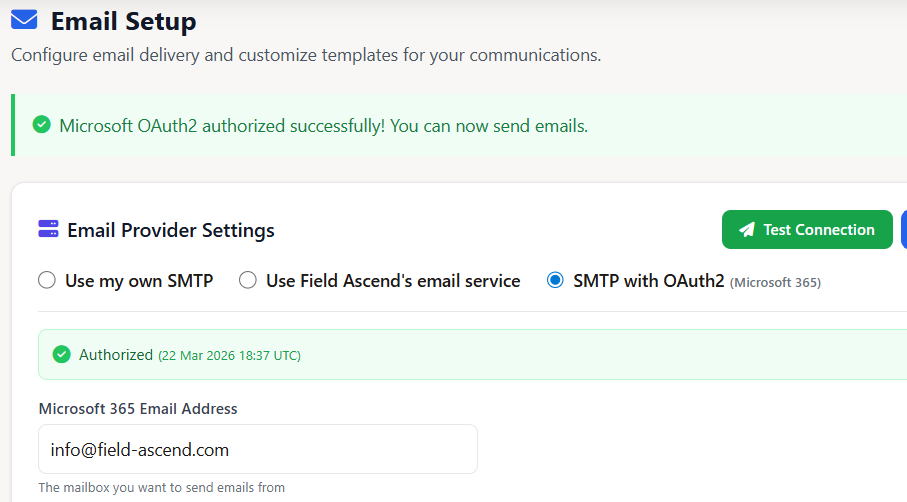
Setting up Microsoft 365 email in Field Ascend takes less than two minutes:
- Choose "SMTP with OAuth2 (Microsoft 365)" as your email provider in Settings → Email Setup
- Enter your Microsoft 365 email address - the mailbox you want to send from
- Click "Authorise with Microsoft" - you'll be redirected to Microsoft's login page
- Sign in and grant permission - Field Ascend only requests permission to send emails on your behalf
- Done - all emails (job sheets, invoices, quotes, certificates) now send from your own mailbox
Benefits for Field Service Businesses
Emails from Your Own Domain
Instead of emails arriving from no-reply@field-ascend.com, your customers receive job sheets and invoices from office@yourcompany.co.uk. This builds trust, improves deliverability and looks professional.
Works with MFA and Security Defaults
Many maintenance management software platforms in the UK struggle with Microsoft 365 because they rely on basic SMTP authentication. Field Ascend's OAuth2 integration works seamlessly with multi-factor authentication, Conditional Access policies and Microsoft's Security Defaults - no IT workarounds needed.
Better Deliverability
Emails sent through your own Microsoft 365 mailbox benefit from your domain's SPF, DKIM and DMARC records. This means fewer emails landing in spam and better inbox placement for your job sheets and invoices.
Centralised Email History
Every email Field Ascend sends on your behalf appears in your Sent Items folder in Outlook. This gives you a complete audit trail without leaving your mail client - useful for compliance and customer queries.
Who Is This For?
The Microsoft 365 integration is available to all Field Ascend customers on any plan. It's particularly valuable for:
- Small to medium field service businesses who use Microsoft 365 for email and want a field service management system for small business UK that integrates natively
- Facilities management contractors using CAFM software who need professional, branded emails for PPM reports and compliance certificates
- Multi-engineer operations using mobile workforce management software where a central office mailbox sends all outbound communications
- Companies with strict IT policies where basic SMTP authentication is blocked and only OAuth2 connections are permitted
Microsoft-Verified Publisher
When you authorise the integration, you'll see the Field Ascend Ltd name with a blue verification badge on the Microsoft consent screen - confirming you're granting access to a legitimate, vetted application.
This verified publisher status is issued by Microsoft and confirms that Field Ascend has been validated as a genuine software publisher with a verified business identity. You can see this badge on the consent screen during the OAuth2 authorisation flow.
Already Using SMTP or Mandrill?
No problem. Field Ascend supports three email delivery methods:
- Microsoft 365 OAuth2 - the new integration, recommended for Microsoft 365 users
- Standard SMTP - for non-Microsoft mail providers (Gmail, custom SMTP servers)
- Field Ascend's email service - our built-in Mandrill-powered delivery, available immediately on signup with no configuration
You can switch between methods at any time from the email setup page in Settings without losing your templates or settings.
Get Started
If you're already a Field Ascend customer, head to Settings → Email Setup and select "SMTP with OAuth2 (Microsoft 365)" to get started. The entire setup takes under two minutes.
If you're evaluating field service management software UK options and Microsoft 365 integration is important to you, start your free trial and see how Field Ascend connects to your existing tools.
For more on how Field Ascend helps UK service businesses streamline operations, explore our guides on PPM software, common field service challenges and engineer productivity tips. You might also be interested in our latest post on connecting Field Ascend to AI.