If you run a field service business, you know the routine. Someone asks “how many jobs did we complete last week?” and the answer involves logging into the system, navigating to reports, setting date filters, exporting a spreadsheet, and finally counting rows. For a simple question, it takes far too long.
Multiply that across every question your operations manager, finance team or site supervisor asks in a week - job history for a customer, overdue PPM visits, equipment certificates about to expire - and you start to see how much time gets lost to what should be instant answers.
That’s why we built the AI Connector. Field Ascend is now one of the first field service management software UK platforms to offer a direct, native connection to an AI assistant - and we believe it changes how service businesses interact with their data.
Key takeaways
- Ask questions about your jobs, equipment, customers and certificates in plain English
- Get instant answers from your live Field Ascend data - no report builder needed
- Read-only and secured with OAuth 2.1 - the AI cannot modify your data
- Works on Claude web, desktop and mobile - query your business from anywhere
- One of the first native AI integrations in UK field service management
What Is the AI Connector?
The AI Connector links your Field Ascend account directly to Claude, the AI assistant built by Anthropic. Once connected, you can open Claude on your computer, phone or tablet and ask questions about your business data in everyday language.
There’s no report builder to learn, no filters to configure, and no CSV files to download. You simply type a question - “show me all overdue jobs”, “which engineer completed the most jobs this month?”, “list all equipment at the Manchester site” - and Claude pulls the answer directly from your live Field Ascend data.
This is what AI-powered data querying for field service looks like in practice: your data, accessible through conversation, available to anyone on your team who needs it.
What Can You Actually Ask?
The best way to understand the AI Connector is to see it in action. Here are two real examples from a connected account:
Example 1: Customer and Site Lookup
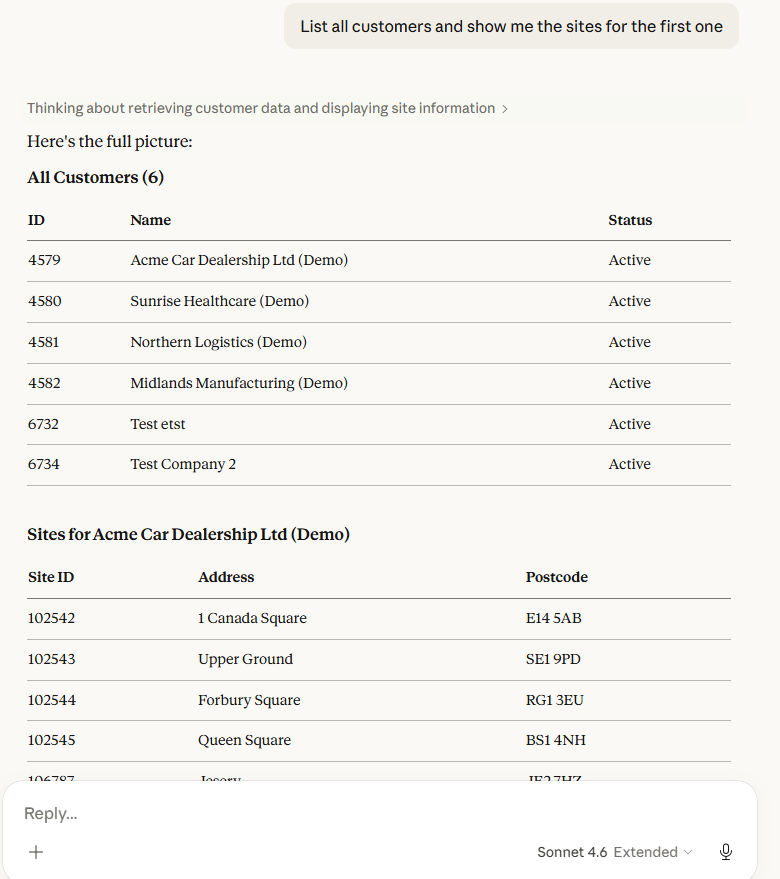
Prompt: “List all customers and show me the sites for the first one.” - Claude returns a full customer list, then drills into the site details for the selected customer.
Example 2: Equipment Search and Details
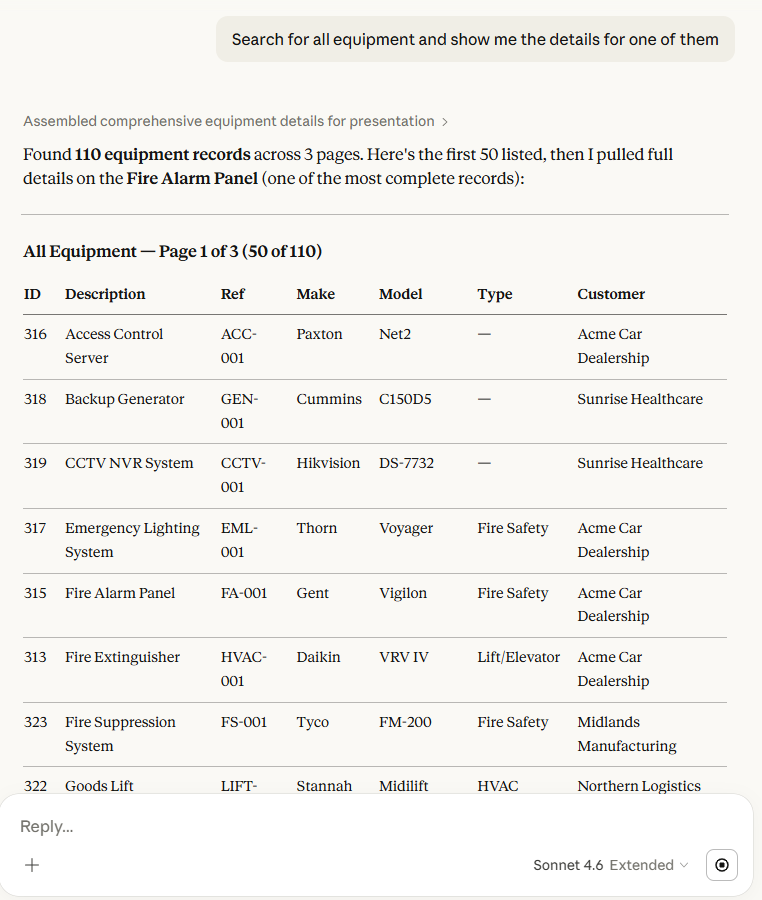
Prompt: “Search for all equipment and show me the details for one of them.” - Claude searches the equipment register and returns full asset details including make, model, serial number and service history.
You can ask about jobs, equipment, customers, sites, certificates, PPM contracts and more. The queries above are simple examples - you can chain questions, ask follow-ups, and explore your data conversationally. This is natural language reporting with Claude AI without the report.
Why This Matters for Field Service Businesses
For most field service management software platforms, getting answers from your data means learning a report builder or waiting for someone who knows how. The AI Connector removes that bottleneck entirely.
Everyone Gets Access to Answers
Your office manager shouldn’t need to wait for an admin to run a report. With the AI Connector, anyone authorised on your account can ask their own questions and get immediate answers. That’s what instant answers from your field service data really means - democratised access to your own data.
Works on Mobile
Claude runs on web, desktop and mobile. That means a site supervisor standing on a job can pull up equipment history, check certificate expiry dates or review job notes - all from their phone, all by asking a question. Pair this with our full feature set and your team has everything they need in the field.
Time Back in Your Day
Every question you don’t have to manually look up is time saved. Across a week, the cumulative effect is significant - especially for operations managers and coordinators who spend hours pulling information for clients, auditors and internal teams.
Competitive Advantage
Most field service software platforms have no AI integration at all. By connecting directly to an AI assistant, Field Ascend customers get a genuine edge - faster decisions, better visibility, and a system that grows smarter alongside the business. Explore our full AI automation capabilities to see how this fits into the bigger picture.
Is My Data Safe?
Here’s how we’ve built the integration with security as a priority:
- OAuth 2.1 authentication - the same modern standard used by Microsoft, Google and other enterprise platforms
- Encrypted in transit - all communication between Claude and Field Ascend is encrypted via HTTPS
- Tenant-isolated - your data is completely separated from every other Field Ascend account
- Nothing stored by AI - Claude does not retain your data after the session ends
- Revoke any time - disconnect the AI Connector instantly from your settings page
We’ve detailed our approach to AI data handling in our privacy policy, including the specific scopes the connector requests and how session data is managed.
How to Connect
Getting started takes less than two minutes. No technical knowledge required.
- Open Claude - go to claude.ai, the Claude desktop app, or the Claude mobile app
- Add the Field Ascend connector - paste
https://mcp.field-ascend.com/mcpas a new integration, then sign in with your Field Ascend credentials - Start asking questions - type any question about your jobs, equipment, customers or certificates and get instant answers
Full setup instructions, including alternative API key authentication, are available on the AI Connector feature page.
The Future of Field Service Is Conversational
We built Field Ascend to be the AI-connected field service platform that UK trades and maintenance businesses actually want to use. The AI Connector is the latest step in that direction - making your data accessible, your decisions faster, and your team more self-sufficient.
This isn’t a gimmick or a chatbot bolted onto the side. It’s a direct, authenticated connection to your live business data, delivered through one of the most capable AI assistants available today. And it’s available now, to every Field Ascend customer.
Whether you’re already using Field Ascend or evaluating field service management software UK options, the AI Connector is worth a look. See how it fits alongside our AI-powered dashboard, intelligent automation, and the rest of our platform on the Field Ascend homepage.