The AI certificate builder sits in Setup → Certificates. You design a template, attach it to a job, and an engineer or the office fills it. Complete and Issue numbers the certificate, locks it, and hashes the content. The model helps you build the form. It does not issue the record.
Corrections go through Reissue or Void, with a reason. Customers and auditors can scan a Verify QR and see status plus whether the printed hash matches. They do not see the certificate body.
An AI certificate builder in Field Ascend turns a sample PDF or a written brief into an editable template. Once issued, that certificate is a locked numbered record with a hash, not a Word file you can quietly change later.
£10/user/month. All features included. 30-day trial.
It is the design and issue path for field-completable certificates. If you run lift, PAT or electrical work, those trade pages stay separate: lift / LOLER, PAT testing, and electrical field service. The rest of the product is on features.
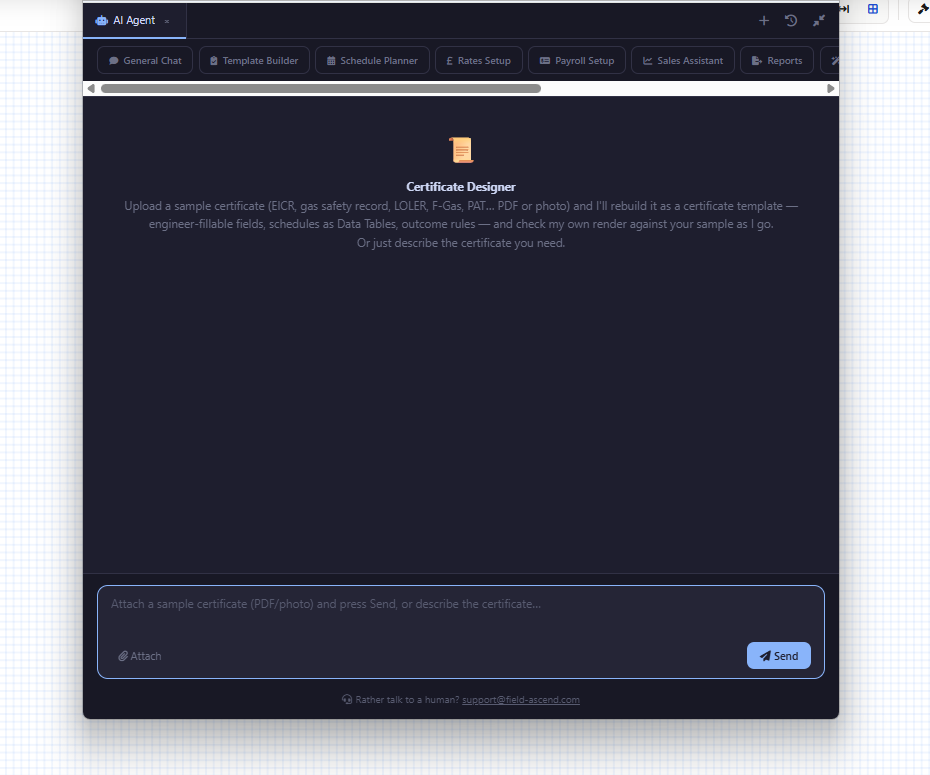
In the Certificate Designer, open AI Designer and upload a sample. A PDF or a photo of a LOLER report, PAT sheet, gas record, F-Gas form or any inspection form is enough. You can also just describe the certificate.
The assistant rebuilds a cover on a canvas page, long schedules as Data Tables on Flow pages, tick groups as radio or yes/no fields, and merge tags for company, customer, site, job and equipment. A Rule can set the overall outcome, for example any C1 or C2 observation → UNSATISFACTORY.
A competent person should review the wording before first use. Every AI save is a new template version. Certificates already issued keep the version they were issued under.
It will not issue, send or sign the certificate for you. It will not paste a scheme logo from your sample. It places a Scheme Badge element and you upload your own badge in Company Details.
Field Ascend does not accredit you to a scheme. An Electrical Installation Condition Report template set appears in Template Library once expert review is complete. It is our layout of the Appendix 6 content, not a live scheme gallery and not a substitute for your scheme’s own paperwork check.
Once Complete and Issue runs, the certificate is a record. You do not edit the issued copy in place.
Complete and Issue numbers the certificate, sets status to Issued, records who issued it and when, takes a record hash of the content, and generates the PDF. Issued certificates open read-only in the office, engineers portal and apps.
Reissue with corrections is office only, and only for issued certificates. It creates a new draft linked to the original. You must give a reason, and that reason prints on the new certificate. When the new one is issued it gets a new number and the original becomes Superseded. It stays downloadable.
Void marks an issued certificate as not to be relied on. You give a reason. Number, content and PDF are kept. Templates that have issued certificates cannot be deleted, because later template edits must never change an issued record.
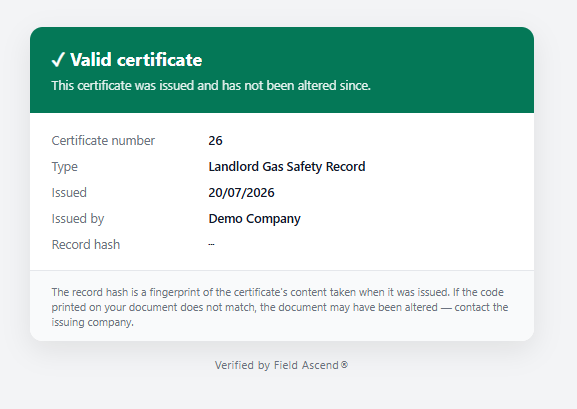
Drag Verify QR and Verify URL from the Certificate merge-tag group in the designer. Anyone who scans sees a public page. That page is deliberately thin.
It shows status (current, superseded or void), certificate number, type, issue date, issuing company and scheme numbers, outcome, next inspection date, and whether the printed record hash matches. No schedule, no readings, no observations. If you need the full document, that is the PDF, not the Verify page.
The register and the readings view are how the office finds overdue work and compares a circuit or test point visit to visit.
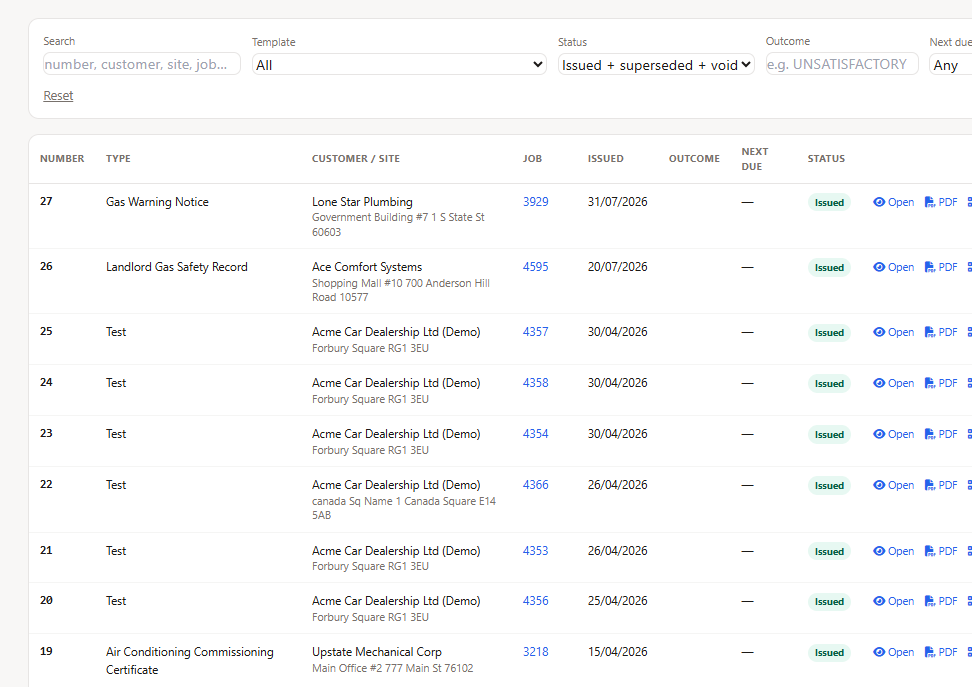
Setup → Certificates → Issued Certificates lists issued, superseded and void records with type, customer and site, job, issue date, outcome, next due and status. Overdue dates show in red. Due within 60 days show amber. Tiles count issued, overdue, due soon and unsatisfactory outcomes.
Invited customer-portal contacts see a Certificates tab for their sites (PDF and verify links, due warnings). That tab is on by default.
Readings from issued certificates at an installation, and on the asset when the certificate has equipment, line up by the key column. A circuit’s Zs or insulation resistance can be compared visit to visit, with band colours and a trend.
Observation rows with a code (C1, C2, C3, FI) can become defects on that equipment so remedial quotes and jobs work the same way as PPM defects.
Long schedules belong on a Flow page so they paginate. A Data Table left on a canvas page is clipped to its box.
Typed columns, calculated cells, pass / warn bands, column totals, a key column, and hide-empty-rows on the PDF. Flow pages stack blocks and repeat table headers on the next sheet.
Derive writes a read-only field from other answers. Require can Block completion or Warn. Formulas can count whole table columns. Rules run in the form, on the app, and again at issue, so a contradictory certificate cannot be issued from any device.
The Scheme Badge element and Scheme Reg. No. merge tag print what you set in Company Details. Field Ascend never supplies scheme logos.
An AI certificate builder helps you turn a sample form or a description into a Field Ascend certificate template. Engineers then complete that template on a job. Complete and Issue numbers it, locks it and hashes the content. The AI does not issue the certificate.
No. An engineer or office user completes the form and chooses Complete and Issue. That step numbers the certificate, locks it, records who issued it, takes a record hash and generates the PDF.
The public Verify page shows status, certificate number, type, issue date, issuing company and scheme numbers, outcome, next inspection date, and whether the printed record hash matches. It does not show the certificate body.
No silent edits. Use Reissue with corrections and give a reason. The replacement gets a new number and the original is kept as superseded. Void marks an issued certificate as not to be relied on and keeps the number, content and PDF.
No. A UK Electrical template set for an Electrical Installation Condition Report to BS 7671 is provided in Template Library once expert review is complete. Review it against your scheme before first use and upload your own scheme badge. Field Ascend does not accredit you to a scheme.
Public review volume is still early, so the figures sit in crawlable HTML and should be refreshed when the profiles change.
Aggregate rating used in schema: 4.6/5 from 10 third-party reviews across G2, Capterra, and Trustpilot. Last checked: August 2, 2026.
Current ratings by source: Capterra 5.0/5 (1 review), G2 4.9/5 (5 reviews), Trustpilot 4.0/5 (4 reviews). Last checked: August 2, 2026.
30-day trial, all features, including Setup → Certificates. Or book a walkthrough of issue, lock and Verify.
Start 30-day trial See pricing Book a demo