Last updated: July 22, 2026
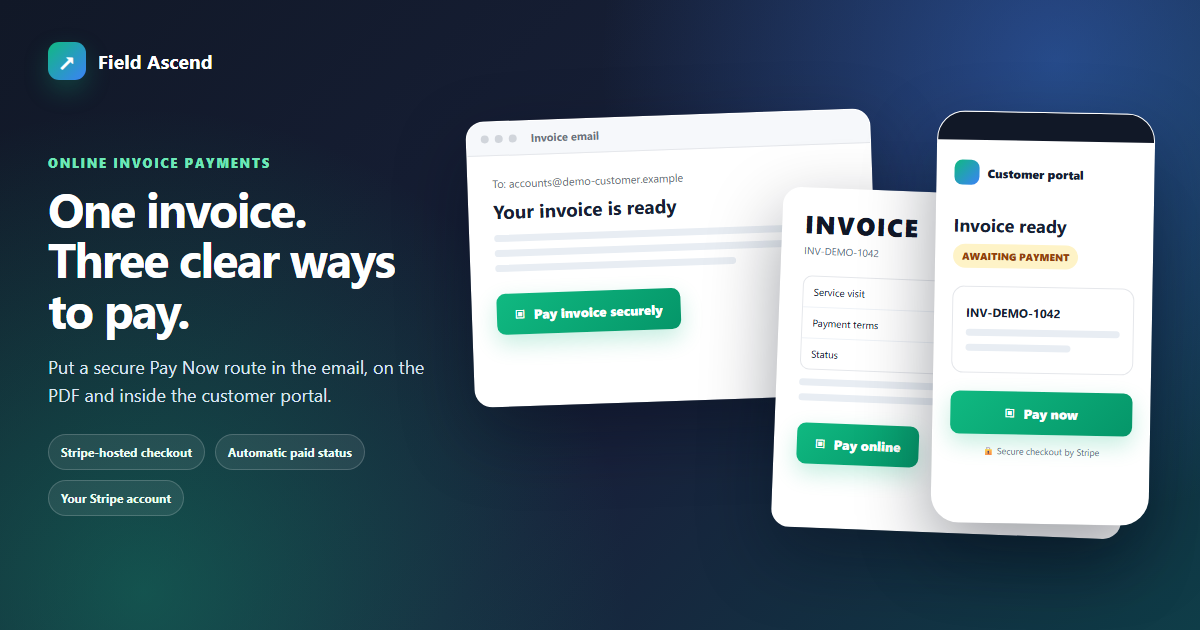
What are online invoice payments? They let a customer open a secure, tokenized link from an invoice email, PDF, the customer portal, or an admin-shared message, then pay in Stripe-hosted checkout. Field Ascend records the successful payment against the invoice and can pass the payment record to QuickBooks Online or Xero.
For a field service organization, that connects the final step of field service invoicing without turning Field Ascend into the merchant holding the money. The charge is made directly on your connected Stripe account. Funds move from your customer to that account and then to your bank; Field Ascend does not hold funds or card data.
This feature is the handoff between an issued invoice and the customer's payment. It does not create a separate wallet, store a card, or move merchant funds through Field Ascend. Instead, it gives an unpaid invoice a tokenized URL that opens a checkout session on the business's own Stripe Connect Standard account.
The payment stays attached to the invoice that requested it. That matters when dispatch, service, and accounting teams share one customer record: the office can see why the invoice exists, the labor or materials behind it, whether a payment succeeded, and which accounting system received the payment record. Customers get a direct route to pay without calling the office for card instructions.
Online payment links complement Field Ascend's wider field service management software. Technicians complete work, the office reviews and issues the invoice, and the customer pays that invoice through Stripe. Each system has a clear job and the audit trail remains tied to the underlying service work.
The workflow is designed to be understandable to the office team and the customer. The immediate payment event and the later accounting handoff are separate, so a bookkeeping delay does not prevent Field Ascend from recording a genuine customer payment.
Add {payment_link} to the invoice email template. When online payments are live, Field Ascend resolves it into a Pay Now control for that invoice.
Add the Pay Online block containing {{payment_link}} in the invoice PDF builder. The PDF only shows the button and printed URL when that block is in the chosen template.
An eligible unpaid invoice can show Pay Now in the customer portal, beside the invoice history the customer already uses.
Use Copy Payment Link on the invoice when the customer needs the URL in a direct, appropriate communication from your office.
These are different presentations of the same invoice-specific route, not unrelated checkout links. A consistent link helps reduce questions about which invoice is being paid and keeps the customer experience recognizable across email, PDF, and portal.
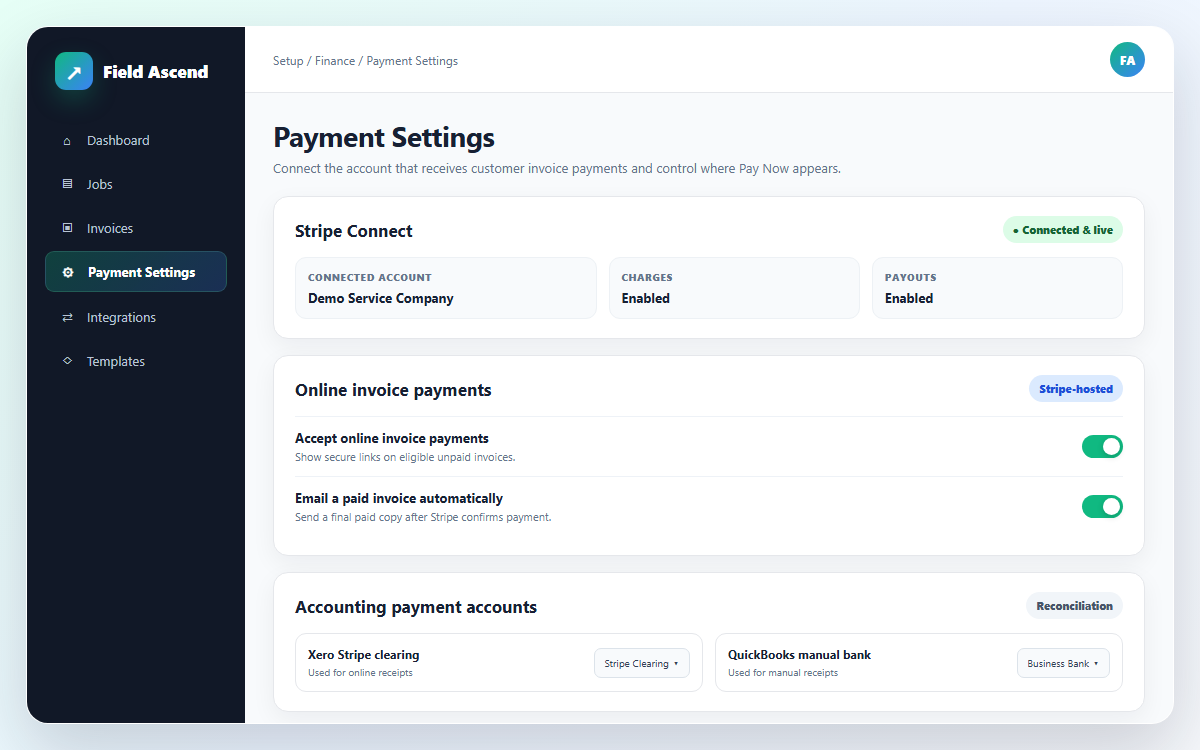
Go to Setup > Payment Settings, choose Connect with Stripe, and complete the required Stripe verification. Existing Stripe users can connect an account; new users can follow Stripe's hosted onboarding. Pay links become available only after the connected account is ready for charges and online payments are enabled.
Field Ascend uses Stripe Connect Standard accounts with direct charges. The customer pays the connected field service business, not Field Ascend. Stripe hosts checkout and manages know-your-customer (KYC) verification, risk controls, payment-method eligibility, payouts, and the connected Stripe Dashboard.
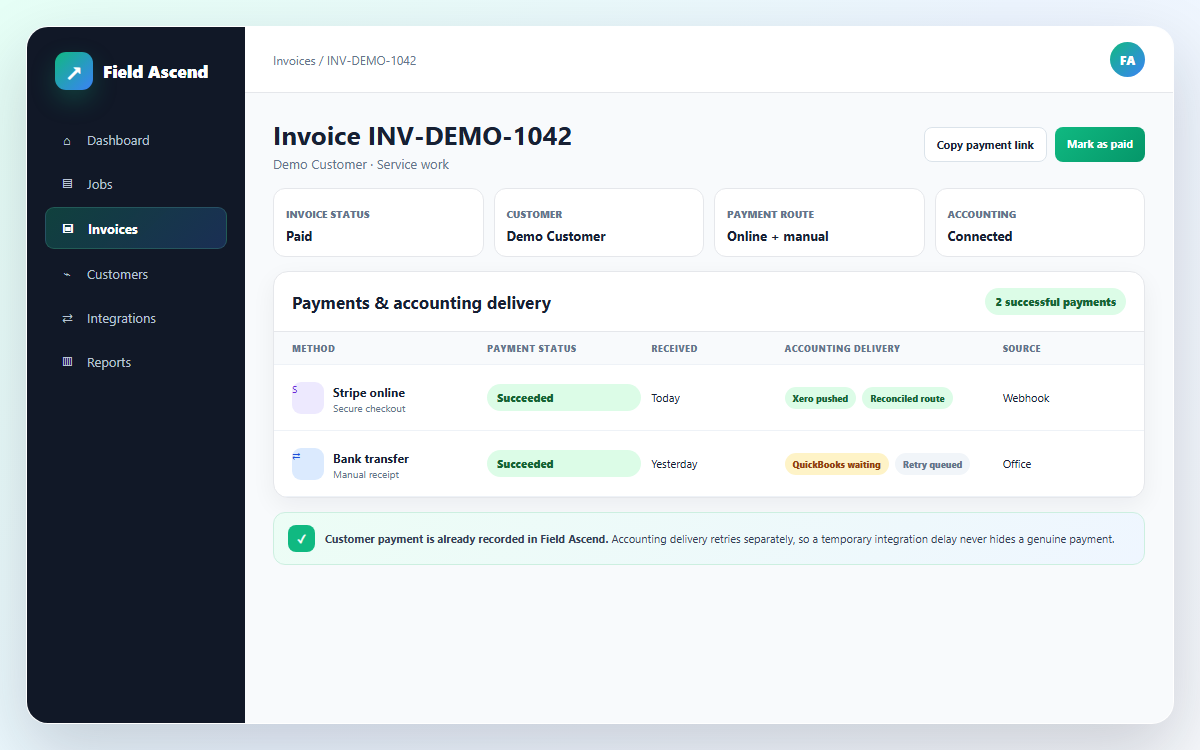
When checkout succeeds, Stripe sends a signed connected-account event to Field Ascend. That webhook is the immediate source of truth. Field Ascend writes a succeeded entry to the invoice payment ledger, recalculates the invoice's paid state, and can automatically email the customer a paid invoice copy when that option is enabled.
The five-minute background schedule belongs to accounting delivery, not payment detection. Your team does not have to wait for that schedule before the Field Ascend invoice shows paid. This distinction keeps a real customer payment visible even when an accounting invoice has not been posted yet.
A paid checkbox is only a summary. The payment row records how the invoice was settled and supports the handoff to accounting.
When QuickBooks Online or Xero is connected, its payment account is configured, and the invoice has been posted, Field Ascend can create the matching accounting payment. A background accounting outbox runs every five minutes and retries later when the accounting invoice, account, or service is not ready.
Stripe receipts allocate to the configured Stripe clearing account. Manual Mark as Paid receipts allocate to the configured manual bank account. Your bookkeeper can then reconcile Stripe's net bank payouts and fees against the clearing account rather than treating the full customer receipt as the final bank deposit.
See the broader accounting integrations overview for invoice and contact workflows around these payment records.
Online payment links are intentionally invoice-only. An estimate or quote does not carry a Pay Now link, because accepting proposed work and paying an issued amount are different customer decisions. Keep scope, options, and approval in your contractor quoting workflow; create the invoice when money is due.
For a deposit, percentage stage, partial amount, or remaining balance, use Field Ascend's existing quote or work-order invoice flow. For example, create the agreed deposit invoice from the quote, send that invoice's payment link, and create later stage or remaining invoices as the project progresses. Each payment then settles a real invoice with its own amount and history.
This approach also supports cleaner communication. The customer sees whether the request is a deposit, a milestone, or the remaining balance, while the office can distinguish paid stages from approved but not-yet-invoiced work.
Start with the people who answer payment questions: billing, dispatch, and whoever reconciles the bank. Agree when invoices are issued, which PDF template is used, and where manual receipts should be recorded.
Tell customers that checkout is hosted by Stripe and that the payment goes to your connected business account. Then review the first few paid invoices and accounting statuses before making the link standard across every invoice email.
For repeating service charges, pair the payment route with recurring invoice software: the plan creates each invoice, and the invoice provides the Pay Now route.
There are no payment links on estimates or quotes. Create a deposit, stage, partial, or remaining invoice before requesting payment.
Cards and supported wallets normally appear through Stripe, but the exact methods depend on the connected account, customer device, and Stripe availability.
The email and portal can offer Pay Now while a PDF does not. The selected PDF template must include the dedicated payment-link block.
Payment-record push supports QuickBooks Online and Xero. Zoho Books, Sage, and FreeAgent require the payment to be recorded manually there for now.
Field Ascend marks the local invoice paid when the verified payment arrives even if accounting delivery must wait. A bookkeeper still reconciles Stripe payouts and processing fees in the normal way. Refunds are managed in the connected Stripe Dashboard; a full refund can mark the Field Ascend invoice unpaid.
Online invoice payments give each eligible Field Ascend invoice a secure, tokenized payment link. The customer opens the link, completes Stripe-hosted checkout, and Field Ascend records the successful payment against that invoice.
The link can appear in invoice emails through {payment_link}, in an invoice PDF through {{payment_link}} when the template includes the Pay Online block, and in the customer portal. An admin can also use Copy Payment Link on the invoice and send it through an appropriate customer communication.
The payment is a direct charge on the field service business's Stripe Connect Standard account. Funds move from the customer to that connected Stripe account and then to the business's bank account. Field Ascend does not hold the funds or card data; Stripe hosts checkout, verification, risk controls, and payouts.
Payment links are invoice-only, so estimates and quotes do not have Pay Now links. For a deposit or project stage, use Field Ascend's existing quote or work-order percentage, partial, or remaining invoice flow, then send the payment link from the invoice that was created.
Yes. A signed Stripe webhook is the immediate source of truth after successful checkout. Field Ascend writes the payment ledger row, updates the invoice to paid, and can email an optional paid invoice copy. This does not wait for a timer.
They can when the accounting integration is connected, the relevant payment account is configured, and the invoice has been posted. Field Ascend's accounting outbox runs every five minutes and retries later when the invoice, account, or accounting service is not ready.
Yes. Mark as Paid records a manual payment row on the invoice. The office can identify the method as bank transfer, cash, card, check, or other, and Field Ascend can push that payment to the configured QuickBooks or Xero bank account.
Cards, Apple Pay, and Google Pay are normally available in Stripe-hosted checkout; other methods depend on the connected Stripe account, device, and availability. A full refund recorded through Stripe can return the Field Ascend invoice to unpaid.
Field Ascend publishes U.S. software pricing at $13 per user per month, with standard product features included. Card and wallet processing charges follow the connected business's Stripe account and Stripe's current terms. See the U.S. pricing page for current software pricing and trial details.
Connect your Stripe account, share secure invoice links, and keep payment status visible from customer checkout through accounting.
Start your free 30-day trial