Job Safety Analysis Software for Field Service
Build, approve and assign digital JSAs and JHAs inside the same field service management software that schedules the work. Each technician completes their own structured analysis or signs the controlled PDF before the workflow stage you choose, and customers can authorize the pack by secure email link or portal when you need it.
Replace disconnected Word files, paper signatures and shared drives with reusable hazards, versioned safety documents, work-order requirements and frozen completion records.
$13/user/month. Your qualified safety personnel remain responsible for assessment, approval and applicable requirements.
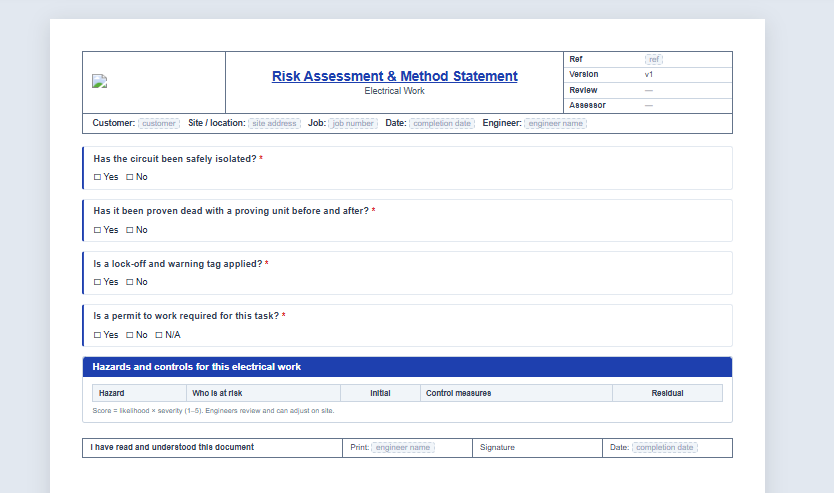
What is job safety analysis software?
Job safety analysis software helps contractors break a task into steps, identify hazards, document controls, distribute the approved analysis and retain completion evidence. Field Ascend connects the JSA or JHA to the actual work order, so each technician's acknowledgment, answers, photos and signature stay with the job, and customers can authorize when your process requires it, instead of living in a separate safety folder.
Digital JSA Documents That Follow the Work Order
Create a reusable analysis in the office, control its release, and put the right version in front of the technician at the point of work.
Build JSA and JHA documents
Combine task scope, work steps, PPE, risk matrix, hazard controls, questions, photos and sign-off in a page-based builder.
Import existing safety files
Turn a Word file, PDF or image into a structured draft, then have a qualified person verify every step, hazard and control.
Complete per technician
Each assigned technician completes their own required copy. One signature cannot clear the requirement for the whole crew.
Standardize hazard scoring
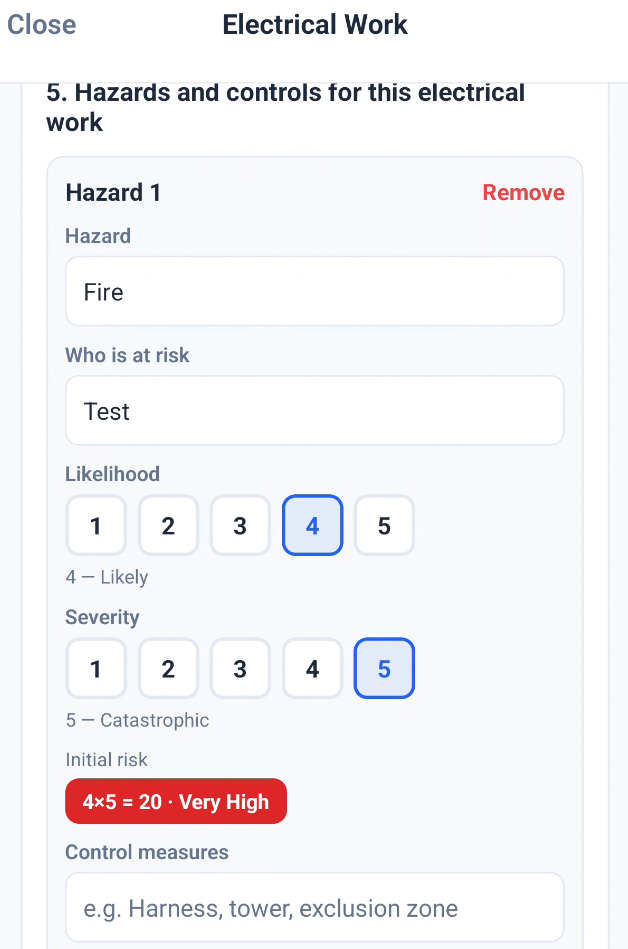
Use a configurable likelihood and severity matrix, initial and residual scores, and a reusable company hazard library.
Gate the right job stage
Require the safety document before travel, before work or before completion for technicians with Force RAMS enabled.
Retain historical evidence
Freeze the version, questions, answers and matrix at completion so a future template edit never rewrites the old record.
Customer authorization
Email a secure link, or show the request in the customer portal, so the contact reviews the safety pack, types their name and signs on screen. Built into Field Ascend; no separate e-sign product required.
Ask technicians to sign early
From the work order, request a signature from assigned technicians before they travel. They get a push and a dashboard reminder, then complete the document through the normal job flow.
Build the safety document your crews actually use
The document-first builder shows section cards beside a live page preview. Use the same tool for job safety analyses, job hazard analyses, point-of-work assessments, method statements and company safety procedures.
- Task scope, numbered work steps and emergency instructions
- PPE tiles, risk matrix legend and prefilled hazard tables
- Yes/no, text, date, dropdown, multi-select, photo and signature inputs
- Conditional sections for extra controls when an earlier answer requires them
- Eight starters covering POWRA, working at height, electrical isolation, COSHH, hot work, confined spaces, lone working and general site work
Design themes for the printed JSA
In Document Builder, open Document settings and pick a Design theme. The live A4 preview is what the PDF prints. Accent color still applies on top of the theme.
- Rounded, Classic, Soft, Bold, Minimal, Corporate, Outline, Editorial (serif), Compact, and High contrast for mono printing
- Set per document, so a point-of-work assessment and a hot-work pack can look different
- Existing documents stay on Standard until you change them
- Completed records are untouched
- Included in the subscription, not an add-on
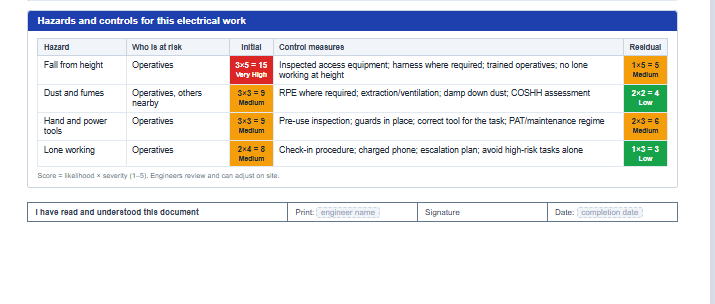
Assign the approved JSA to the right work
Different contractors use different controls. Field Ascend supports repeatable category rules, strict office assignment and technician selection without forcing every job through one model.
- Automatic assignment by work-order category
- Office-pinned documents for unique sites, customers or tasks
- Technician-select mode when field conditions determine the relevant analysis
- Drafts hidden from technicians until reviewed and approved
- Completion inside the field service mobile app, with sync when connectivity returns
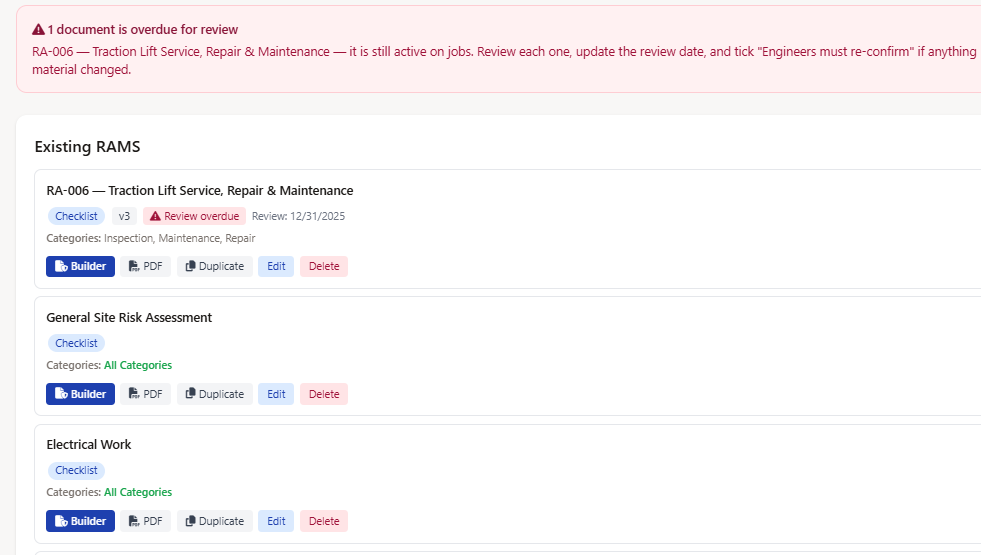
Version control built for changing field conditions
Approved safety documents need review, and site-specific work may need a controlled variation. Keep the master, the new draft and the historical completion separate.
- Draft and approved status with approver and timestamp
- Review due date, document version and overdue warning
- Duplicate a company master into a site-specific draft
- Mark controlled completions for re-confirmation after a material change; mobile enforcement depends on a current app build and fresh sync
- Keep the earlier completion as historical evidence
Customer authorization without a separate e-sign product
When a client or general contractor needs to authorize the safety pack before work, send the request from the work order. Contacts review the documents online, type their name and sign on screen. The signed copy stays on the work order with name, date and audit trail.
- Secure email link, and no customer portal login required
- Optional customer portal card on the work order for logged-in contacts
- One signature can authorize every safety document in that send
- Optional decline with a reason, office notification, and signed-copy email
- Resend or cancel while a request is still pending
From Safety Template to Work-Order Evidence
A repeatable process for office control, field completion, customer authorization and historical records.
Software Supports the Process. People Own Safety.
Field Ascend provides structured control and evidence. It does not replace qualified judgment, training, supervision or legal advice.
Important safety and compliance boundary
Your company remains responsible for determining whether a JSA, JHA, control measure and work method are appropriate for the task, site, equipment, workforce and jurisdiction. Requirements can differ by state, customer and activity.
- AI-created documents begin as drafts and should be verified against the source and real job conditions.
- Technicians can record changed conditions, answers, photos and signatures, but must still stop work and escalate unsafe situations.
- Digital records can support your safety program and audits; they do not by themselves establish OSHA or other regulatory compliance.
Frequently Asked Questions
Plain answers for U.S. contractors evaluating digital JSA and JHA software.
What is job safety analysis software?
It helps break work into steps, identify hazards, document controls, assign the approved analysis and retain each technician's completion. Field Ascend connects this process directly to field service work orders.
What is the difference between JSA, JHA and RAMS?
JSA and JHA are common U.S. terms for analyzing task steps, hazards and controls. RAMS combines risk assessment with a written method statement and is more common in the UK. Field Ascend's structured builder can support all of these document styles.
Can I import an existing JSA?
Yes. Upload a Word document, PDF or image to create a structured draft. Your qualified reviewer should verify wording, hazards, scoring and controls before approval.
Can I change how a JSA document looks?
Yes. In Document Builder open Document settings and pick a Design theme: Rounded, Classic, Soft, Bold, Minimal, Corporate, Outline, Editorial (serif), Compact, or High contrast for mono printing. Accent color still applies on top. The A4 preview is what the PDF prints. You set this per document. Existing documents stay on Standard until you change them, and completed records are untouched. Themes are included in the subscription.
Can safety analysis block work?
Yes. For technicians with Force RAMS enabled, require completion before travel, before work or before work-order completion. Assignment can follow work categories, office selection or technician selection.
Will an edit change an old signed record?
No. Completed checklist records use a frozen snapshot. A material update can mark the controlled record for re-confirmation while preserving earlier evidence. Mobile enforcement depends on a current app build and fresh sync.
Can customers authorize a JSA or safety pack?
Yes. Built-in customer authorization from the work order: secure email link and optional customer portal. The contact reviews the documents, types their name and signs on screen. One signature can cover several documents in the same send; the signed copy stays on the work order. No separate e-sign product required.
Can we ask technicians to sign before the visit?
Yes. On the work-order safety matrix, request a signature from an assigned technician. They get a push notification and a dashboard reminder, then complete the document in the normal job flow on the mobile app.
What other workforce safety tools connect?
Use JSA workflows beside lone worker safety, training and certification tracking, work-order checklists, photos and the mobile app.
Related U.S. Field Service Features
Put the Job Safety Analysis on the Work Order
Control the approved document, assign it to the right task and keep each technician's completed evidence with the work it covered.
Start your 30-day free trial