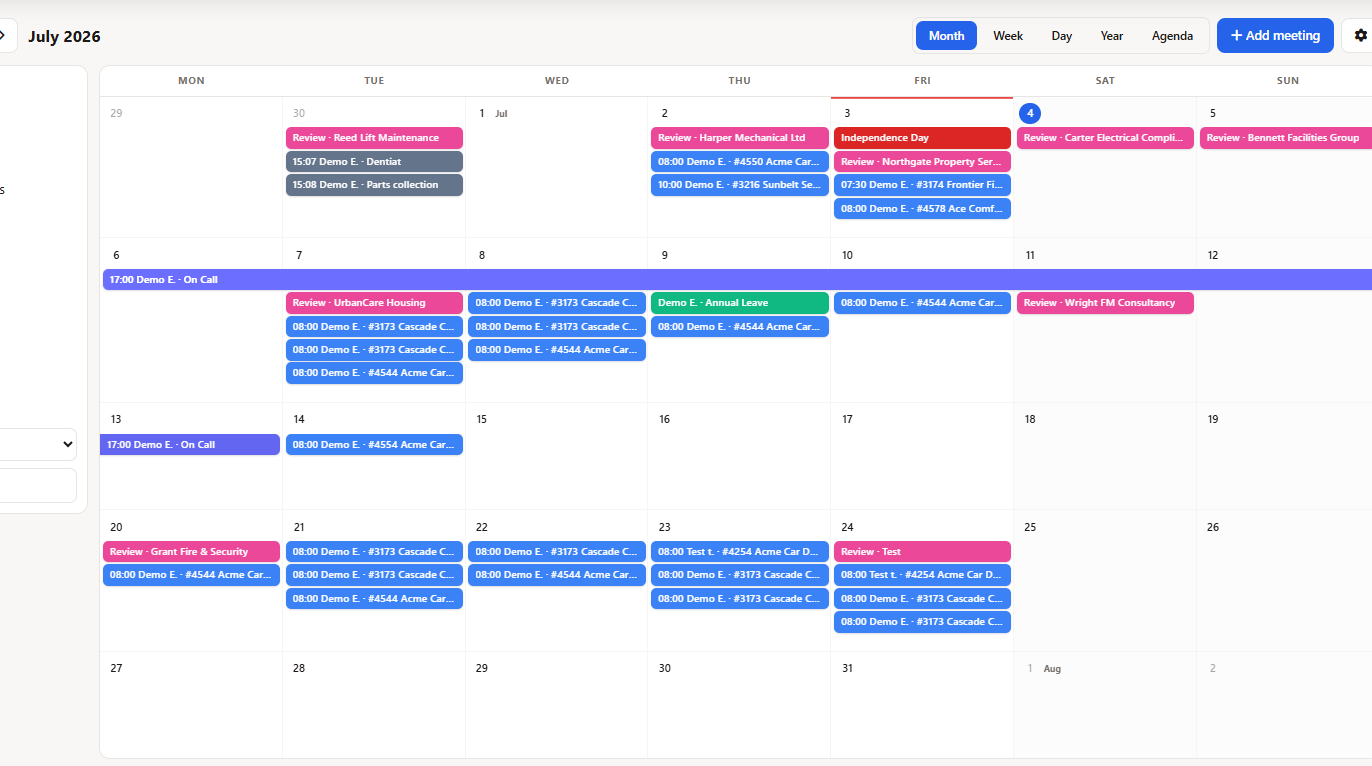
Jobs, vacation, sick time, public holidays, the on-call schedule, meetings and lead reviews - all on one company-wide office calendar. Field Ascend's Team Calendar shows who is where, who is out and who is on call, so the office plans with the full picture instead of five separate systems.
Start Free Trial
A field service team calendar is a company-wide office calendar that brings everything affecting availability into one view: scheduled jobs, approved vacation, sick time and absence, public holidays, the on-call schedule, planner events, meetings and lead review dates. Instead of cross-referencing the dispatch board, an HR spreadsheet and a separate on-call list, the office sees the whole operation on one screen - with Month, Week, Day, Year heatmap and Agenda views, filtered by department, staff group or person.
The Team Calendar sits alongside the visual planner board in Field Ascend's field service management software. The planner is where dispatchers schedule work; the Team Calendar is where the whole company sees the combined result.
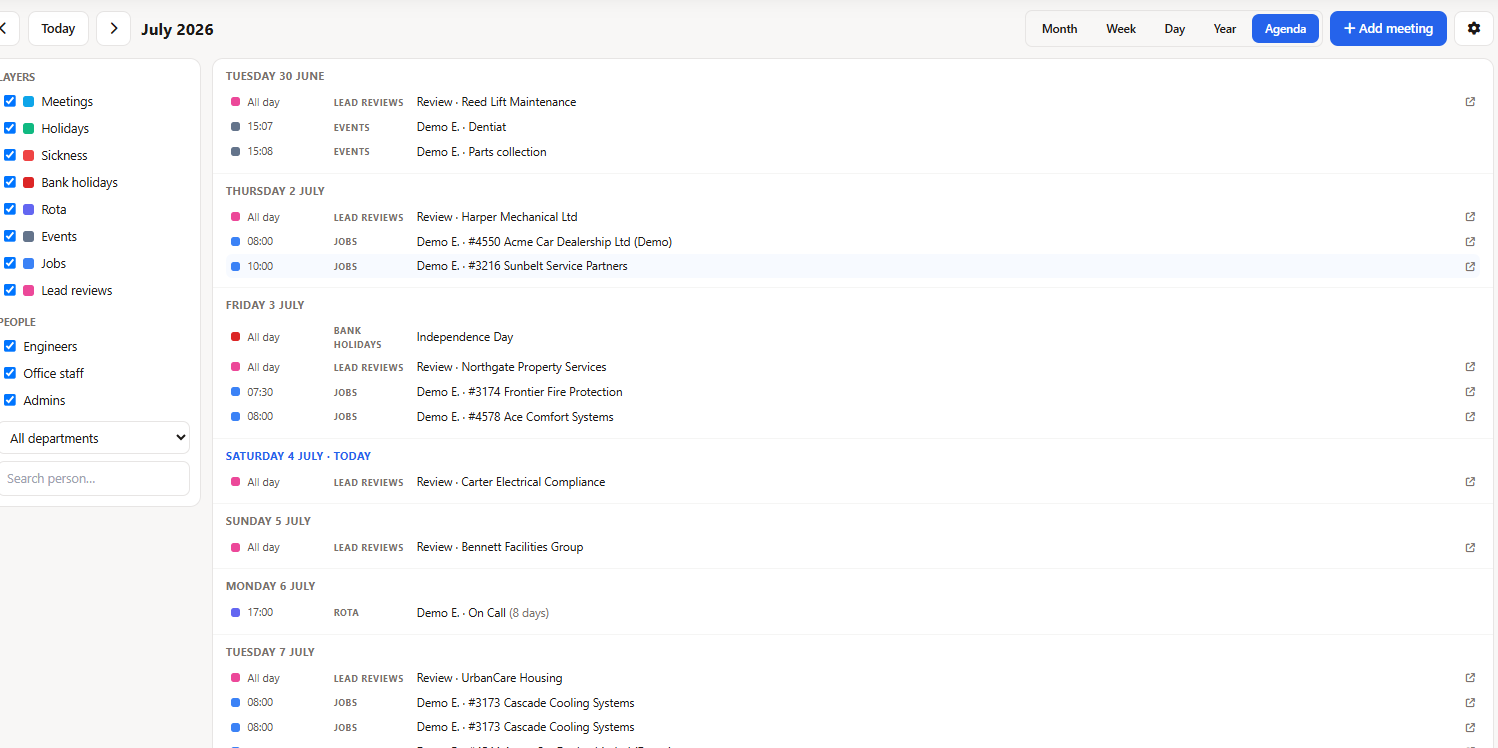
Each layer can be switched on or off independently, so the calendar answers whatever question you're asking - from "who's out in August?" to "who's on call this weekend?"
Every job on the dispatch board appears on the company calendar, so office staff see field commitments without opening the scheduler. Works hand in hand with our field service dispatch software.
Approved time off shows for every person, so nobody books a meeting - or a job - into someone's week off.
Recorded sick time and absence appear alongside vacation, giving managers a truthful picture of who is actually available today.
Public holidays display automatically across the calendar, so seasonal planning and holiday-adjacent scheduling take them into account from the start.
See who carries the on-call phone on any given day, week or holiday weekend - visible to the office and read-only in the technician and staff portals.
Non-job events from the planner - training days, vehicle services, office days - appear on the team calendar so no committed time goes missing.
Book meetings directly on the calendar, including surveys and site visits created straight from sales leads - sales activity and operations finally share one calendar.
Follow-up and review dates from your sales leads surface on the calendar, so promising work gets chased on time instead of slipping through the cracks.
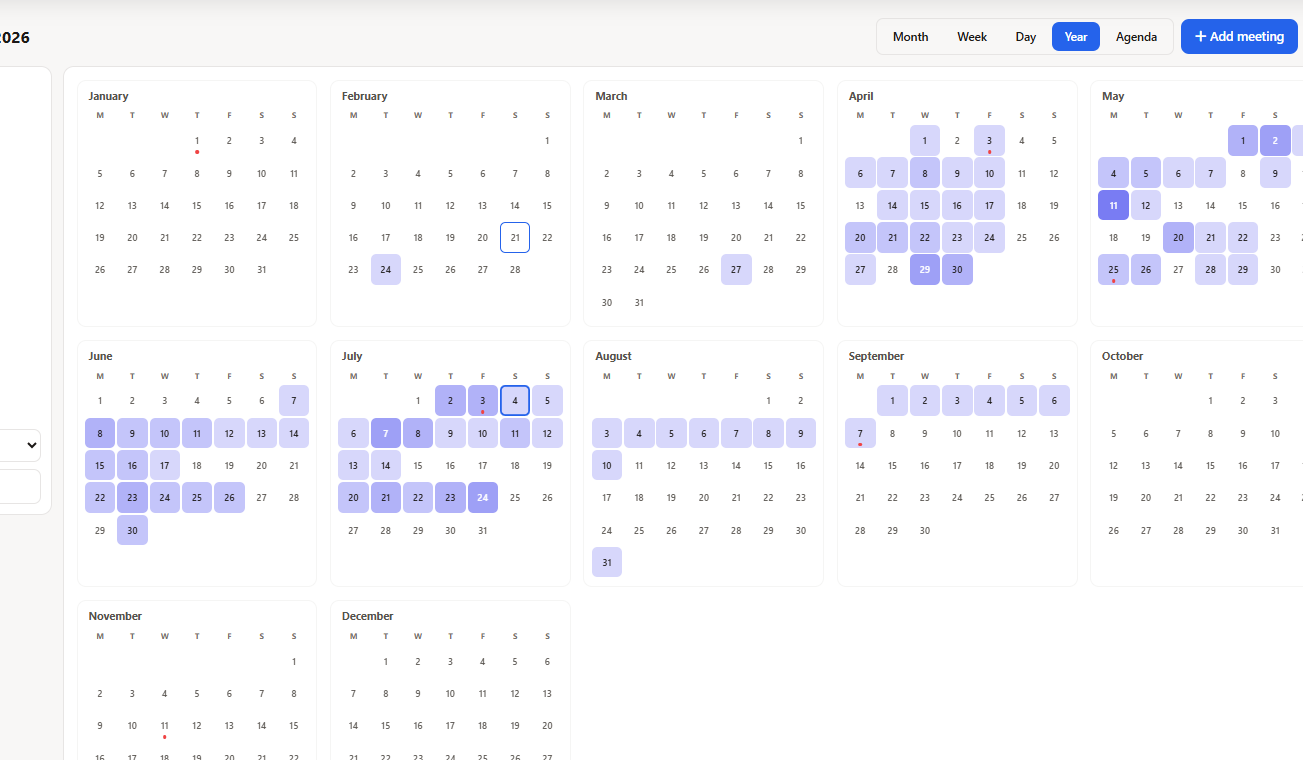
The Year view shows per-day people density across all twelve months at a glance. Darker days mean more people committed - jobs, time off, on-call and meetings combined. When a vacation request lands, the manager sees in seconds whether that week can absorb another absence.
Week and Day views give every person their own resource lane. Drag across a lane to create a meeting, drag it to move it, or grab an edge to resize - the same fluid feel as our field service scheduling software, applied to the whole company.
A mobile workforce runs on shared visibility. The Team Calendar keeps office, field and management looking at the same truth - filtered to what each person needs.
View just the electrical team's week, one technician's month, or the whole company's year. Layer toggles and people filters combine freely.
Technicians and office staff get read-only calendar pages in their own portals, so everyone can check the company calendar without being able to change it. Pairs perfectly with the technician mobile app.
Tokenized iCal subscription feeds let managers subscribe to the team calendar from the tools they already live in. The feed updates automatically, and each token can be managed individually.
Month for the overview, Week and Day for detail with per-person lanes, Year heatmap for capacity, Agenda for a simple list. Switch with one click.
Surveys and site visits booked from sales leads land on the same calendar as jobs and time off, and lead review dates keep follow-ups visible - the handoff between winning work and doing work stops being a gap.
The Team Calendar is one piece of Field Ascend's mobile workforce management software - connected to jobs, people, leads and the field, not a bolt-on calendar.
A field service team calendar is a company-wide office calendar that shows everything affecting who is available and where - scheduled jobs, approved vacation, sick time and absence, public holidays, the on-call schedule, planner events, meetings and lead review dates - in one view. Field Ascend's Team Calendar offers Month, Week, Day, Year heatmap and Agenda views with filters by layer, department, staff group and person.
The Team Calendar aggregates layers: scheduled jobs, approved vacation, sick time and absence, public holidays, the on-call schedule, planner events, meetings (including surveys and site visits booked from sales leads) and lead review dates. Each layer can be toggled on or off, and you can filter by department, staff group or individual person.
Yes. Field Ascend publishes tokenized iCal subscription feeds, so managers can subscribe to the team calendar from Outlook, Google Calendar or Microsoft Teams. The feed updates automatically as the calendar changes.
The Year heatmap shows per-day people density across the whole year at a glance. When a time-off request comes in, a manager can instantly see how many people are already out, on jobs or on call that day - making approval decisions faster and preventing accidental understaffing.
Yes. Week and Day views have per-person resource lanes where you can drag to create a meeting, then move or resize it. Meetings such as surveys and site visits can also be booked from sales leads, and they appear on the calendar automatically.
Yes. Read-only calendar pages are available in both the technician portal and the staff portal, so the wider team can check the company calendar without being able to change it.
Yes. The Team Calendar filters by layer, department, staff group and individual person, so you can view just the electrical team's week, one technician's month, or the whole company's year.
Try Field Ascend free and see jobs, vacation, the on-call schedule and meetings in a single company view.
Start Your Free Trial