Contractor sales pipeline

Field Service CRM Software

Field Ascend now includes a built-in Sales CRM — a pipeline for the people who aren't customers yet. Every lead carries a mandatory review date the system chases for you, and pipeline value comes from real open quote totals, not what a rep guessed into a deal field.

Inquiry, survey, quote, customer, invoice — one field service management platform, no re-keying, and closed-loop revenue attribution across the whole journey.

$13/user/month. Sales CRM and all features included. 30-day trial.

Pipeline snapshot

Pipeline valueReal quote totals
Conversion funnelBy stage
Win/lossBy source
Today's follow-upsAI-ranked

Stages, sources, and priorities are tenant-configurable, so the pipeline reflects how your company actually sells — not a fixed template.

What is field service CRM software?

Field service CRM software manages sales leads — the inquiries, prospects, and opportunities that aren't customers yet — inside the same platform that runs your work orders, quotes, scheduling, and invoicing. One system carries a lead from first inquiry through site survey, quote, conversion to customer, and on to the first invoice.

Because Field Ascend already holds your quotes and invoices, the sales pipeline is valued from real open quote totals, with estimates used only as a fallback where no quote exists yet. Conversion funnel by stage, win/loss by source, and quoted-vs-won value per source all come from actual records — closed-loop attribution that standalone CRM tools bolted onto contractor management software simply can't see.

How does the built-in Sales CRM help contractors?

The pipeline chases itself, the numbers come from real quotes, and every lead keeps a full audit timeline — so sales stops depending on memory.

Review dates the system enforces

Every lead must have a "to be reviewed" date. No lead can sit in the pipeline without a next-touch commitment.

Automatic priority escalation

As review dates approach, lead priority escalates automatically using rules you configure — the system chases, not the human.

Table and Kanban pipeline views

Work leads in a table or drag them across a Kanban board with configurable stages, sources, and priorities.

Honest pipeline reporting

The Pipeline Value stat uses real open quote totals where quotes exist. Estimates are only a fallback, never the headline.

AI-ranked daily work list

The "Work These Today" panel ranks which leads to work each day, with a one-line reason for every pick.

Capture from everywhere

Website inquiry widget, existing-form connection, one-click ticket promotion, and a bulk ticket-import migration tool.

What does the contractor sales pipeline look like?

Leads become cards, stages become columns, and every quote, survey, email, and conversion is logged on the lead's timeline.

Drag-and-drop pipeline stages

Configure stages, sources, and priorities to match your sales process, then manage the funnel visually. Deleted leads go to a recycle bin, granular sales permissions control who can see and work the pipeline, and every change lands on the lead's audit timeline.

  • Kanban and table views of the same pipeline
  • Configurable stages, sources, and priorities
  • Recycle bin and full audit trail on every lead

If your office already uses the jobs Kanban board, the sales pipeline works the same way.
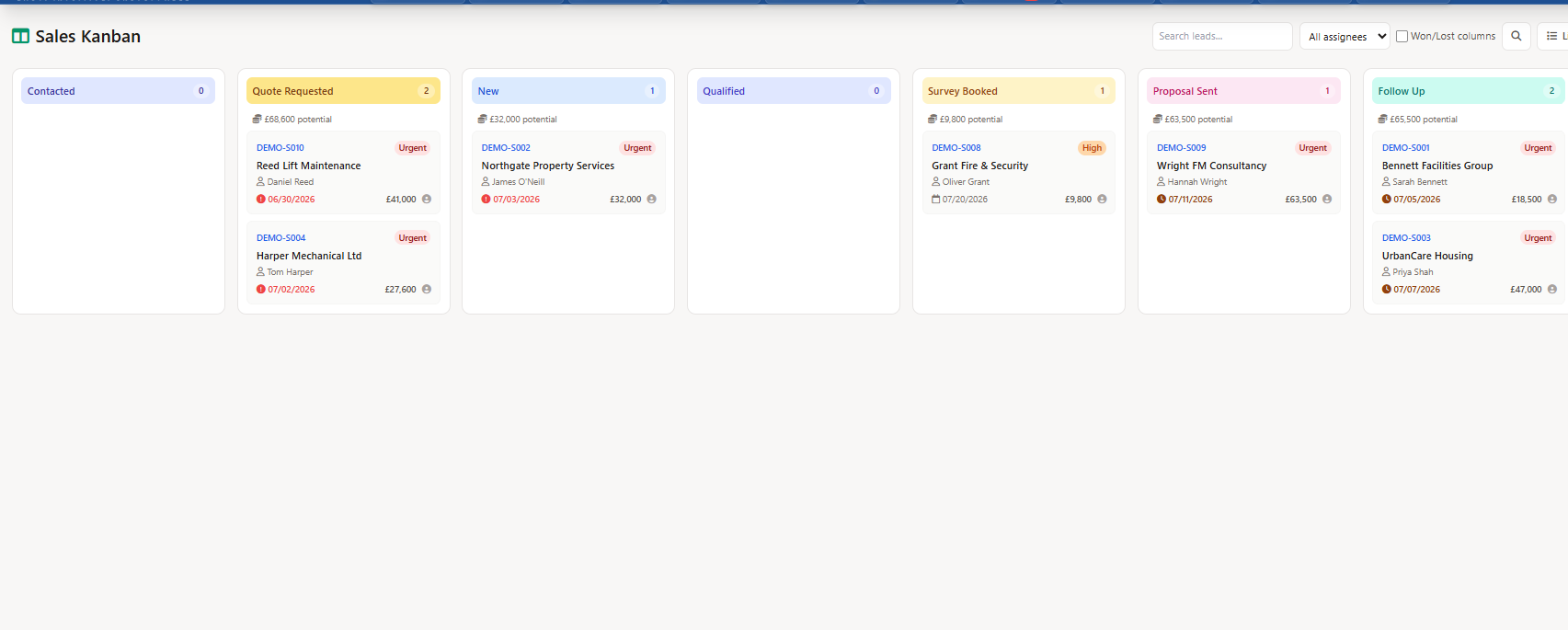
Contractor sales pipeline Kanban board showing field service leads in drag-and-drop stage columns

A lead record that remembers everything

Each lead page shows the full timeline — emails, stage changes, quotes, surveys, notes — plus linked quotes and one-click actions. Send one-to-one email through your own email provider, logged on the timeline, with a warning flag if a send fails.

  • Mandatory review date with automatic priority escalation
  • Per-lead task list with due dates and assignees
  • One-to-one email via your own sending identity, fully logged
  • Failed-email warnings so "I emailed them" is verifiable

Survey and site-visit bookings from the lead appear on the company team calendar alongside scheduled jobs.
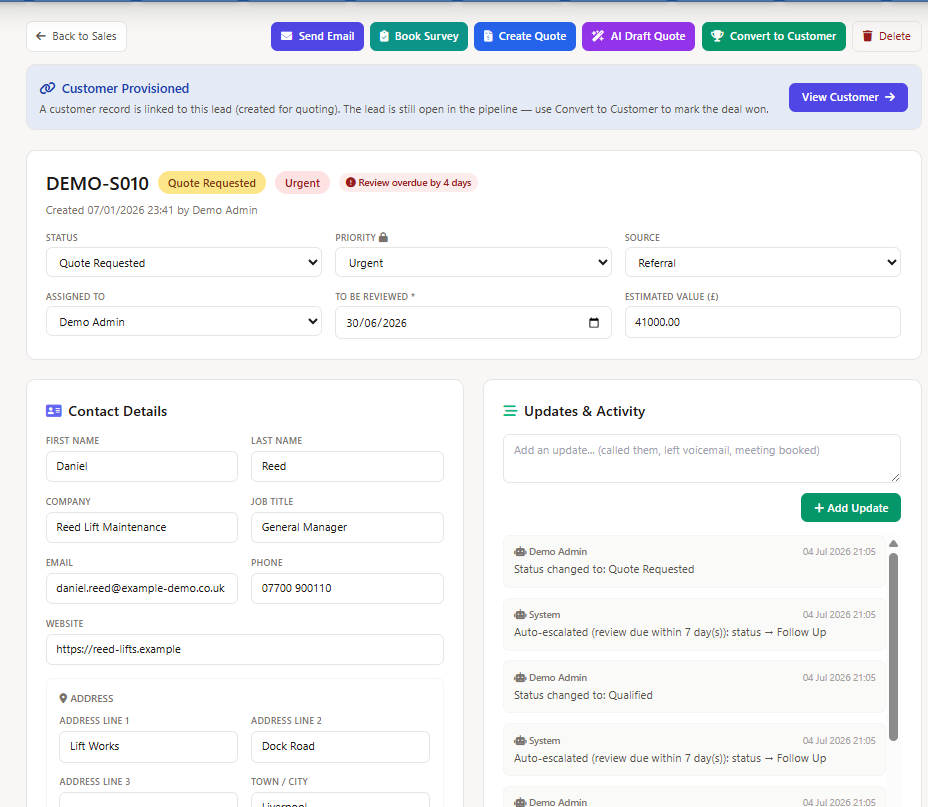
Sales lead CRM record showing audit timeline, linked quotes panel, and follow-up action buttons

"Work These Today" — AI picks your follow-ups

Open the sales list and the AI panel hands you a ranked daily list with a one-line reason for each lead: overdue review, customer viewed a quote recently, upcoming survey, gone quiet after quoting, or never contacted.

The AI Sales Assistant chat drafts follow-up emails from the lead's real timeline — a human always reviews and sends. It also answers funnel questions from real data, and previews funnel hygiene fixes that apply only after your explicit confirmation.

  • Ranked daily list with plain-language reasons
  • AI-drafted emails, human-sent every time
  • Preview-then-confirm for any data cleanup
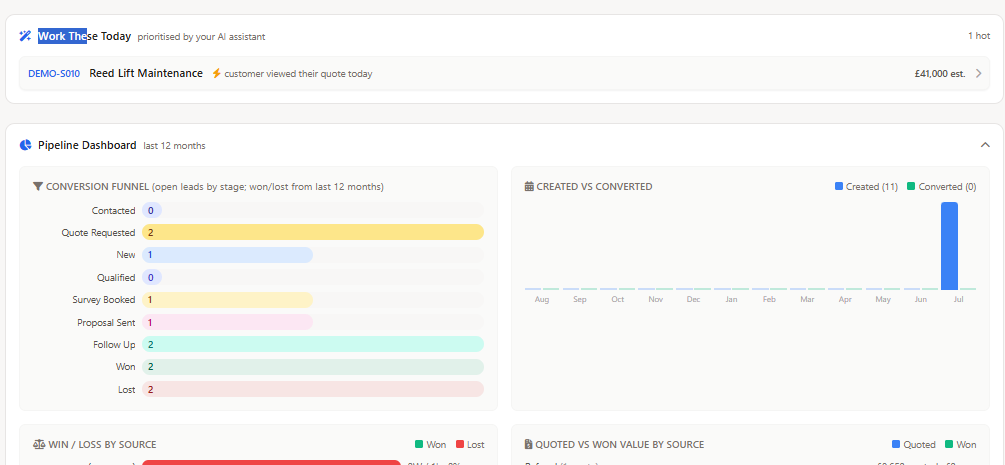
Work These Today AI panel showing a ranked daily list of sales leads with one-line follow-up reasons

Pipeline dashboard with closed-loop attribution

The dashboard reports from the quotes and invoices the platform already holds. Conversion funnel by stage, win/loss by source, lead age, created-vs-converted trend, and quoted-vs-won value per source — from real records, not rep guesses.

  • See which lead sources actually turn into revenue
  • Spot funnel stalls before they hit the schedule
  • Pipeline Value from real open quote totals
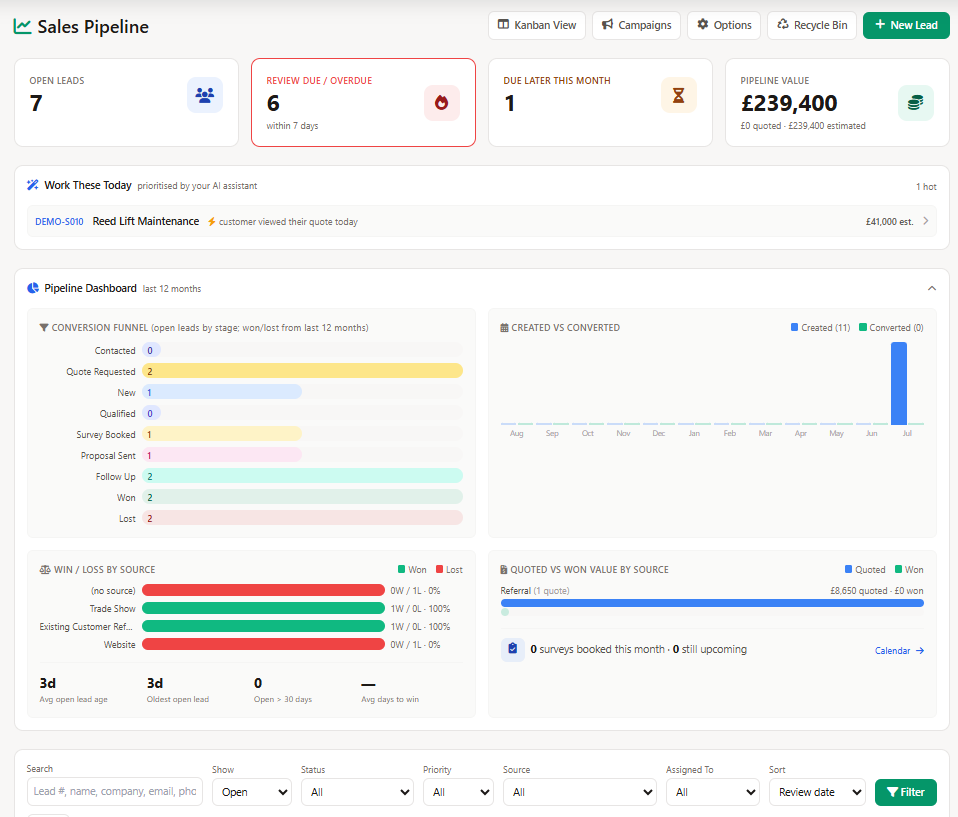
Sales pipeline dashboard for field service contractors showing conversion funnel and quoted versus won value by source charts

Quote, survey, and convert from the lead

Create a quote — or let AI draft one — directly from the lead page, with the quote linked back for attribution. Book surveys onto the company calendar. When the prospect says yes, one click converts the lead into a real customer record with a site and an invoice contact.

  • Create Quote / AI Draft Quote from any lead
  • Quoting is not winning — the lead stays in the pipeline until a human converts it
  • One-click Convert to Customer, flowing straight into work orders and invoicing
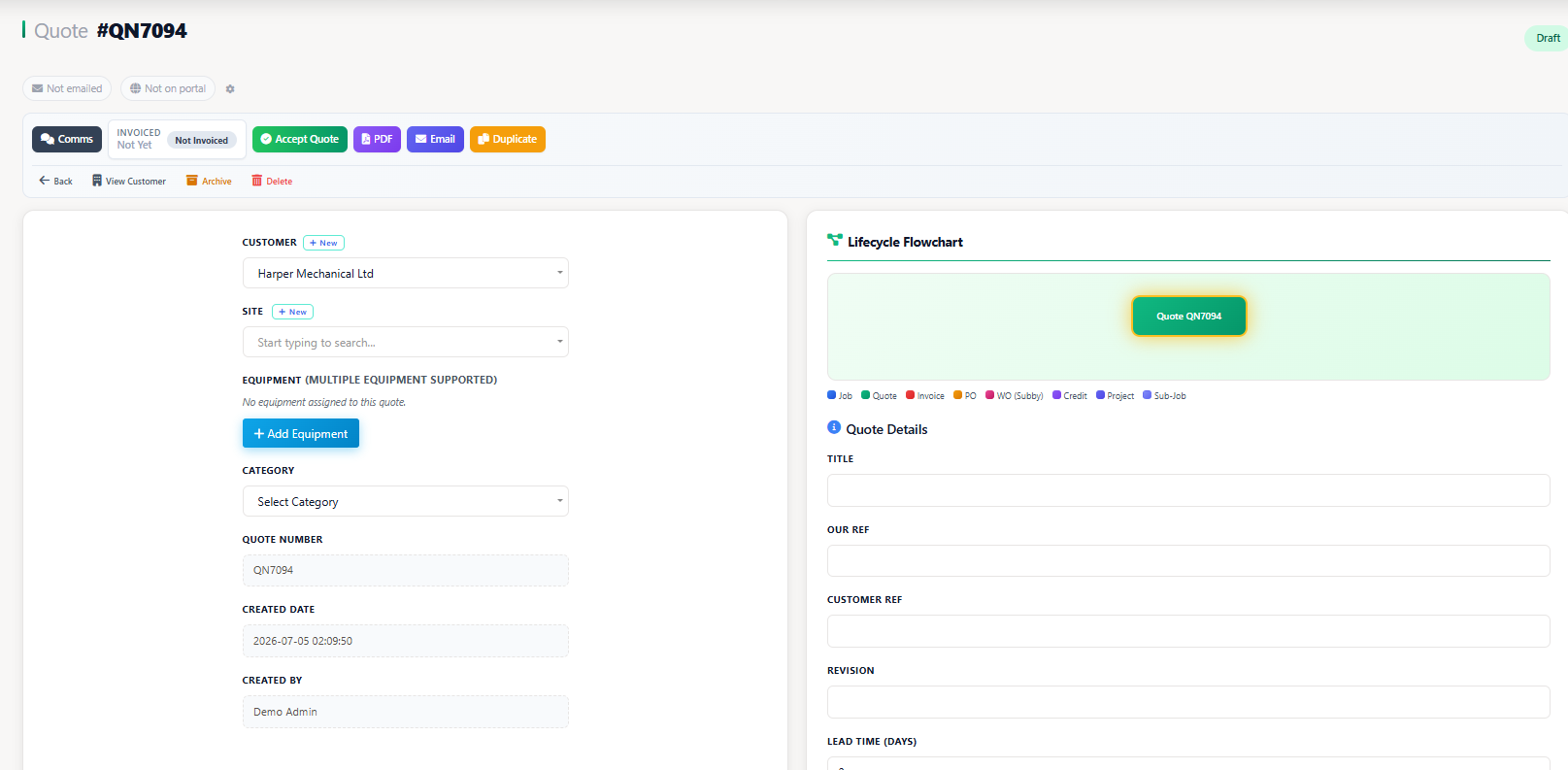
Creating a quote from a sales lead in field service CRM software with AI draft quote option

Targeted email campaigns from your own mailbox

Small-batch outreach connected to the pipeline

Build a campaign from leads already in your pipeline, filter the audience, send a test, then let Field Ascend drip the approved message through your connected Microsoft 365 or SMTP mailbox. It is designed for relevant follow-up to your own prospects, not purchased-list blasting.

  • Pipeline audiences filtered by stage, source, priority, and assignee
  • Daily send caps (250 by default) with automatic continuation until the approved audience is complete
  • Open, click, and unsubscribe reporting on every campaign
  • Consent enforced — opted-out leads and records without an email address are excluded automatically
  • AI copy assistance drafts subject and body variants for a person to review and approve
  • CSV audience export when newsletter-scale sending belongs in a dedicated email platform

Engagement stays beside the lead record, giving your team context for the next call, survey, or estimate follow-up instead of another disconnected marketing list.

Who is the Sales CRM for?

It's built for contractors who win work through inquiries, surveys, and quotes — and who are tired of a separate sales tool that doesn't talk to the software running the business.

Owners and GMs

See honest pipeline value, win/loss by source, and created-vs-converted trends without asking anyone to update a spreadsheet.

Office and sales staff

Start each day with an AI-ranked follow-up list, send logged emails from the lead page, and book surveys straight onto the calendar.

Estimators

Quote from the lead — or let AI draft it — and know every quote links back for attribution when the dashboard tallies quoted-vs-won.

Related Field Ascend Workflows

Explore connected U.S. product pages for quoting, ticketing, scheduling, Kanban workflow, invoicing, and pricing.

Independent Review Footprint

Public review volume is still early, so the review sources are shown in crawlable plain HTML and should be refreshed when profiles change.

Aggregate rating used in schema: 5.0/5 from 3 third-party reviews across Capterra, G2, and GetApp. Last checked: April 30, 2026.

Frequently Asked Questions

What is field service CRM software?

Field service CRM software manages sales leads and prospects inside the same platform that runs your work orders, quotes, scheduling, and invoicing. Every lead lives alongside the surveys you book, the quotes you send, and the customer record it becomes — so pipeline numbers come from real quote and invoice data instead of manual estimates.

How is a built-in sales CRM different from a standalone CRM tool?

Standalone CRM tools stop at the point of sale — closed deals get re-keyed into your job management software, and revenue reporting relies on whatever value a rep typed in. Field Ascend's Sales CRM shares one platform with quoting, scheduling, and invoicing, so pipeline value comes from real open quote totals, surveys land on the company calendar, and converting a lead creates the actual customer record with a site and billing contact.

Does the AI send emails to leads by itself?

No. The AI Sales Assistant drafts follow-up emails from the lead's real timeline, but a human always reviews and sends every email. The assistant also previews funnel hygiene fixes and applies them only after your explicit confirmation.

Can I capture leads from my website?

Yes. Embed Field Ascend's inquiry widget on your website, or connect an existing website form so submissions create sales leads automatically. You can also promote a support ticket to a sales lead in one click from the ticketing system, and a bulk ticket-import tool migrates historic inquiries into the pipeline.

What happens when a lead becomes a customer?

One click converts the lead into a real customer record with a site and an invoice contact, ready for work orders and billing. Quoting a lead does not close it — the lead stays in the pipeline until a human deliberately converts it, so win rates reflect real decisions.

Can I send tracked email campaigns to sales leads?

Yes. Build a filtered audience from your own leads, send a test, and drip the approved campaign through your connected Microsoft 365 or SMTP mailbox. Daily caps protect deliverability; opens, clicks, and unsubscribes appear in campaign reporting; and opted-out leads are excluded automatically.

How much does Field Ascend cost?

Field Ascend pricing is $13/user/month. The Sales CRM is included along with every other feature. 30-day trial. See pricing.

Run your sales pipeline where your jobs live

Try Field Ascend with full access to the Sales CRM, quoting, scheduling, dispatch, mobile work orders, dashboards, preventive maintenance, invoicing, and the rest of the platform.