Field Ascend field inspection software for US contractors lets you build your own inspection templates, send technicians out to complete them on the phone (with or without signal), and score the result. A failed question raises a corrective action with an owner and a due date. The finished inspection becomes a branded PDF report your client can verify from a QR code.
One system covers four kinds of inspection: a job site, a truck, a piece of equipment (or several in one visit), and a technician. If your company says "audits" or "checks" instead of inspections, rename the whole module in settings.
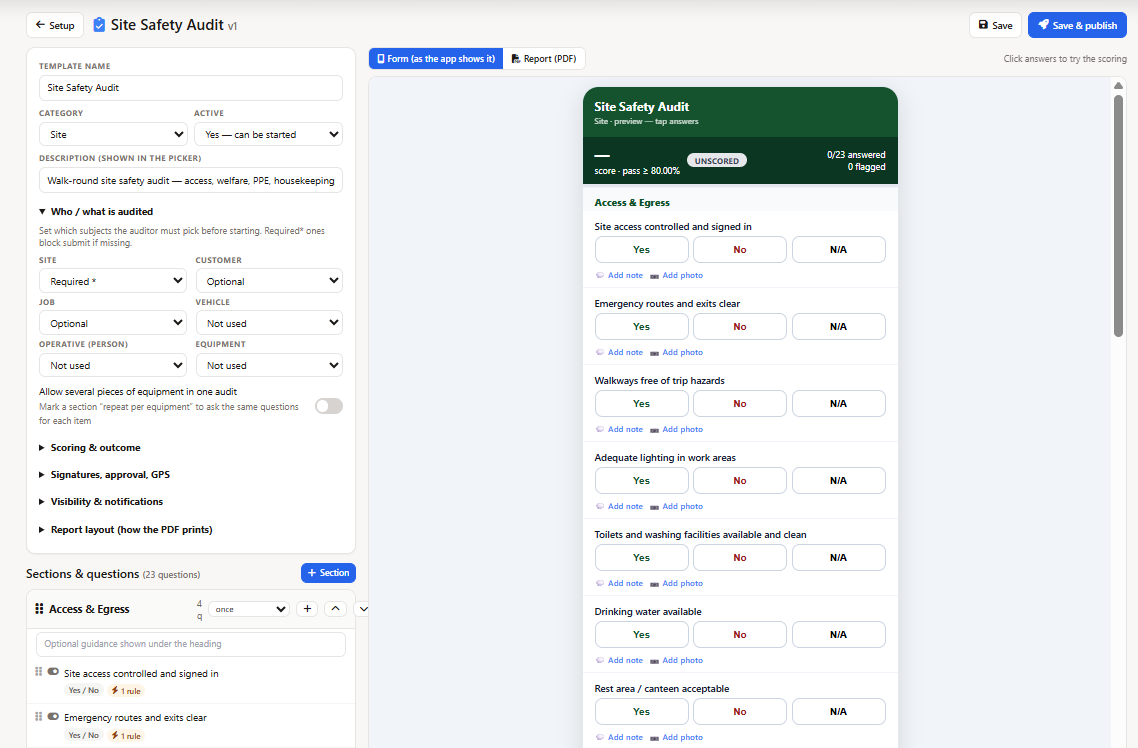
The setup screen ships with six editable starter templates: a site inspection, a vehicle inspection, a ladder and equipment inspection, a technician compliance review, a PPE check and a general template. Each one is a question list you can reorder, reword and rescore. Nothing is hard-coded.
Yes/no, pass/fail, multiple choice, numbers, text, photos and signatures. Response sets let you define one answer scale (say Good / Fair / Poor / N/A) and reuse it across every template, with an outcome and a score behind each option.
Templates score by section and overall, against a pass threshold you set. Mark a question critical and one failure fails the inspection even at 95%. Advisory answers are recorded without dragging the score down.
Any option can demand a photo, a note or a corrective action when it is picked. The inspector cannot submit until the follow-ups the template asks for are filled in.
Each template declares what it inspects: a job site, a vehicle, equipment or a person, and whether that subject is optional or required. The equipment inspection software side can cover several assets in one visit, with the question set repeating per asset and each one scored separately.
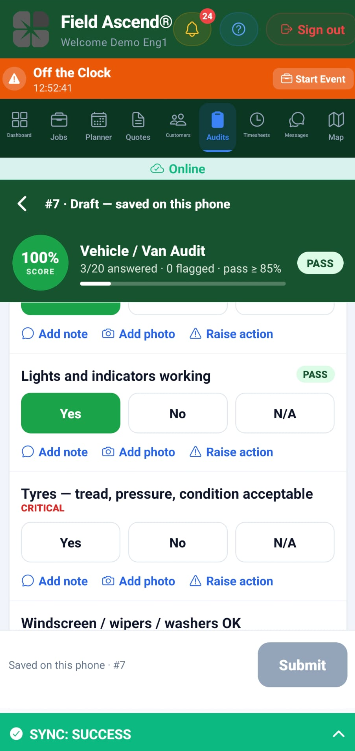
The mobile app mid-inspection, no signal needed
Technicians with the inspection permission get an Audits tab in the Field Ascend app (renamed to whatever your company calls it). Drafts, photos and signatures live on the phone until there is signal, then sync. The score ring on the phone is a live preview; the server recalculates the authoritative score when the inspection is submitted.
Truck inspections here are not the daily DVIR-style walk-around. Those stay in fleet management. An inspection is the deeper, scored review you run monthly or quarterly.
Technician reviews (one person observing another work) can be kept off the customer portal entirely. Clients never see them.
Every failed answer can raise an action: an owner, a due date, a priority and a photo of the problem. Actions live on the inspection and on their own list, and can convert to a ticket, a job or an equipment defect when the fix is real work.
Templates can require sign-off: the inspector submits, an approver reviews, approves with a signature or returns the inspection with a written reason. Action closures can go through the same gate, so "fixed it" needs a second pair of eyes.
Draw on inspection photos: arrows, circles, boxes and freehand pen in six colors. The marked-up copy goes on the report and the original photo is kept unchanged underneath.
Inspections are numbered from your own sequence and carry a full trail: who inspected, who approved, when, and what changed. The finished PDF carries a QR that opens a read-only verification page.
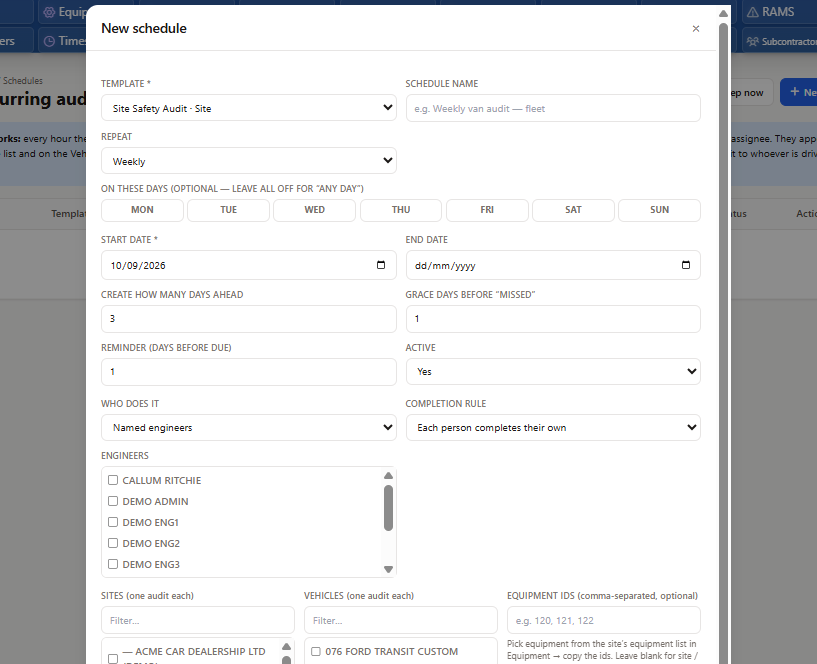
Schedules generate the work so nobody has to remember it. Pick a template, a frequency (daily through annual, or a custom day interval), the sites or trucks it covers, and who does it. Assignment can follow the vehicle: whoever holds the truck gets its inspection.
A scheduled inspection past its due date and grace period is marked missed, visibly, on its own list. It does not quietly disappear. Reminders go out by push notification before the due date, and the office sees Due and Missed counts without opening each schedule.
Schedules can require every named assignee to complete their own copy, or accept the first completion and stand the rest down. Grace days and how far ahead inspections are generated are per schedule.
Creating a weekly inspection schedule in the office portal
The inspection report is a designed PDF, not a data dump. A report designer (a simple block builder, plus an advanced drag-and-drop canvas for pixel placement) controls exactly what prints: answers by section, photo evidence, the score dial, the previous score and a trend chart across the last inspections of the same site or truck.
The report can show this inspection against the last eight of the same template on the same subject, so a facility manager sees the building improving (or not) over the year. Analytics in the office does the same across the whole business, with an Excel export.
Nothing shows on the customer portal unless the inspection is marked customer-visible and the portal toggle is on. Completed job-linked inspections can ride along with the job completion email as a PDF attachment, again as a setting you choose.
Analytics ranks sites, vehicles, technicians and inspectors by average score and fail rate, and lists the most-failed questions so you can fix the template or the training. The heatmap shows the 40 busiest subject rows, not an infinite wall.
Inspections sit beside the rest of Field Ascend rather than in a separate product: start one from a job page, raise a job from a failed action, and see a site's inspection history on the site record. Toolbox talks, fleet and equipment records stay their own features and link up where it makes sense.
Public review volume is still early, so the figures sit in crawlable HTML and should be refreshed when the profiles change.
Aggregate rating used in schema: 4.6/5 from 10 third-party reviews across G2, Capterra, and Trustpilot. Last checked: August 2, 2026.
Current ratings by source: Capterra 5.0/5 (1 review), G2 4.9/5 (5 reviews), Trustpilot 4.0/5 (4 reviews). Last checked: August 2, 2026.
No. Compliance Checks are checklists tied to a specific job and completed as part of the job workflow. An inspection stands on its own: it is about a job site, a truck, a piece of equipment or a person, it carries a score and a pass or fail result, and it can exist with no job at all. You can still start one from a job page when the work calls for it.
Yes. Technicians complete inspections on the Field Ascend app with no signal: answers, photos and signatures are held on the phone and sync when connectivity returns. The score ring on the phone is a preview; the server recalculates the authoritative score on submission.
Yes. Each answer option carries a score and an outcome (pass, fail, advisory or not applicable). The template sets a pass threshold, and you can mark a question critical so one failure fails the whole inspection regardless of the percentage.
A failed answer can raise a corrective action automatically or by hand: assign it to a person, give it a due date and priority, and track it to closure. Actions can also convert to a ticket, a job or an equipment defect. If you turn closure approval on, the assignee requests closure and an approver signs it off or returns it with a reason.
Yes. Inspection schedules generate the work on a daily, weekly, biweekly, monthly, quarterly or annual cycle, assigned to named technicians or to whoever holds the truck. Overdue inspections past their grace period are marked missed, and the office sees Due and Missed lists. Reminders go out by push notification.
Field Ascend produces your own internal and client-facing inspection records with your branding, a full trail of who inspected and who approved, and a verification QR. It is documentation of your program, not a government filing, and it does not replace inspections that a licensed third party must perform.
Turn the module on, edit a starter template to match your form, and send it to one technician's phone. The report designer and schedules can wait until the questions are right.
Start your free trial