Last updated: May 2, 2026
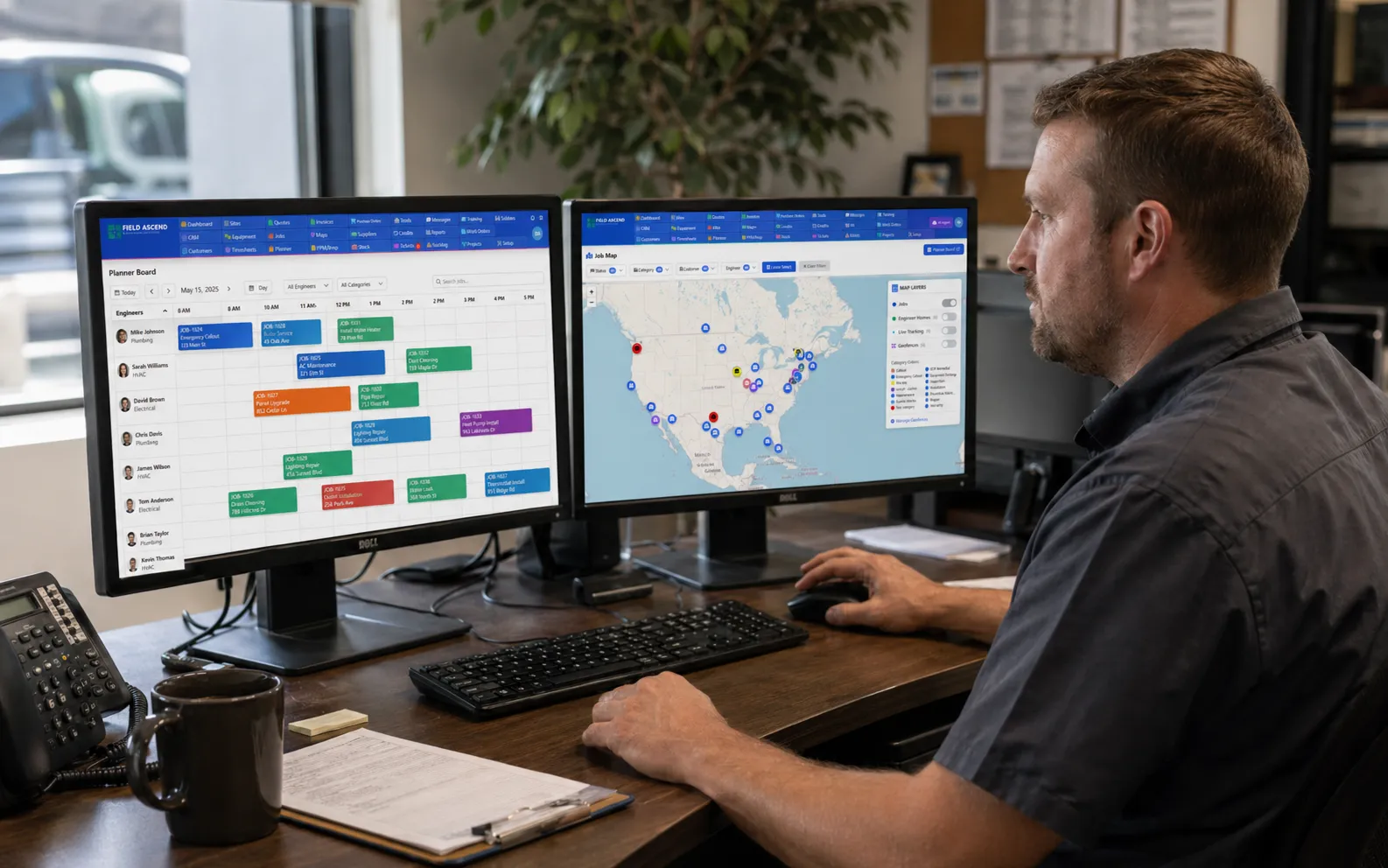
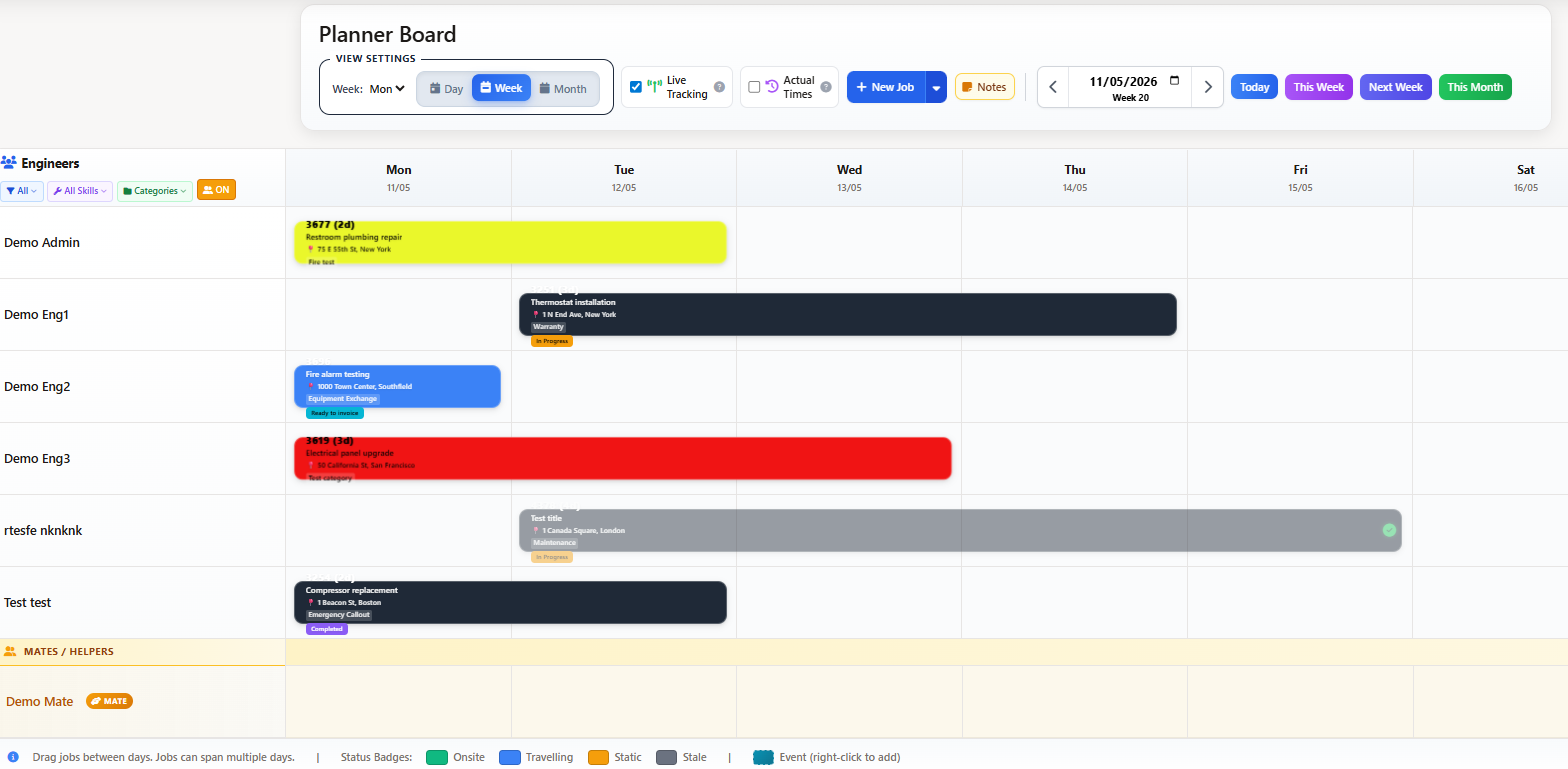
Field service dispatch software is the system that assigns the right technician to each job based on skill, location, availability and priority. Field Ascend gives dispatchers a visual dispatch board, rules-based auto-assignment for repeatable work, drag-and-drop control for urgent callouts, real-time mobile technician updates and connected work orders that tie every dispatch decision to a single job record from request to invoice.
Growing teams do not just need a calendar. They need a technician dispatch software setup that reduces decision load on the office without losing control when priorities change. That means auto-assigning the jobs that follow clear rules, flagging the ones that need dispatcher judgment, and keeping the office, the technician and the customer on the same record.
If you are evaluating this as part of a wider platform, it sits alongside field service management software, work order management software and the field service mobile app — so dispatch is part of the operating workflow, not a standalone calendar.
A practical scheduling and dispatch workflow is not a calendar with colors. It takes a request from the customer and moves it through office, technician and back-office billing without losing context at any step. The essentials look like this:
Take the job in from a phone call, email, portal request or recurring maintenance plan, and open a single work order record.
Match the work to a technician who can actually complete it — the skill set matters more than who is free first.
Confirm the technician is not already committed, on leave, traveling or booked on another priority job for the same window.
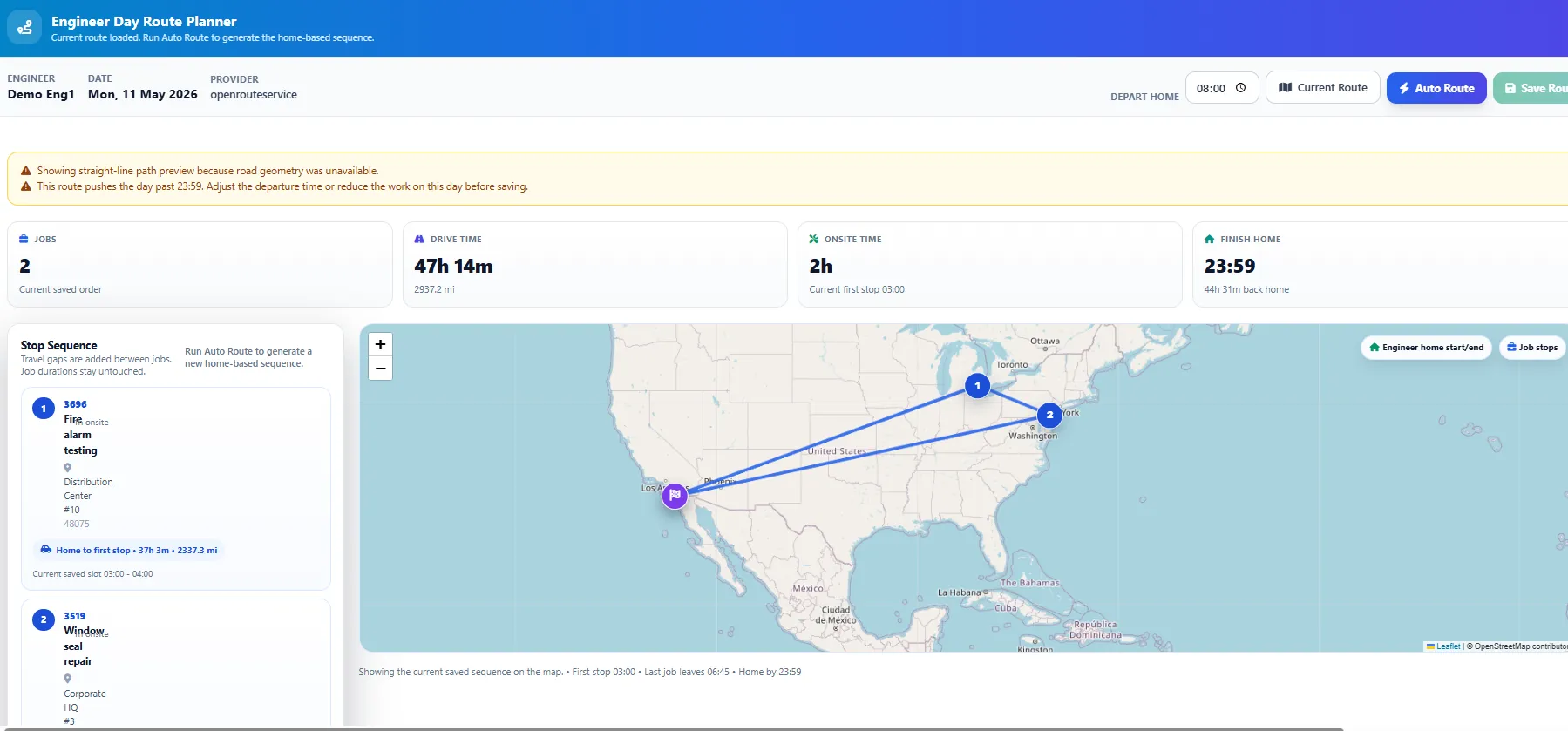
Factor in certifications, equipment type, territory and drive time so the closest qualified technician gets the job.
Flag emergency callouts as high priority, bump lower-priority work and dispatch without rebuilding the whole day.
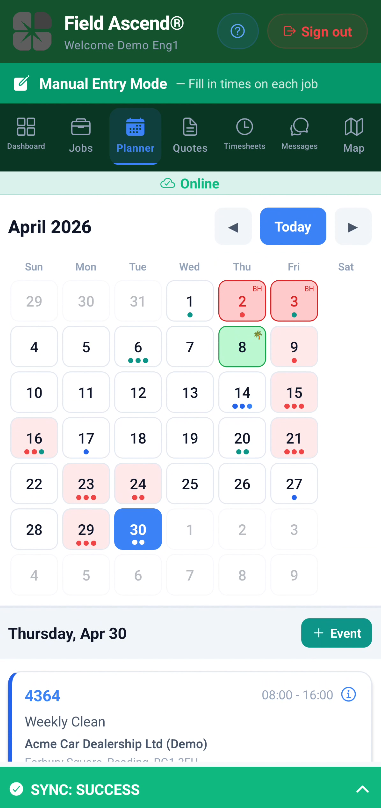
Push the full work order — site, equipment, history, safety notes — to the field service dispatch app on the technician’s phone.
Show live status on the dispatch board: traveling, checked in on site, on the tools, complete, or stuck and needs help.
Sync photos, signatures, parts used, time logged and completion notes into the work order for invoicing and audit.
People often search for “technician scheduling software” and end up with a calendar. A calendar tells you when work is planned. A dispatch board and work order dispatch software tell you who should attend, why they are the right choice, and what job context they need before they leave — then follows the job through to completion. Both matter, but they are not the same tool.
| Capability | Basic scheduling software | Field service dispatch software |
|---|---|---|
| Calendar / dispatch board view | Yes | Yes |
| Auto-assign by skill and location | No | Yes — rules-based auto-assignment |
| SLA and priority awareness | Rarely | Yes, contract response times respected |
| Connected to the work order | Partial | Yes, one record from request to invoice |
| Mobile technician updates in real time | Limited | Check-in, progress, photos, signatures, parts |
| Emergency callout handling | Manual re-scheduling | Bump, reassign, notify technician instantly |
| Invoice-ready completion record | No | Yes — evidence flows straight into billing |
If your team already has a calendar tool and still spends the morning on the phone deciding who goes where, the gap is dispatch, not scheduling.
Automated dispatch software is powerful when the rules are clear — a plumbing callout in a specific territory, a preventive maintenance visit on equipment a technician already knows, a repeat customer with a preferred technician. In those cases the dispatcher should not have to think: the rules engine should assign it and move on.
But not every job fits a rule. A commercial customer calls with a priority emergency, a technician runs over on the previous site, a weather event reshuffles the morning. That is where the manual drag-and-drop dispatch board earns its place. Good technician dispatch software lets both modes run side by side: auto-assignment for the repeatable work, dispatcher judgment for the exceptions.
Skill, territory, availability, priority and SLA translated into repeatable logic, so the same job always goes to the right person.
Override the system when the dispatcher knows the customer, the building or the local workload better than the algorithm.
Everyone sees the same backlog, technician load, and what can realistically be moved without calling around.
Whichever way the job is assigned, it stays tied to a single work order — no separate planning silo.
The goal is not “AI dispatch” for its own sake. It is removing the repeat low-value decisions so the dispatcher can focus on the jobs that actually need human judgment.
A connected dispatch board, rules-based auto-assignment, a mobile app your technicians will actually use, and one record from the first phone call to the invoice.
Sending the job to “whoever is free next” is how jobs get dispatched to the wrong technician, to the wrong side of the territory, or ahead of a contract-critical visit. Strong technician dispatch software weighs several factors before it assigns anything.
Certifications, equipment type, product experience and licenses — the job has to go to someone who can finish it first time.
Travel time directly affects daily capacity and customer response. The nearest qualified technician usually wins.
VIP customers, strategic accounts and tenants with access restrictions should be recognized by the dispatch rules.
Contracts with response-time commitments need to be honored first, with supporting evidence logged automatically.
Urgent callouts need to bump low-priority work, notify the technician and update the customer in one step.
Overdue preventive maintenance should not be buried under reactive work — dispatch needs to see the contract risk.
Spreading jobs evenly prevents one technician from being buried while another finishes early every day.
Lone-worker check-in status belongs on the dispatch board too — dispatch is where the office sees trouble first.
The clearest way to evaluate any work order dispatch software is to trace one job end to end. In Field Ascend, a single dispatch turns into a single, invoice-ready record:
Customer calls, emails or submits a portal request. The job is logged with site, equipment and priority.
A single connected work order opens with site history, previous visits and any SLA context attached.
Auto-assignment picks the best-fit technician, or the dispatcher drags the job onto the board manually.
The job appears on the technician’s field service dispatch app with all the detail they need.
Arrival is logged, GPS confirms the site, and the office sees the job move to “on site” in real time.
Photos, parts used, time on tools, risk assessments and customer signature are captured on the phone.
The technician closes the job with notes, follow-ups and a completion status the office can trust.
The work order becomes the invoice input — no re-keying, no chasing, no “what did we do on this one?”
That is the difference between a dispatch calendar and a dispatch workflow. See the technician side on the Field Ascend mobile app page.
Dispatch software is most valuable where a small office has to coordinate multiple technicians across changing priorities every day. Typical users include:
Mixed residential and commercial calls, seasonal demand spikes, equipment-specific skill matching.
Emergency callouts, drain and leak response, multi-van coverage across a service area.
Reactive service, project work and inspection visits scheduled against licensed technicians.
Appliance repair, garage door, pest control, pool service — anywhere a technician goes to a customer.
Multi-site portfolios, SLA-driven response, preventive maintenance on equipment registers.
Contract customers with recurring visits plus reactive work, all on one dispatch board.
Specialist certifications, scheduled inspections, entrapment response and safety-critical records.
Landlords, block managers and property portfolios with tenants, access windows and follow-up repairs.
If your team sits anywhere on this list, the home service software and field service management software pages show how dispatch fits into the wider operating platform.
When a small HVAC, plumbing or electrical team picks up dispatch software, the question that actually matters is: does the technician open their phone and know exactly what to do? Dispatch is only as strong as the mobile experience it pushes work to.
Dispatch software for small business should feel like an upgrade to the whiteboard, not an ERP implementation. Small HVAC, plumbing, electrical and home service teams need practical, affordable, easy-to-use dispatch — not a six-month rollout, not a “call sales” pricing process, and not a system that takes a full-time admin to feed.
In practice that means three things: a visual dispatch board that shows the day at a glance, simple auto-assignment rules for the repeatable jobs, and a mobile app your technicians can pick up in an afternoon. The rest — invoicing, reporting, customer communication — should come from the same connected record so nothing gets re-keyed.
Field Ascend publishes U.S. pricing on a single pricing page with a 30-day free trial, so small teams can evaluate the dispatch workflow as part of a wider platform rather than a sales-led project. See the field service software for small business page for the full picture.
Field service dispatch software is the system that assigns incoming work to the right technician based on skill, location, availability and priority, then pushes the job to a mobile app and tracks progress back to the office. It connects the dispatch decision to the work order so the whole job lives on one record.
Scheduling software shows when work is planned on a calendar. Dispatching software helps decide who should go, when, why, and with what job context. Good field service dispatch software combines both on one dispatch board.
Yes. Automated dispatch software uses rules — skill, territory, availability, priority, SLA — to assign repeatable jobs without dispatcher input. Manual drag-and-drop is still available for the exceptions.
Yes. The dispatched job appears on the technician’s phone with the full work order, site details, equipment history, photos, forms and safety notes. They check in, complete the work and sync back without calling the office.
Yes. The dispatch board shows live status — en route, checked in, on the tools, complete — so the office knows immediately if a job is running late or a technician needs support.
Yes. Urgent callouts can be flagged high priority, routed to the nearest qualified technician and pushed ahead of scheduled work. The day reshuffles without losing SLA tracking on the jobs that move.
Yes. Work order dispatch software ties the assignment, technician notes, photos, parts, signature and time entries to a single work order record — which then feeds invoicing and reporting without re-keying.
Yes. Dispatch software for small business should reduce admin without enterprise complexity. A clear dispatch board, simple auto-assignment rules and a mobile app for technicians cover most of the day-to-day.
Pricing varies by product and plan. Field Ascend publishes U.S. pricing on one page at $13 per user per month, with a 3-user minimum and a 30-day free trial. See the pricing page for the live figures.
See Field Ascend pricing or book a demo — dispatch, work orders, mobile app and invoicing on one connected platform, built for trade and service businesses.