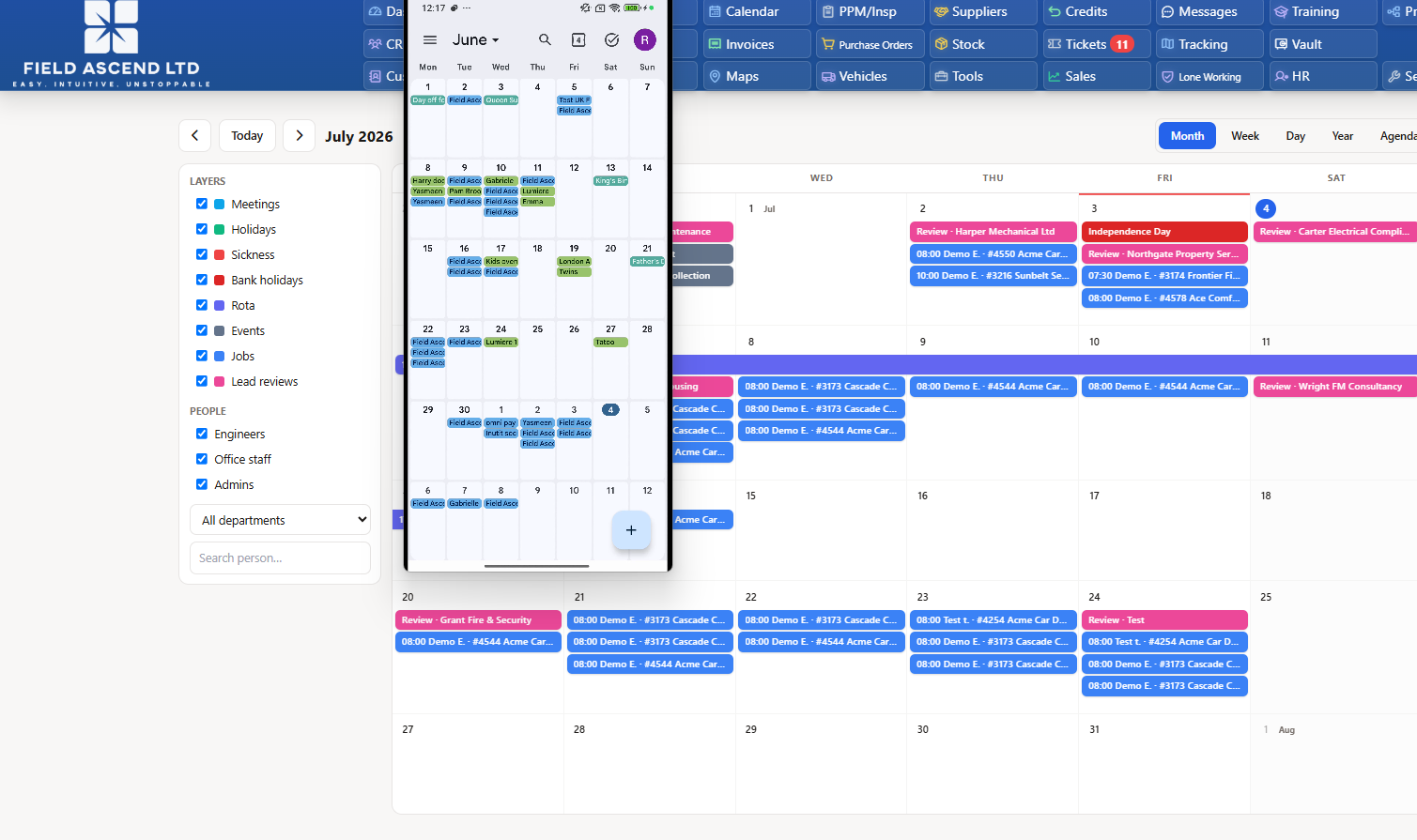
Short version: Field Ascend's Team Calendar can publish secret, tokenized iCal (.ics) subscription feeds. Copy a feed URL from Calendar Settings, paste it into Outlook, Google Calendar or Teams using "subscribe from URL", and your operational schedule stays current in that calendar automatically. Feeds are read-only, can be company-wide or scoped to one person, and can be revoked instantly.
Every field service business runs on a schedule - but the schedule rarely lives in one place. Jobs sit in the office system, the shift schedule lives on a spreadsheet, time off is buried in an email thread, and half the team keeps a personal calendar that has never heard of any of it. The result is the familiar Monday-morning question: "Am I actually working this weekend?"
Proper field service calendar integration fixes that without asking anyone to change tools. Field Ascend's Team Calendar publishes standards-based iCal feeds that Outlook, Google Calendar and Teams can all subscribe to natively. One operational calendar in the office; a live, read-only copy in every calendar that matters.
Why one operational calendar beats scattered schedules
The office Team Calendar inside Field Ascend aggregates jobs, time off, sick days, shift schedules and meetings into a single view. Dispatchers see who is on shift, who is on approved vacation, and what is booked, all against the same dates.
Scattered schedules break in predictable ways. Time off approved in one system never reaches the person planning the shifts. A meeting moved in someone's personal calendar never reaches the office. Every gap becomes a phone call, and every phone call becomes a delay. A single source of truth, mirrored out to personal calendars, removes the copy-paste layer where those errors happen.
For businesses using technician scheduling software, this is the natural next step: scheduling decisions get made once, in one system, and everything downstream simply reflects them.
What is an iCal subscription feed?
iCalendar (iCal, the .ics format) is the open standard that nearly every calendar application speaks - Outlook, Google Calendar, Teams and Apple Calendar included. A subscription feed is a URL that serves your events in that format. Instead of importing a static file once, the calendar app checks the URL on a schedule and refreshes itself, so changes in the source system flow through automatically.
Because it is an open standard rather than a custom plugin, there is nothing to install, no add-in to maintain, and no per-seat connector license. If a calendar app can subscribe to a URL - and all the major ones can - it can subscribe to a Field Ascend feed.
How Field Ascend's Team Calendar feeds work
Admins manage feeds from Calendar Settings. Two scopes are available:
- Whole-company feed - everything the Team Calendar shows: shift schedules, meetings, approved time off, recorded absences and public holidays across the business. Ideal for managers and office wall screens.
- Person-scoped feed - the same event types filtered to one individual. Ideal for a technician who just wants their own shifts and time off in their phone calendar.
Every feed URL contains a long secret token, so the feed only works for someone holding the exact URL. Feeds are strictly read-only - an external calendar can display events but can never change anything inside Field Ascend. And they refresh automatically: when the shift schedule changes or time off is approved, subscribed calendars pick it up on their next refresh with no action from anyone.
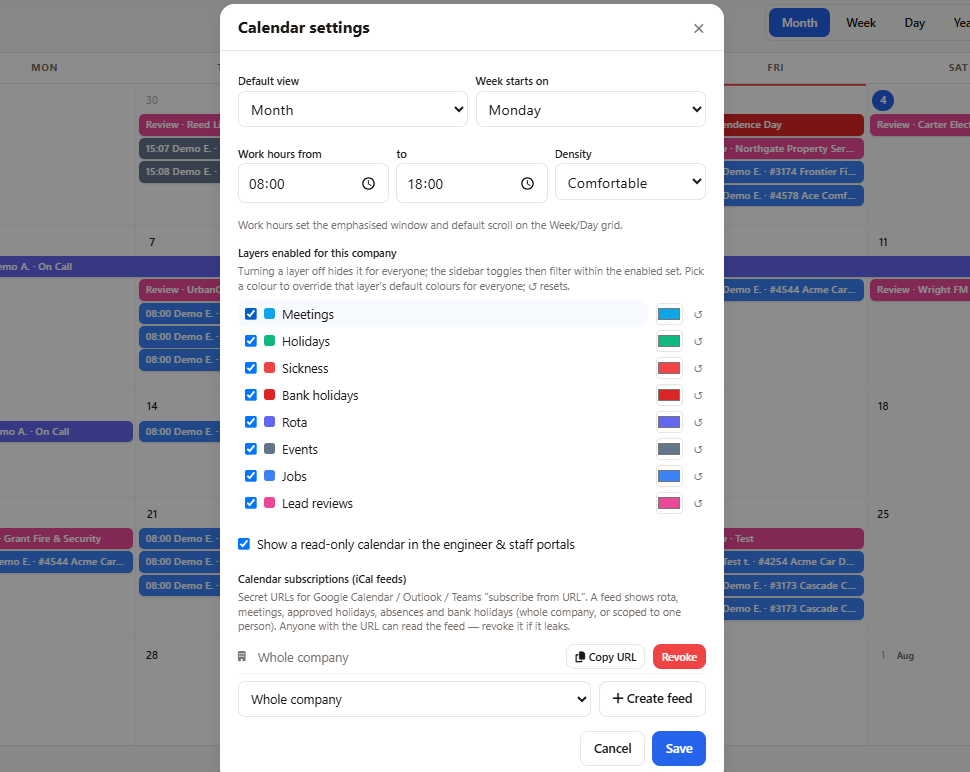
Calendar Settings: create a whole-company or person-scoped iCal feed, copy the secret URL, and revoke it instantly if needed.
How to subscribe: Outlook, Google Calendar and Teams
The pattern is the same everywhere: copy the feed URL from Calendar Settings, then use the calendar app's subscribe-from-URL option.
Outlook
- In Outlook on the web, open the calendar and choose Add calendar → Subscribe from web.
- Paste the Field Ascend feed URL, give the calendar a name, and confirm.
- The feed also flows to the Outlook desktop and mobile apps signed into the same account.
Google Calendar
- In Google Calendar on the web, next to Other calendars choose + → From URL.
- Paste the feed URL and add it. Events appear alongside your personal calendar and sync to the Google Calendar mobile app automatically.
Microsoft Teams
- Teams calendars are backed by the same Microsoft 365 account as Outlook, so subscribing in Outlook (above) makes the feed available across your Microsoft 365 calendar experience.
- For a shared team view, subscribe from a group mailbox or a shared calendar that the whole team can see.
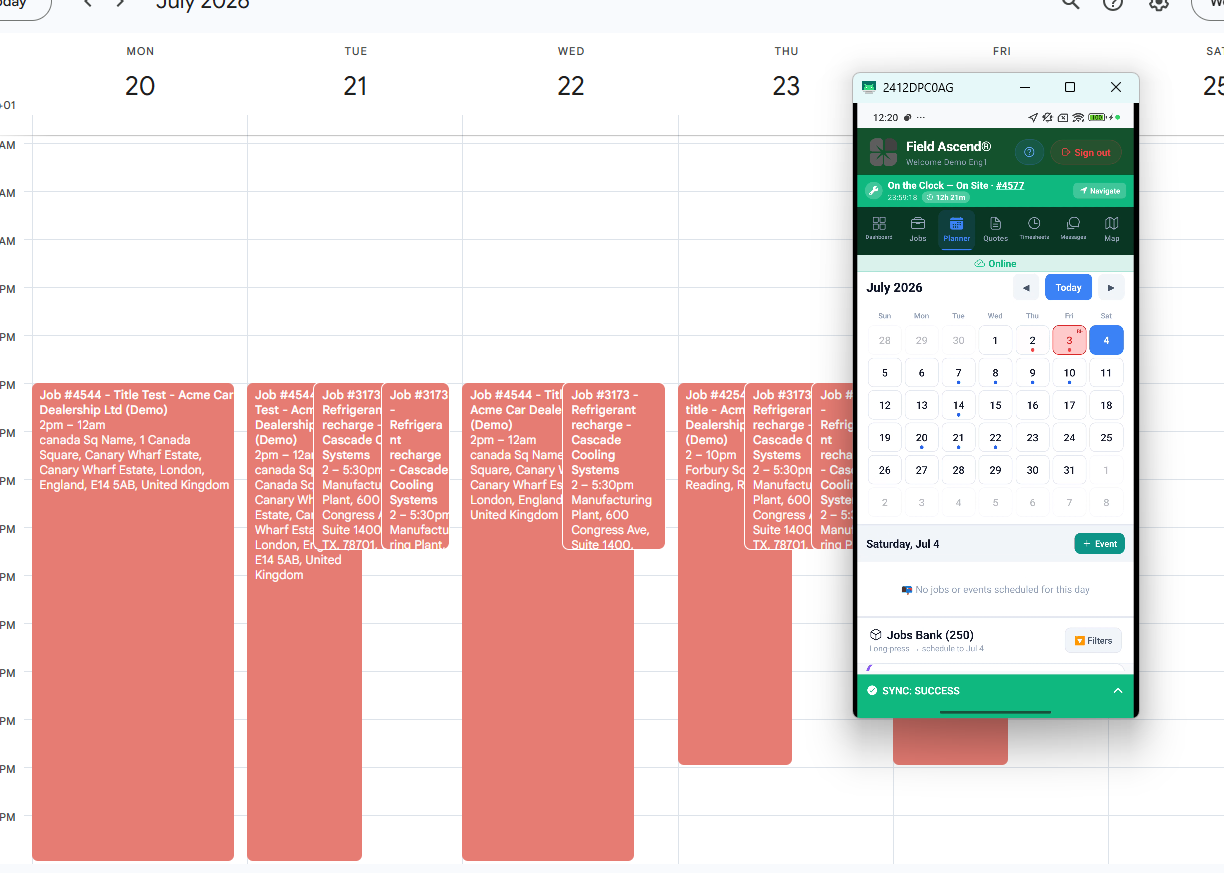
Once subscribed, shift schedules, meetings and approved time off sit alongside personal events and refresh automatically.
The on-call technician's phone, always current
Person-scoped feeds shine for on-call work. A technician subscribes once from their phone's calendar app, and from then on their upcoming shifts, approved time off and meetings are simply there - next to family plans and dentist appointments, on the device they check anyway.
When the shift schedule changes, the feed changes; nobody has to text the update or hope the right screenshot reached the right group chat. Combined with the Field Ascend mobile app for the jobs themselves, the technician's phone becomes a genuinely complete picture of their working week.
Security etiquette for secret feed URLs
A tokenized feed URL is a credential - treat it like a password:
- Share person-scoped feeds only with the person concerned. Their feed is their schedule.
- Keep the whole-company feed to people who should see the whole company. Managers, dispatchers, office screens.
- Don't paste feed URLs into public channels, shared documents or group chats where they can wander.
- Revoke without hesitation. If a URL has been shared too widely, an admin revokes it instantly from Calendar Settings and issues a fresh one. The old URL stops working immediately.
Because feeds are read-only, the worst case of a leaked URL is someone seeing a schedule - never changing one. Revocation closes even that gap in seconds.
Calendars inside the portals, too
External feeds are not the only view. Technicians get a read-only calendar page inside the technician portal, and office staff get the same in the staff portal - so anyone who prefers to check their schedule in the browser can, without touching Outlook or Google Calendar at all. The office Team Calendar remains the master view, aggregating jobs, time off, sick days, shift schedules and meetings for the people running the plan.
That layering is deliberate: one source of truth in the office, read-only mirrors everywhere your team actually looks. It is what a team calendar for a field service business should do - meet people where they already are.
Why open standards were the right choice
We built calendar sync on the iCal standard rather than proprietary connectors because open standards age well. Your team's calendar apps will change over the years; the .ics format will still be there, and your feeds will keep working. No plugins to update, no integrations to re-authorize, no vendor-specific setup per device.
It also keeps the trust model simple: Field Ascend never needs access to anyone's personal calendar account. The connection only flows one way - from your operational schedule, out.
Calendar integration FAQs
Can I sync my field service schedule with Outlook or Google Calendar?
Yes. Field Ascend's Team Calendar publishes secret, tokenized iCal (.ics) subscription feeds. Paste the feed URL into Outlook, Google Calendar or Teams using their subscribe-from-URL option and the schedule appears in that calendar and refreshes automatically.
What does a Field Ascend iCal feed include?
Feeds cover shift schedules, meetings, approved time off, recorded absences and public holidays from the Team Calendar. Feeds are read-only, so nothing in Field Ascend can be changed from an external calendar.
Are iCal feed URLs secure?
Each feed URL contains a long secret token, so it only works for someone who has the exact URL. Treat feeds like passwords: share person-scoped feeds only with the person concerned, and if a URL is shared too widely an admin can revoke it instantly from Calendar Settings.
Can each technician have their own calendar feed?
Yes. Admins create a whole-company feed or a person-scoped feed from Calendar Settings. A person-scoped feed shows only that individual's shifts, time off and meetings - ideal for keeping an on-call technician's phone calendar current.